Nativescript-angular: Fonts not loading
I'm using a blank ng template and it seems it's not possible to use custom fonts. I've tried to place the "fonts" folder under /my-project/src/app/fonts and /my-project/fonts, and I've also named the font family after the file's name.
In order to reproduce, install the blank ng template
tns create my-blank-ng --template tns-template-blank-ng
and try using a custom font.
 SkupeZZ
All 6 comments
@SkupeZZ the location of fonts directory should be /my-project/src/fonts
 jibon57
on 9 Nov 2018
jibon57
on 9 Nov 2018
That solved it, thanks 👍
SkupeZZ
on 9 Nov 2018
I got this issue too. I tried for a week but it doesn't work.


 RiddlerKnight
on 13 Jan 2019
RiddlerKnight
on 13 Jan 2019
HI @pisitch,
Can you send us a sample project, which can be used for debugging?
 tsonevn
on 14 Jan 2019
tsonevn
on 14 Jan 2019
Hi @tsonevn
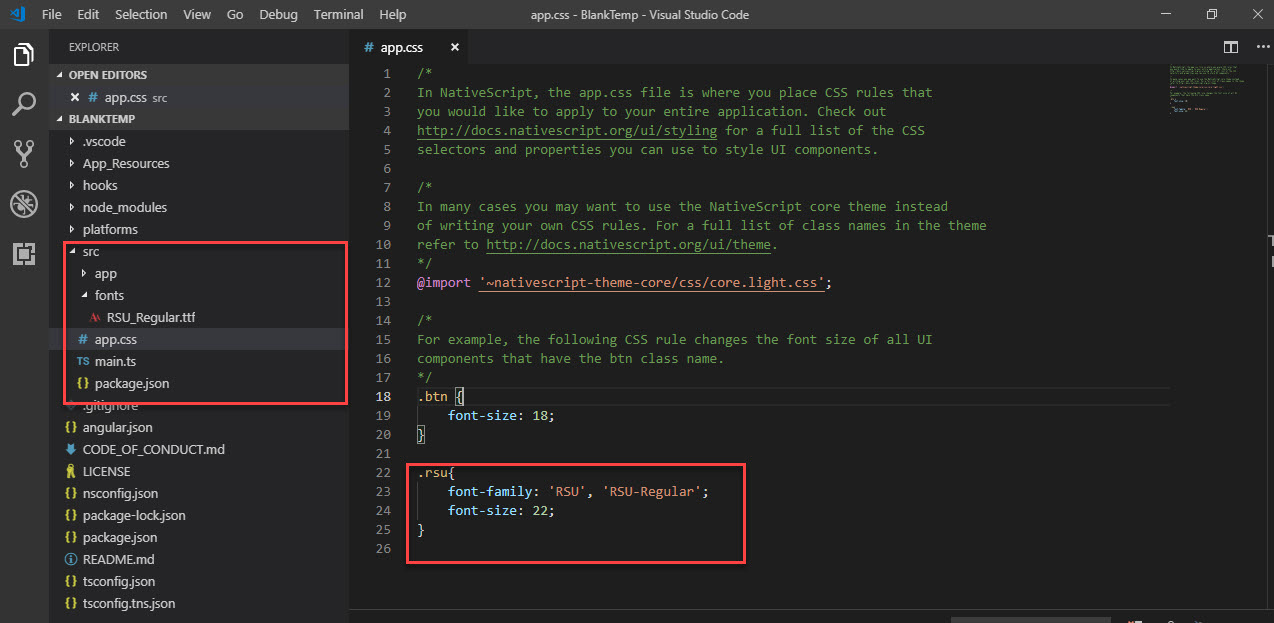
I have solved this problem. The problem is that Android is required to exactly use font file name in CSS file ,whereas IOS is required to exactly use font name that is needed to open the font file to see it.
I just put font file name and font name in the CSS file like this.
.rsu{
   font-family: 'RSU', 'RSU_Regular';
}
Fabulous. It worked. Thanks.
 Avonstar
on 15 Mar 2019
Avonstar
on 15 Mar 2019
Related issues
 samuelvisscher
·
3Comments
samuelvisscher
·
3Comments
 tskweres
·
3Comments
tskweres
·
3Comments
 Sulman633
·
3Comments
Sulman633
·
3Comments
 igorls
·
3Comments
igorls
·
3Comments
 sis0k0
·
3Comments
sis0k0
·
3Comments
Most helpful comment
@SkupeZZ the location of
fontsdirectory should be/my-project/src/fonts