Nativefier: Electron 3.x and later break CSS injection
Description
Steps to reproduce issue
nativefier "https://www.w3schools.com" --inject ./main.css --overwrite
//main.css
body{ background: red}
Details
- Are you nativefying a public website? YES
- Feature request? Have you looked at
nativefier --helpto see if an existing option could fit your needs? NO - Full nativefier command used to build your app:
nativefier "https://www.w3schools.com" --inject ./main.css --overwrite - Version of Nativefier (run
nativefier --version):v7.6.8 - Version of node.js (run
node --version):v8.12.0 - OS:
10.14 OSX - Error message / stack trace (if any):
NONE
JS script injection works exactly as expected, and I can use it for inject css via javascript, but css is completely ignored, and not injected
 oscarmorrison
All 34 comments
I believe that the format is wrong. Try using the API before the actual URL of the page.
 JMarteF
on 1 Nov 2018
JMarteF
on 1 Nov 2018
for example, "nativefier --inject main.css https://www.w3schools.com"
JMarteF
on 1 Nov 2018
Hi @JMarteF, thanks for the response. I can confirm that this make NO difference. If I pass options before or after, the css is not injected.
I can further confirm that the js injection works with either format
oscarmorrison
on 2 Nov 2018
I have tried exactly the same:
//main.css
body{ background: red}
nativefier --inject main.css https://www.w3schools.com
on the Mac and can confirm that the insertation DOES NOT WORK.
@oscarmorrison maybe there is Mac problem?
 StefanRied
on 5 Nov 2018
StefanRied
on 5 Nov 2018

Apparently it is a MacOS issue because I tried it on Ubuntu 18.0.4 LTS and it works just fine.
JMarteF
on 6 Nov 2018
Actually the injection is packaged into Application.app/Contents/Ressources/app/inject/inject.css
I guess this is where it should be. The file holds the content of whatever I have in the file given to the --inject option.
However, loading the app seems to ignore this.
Maybe an issue with the electron version? I have really no glue.
(darwin x64 using electron v3.0.3)
StefanRied
on 7 Nov 2018
I have also force the nativefier with -e to the same Electron version you are using.
nativefier --inject main.css https://www.w3schools.com -e 2.0.8
packaging [============================== ] 60%Packaging app for platform darwin x64 using electron v2.0.8
the injection is still not processed.
StefanRied
on 7 Nov 2018
The file holds the content of whatever I have in the file given to the --inject option.
However, loading the app seems to ignore this.
I'm also experiencing this issue and can confirm this also happens for me.
Happy to provide more debugging info or help out with a fix for this, but not sure where to start 🤓
 maxshelley
on 7 Nov 2018
maxshelley
on 7 Nov 2018
"Happy to provide more debugging info or help out with a fix for this, but not sure where to start :nerd_face:"
Hi @maxshelley . If you want to get your hands dirty and work on a fix, our developer docs will help you get started.
 ronjouch
on 7 Nov 2018
ronjouch
on 7 Nov 2018
Hi
I tried the previous nativefier version and here is the result:
nativefier -v -->7.6.7
nativefier --name "W3" --inject site.css "https://www.w3schools.com"
Downloading tmp-12225-1-SHASUMS256.txt-2.0.6
[============================================>] 100.0% of 5.33 kB (5.33 kB/s)
Packaging app for platform darwin x64 using electron v2.0.6
The injection does now WORK!!!!!!
nativefier -v --> 7.6.8
nativefier --name "W3" --inject site.css "https://www.w3schools.com"
packaging [============================== ] 60%Packaging app for platform darwin x64 using electron v3.0.3
The injection does NOT Work!!!!!
So it is clearly a bug introduced with the latest nativefier version 7.6.8.
Even if I force this one to use the older electron, the bug is still there.
I have no time to pick the reasons and patch nativefier. So I hope the author does this. Meanwhile, I'll just went down to the older nativefier with.
npm install [email protected] -g
Thanks to all answering or confirming the issue.
StefanRied
on 7 Nov 2018
@StefanRied relax with the caps, exclamation marks, and overall passive-agressive tone, please 🙂. No one is paid to receive your aggressiveness, and Nativefier is now just one person (me) doing minimal maintenance and accepting PRs, so bugs happen.
Back to the issue: you say "Even if I force this one to use the older electron, the bug is still there"; are you sure about that? There was one single code change between Nativefier 7.6.7 and 7.6.8 but it's super unrelated, so I'd guess the culprit is our move from Electron 2.x to 3.x; either there's a regression in Electron itself, or we missed a deprecation / breaking API change.
@StefanRied if you have the time for two more tests, can you try forcing more recent electrons and report here? Thanks.
- With currently latest 3.x:
nativefier -e 3.0.8 --name "W3" --inject site.css "w3schools.com" - With currently latest 4.x beta:
nativefier -e 4.0.0-beta.7 --name "W3" --inject site.css "w3schools.com"
ronjouch
on 7 Nov 2018
@StefanRied if you have the time for two more tests, can you try forcing more recent electrons and report here? Thanks.
With currently latest 3.x: nativefier -e 3.0.8 --name "W3" --inject site.css "w3schools.com"
With currently latest 4.x beta: nativefier -e 4.0.0-beta.7 --name "W3" --inject site.css "w3schools.com"
I tested these just now, looks like you're right it's the switch in Electron versions that's caused the issue, but it's not resolved in 4.x
✅ nativefier -e 2.0.12 --name "Echoleft" --inject site.css "https://www.echoleft.com"
❌ nativefier -e 3.0.8 --name "Echoleft" --inject site.css "https://www.echoleft.com"
❌ nativefier -e 4.0.0-beta.7 --name "Echoleft" --inject site.css "https://www.echoleft.com"
maxshelley
on 7 Nov 2018
Alright, thanks for looking, @maxshelley 👍👍👍.
In mainWindow.js we do the injection:
    // we have to inject the css in did-get-response-details to prevent the fouc
    // will run multiple times
    browserWindow.webContents.on('did-get-response-details', injectCss);
And Electron 3.0 breaking API changes mention:
- [#12477] refactor: removed
did-get-response-detailsanddid-get-redirect-requestevents
Patch welcome replacing usage of did-get-response-details with another appropriate event (or doing something else entirely). See existing comment; please pay attention to not cause a FOUC (Flash Of Unstyled Content) while doing that. That is, we should use an early event, to avoid the unpleasant effect of getting unstyled contents rendered, then injected CSS being applied.
ronjouch
on 7 Nov 2018
@ronjouch
Your tool is great. I love it.
@StefanRied relax with the caps, exclamation marks, and overall passive-agressive tone, please 🙂. No one is paid to receive your aggressiveness, and Nativefier is now just one person (me) doing minimal maintenance and accepting PRs, so bugs happen.
I've expected this.
Sorry, if you did get the tone wrong. I had no intention to raise any expectation.
Actually the opposite is the case. As I wrote, I found a workaround with the previous version.
So, there is no expectation that this is fixed.
Thanks again for writing nativefier.
StefanRied
on 7 Nov 2018
you say "Even if I force this one to use the older electron, the bug is still there"; are you sure about that? There was one single code change between Nativefier 7.6.7 and 7.6.8 but it's super unrelated, so I'd guess the culprit is our move from Electron 2.x to 3.x; either there's a regression in Electron itself, or we missed a deprecation / breaking API change.
I apologize, this was wrong.
It looks that the Nativefier 7.6.7 and 7.6.8 versions defaults on my machine to electron 2 and 3.
Meanwhile I can confirm what @maxshelley wrote. It is about the electron version used under the current nativefier. Not about the nativefier version.
StefanRied
on 7 Nov 2018
@StefanRied no worry, no grudge taken, and thanks for the acknowledgement that your tone could have been more gentle. And glad you appreciate Nativefier! (Which by the way isn't exactly "mine", the original author is Jia, I'm only a maintainer).
ronjouch
on 8 Nov 2018
@StefanRied hello stefan Am looking for the old version of nativefier if you could please send it to me via mail [email protected] or please tell me were could I find it.
Regards,
 mohzad
on 13 Nov 2018
mohzad
on 13 Nov 2018
@StefanRied hello stefan Am looking for the old version of nativefier if you could please send it to me ...or please tell me were could I find it.
Hi @mohzad
the usual way with Github, right here on the page
https://github.com/jiahaog/nativefier/releases
select a version there and add the version you like to the npm command like this:
npm install [email protected] -g
On the subject of this thread, I guess the best workaround is to use the current and latest nativefier and tell it to use an older electron version, for example with "nativefier -e 2.0.12 ..." on your Mac.
StefanRied
on 13 Nov 2018
Hi, I have the same problem on Linux, so it's not just Mac OS issue. Switching to electron 2.0.12 solved the problem too.
Version of Nativefier (run nativefier --version): 7.6.8
Version of node.js (run node --version): v11.1.0
OS: up-to-date Arch Linux
 martinsvoboda1101
on 13 Nov 2018
martinsvoboda1101
on 13 Nov 2018
I was having the same issue so I decided to give it a try. It turned out to be a pretty simple correction :)
As I said in the PR's description, I tested with the same command of this issue and everything is fine, now I will start to test it more thoroughly with the other apps that I have in my Mac.
 luccasclezar
on 16 Nov 2018
luccasclezar
on 16 Nov 2018
Now I have tested with my nativefied YouTube and Azure DevOps apps and both worked very well, the CSS got reloaded when the page updated and had minimal time (if not no time at all) displaying the overridden styles.
The only problem that I could not circumvent is that when the page already sets a property that you want to change, you have to add !important to its value. I tried to use all possible Electron's events to add the CSS after the page's style, but I didn't manage to do it.
Having that said, I don't think it's that much of a problem, as my modified version of YouTube app has only one !important property.
div#container.style-scope.ytd-masthead {
    padding: 22px 16px 0 16px !important;
    -webkit-app-region: drag;
}

#guide-spacer {
    height: 22px;
}

#search {
    height: 32px;
}

::-webkit-scrollbar {
    background: rgb(19,19,19);
    width: 10px;
}

::-webkit-scrollbar-thumb {
    background: #3d3d3d;
}
The command that I used to create this YouTube app is nativefier "youtube.com" --name "YouTube" --title-bar-style hiddenInset --inject 'pathToCSS', if someone wants to check out that it's working correctly. :)
luccasclezar
on 16 Nov 2018
Fix released in v7.6.9. Thanks @luccasclezar !
ronjouch
on 1 Dec 2018
I'm still experiencing the bug on v7.6.9.
nativefier "https://www.w3schools.com" --inject ./main.css --overwrite as a test fails to inject any CSS. The css does appear in the package.app/Contents/Resources/app/inject/inject.css file, but no injection is actually occurring.
 ron-casey
on 3 Dec 2018
ron-casey
on 3 Dec 2018
Yeah @ron-casey, me too.
I downloaded the source code to check if it's correct and it is. I don't know what broke my patch, but it was working when I made the PR.
luccasclezar
on 3 Dec 2018
@luccasclezar thanks for jumping in. Looking at the 7.6.8 → 7.6.9 diff, the problem must come from Bump default Electron to 3.0.10; I don't see how any of the other changes might have caused the regression.
@luccasclezar @ron-casey can you try 7.6.9 untouched, but asking for the old electron used in 7.6.8? Just include -e 3.0.3 in your nativefier command.
ronjouch
on 3 Dec 2018
Yeah, I thought that was the only thing that could change something too, but I tried it with -e 3.0.3 and the issue persists. 😕
luccasclezar
on 3 Dec 2018
Issue persists with -e 3.0.3
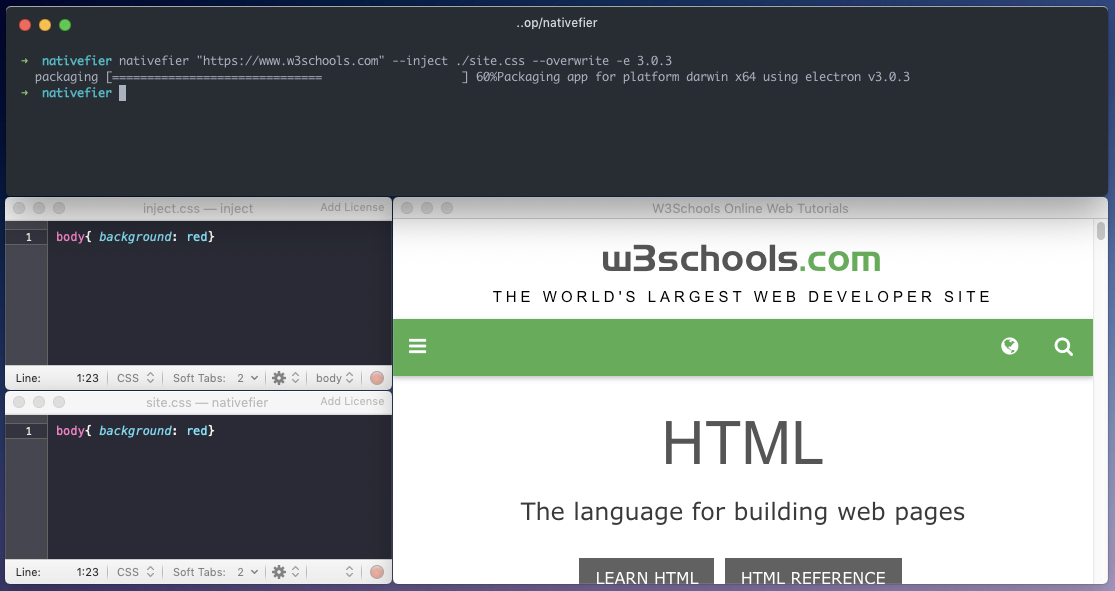
ron-casey
on 3 Dec 2018
This issue goes away if you use electron 2.0.8 @ron-casey
JMarteF
on 13 Dec 2018
Experiencing this issue with the latest nativefier and MacOS Mojave. @JMarteF I tried with electron 2.0.8, still it doesn't work.
 dragfire
on 13 Dec 2018
dragfire
on 13 Dec 2018
I took some time to dig into this, and there are actually two issues -- CSS Injection, and JS Injection.
The CSS Issue appears to be:
The filter parameter on the onHeadersReceived callback is passed null; Passing [] seems to address the issue for CSS injection.
The JS Injection appears to be:
A timing related issue, where in preload.js, the attachment of the DOMContentLoaded handler to call injectScripts() happens on ~line 65, _after_ the event has been raised. I'm assuming this is because while the require calls are present as synchronous, they're actually async relative to the rest of the browser context. This means when they complete and the event handler is attached, DOMContentLoaded has already been raised, so it's missed.
I _suspect_ the JS Issue is only experienced on low end machines (I'm on a core m3 MacBook). I have filed https://github.com/jiahaog/nativefier/issues/731 to address that.
I will create a pull request to fix those issues shortly.
 grork
on 2 Jan 2019
grork
on 2 Jan 2019
Fixed with Nativefier 7.6.10, which will hit npm in a few minutes/hours. :clap: :pray: @grork !
ronjouch
on 2 Jan 2019
CSS injection not working for me with Nativefier 7.6.12 on MacOS 10.14.4
Works when I append -e 2.0.8
 co1in
on 22 Apr 2019
co1in
on 22 Apr 2019
css injection failing for me as well on nativefier 7.6.12. Using -e 2.0.8 also fails to load. The inject.css file appears in the correct area but it is being ignored. Basically the same issue that everyone else is having.
 PhantomNimbi
on 2 May 2019
PhantomNimbi
on 2 May 2019
I just tried to repro this with 7.6.12, and did not repro it. Do you have any more details -- is on a specific site? I tried with Instapaper & Google Docs, and it's for newly generated packages.
My command line is:
nativefier --inject Instapaper.css --name "Instafoo" --fast-quit --title-bar-style hiddenInset https://www.instapaper.com/u
grork
on 3 May 2019
Related issues
 citrusui
·
3Comments
citrusui
·
3Comments
 Waitsnake
·
5Comments
Waitsnake
·
5Comments
 DougBeney
·
5Comments
DougBeney
·
5Comments
 jjgalvez
·
3Comments
jjgalvez
·
3Comments
 desimaniac
·
4Comments
desimaniac
·
4Comments
Most helpful comment
Fixed with Nativefier 7.6.10, which will hit npm in a few minutes/hours. :clap: :pray: @grork !