Nativebase: [Bug] Toast is not working within a Modal
react-native, react and native-base version
RN: 0.45.1
React:16.0.0-alpha.12
native-base: 2.1.5
Expected behaviour
Toast to be shown in react native Modal
Actual behaviour
The toast is not shown in react native Modal
Steps to reproduce (code snippet or screenshot)
Do Toast.show() in a Modal
Is the bug present in both ios and android or in any one of them?
No that I know of. This was working with RN on 0.44 and native-base on a lower version (I can't remember exactly which one, either 2.1.4 or 2.1.3)
 JLLLinn
All 38 comments
@JLLLinn Check the latest of NativeBase i.e, v2.2.0
 shivrajkumar
on 3 Jul 2017
shivrajkumar
on 3 Jul 2017
Was this verified that it was fixed? I think I'm experiencing it as well. My issue is that the Modal is covering the Toast so it isn't visible.
I'm on RN 0.46.4 and native base 2.2.1 and using the ios emulator.
Thanks!
 laxgoalie392
on 10 Aug 2017
laxgoalie392
on 10 Aug 2017
Same problem. I'm on RN 0.46.1 and native base 2.2.1 and using the ios emulator.
 vovanmozg
on 15 Aug 2017
vovanmozg
on 15 Aug 2017
Exactly the same problem using RN 0.47 and NativeBase 2.2.1.
Any news about it?
thanks!
 mdebo
on 24 Aug 2017
mdebo
on 24 Aug 2017
The Toast still appears behind the Modal (from React Native):
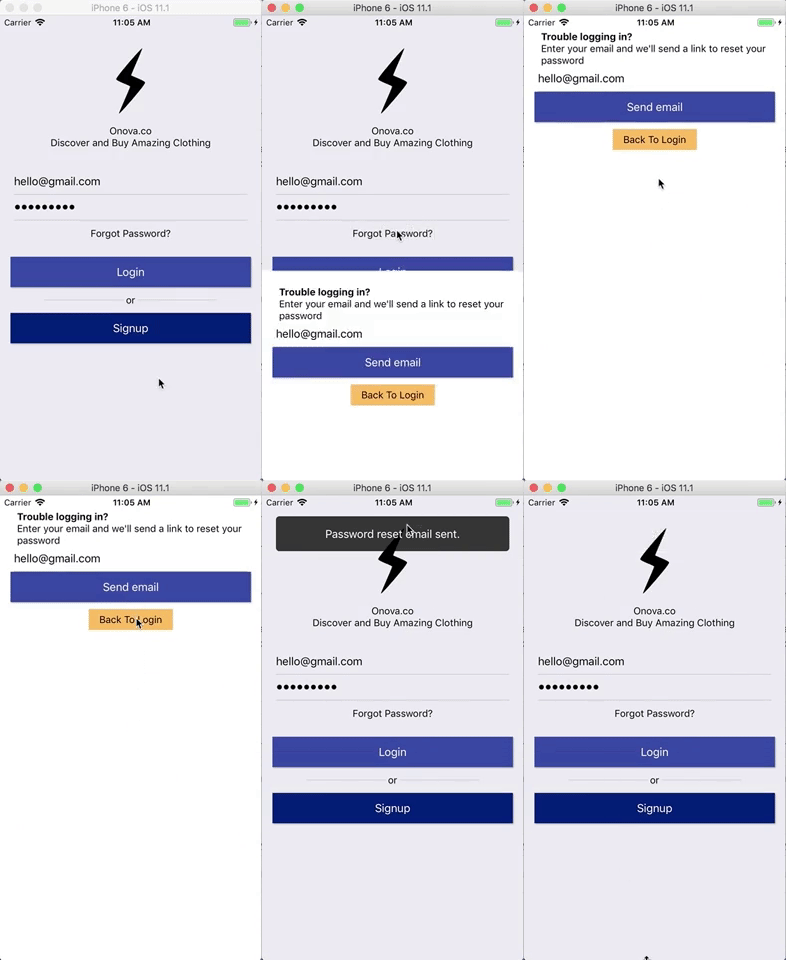
the code is basically this:
import React from 'react';
import {
Modal,
Toast,
Text,
View,
} from 'react-native';
export default class LoginScreen extends React.Component<Props, State> {
state = {
modalVisible: false,
}
onResetPassword() {
Toast.show({
text: message,
duration: 2000,
position: "top",
textStyle: { textAlign: "center" },
});
}
render() {
return (
<View>
<Modal
animationType="slide"
transparent={false}
visible={this.state.modalVisible}
>
<View>...</View>
</Modal>
</View>
)
}
}
Any suggestions?
I see there's something called zIndex as Layout Props - React Native
Using:
$ yarn list --depth=0 | grep 'native-base@\| react-native@'
├─ [email protected]
├─ [email protected]
Can something be done to the ToastContainer.js?
https://github.com/GeekyAnts/NativeBase/blob/master/src/basic/ToastContainer.js
 gianpaj
on 21 Nov 2017
gianpaj
on 21 Nov 2017
@gianpaj Looks like you are using React-Native-Seed boilerplate. Nice!
We will check this issue
 SupriyaKalghatgi
on 22 Nov 2017
SupriyaKalghatgi
on 22 Nov 2017
I just want to add that I’m having this issue too with v 2.3.3
 idrakimuhamad
on 13 Dec 2017
idrakimuhamad
on 13 Dec 2017
FYI: this issue happens both on Android and iOS
gianpaj
on 13 Dec 2017
Still present on 2.3.5
 supercamilo
on 29 Dec 2017
supercamilo
on 29 Dec 2017
I think I'm just going to use the Toast from ant-design-mobile.
My bad. Ant-Design Toast doesn't work. It also appears under the react-native Modal
gianpaj
on 10 Feb 2018
@gianpaj I'm also using antd-mobile for the datepicker. Perhaps I should take a look at their toast implementation too.
idrakimuhamad
on 10 Feb 2018
@gianpaj What was the purpose of sharing graphs for commit-activity?
SupriyaKalghatgi
on 12 Feb 2018
Any hotfix for now with v2.3.10 ?
 ThomasLabstep
on 3 Apr 2018
ThomasLabstep
on 3 Apr 2018
Any chance this will be fixed anytime soon?
 AdrianMrn
on 3 Apr 2018
AdrianMrn
on 3 Apr 2018
Сталкивался с этой проблемой недавно, решил следующим способом. Просто добавляем в Modal элемент Root, а в него весь контент который вам нужен
P.S. на английский переводить лень, главное ведь код
translation : Faced this problem recently, I decided in the following way. Just add the Root element to the Modal, and all the content you need is in it
import { Root, Container, Content } from 'native-base';
<Modal>
<Root>
<Container>
<Content>
// .. modal content with toast
</Content>
</Container>
</Root>
</Modal>
 Zeratyll
on 23 Apr 2018
Zeratyll
on 23 Apr 2018
@Zeratyll Hey! It doesn't work for me at all, the toast still appears behind the Modal.
 doreentseng
on 10 May 2018
doreentseng
on 10 May 2018
@doreentseng Tried @Zeratyll 's solution of putting <Root/> into <Modal/>, but it still didn't work.
@gianpaj Also tried to put style : { zIndex: 1000 } into Toast.show(), no effect as well.
All of the results are tested in a real iPad.
Tried Modal component from both original react-native and react-native-community, both of them didn't work. Will native-base provide its own modal component?
@SupriyaKalghatgi @shivrajkumar Dear collaborators, when can we get an fix?
 michaellee8
on 1 Jun 2018
michaellee8
on 1 Jun 2018
checked this issue after merging PR https://github.com/GeekyAnts/NativeBase/pull/1700. Placing Root inside a modal component as suggested by @Zeratyll https://github.com/GeekyAnts/NativeBase/issues/985#issuecomment-383596951 is working after merging. See attached Gif.
Sample code
import React from 'react';
import { Modal } from "react-native";
import { createStackNavigator } from 'react-navigation';
import { Root, Container, Text, Header, Left, Body, Right, Title, Content, Button, Toast } from 'native-base';

class HomeScreen extends React.Component {

  state = { modalVisible: false }

  render() {
    return (
      <Container>
        <Header>
          <Left />
          <Body>
            <Title>Home screen</Title>
          </Body>
          <Right />
        </Header>

        <Content>
          <Button onPress={() => this.setState({ modalVisible: !this.state.modalVisible })} style={{ margin: 20 }}>
            <Text>Show modal</Text>
          </Button>
        </Content>

        <Modal
          animationType="slide"
          transparent={false}
          visible={this.state.modalVisible}>
          <Root>
            <Container style={{ padding: 20 }}>
              <Button style={{ margin: 20 }} onPress={() => Toast.show({
                text: 'Wrong password!',
                buttonText: 'Okay'
              })}>
                <Text>Show toast</Text>
              </Button>
              <Button style={{ margin: 20 }} onPress={() => this.setState({ modalVisible: !this.state.modalVisible })}>
                <Text>Hide modal</Text>
              </Button>
            </Container>
          </Root>
        </Modal>
      </Container>
    );
  }
}

const App = createStackNavigator({
  Home: {
    screen: HomeScreen
  },
}, {
    navigationOptions: {
      header: null
    }
  });

export default () => <Root>
  <App />
</Root>
Gif

Edit : As @gianpaj pointed out this may not be a viable option. Please see the below comment.
 akhil-geekyants
on 20 Jun 2018
akhil-geekyants
on 20 Jun 2018
Placing Root inside a modal component as suggested ... is working fine
@akhil-geekyants
This is not ideal or neither practical.
The state of Modal(s) should not be at the Root of an application. It should be where the Modal needs to appear, i.e. inside a screen/component/container.
If we had to do the way you suggest, the state of the Modal needs to pass down all the way to the Component in need (via props or in order ways).
I have to say this is not a viable option for any decent size application.
I don't know at the moment how to solve this, but pretty sure that's not it. Happy to be corrected if I'm wrong.
gianpaj
on 20 Jun 2018
@gianpaj updated my comment.
akhil-geekyants
on 25 Jun 2018
Also having this problem. The Root workaround does work but also has an unwanted side-effect that windowed (non-fullscreen) modals no longer appear vertically centered, and no JSX adjustments appear to help.
 JeremyBradshaw7
on 5 Jul 2018
JeremyBradshaw7
on 5 Jul 2018
The above Root fix didn't work for me as I'd like it to, as it completely ruins the vertical centring of the Toast
 lewisflude
on 30 Jul 2018
lewisflude
on 30 Jul 2018
My workaround for modals.
scene.js
<Scene>
<ModalComponent />
</Scene>
ModalComponent.js
import Toast from 'mypathto/Toast';
class ModalComponent Component {
showToast() {
Toast.show({
text: 'modal toast',
position: 'bottom',
duration: 3000
});
}
render() {
return (
<Modal>
<View>
<Button onPress={()=>this.showToast()}><Text>Toast<Text></Button>
<Toast
ref={c => {
if (c) Toast.toastInstance = c;
}}
/>
</View>
</Modal>
)
}
}
mypathto/Toast.js
import {
Toast as ToastNB,
} from "native-base";
class Toast extends ToastNB {
}
export default Toast;
 Aleksandern
on 8 Aug 2018
Aleksandern
on 8 Aug 2018
Сталкивался с этой проблемой недавно, решил следующим способом. Просто добавляем в Modal элемент Root, а в него весь контент который вам нужен
P.S. на английский переводить лень, главное ведь код
translation : Faced this problem recently, I decided in the following way. Just add the Root element to the Modal, and all the content you need is in it
import { Root, Container, Content } from 'native-base';

<Modal>
    <Root>
        <Container>
             <Content>
                  // .. modal content with toast
             </Content>
        </Container>
    </Root>
</Modal>
Very good, it works with me
 tmtung144
on 10 Oct 2018
tmtung144
on 10 Oct 2018
My workaround for modals.
scene.js
<Scene>
  <ModalComponent />
</Scene>
ModalComponent.js
import Toast from 'mypathto/Toast';
class ModalComponent Component {

    showToast() {
        Toast.show({
          text: 'modal toast',
          position: 'bottom',
          duration: 3000
        });
    }

    render() {
        return (
            <Modal>
                <View>
                    <Button onPress={()=>this.showToast()}><Text>Toast<Text></Button>

                    <Toast
                      ref={c => {
                        if (c) Toast.toastInstance = c;
                      }}
                    />

                </View>
            </Modal>
        )
    }
}
mypathto/Toast.js
import {
  Toast as ToastNB,
} from "native-base";

class Toast extends ToastNB {
}

export default Toast;
Works for me, Nice Solution
 AonanLi
on 2 Dec 2018
AonanLi
on 2 Dec 2018
My workaround for modals.
scene.js
<Scene>
  <ModalComponent />
</Scene>
ModalComponent.js
import Toast from 'mypathto/Toast';
class ModalComponent Component {

    showToast() {
        Toast.show({
          text: 'modal toast',
          position: 'bottom',
          duration: 3000
        });
    }

    render() {
        return (
            <Modal>
                <View>
                    <Button onPress={()=>this.showToast()}><Text>Toast<Text></Button>

                    <Toast
                      ref={c => {
                        if (c) Toast.toastInstance = c;
                      }}
                    />

                </View>
            </Modal>
        )
    }
}
mypathto/Toast.js
import {
  Toast as ToastNB,
} from "native-base";

class Toast extends ToastNB {
}

export default Toast;
It's necessary to extend the Toast? I tried the trick directly with NB export and it worked.
EDIT: Yes, it's necessary beacuse the ref to the root is the same for all present and future Toasts (Without extending the Toast, it will try to render within the modal even if it doesn't exist anymore).
 filippoitaliano
on 14 Jan 2019
filippoitaliano
on 14 Jan 2019
onPress={()=>this.setState({ toastVisible: !this.state.toastVisible },() =>Toast.show({ text: 'Wrong password!', buttonText: 'Okay' }))}
This code is working for me. Thanks @akhil-geekyants. This comment helped me
https://github.com/GeekyAnts/NativeBase/issues/985#issuecomment-398688935
 jayan2019
on 24 Jan 2019
jayan2019
on 24 Jan 2019
As mentioned in NB Docs https://docs.nativebase.io/Components.html#toast-def-headref - For Toast to work, you need to wrap your topmost component inside <Root> from native-base. ,the solution is to wrap Toast with Root within Modal, which has already been found in discussion above...
 suvenduchhatoi
on 11 Feb 2019
suvenduchhatoi
on 11 Feb 2019
Wrapping Modal content with Root solved the problem with z-indexing Toast, but this problem appears next https://github.com/GeekyAnts/NativeBase/issues/937
 artshevtsov
on 19 Apr 2019
artshevtsov
on 19 Apr 2019
In my case I use Modal as component and the Toast is being shown after executing an async function, this works for me:
Toast:
import { Toast as ToastNB } from "native-base";
class Toast extends ToastNB {
}
export default Toast;
Modal Component:
import Toast from 'path/toast';
const ModalContainer = ({
visible, onClose, children, onShow,
}) => (
<Modal
visible={visible}
onRequestClose={onClose}
onShow={() => onShow(Toast)}
>
<View>
{children}
</View>
<Toast
ref={(t) => {
Toast.toastInstance = t;
}}
/>
</Modal>
);
Usign the Modal Component:
import ModalContainer from 'path/modalContainer/;
class SomeClass Component {
showToast() {
add1(10).then(() => this.toastInstance.show({
text: 'modal toast',
position: 'bottom',
duration: 3000
}));
}
render() {
return (
<ModalContainer onShow={(e) => { this.toastInstance = e; }}>
<Text>Hi</Text>
</ModalContainer>
)
}
}
 Jhony-Reyes
on 10 Jul 2019
Jhony-Reyes
on 10 Jul 2019
Why can't we add containerStyle to Toast.show() method? all of above solutions seem very unnecessary.
 summerkiflain
on 19 Jul 2019
summerkiflain
on 19 Jul 2019
I think a better solution is to define which component the Toast appears in. Or is it assumed that the top most
 CyberCyclone
on 29 Sep 2019
CyberCyclone
on 29 Sep 2019
Please re-open this.
Putting a Root component inside Modal does work; however, if you ever try to show another toast (let's say you had a root in your main - non-modal - component), then trying to show another toast will horribly crash because the
PR here: https://github.com/GeekyAnts/NativeBase/pull/3018
Basically, it allows for multiple Root elements (allowing us to use extra Roots on Modals without breaking everything)
 cristianoccazinsp
on 8 Dec 2019
cristianoccazinsp
on 8 Dec 2019
My workaround for modals.
scene.js
<Scene>
  <ModalComponent />
</Scene>
ModalComponent.js
import Toast from 'mypathto/Toast';
class ModalComponent Component {

    showToast() {
        Toast.show({
          text: 'modal toast',
          position: 'bottom',
          duration: 3000
        });
    }

    render() {
        return (
            <Modal>
                <View>
                    <Button onPress={()=>this.showToast()}><Text>Toast<Text></Button>

                    <Toast
                      ref={c => {
                        if (c) Toast.toastInstance = c;
                      }}
                    />

                </View>
            </Modal>
        )
    }
}
mypathto/Toast.js
import {
  Toast as ToastNB,
} from "native-base";

class Toast extends ToastNB {
}

export default Toast;
Actually it works for me,
but Toast should display on the top of the Login page instead of the top of the config Modal:

This is My code:

 HeyShinner
on 1 Apr 2020
HeyShinner
on 1 Apr 2020
I tried using this but ran into an issue on react-navigation.
If you click to a page, and then click back...the re-render won't trigger and the ref won't get reset and then you'll get the null toastInstance error.
So, I needed to add a useFocusEffect to reset the instance when it comes back to that screen.
Here is my solution based on the one below...so far seems to be working. Also, I'm not using "Modal", but using instead transparentModal and normal screens in the StackNavigator from react-native-screens but same issue....
// Solution based on the one here: https://github.com/GeekyAnts/NativeBase/issues/985#issuecomment-411379940
import {Container as ContainerNB, NativeBase, Toast as ToastNB} from "native-base";
import {useFocusEffect} from "@react-navigation/native";
class Toast extends ToastNB {}
const Container = ({children, ...props}: NativeBase.Container & {children: any}) => {
const toastInstance = useRef();
useFocusEffect(useCallback(() => {
if (toastInstance.current && toastInstance !== (Toast as any).toastInstance) {
(Toast as any).toastInstance = toastInstance.current;
}
}, []));
return <ContainerNB {...props}>
{/*Needs to be first*/}
{children}
{/*// @ts-ignore*/}
<Toast
ref={c => {
if (c) {
(Toast as any).toastInstance = c;
toastInstance.current = c;
}
}}
/>
</ContainerNB>;
};
My workaround for modals.
scene.js
<Scene>
  <ModalComponent />
</Scene>
ModalComponent.js
import Toast from 'mypathto/Toast';
class ModalComponent Component {

    showToast() {
        Toast.show({
          text: 'modal toast',
          position: 'bottom',
          duration: 3000
        });
    }

    render() {
        return (
            <Modal>
                <View>
                    <Button onPress={()=>this.showToast()}><Text>Toast<Text></Button>

                    <Toast
                      ref={c => {
                        if (c) Toast.toastInstance = c;
                      }}
                    />

                </View>
            </Modal>
        )
    }
}
mypathto/Toast.js
import {
  Toast as ToastNB,
} from "native-base";

class Toast extends ToastNB {
}

export default Toast;
 Aryk
on 21 Jun 2020
Aryk
on 21 Jun 2020
I tried using this but ran into an issue on react-navigation.
If you click to a page, and then click back...the re-render won't trigger and the ref won't get reset and then you'll get the null toastInstance error.
So, I needed to add a useFocusEffect to reset the instance when it comes back to that screen.
Here is my solution based on the one below...so far seems to be working. Also, I'm not using "Modal", but using instead transparentModal and normal screens in the StackNavigator from react-native-screens but same issue....
// Solution based on the one here: https://github.com/GeekyAnts/NativeBase/issues/985#issuecomment-411379940
import {Container as ContainerNB, NativeBase, Toast as ToastNB} from "native-base";
import {useFocusEffect} from "@react-navigation/native";

class Toast extends ToastNB {}

const Container = ({children, ...props}: NativeBase.Container & {children: any}) => {

  const toastInstance = useRef();

  useFocusEffect(useCallback(() => {
    if (toastInstance.current && toastInstance !== (Toast as any).toastInstance) {
      (Toast as any).toastInstance = toastInstance.current;
    }
  }, []));

  return <ContainerNB {...props}>
    {/*Needs to be first*/}
    {children}
    {/*// @ts-ignore*/}
    <Toast
      ref={c => {
        if (c) {
          (Toast as any).toastInstance = c;
          toastInstance.current = c;
        }
      }}
    />
  </ContainerNB>;
};
My workaround for modals.
scene.js<Scene> <ModalComponent /> </Scene>ModalComponent.js
import Toast from 'mypathto/Toast';
class ModalComponent Component {

    showToast() {
        Toast.show({
          text: 'modal toast',
          position: 'bottom',
          duration: 3000
        });
    }

    render() {
        return (
            <Modal>
                <View>
                    <Button onPress={()=>this.showToast()}><Text>Toast<Text></Button>

                    <Toast
                      ref={c => {
                        if (c) Toast.toastInstance = c;
                      }}
                    />

                </View>
            </Modal>
        )
    }
}
mypathto/Toast.js
import {
  Toast as ToastNB,
} from "native-base";

class Toast extends ToastNB {
}

export default Toast;
Got it! I will give my feedback after I try this nice solution!
HeyShinner
on 23 Jun 2020
As mentioned in NB Docs https://docs.nativebase.io/Components.html#toast-def-headref -
For Toast to work, you need to wrap your topmost component inside <Root> from native-base.,the solution is to wrapToastwithRootwithinModal, which has already been found in discussion above...
I can confirm what @cristianoccazinsp is true. The instance is no longer available after the Toast in Modal hides.
null is not an object (evaluating
'this.toastInstance.root.showToast')
 Rc85
on 19 Aug 2020
Rc85
on 19 Aug 2020
@SupriyaKalghatgi The issue is still not solved. Why haven't you added support for multiple roots yet
 emil-keyvalue
on 27 Oct 2020
emil-keyvalue
on 27 Oct 2020
Related issues
 nschurmann
·
3Comments
nschurmann
·
3Comments
 natashache
·
3Comments
natashache
·
3Comments
 sihemhssine
·
3Comments
sihemhssine
·
3Comments
 chetnadaffodil
·
3Comments
chetnadaffodil
·
3Comments
 agersoncgps
·
3Comments
agersoncgps
·
3Comments
Most helpful comment
checked this issue after merging PR https://github.com/GeekyAnts/NativeBase/pull/1700. Placing Root inside a modal component as suggested by @Zeratyll https://github.com/GeekyAnts/NativeBase/issues/985#issuecomment-383596951 is working after merging. See attached Gif.
Sample code
Gif
Edit : As @gianpaj pointed out this may not be a viable option. Please see the below comment.