mysql 8 new authentication method caching_sha2_password
This new auth method brings breaking changes to a lot of frameworks/workflows.
I see a lot of emerging questions regarding this...
Maybe it would be good idea to have 8 version images with old auth method also, for backwards compatibility?
 chilio
All 16 comments
I don't believe this is a viable solution -- to maintain a non-default feature that is rather simple to work around if need be: connecting with mysql --default-auth=mysql_native_password -p. Users should be familiar with the product that they're using as well, so changes such as this isn't our realm to interfere.
This is upstream's explanation as for why it's the preferred authentication plugin https://dev.mysql.com/doc/refman/8.0/en/upgrading-from-previous-series.html#upgrade-caching-sha2-password
 wglambert
on 19 Jul 2018
wglambert
on 19 Jul 2018
@wglambert hmmm yes and no.
Although it is pretty simple to turn backwards compatibility, there are tons of repositories using old auth, which will stuck until upgraded (and some of them taking pretty long way to make it work).
And I believe hashing algo is a pretty default feature.
And to security measures which I treat really seriously, - does it mean all mysql 5.7 and former installations are vulnerable (I believe not, they mainly exist in private networks, so still protected)?
That's why I suggested having backwards compatible images...
BTW. And believe me there are cases where workaround is not even found so far....
chilio
on 19 Jul 2018
In this case, changing the default authentication method was an intentional choice by upstream, which is their prerogative. In this case, they even decided to only do so when changing from MySQL 5 to MySQL 8, which is a major version bump (and I'd be very surprised if this is the _only_ breakage introduced in the change), and that was very kind of them.
As packagers of their solution, I do not believe it is appropriate for us to change this new default simply for the sake of compatibility with the older version, especially given that folks can still continue to use mysql:5.7 and mysql:5.6 (and even mysql:5.5), and that there is a trivial workaround by adding an additional command-line flag (or other means of adding extra mysqld configuration) to the container.
Any folks using mysql:latest and expecting it to continue to be compatible with their application are going to have a bad time -- even just mysql:5 would be better to avoid issues like this very one.
See https://github.com/docker-library/mysql/issues/409 and https://github.com/docker-library/mysql/issues/419 for additional information/discussion.
 tianon
on 20 Jul 2018
tianon
on 20 Jul 2018
In this case could you please suggest simplest set of commands I should issue on clean running mysql 8 container to be able to use default-auth=mysql_native_password but on the server, not client ?
chilio
on 23 Jul 2018
@chilio simply add --default-authentication-plugin=mysql_native_password to your mysql:8 container invocation (either via the command-line or in the command: field of your relevant YAML file)
tianon
on 23 Jul 2018
@tianon thank you, just a 5 mins ago figured that out.
And I can confirm it works... :)
chilio
on 23 Jul 2018
version: '3'
services:
  author_db:
    image: mysql:8.0.12
    command: --default-authentication-plugin=mysql_native_password
    restart: always
    ports:
      - "3306:3306"
It not working.
 EnziinSystem
on 28 Sep 2018
EnziinSystem
on 28 Sep 2018
You didn't give a password
version: '3'
services:
  author_db:
    image: mysql:8.0.12
    command: --default-authentication-plugin=mysql_native_password
    environment:
      MYSQL_ROOT_PASSWORD: pass
    restart: always
    ports:
      - "3306:3306"
$ docker-compose up -d
Creating network "mysql-454_default" with the default driver
Pulling author_db (mysql:8.0.12)...
8.0.12: Pulling from library/mysql
Digest: sha256:038f5f6ea8c8f63cfce1bce9c057ab3691cad867e18da8ad4ba6c90874d0537a
Status: Downloaded newer image for mysql:8.0.12
Creating mysql-454_author_db_1 ... done
$ docker-compose logs --tail 3
Attaching to mysql-454_author_db_1
author_db_1  | 2018-09-28T17:27:18.867303Z 0 [Warning] [MY-010330] [Server] 'tables_priv' entry 'user mysql.session@localhost' ignored in --skip-name-resolve mode.
author_db_1  | 2018-09-28T17:27:18.867325Z 0 [Warning] [MY-010330] [Server] 'tables_priv' entry 'sys_config mysql.sys@localhost' ignored in --skip-name-resolve mode.
author_db_1  | 2018-09-28T17:27:18.870988Z 0 [System] [MY-010931] [Server] /usr/sbin/mysqld: ready for connections. Version: '8.0.12'  socket: '/var/run/mysqld/mysqld.sock'  port: 3306  MySQL Community Server - GPL.
$ docker exec -it mysql-454_author_db_1 mysql -uroot -ppass
mysql: [Warning] Using a password on the command line interface can be insecure.
Welcome to the MySQL monitor.  Commands end with ; or \g.
Your MySQL connection id is 10
Server version: 8.0.12 MySQL Community Server - GPL

Copyright (c) 2000, 2018, Oracle and/or its affiliates. All rights reserved.

Oracle is a registered trademark of Oracle Corporation and/or its
affiliates. Other names may be trademarks of their respective
owners.

Type 'help;' or '\h' for help. Type '\c' to clear the current input statement.

mysql>
import mysql.connector
def connect():
conn = mysql.connector.connect(host='localhost',
database='mydb',
user='root_new',
password='root_new')
if conn.is_connected():
print('Connected to MySQL database')
if name == 'main':
connect()
Output : Connected to MySQL database
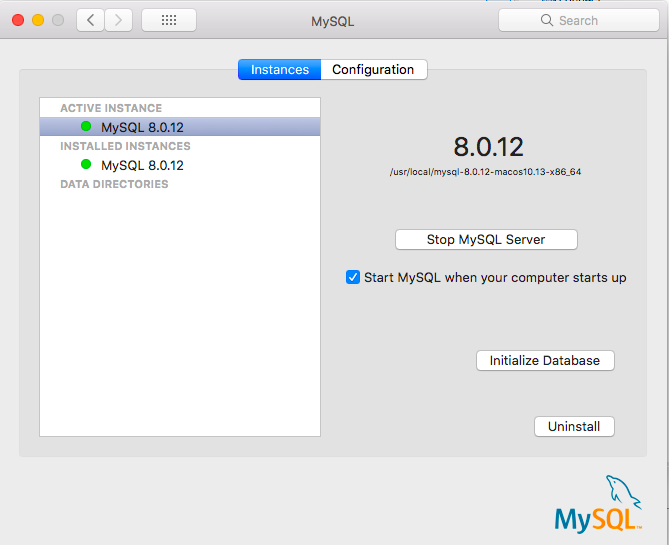
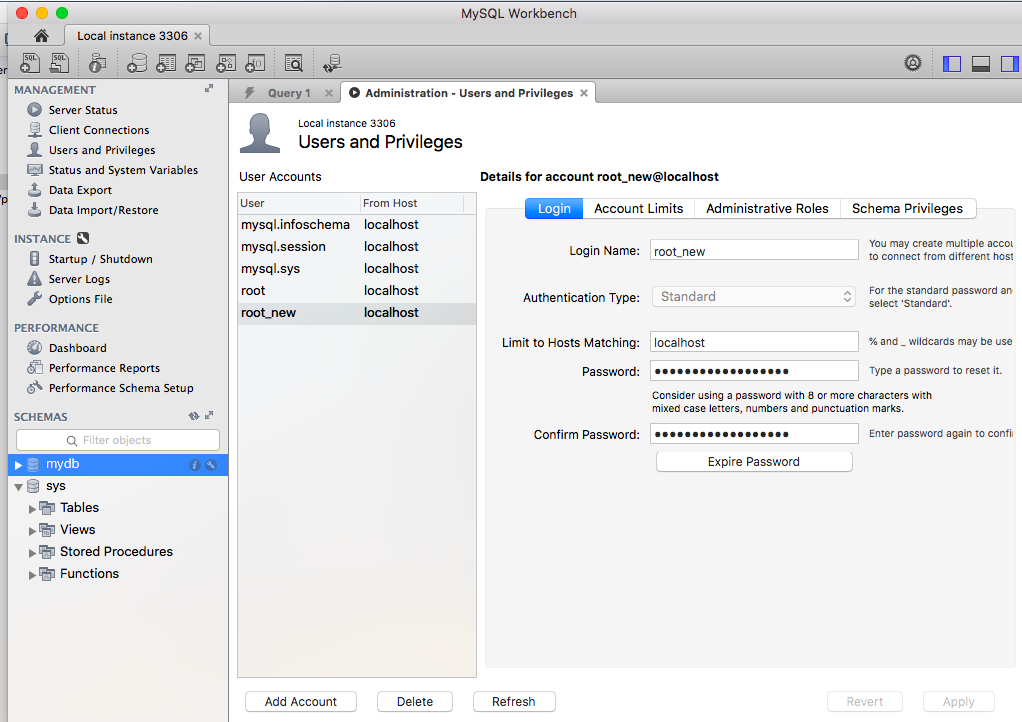
Follow the Screenshot 👍
Stop database server in preferences.
initialise DB with legacy authentication.
Open mysqlWorkBench and Create a new user with standard authentication.
Create a new schema(DB) in sqlWorkbench.
Execute python Code in Eclipse.


 djanshuman
on 20 Oct 2018
djanshuman
on 20 Oct 2018
@wglambert I have tried the following docker-compose.yml file:
version: '3'

services:
  mysql:
    image: mysql
    container_name: mysql
    restart: always
    volumes:
      - mysql:/var/lib/mysql
    environment:
      - MYSQL_ROOT_PASSWORD= password
      - MYSQL_DATABASE= db
      - MYSQL_USER= mostafa
      - MYSQL_PASSWORD= ghadimi
    command: --default-authentication-plugin=mysql_native_password
    ports:
      - 3306:3306
      - 33060:33060

  adminer:
    image: adminer
    restart: always
    ports:
      -  8080:8080

  prometheus:
    image: prom/prometheus
    container_name: prometheus
    ports:
      - 9090:9090
    volumes:
      - ./prometheus/prometheus.yml:/etc/prometheus/prometheus.yml
    command:
      - --config.file=/etc/prometheus/prometheus.yml

  mysql-exporter:
    image: prom/mysqld-exporter
    container_name: mysql-exporter
    ports:
      - 9104:9104
    volumes:
      - ./mysql-exporter/.my.cnf:/root/.my.cnf
    environment:
      - DATA_SOURCE_NAME='mostafa:ghadimi@(localhost:9104)/db'
      - collect.info_schema.tablestats=true
      - collect.info_schema.userstats=true
      - collect.info_schema.query_response_time=true
      - collect.auto_increment.columns=true
      - collect.binlog_size=true
      - collect.perf_schema.eventsstatements=true
      - collect.perf_schema.eventswaits=true
      - collect.perf_schema.file_events=true
      - collect.perf_schema.indexiowaits=true
      - collect.perf_schema.tableiowaits=true
      - collect.perf_schema.tablelocks=true
    depends_on:
      - mysql

volumes:
  mysql:
but I can't access to mysql using docker exec as you have explained and I face with the following error:
ERROR 1045 (28000): Access denied for user 'root'@'localhost' (using password: YES)
For more detail please check (this link)[https://stackoverflow.com/questions/57347415/cant-monitor-mysql-using-prometheus-docker-and-prom-mysqld-exporter-image]
 mostafaghadimi
on 6 Aug 2019
mostafaghadimi
on 6 Aug 2019
@NicolasFCO Hi Nicolas, it still doesn't work! what should I do? I have also done the last method you said in the link you've sent.
mostafaghadimi
on 6 Aug 2019
@mostafaghadimi try to remove your images by using:
docker-compose stop
docker system prun
Then rebuild it:
docker-compose build
docker-compose up
 nfacciolo
on 6 Aug 2019
nfacciolo
on 6 Aug 2019
@NicolasFCO I've also done that, but I faced with the following error:
ERROR 1045 (28000): Access denied for user 'root'@'localhost' (using password: YES)
More Detail: I use docker exec -it <container-id> bash and mysql -u <username> -p <password> to connect to mysql database, but the above error occurs every time, I attempt.
mostafaghadimi
on 6 Aug 2019
@mostafaghadimi, I think you might have an issue in your yaml. There are spaces in the env values for MySQL and I don't think it will handle those in the way you expect:
    environment:
      - MYSQL_ROOT_PASSWORD= password
      - MYSQL_DATABASE= db
      - MYSQL_USER= mostafa
      - MYSQL_PASSWORD= ghadimi

# should be:
    environment:
      - MYSQL_ROOT_PASSWORD=password
      - MYSQL_DATABASE=db
      - MYSQL_USER=mostafa
      - MYSQL_PASSWORD=ghadimi
 yosifkit
on 8 Aug 2019
yosifkit
on 8 Aug 2019
@mostafaghadimi Try deleting the mysql volume path on your system:
    volumes:
      - mysql:/var/lib/mysql
So delete the mysql directory in your local path. And then try. Docker down and prune doesn't really remove the volume data. Even docker system prune --volumes did not remove the mysql volume for me.
 sawant
on 18 Mar 2020
sawant
on 18 Mar 2020
if you are facing "caching_sha2_password" error during connectivity of your mysql database using python ,
go through this
https://www.youtube.com/watch?v=YNq-EuQEJos
 hackdavid
on 30 May 2020
hackdavid
on 30 May 2020
Related issues
 mcandre
·
4Comments
mcandre
·
4Comments
 zeuscronos
·
3Comments
zeuscronos
·
3Comments
 seangerhardt-wf
·
4Comments
seangerhardt-wf
·
4Comments
 chlch
·
3Comments
chlch
·
3Comments
 AdriVanHoudt
·
4Comments
AdriVanHoudt
·
4Comments
Most helpful comment
It not working.