mysqli::__construct(): (HY000/2002): Connection refused in Standard input code on line 22
Issue Description
On this repository: https://github.com/napolev/mysite.local
I have a very simple docker-compose project which uses: MySQL + Wordpress + Nginx.
My development environment is:
- Windows 10 Pro
- Docker Desktop v2.2.0.5
- Windows Subsystem for Linux (WSL) > Ubuntu 18.04
- Docker version 19.03.5, build 633a0ea838
- docker-compose version 1.17.1
When I run it on this environment with:
$ docker-compose up
My problem is: I get the following error:
PHP Warning: mysqli::__construct(): (HY000/2002): Connection refused in Standard input code on line 22
Here you have the full log:
$ docker-compose up -d
Creating network "mysitelocal_app-network" with driver "bridge"
Creating db ...
Creating db ... done
Creating wordpress ...
Creating wordpress ... done
Creating webserver ...
Creating webserver ... done

$ docker-compose logs db
Attaching to db
db           | 2020-05-02 19:38:41+00:00 [Note] [Entrypoint]: Entrypoint script for MySQL Server 8.0.20-1debian10 started.
db           | 2020-05-02 19:38:41+00:00 [Note] [Entrypoint]: Switching to dedicated user 'mysql'
db           | 2020-05-02 19:38:41+00:00 [Note] [Entrypoint]: Entrypoint script for MySQL Server 8.0.20-1debian10 started.
db           | 2020-05-02T19:38:41.951665Z 0 [Warning] [MY-011070] [Server] 'Disabling symbolic links using --skip-symbolic-links (or equivalent) is the default. Consider not using this option as it' is deprecated and will be removed in a future release.
db           | 2020-05-02T19:38:41.951755Z 0 [System] [MY-010116] [Server] /usr/sbin/mysqld (mysqld 8.0.20) starting as process 1
db           | 2020-05-02T19:38:41.962585Z 1 [System] [MY-013576] [InnoDB] InnoDB initialization has started.
db           | 2020-05-02T19:38:42.326668Z 1 [System] [MY-013577] [InnoDB] InnoDB initialization has ended.
db           | 2020-05-02T19:38:42.441714Z 0 [System] [MY-011323] [Server] X Plugin ready for connections. Socket: '/var/run/mysqld/mysqlx.sock' bind-address: '::' port: 33060
db           | 2020-05-02T19:38:42.498213Z 0 [Warning] [MY-010068] [Server] CA certificate ca.pem is self signed.
db           | 2020-05-02T19:38:42.502448Z 0 [Warning] [MY-011810] [Server] Insecure configuration for --pid-file: Location '/var/run/mysqld' in the path is accessible to all OS users. Consider choosing a different directory.
db           | 2020-05-02T19:38:42.518170Z 0 [System] [MY-010931] [Server] /usr/sbin/mysqld: ready for connections. Version: '8.0.20'  socket: '/var/run/mysqld/mysqld.sock'  port: 3306  MySQL Community Server - GPL.

$ docker-compose logs wordpress
Attaching to wordpress
wordpress    | [02-May-2020 19:38:42 UTC] PHP Warning:  mysqli::__construct(): (HY000/2002): Connection refused in Standard input code on line 22
wordpress    |
wordpress    | MySQL Connection Error: (2002) Connection refused
wordpress    | [02-May-2020 19:38:45] NOTICE: fpm is running, pid 1
wordpress    | [02-May-2020 19:38:45] NOTICE: ready to handle connections
Here you have a Screenshot:
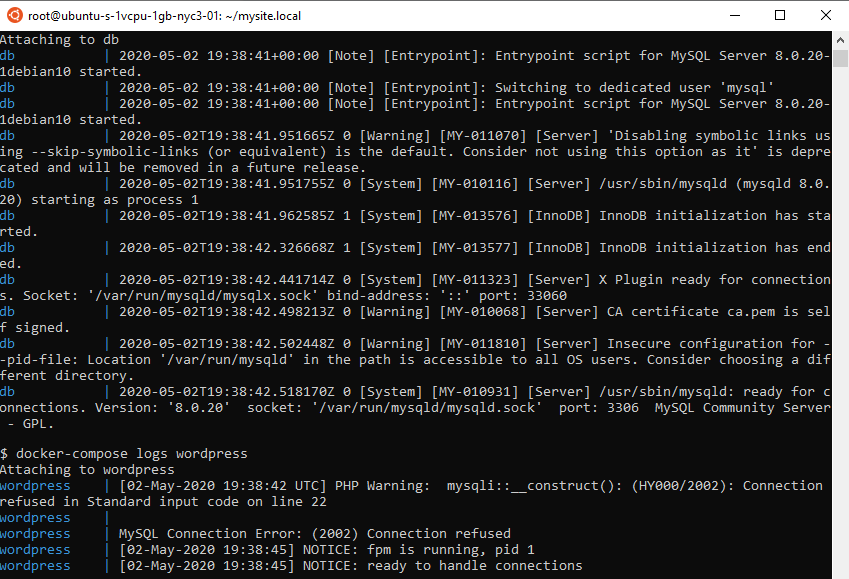
When I open the website on Chrome (using: http, I don't need: https), I get the following error:
This page isn’t working

When I open the website on Firefox (using: http, I don't need: https), I get the following error:
The connection was reset
 ]
]
The hosts file is already configured with:
127.0.0.1 mysite.local
127.0.0.1 www.mysite.local
I just want to be able to access to the website.
docker-compose.yml
version: '3'

services:
  db:
    image: mysql:8.0
    container_name: db
    restart: unless-stopped
    env_file: .env
    environment:
      - MYSQL_DATABASE=wordpress
    volumes:
      - dbdata:/var/lib/mysql
    command: '--default-authentication-plugin=mysql_native_password'
    networks:
      - app-network

  wordpress:
    depends_on:
      - db
    image: wordpress:5.1.1-fpm-alpine
    container_name: wordpress
    restart: unless-stopped
    env_file: .env
    environment:
      - WORDPRESS_DB_HOST=db:3306
      - WORDPRESS_DB_USER=$MYSQL_USER
      - WORDPRESS_DB_PASSWORD=$MYSQL_PASSWORD
      - WORDPRESS_DB_NAME=wordpress
    volumes:
      - ./wordpress:/var/www/html
    networks:
      - app-network

  webserver:
    depends_on:
      - wordpress
    image: nginx:1.15.12-alpine
    container_name: webserver
    restart: unless-stopped
    ports:
      - "80:80"
    volumes:
      - ./wordpress:/var/www/html
      - ./nginx-conf:/etc/nginx/conf.d
    networks:
      - app-network

volumes:
  wordpress:
  dbdata:

networks:
  app-network:
    driver: bridge
nginx.conf
server {
  listen 80;
  listen [::]:80;

  server_name mysite.local www.mysite.local;

  index index.php index.html index.htm;

  root /var/www/html;

  location / {
    try_files $uri $uri/ /index.php$is_args$args;
  }

  location ~ \.php$ {
    try_files $uri =404;
    fastcgi_split_path_info ^(.+\.php)(/.+)$;
    fastcgi_pass wordpress:9000;
    fastcgi_index index.php;
    include fastcgi_params;
    fastcgi_param SCRIPT_FILENAME $document_root$fastcgi_script_name;
    fastcgi_param PATH_INFO $fastcgi_path_info;
  }

  location = /favicon.ico {
    log_not_found off; access_log off;
  }
  location = /robots.txt {
    log_not_found off; access_log off; allow all;
  }
  location ~* \.(css|gif|ico|jpeg|jpg|js|png)$ {
    expires max;
    log_not_found off;
  }
}
Any idea on how to make it work on my local environment (I just need http, not need https)?
Requirement: Please, use Windows Subsystem for Linux (WSL) > Ubuntu 18.04 as well in order to reproduce the error on the console above.
 zeuscronos
All 3 comments
Seems like an auth problem, the mysql container is fine but php can't connect to it.
Maybe changing the credentials from $MYSQL_USER and $MYSQL_PASSWORD to the username/pass itself?
 wglambert
on 4 May 2020
wglambert
on 4 May 2020
Removing the port on - WORDPRESS_DB_HOST=db solved my problem.
I hope this helps you.
 techuila
on 28 Aug 2020
techuila
on 28 Aug 2020
@techuila thank you!!!
 jamesjsewell
on 5 Apr 2021
jamesjsewell
on 5 Apr 2021
Related issues
 odero
·
3Comments
odero
·
3Comments
 smallfryy
·
4Comments
smallfryy
·
4Comments
 whgibbo
·
5Comments
whgibbo
·
5Comments
 tomnewport
·
3Comments
tomnewport
·
3Comments
 KomaBeyond
·
4Comments
KomaBeyond
·
4Comments
Most helpful comment
Removing the port on
- WORDPRESS_DB_HOST=dbsolved my problem.I hope this helps you.