Mybinder.org-deploy: Build a cold spare cluster with manual failover
Currently prod runs on one cluster. If this cluster runs into problems (as it did last week), we have to rush to bring it back up to speed - not conducive to operational healthiness nor our uptime! Also GKE still makes the master unavailable when upgrading or modifying parameters (such as autoscaling limits).
We should instead operate with a pair of cluster - a 'cold spare'. In building it, we should meet the following criteria:
- We should be able to make mybinder.org point to either of them with one automated command
- Users who are on the hub during the failover should ideally not be affected as much as possible during a failover. People in the middle of a build will probably be affected.
The easiest way to do this is:
- Create a new cluster (prod-b) with similar specs as current cluster (prod-a)
- Modify our deploy.py script to do all deployments to both the clusters each time. Only difference should be the IPs assigned to the load balancers.
- Write the failover script to change the cluster the static IP is assigned to.
- Run the cold spare cluster at minimal capacity (1 node? 0 nodes? 1 really small node?), and have failover script also perform scale up
With this in place, we can do upgrades with minimal hassle & deal with full cluster outages better.
 yuvipanda
All 8 comments
Ideally someone else not me would do all this :D I think that'd be a great way to build operational capacity in the team/community, and it'll also be a lot of fun/learning for the person doing it!
yuvipanda
on 11 Nov 2017
Sounds like a really good idea, especially the not-making-you-do-everything part!
Question about ips: Right now, as I understand it the IP is the load-balancer IP. Can we update that to point to another cluster without updating it at the DNS level? Or do we need an additional layer of indirection that we don't yet have in order to accomplish that?
 minrk
on 13 Nov 2017
minrk
on 13 Nov 2017
I'd help with that. (1) and (2) look like things I already know how to do, (3) I'd appreciate a pointer as all the docs I've read so far don't mention static IPs (I'll start by sniffing around the cloud console).
 betatim
on 13 Nov 2017
betatim
on 13 Nov 2017
Notes from poking around: the load balancer is an Ingress, it knows where to point to because of the backend configuration in the helm chart of binderhub.
This means each binderhub deployment/cluster has one of these ingress controllers/load balancers. I don't think we could point the ingress of prod-a to the service called binder in a cluster called prod-b. Also weird because you are mixing things together.
So right now I'm thinking like Min that we need another Ingress/LB in front of the LB for prod-a and prod-b.
betatim
on 13 Nov 2017
Ideally, we would have another Cloud Load Balancer from Google Cloud of some sort that gives us an IP we can switch between the lb IPs of prod-a and prod-b. However, from a cursory look it looks like it isn't possible to get a Cloud Load Balancer that lets you switch between two IPs, rather than two instance groups? Hopefully I had just missed something, and this feature exists in there somewhere... If so, we should use it :D
The alternative (and what I did for switching between prod and prod-a):
- "Release" the static IP from its current configuration (I did this by deleting the svc in prod, but there is probably a gcloud way to do this). This keeps the IP still in our project (since we've 'reserved' it) but available for use by other kubernetes clusters.
- Deploy the helm chart to prod-a, including the nginx-ingress IP configuration
This is more error prone, but still decent.
The option I'd like us to not do is to have another series of servers whose job it is to do the load balancing. While easy, this just kicks the 'cold spare / switching' can down the road to another set of servers...
Thanks a lot for taking this up, @betatim and @minrk!
yuvipanda
on 13 Nov 2017
If you click on "edit config" for the load balancer in the cloud console you see the following:
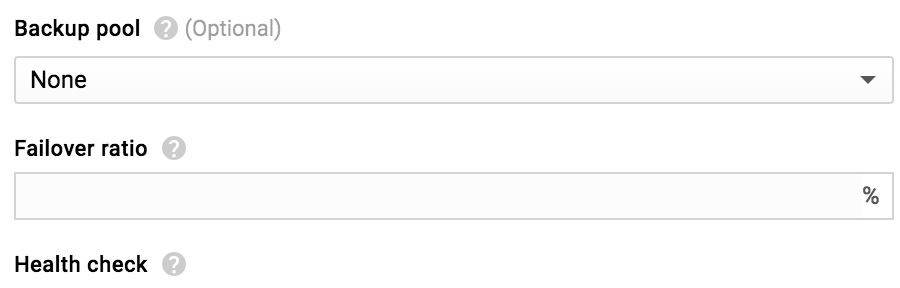
So maybe we can use that to configure a fail over? One thing we'd have to understand is why the current LB thinks that two of the three nodes in the prod-a cluster are "unhealthy".
betatim
on 13 Nov 2017
@betatim not sure. I think we should treat the LoadBalancer that Kubernetes has provisioned as 'owned' by Kubernetes and try not to fitz with it directly in Google Cloud console. I am pretty sure that'll just get overwritten silently at some point.
yuvipanda
on 14 Nov 2017
For sure not suggesting fiddling around through the UI. You'd have to set up things through the helm chart. I just noticed it while browsing around which is my way of discovering what is out there ;)
betatim
on 14 Nov 2017
Related issues
 choldgraf
·
5Comments
choldgraf
·
5Comments
 brandtbucher
·
4Comments
brandtbucher
·
4Comments
 guiwitz
·
6Comments
guiwitz
·
6Comments
 certik
·
7Comments
choldgraf
·
4Comments
certik
·
7Comments
choldgraf
·
4Comments
Most helpful comment
Sounds like a really good idea, especially the not-making-you-do-everything part!
Question about ips: Right now, as I understand it the IP is the load-balancer IP. Can we update that to point to another cluster without updating it at the DNS level? Or do we need an additional layer of indirection that we don't yet have in order to accomplish that?