Mybinder.org-deploy: Unexpected build dialogs when launching a Binder notebook
Here you go, @willingc! CC @jasongrout.
Bug description
I'm not quite sure what's wrong. Hopefully the info below helps:
Expected behaviour
Our notebook launches without any pop-up dialogs. This is how it has behaved for quite some time. I haven't used it in the last few months, though, so it must have stopped working fairly recently.
Actual behaviour
Our notebook launches, and this dialog appears:

Clicking "Cancel" makes the dialog disappear, and everything seems normal. Clicking "Build" appears the same, but a minute or two later will pop up a new dialog:

Clicking "Dismiss" makes the dialog disappear, and everything seems normal.
Some time much later (Minutes? Hours? It happened while I was in another tab, and I don't have the patience to reproduce it...), this new dialog appears:
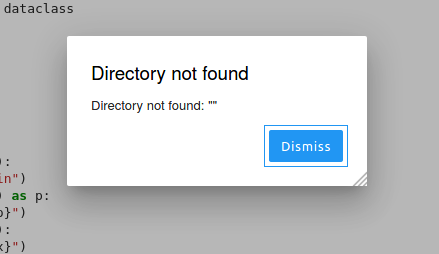
Clicking Dismiss opens a new, identical dialog immediately. I clicked it a few dozen times and couldn't get it to go away. This keeps me from interacting with the notebook now, and I think the only solution is to refresh the page and start over.
How to reproduce
- Visit this link.
- Wait a bit.
- Profit!
Your personal set up
Not sure what sort of setup we have, since I didn't set it up! 🙃 This directory in our repository is what some helpful friends gave us, though. Note that we probably have a non-standard setup, though: they actually had to do quite a bit of ~hacking~ maintenance to get our custom build of Python 3.10 to build and integrate properly with everything else. So that could be part of the issue.
Thanks for looking into this!
 brandtbucher
All 4 comments
Thank you for opening your first issue in this project! Engagement like this is essential for open source projects! :hugs:
If you haven't done so already, check out Jupyter's Code of Conduct. Also, please try to follow the issue template as it helps other other community members to contribute more effectively.

You can meet the other Jovyans by joining our Discourse forum. There is also an intro thread there where you can stop by and say Hi! :wave:
Welcome to the Jupyter community! :tada:
![welcome[bot] picture](https://avatars0.githubusercontent.com/in/4141?v=4&s=40) welcome[bot]
on 22 Oct 2020
welcome[bot]
on 22 Oct 2020
Thank you for opening your first issue in this project! Engagement like this is essential for open source projects! :hugs:
If you haven't done so already, check out Jupyter's Code of Conduct. Also, please try to follow the issue template as it helps other other community members to contribute more effectively.
You can meet the other Jovyans by joining our Discourse forum. There is also an intro thread there where you can stop by and say Hi! :wave:
Welcome to the Jupyter community! :tada:
welcome[bot]
on 22 Oct 2020
I think there are two issues here:
Rebuilding JupyterLab with extensions
mybinder has limited memory, and we've had problems with jupyter lab build failing as a result:
- https://discourse.jupyter.org/t/tip-binder-jupyterlab-extension/6022
- https://discourse.jupyter.org/t/jupyter-lab-build-hangs-and-then-fails-at-webpack-config-webpack-prod-minimize-config-js/6017/3
- https://github.com/jupyterhub/repo2docker/pull/963
In https://github.com/gvanrossum/patma/blob/9f055b91cc394675bef88e87ffc8ee842e2cad75/binder/postBuild#L4 you're updating JupyterLab which is probably why you're asked to rebuild the pre-installed extension. You could either remove this upgrade step (is there a particular feature you need?), or do the rebuild yourself with minimisation disabled:
jupyter lab build --minimize=False
This should hopefully resolve itself when we upgrade mybinder to use JupyterLab 3 where pre-built extensions can be pip-installed.
mybinder timeout
mybinder will eventually time out if you're not actively using it, this might be why you get the Directory not found dialog in JupyterLab.
 manics
on 22 Oct 2020
manics
on 22 Oct 2020
@manics I'll take a look at this issue over the weekend. Fernando et al put together the original implementation.
One of the odd things is that there is a "jupuyerlab-toc" reference in workspace.json file. The spelling of the extension with two "u"s is unexpected.
 willingc
on 23 Oct 2020
willingc
on 23 Oct 2020
Related issues
 jzf2101
·
3Comments
jzf2101
·
3Comments
 certik
·
7Comments
certik
·
7Comments
 jhamman
·
3Comments
jhamman
·
3Comments
 yuvipanda
·
4Comments
yuvipanda
·
4Comments
 tacaswell
·
4Comments
tacaswell
·
4Comments
Most helpful comment
@manics I'll take a look at this issue over the weekend. Fernando et al put together the original implementation.
One of the odd things is that there is a
"jupuyerlab-toc"reference in workspace.json file. The spelling of the extension with two "u"s is unexpected.