Multi-account-containers: [Ctrl+.] The focus order and hightlight could be better and require less key strokes
I always open new tabs with Ctrl+T. Hence I heavily use Ctrl+. to open new container tabs. Here I find that the focus or tab order could be clearer.
STR:
- Do
Ctrl+.:
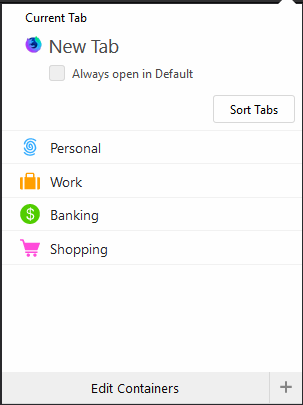
In 99% I'll open the top-most container so this should have the focus in my opinion so that I could just press <Enter> or <Space> to select it. But here no button has the focus by default.
- So I press arrow down
↓key:
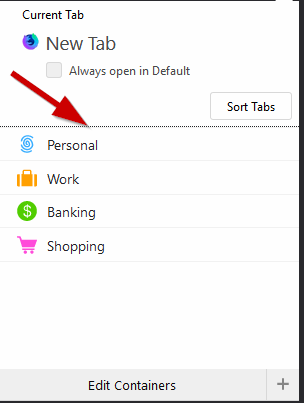
Now the focus is on this line. I have no clue what this means.
FWIW, pressing TAB would select Sort tabs, so behaves different (it should behave the same here in my opinion).
- So I need to press arrow down
↓key again:
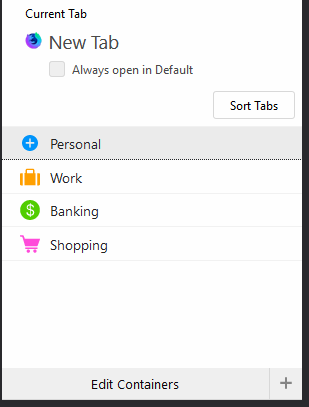
Now Personal container is focussed, but it has no top focus line. It should have one like all the other containers have, e.g.:
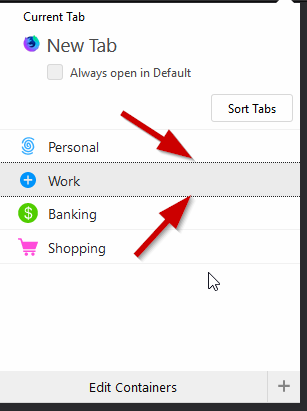
There are a few minor things that could be done here, mark bold above. But also step 2 could be avoided altogether. It is a lot of key strokes to open a new container tab vs. just Ctrl+T. Adding characters with underlines like in menus would help greatly, e.g.
_W_ork
_B_anking
_S_hopping
So one could just to do Ctrl+. following by P to open a Personal tab (at the moment its is Ctrl+., ↓, ↓, Enter.
 jnachtigall
All 7 comments
On OSX this is not a viable option because TAB or the arrow keys are working... I've tried to use the OS shortcut system to set keyboard shortcuts to open new containers (CMD+CTRL+1, CMS+CTRL+2 etc) but this solution has worked only the first time.
Once the system has been rebooted the shortcuts aren't working anymore.
It could be nice to be able to set specific shortcuts for each container as the CMD+T combination opens a new tab.
 AndreaBarghigiani
on 8 Jun 2018
AndreaBarghigiani
on 8 Jun 2018
The CTRL + . shortcut doesn't do anything for me. Can anyone advise?
 fooditron
on 24 Aug 2018
fooditron
on 24 Aug 2018
If this helps you: After Ctrl + . you can hit a number key to open a certain tab, e.g. in your screenshot 1 would open Personal, 2 Work etc.
 Knorrke
on 5 Dec 2018
Knorrke
on 5 Dec 2018
If this helps you: After Ctrl + . you can hit a number key to open a certain tab, e.g. in your screenshot 1 would open Personal, 2 Work etc.
That doesn't really help when it comes to selecting a tab container. Also, CTRL + . Does nothing for me. I think perhaps the shortcut is being over ridden by an add-on...
fooditron
on 5 Dec 2018
Sorry, my comment was a response to the issue of @jnachtigall not yours.
That doesn't really help when it comes to selecting a tab container.
Why not? I think that's the only purpose o.O
Knorrke
on 11 Dec 2018
Sorry, my comment was a response to the issue of @jnachtigall not yours.
That doesn't really help when it comes to selecting a tab container.
Why not? I think that's the only purpose o.O
Sorry, i misunderstood your comment! What's more, the CTRL + . shortcut is now suddenly working for me. And you're right, the 1,2,3,4 shortcuts work great! Thanks 👍 :)
fooditron
on 11 Dec 2018
Seems the reason the CTRL + . shortcut wasn't working for me was that I had removed the containers button from my toolbar.
fooditron
on 11 Dec 2018
Related issues
 maxxcrawford
·
3Comments
maxxcrawford
·
3Comments
 skank
·
3Comments
skank
·
3Comments
 bcb44
·
4Comments
bcb44
·
4Comments
 emyarod
·
3Comments
emyarod
·
3Comments
 coot
·
3Comments
coot
·
3Comments
Most helpful comment
Sorry, i misunderstood your comment! What's more, the CTRL + . shortcut is now suddenly working for me. And you're right, the 1,2,3,4 shortcuts work great! Thanks 👍 :)