Multi-account-containers: Websites using ServiceWorkers can't be assigned
Steps to reproduce:
Open a Personal container tab
Visit web.whatsapp.com
Click Firefox Multi-Account Containers icon
Select Always open in Personal
Open a new tab in default container
Visit web.whatsapp.com
Actual results:
It goes to web.whatsapp.com in default container
Expected results:
It should have visited web.whatsapp.com in Personal container
 spastorino
All 36 comments
I can't reproduce this in the Test Pilot version at the moment which would likely have the same code, I will take another look into this however I don't think the code has changed in the past few versions.
 jonathanKingston
on 15 Sep 2017
jonathanKingston
on 15 Sep 2017
It does not work for me using neither the test pilot version and neither the github version.
spastorino
on 18 Sep 2017
I've managed to reproduce the issue using the steps from the STR on Windows 10 x64 and Mac 10.12.
The issue is reproducible on Firefox release (55.0.3) with Test Pilot version of "Containers" and on latest Nightly (57.0a1- Build ID 20170918220054) with "Multi-Account Containers" (4.0.2 version) installed.
- On web.whatsapp.com the "Multi-Account Containers" option is missing from the context menu.
Attached a screen recording of the issue:

 Softvision-MariusComan
on 20 Sep 2017
Softvision-MariusComan
on 20 Sep 2017
Thanks @Softvision-MariusComan!
jonathanKingston
on 20 Sep 2017
I have encountered the same issue with Firefox Stable (v57.0 64-bit) with Multi-Account Containers (v4.1.0) on Kubuntu 17.10. However the issue is not present in Firefox Developer Edition (v58.0b5 64-bit) on the same OS and witht the same version of addon.
The issue is not limited to _web.whatsapp.com_. I initially encountered it on _web.telegram.org_. I suspected that it gets triggered by any _web_ subdomain, but that proved not to be the case as _web.archive.org_ and _web.google.com_ open in their assigned containers without issues.
EDIT: I noticed that this bug only occurs when starting from a non-container tab. So if I open a new tab in _Shopping_ container and type in _web.whatsapp.com_, the website correctly opens in _Personal_ container. However, if I open a new non-container tab (or is it called default container?) and do the same thing, the bug gets triggered and the website opens outside of its assigned container.
 hoorzad
on 22 Nov 2017
hoorzad
on 22 Nov 2017
+1
I'm experiencing this issue too.
edit
FF 58.0b8 (64-bit) (also happened on 57 beta)
Ubuntu Gnome
 ssipos90
on 4 Dec 2017
ssipos90
on 4 Dec 2017
I'm experiencing the same on https://app.wire.com.
Verified this:
EDIT: I noticed that this bug only occurs when starting from a non-container tab. So if I open a new tab in Shopping container and type in web.whatsapp.com, the website correctly opens in Personal container. However, if I open a new non-container tab (or is it called default container?) and do the same thing, the bug gets triggered and the website opens outside of its assigned container.
FF 57.0.1 (64-bit)
openSUSE Tumbleweed
 melon3r
on 20 Dec 2017
melon3r
on 20 Dec 2017
here to complain about https://web.whatsapp.com
from the default container -it won't open in the Whatsapp container even if it set to 'always open in specific container'
from other containers the prompt is triggered
here's my details:
{
  "Operating System": "Windows NT 10.0 amd64",
  "language": "en-US",
  "software": "Mozilla/5.0 (Windows NT 10.0; Win64; x64; rv:58.0) Gecko/20100101 Firefox/58.0"
}
 Sprinting
on 22 Feb 2018
Sprinting
on 22 Feb 2018
Can confirm that this still happens, is it going to ever be fixed? I'd like to use Multi-Account Containers, but having already encountered 3 different issues in the first 10 minutes of setting up the extension, I don't feel like it's worth it :/
 platelminto
on 26 Apr 2018
platelminto
on 26 Apr 2018
Verified bug present on Firefox 60.0.1 (Kubuntu 18.04) and Firefox Multi-Account Containers 6.0.0
 ferdynice
on 21 Jun 2018
ferdynice
on 21 Jun 2018
Still not defaulting https://web.whatsapp.com to specified container (Firefox 62.0b14). This is the only site for me with this behaviour.
 geotheory
on 5 Aug 2018
geotheory
on 5 Aug 2018
Not sure whether my experience would help reproduce this issue with web.telegram.org, but I would like to share it here.
1.Opened web.telegram.org in container1, logged in, and checked the option to "always open in container1". Now web.telegram.org keeps opening in container1 without any glitches.
- After a few days I bookmarked (in bookmarks toolbar) web.telegram.org.
- Right clicked the bookmark in bookmarks toolbar and selected properties.
- Checked the "load this bookmark in the sidebar" option. Now web.telegram.org opens in the sidebar but doesn't respect the container choice.
- Undid step 4 (unchecked "load this bookmark in the sidebar" option).
- Now web.telegram.org opens in the current container instead of container1 when it's launched from bookmarks or addressbar. But if it's launched from a telegram notification (I've enabled notification from web.telegram.org), it correctly opens in container1.
 anupam207
on 5 Aug 2018
anupam207
on 5 Aug 2018
Same bug here with FF 61.0.1 on Ubuntu Bionic and Multi-Account Containers 6.0.0. Is there any workaround, that don't requires a lot of remembering and clicking (i.e. changing the WhatsAppWeb URL to something that does the trick)?
 z3dm4n
on 1 Sep 2018
z3dm4n
on 1 Sep 2018
Bug is still present on Win8.1 running FF 62.0 and Multi-Account Containers 6.0.0
 yungslime
on 19 Sep 2018
yungslime
on 19 Sep 2018
Bug still present with Whatsapp site, on Win10, FF 62.0.2, Multi-Account Containers 6.0.0
 GiuseppeGiacoppo
on 23 Sep 2018
GiuseppeGiacoppo
on 23 Sep 2018
Still present on Win 8.1 Firefox 63.0.3 (64-bit) 6.0.0
 tekord
on 5 Dec 2018
tekord
on 5 Dec 2018
Still present in FF 64.0
 MauroMombelli
on 21 Dec 2018
MauroMombelli
on 21 Dec 2018
For everyone having this issue, follow this steps to fix the issue locally:
1) Close all whatsapp web tabs
2) Navigate to about:debugging#workers
3) Unregister all service workers for whatsapp (ctrl+F "whatsapp" should help you find them)

4) Go to https://web.whatsapp.com/ again, it should open in your desired container now :slightly_smiling_face:
 elamperti
on 7 Jan 2019
elamperti
on 7 Jan 2019
@spastorino @elamperti I am not able to reproduce this. Is this still reproducible?
 ShivangiKakkar
on 7 Jan 2019
ShivangiKakkar
on 7 Jan 2019
Still does not work form me, i have no watsapp worker, and if i right cloick and select open in caontaner XXX, i see it loading for a moment and then it "reload" in the default container.
Smae if i right click on the tab and select "reopen in container", it will always open a new tab but using default container (arch linux, firefox 64.0.1)
MauroMombelli
on 7 Jan 2019
@ShivangiKakkar Yes, I've had this issue up until now with Firefox 64 on Ubuntu, addon version 6.0.1.
The fix I propose is based on the research by @stoically (apr/18) on related issue #101.
This may have been fixed by this PR, but I can't confirm that.
Edit: fixed PR link
elamperti
on 7 Jan 2019
I had the same issue and the local workaround suggested by @elamperti worked for me on Firefox 65.0.2 (64-bit). Thank you!
 rohitshriwas
on 20 Mar 2019
rohitshriwas
on 20 Mar 2019
@ShivangiKakkar I'm not having this issue anymore since a while. With whatsapp I'm having a different one but unsure if it's related to containers.
Mainly after cleaning temps, cookies, offline data, everything that it's removable from the clean recent history menu, when I visit whatsapp it shows the QR code, I scan that and get logged in as usual. When I close the tab and at some point in the future I go back I'm not logged in anymore. This happens kind of in a random fasion, of course it's probably not random but it's nothing obvious. The most amazing thing is that after a long while playing this log out/login game I'm never logged out anymore unless I clean history again. It's really weird and I'm not sure if it's related to containers or what.
spastorino
on 20 Mar 2019
@elamperti The fix introduced in https://github.com/mozilla/contain-facebook/pull/116 would work for Facebook Container on Firefox >=61, though the WhatsApp domains didn't make it into an official release yet.
It's not that easy to introduce the same fix in MAC, because:
What FC does is
- Add-on initializes and clears serviceworkers for all contained domains (in all containers)
- Visiting a contained domain in a non-Facebook container now fires as
main_framerequest and reopens in the Facebook container (if a serviceworker is registered, the request fires asscriptand can't be reopened, leading to the behavior described in this issue) - The serviceworker is registered in the Facebook container
- All following requests in non-Facebook containers repeat step 2 because no serviceworker is registered in non-Facebook containers
In MAC however we have the concept of the confirm page, which lets you choose between the current container and the assigned container - so with the same fix we could end up with
- Add-on initializes and clears serviceworkers for all assigned domains (in all containers)
- Visiting an assigned domain opens the confirm page
- Choosing the current container opens the domain and registers serviceworker in that container (could be the default container)
- Open the assigned domain again in the same container will not show the confirm page, since a serviceworker is registered (no
main_framerequest)
It would work if, after the serviceworkers are cleared, "Remember my choice" is selected or the assigned container is always selected, since MAC would behave like FC in that case. @spastorino Is that by chance the case for you?
To fix it in MAC we probably would need to clear serviceworkers on a regular basis somehow.
 stoically
on 20 Mar 2019
stoically
on 20 Mar 2019
Solution that works for wire.com at least, disable tracker blocking (e.g. ublock origin). That was the only one I had to turn off to get wire.com to work in its own container.
 J-a-n-u-s
on 11 Apr 2019
J-a-n-u-s
on 11 Apr 2019
Hi, everyone. We're currently triaging the Multi Account Container issues. I can't reproduce this. Is it fixed? If I don't hear back, I'll close it in a few days. If it's not fixed, can someone give updated steps to reproduce? Thanks!
 kendallcorner
on 4 Dec 2019
kendallcorner
on 4 Dec 2019
It's not fixed. What's missing in OPs STR is that you need to visit web.whatsapp.com once in the default container before following the described steps, so that the service worker is registered.
stoically
on 4 Dec 2019
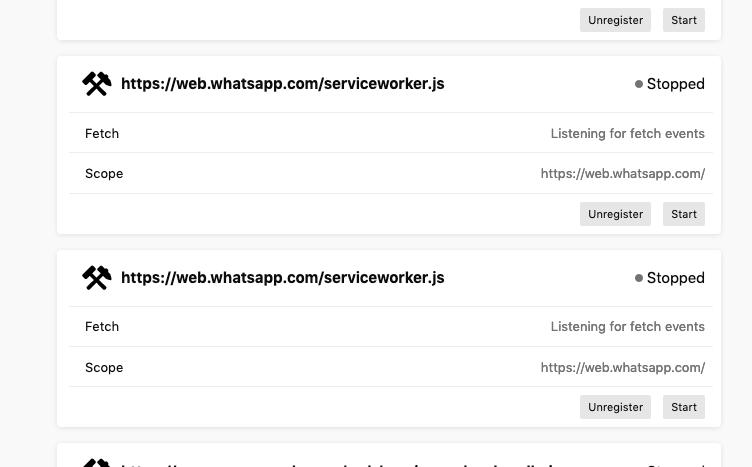
I walked through the steps with no issue. It registered both workers in about:debugging. Is anything else outside of those steps needed to reproduce the error?
 maxxcrawford
on 4 Dec 2019
maxxcrawford
on 4 Dec 2019
I made sure to open web.whatsapp,com in a default container and then followed OP's STR. It opens for me in the correct assigned container. @stoically are you seeing 2 service workers in about:debugging like above?
Also, which version of Firefox are you using? I will try to reproduce on that one.
kendallcorner
on 4 Dec 2019
@maxxcrawford @kendallcorner My bad, you're right, its working for me as well. The webRequest.onBeforeRequest event now fires for ServiceWorkers, so it got fixed in Firefox directly. Cool stuff!
I guess we could remove the workaround in Facebook Container then too.
stoically
on 5 Dec 2019
Great!! Closing.
kendallcorner
on 5 Dec 2019
firefox 71.0 on linux, still does not work for me.
If i open we.watsapp.com in a container, it will "escape", looks like opening a new tab and closing the old one.
Same if i try to "reopen in container", it will end up in a tab without container.
I am a bit puzzled how i am supposed to make it work
MauroMombelli
on 29 Dec 2019
Try this: https://github.com/mozilla/multi-account-containers/issues/822#issuecomment-452068677 and see if it works. On a fresh install, we can't reproduce and it appears to be fixed, so if that doesn't work, you can try clearing your cache and cookies.
kendallcorner
on 31 Dec 2019
FYI I was having a similar problem on Atlassian Confluence - going to the main page opened in the correct container but following a link to any sub page (same domain, just different page after /) opened in default. Unregistering the Service Workers for that page as suggested above worked to fix the problem. Thanks!
 kvdnberg
on 7 Jan 2020
kvdnberg
on 7 Jan 2020
Fixed by disabling the "Facebook container" extension, that AFAIK come by
default in FF.
Is this expected?
On Tue, Jan 7, 2020, 08:52 Karin van den Berg notifications@github.com
wrote:
FYI I was having a similar problem on Atlassian Confluence - going to the
main page opened in the correct container but following a link to any sub
page (same domain, just different page after /) opened in default.
Unregistering the Service Workers for that page as suggested above worked
to fix the problem. Thanks!—
You are receiving this because you commented.
Reply to this email directly, view it on GitHub
https://github.com/mozilla/multi-account-containers/issues/822?email_source=notifications&email_token=ABQTZUISFFUTNQZ5CU5C5XTQ4QYDRA5CNFSM4D3FMBQKYY3PNVWWK3TUL52HS4DFVREXG43VMVBW63LNMVXHJKTDN5WW2ZLOORPWSZGOEIIATFI#issuecomment-571476373,
or unsubscribe
https://github.com/notifications/unsubscribe-auth/ABQTZUM5DB2JQNQ63JWYQ63Q4QYDRANCNFSM4D3FMBQA
.
MauroMombelli
on 7 Jan 2020
Facebook Container should not come by default in Firefox. Firefox does sometimes recommend it, but it shouldn't be installed by default.
 groovecoder
on 7 Jan 2020
groovecoder
on 7 Jan 2020
Related issues
 skank
·
3Comments
skank
·
3Comments
 nekromoff
·
3Comments
nekromoff
·
3Comments
 ericlathrop
·
3Comments
ericlathrop
·
3Comments
 jbyler
·
4Comments
jbyler
·
4Comments
 emyarod
·
3Comments
emyarod
·
3Comments
Most helpful comment
For everyone having this issue, follow this steps to fix the issue locally:
1) Close all whatsapp web tabs

2) Navigate to
about:debugging#workers3) Unregister all service workers for whatsapp (
ctrl+F"whatsapp" should help you find them)4) Go to https://web.whatsapp.com/ again, it should open in your desired container now :slightly_smiling_face: