Mui-datatables: Recurring errors flooding console
There are two errors which I have no idea how to fix that are thrown anytime a rerender happens:
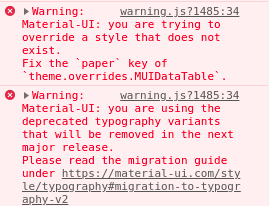
I have looked at all the solutions as to how to remove the typography error, to which nothing has worked. Also, I am styling the paper like so:
MUIDataTable: {
          paper: {
            boxShadow: "none"
          },
          responsiveScroll: {
            height: "305px"
          }
        },
This has been exactly how it is done in some examples, so I do not understand why it throws an error, because it works too!
 aishmitk
All 7 comments
The typography issue should be addressed in beta-53. I will look into the other issue tomorrow
 gregnb
on 25 Jan 2019
gregnb
on 25 Jan 2019
+1
 iChaosren
on 30 Jan 2019
iChaosren
on 30 Jan 2019
@aishmitk I think I was able to prevent the typography error by applying a custom theme to the table with this typography setting?
createMuiTheme({
typography: {
useNextVariants: true,
},
overrides: {...}
 william-chu
on 30 Jan 2019
william-chu
on 30 Jan 2019
@william-chu
I managed to do the same, but I can't remove the first error message regarding the: Fix the paper key
Without removing my styling that is...
If there's a similar solution for the first message I haven't found it.
iChaosren
on 31 Jan 2019
@iChaosren Hmm, I think I forced the removal of the box shadow on the table by targeting the MuiPaper class instead of MUIDataTable I had to force the override with !important
overrides: {
    MuiPaper: {
      root: {
        boxShadow: "none !important",
       },
    },
@william-chu
Awesome!
Thanks!!!
iChaosren
on 1 Feb 2019
Sweet, thanks a bunch
aishmitk
on 4 Feb 2019
Related issues
 jkeruzec
·
17Comments
jkeruzec
·
17Comments
 ghost
·
18Comments
ghost
·
18Comments
 sarawinter
·
15Comments
sarawinter
·
15Comments
 rooby
·
32Comments
rooby
·
32Comments
 krishnaUIDev
·
21Comments
krishnaUIDev
·
21Comments
Most helpful comment
@iChaosren Hmm, I think I forced the removal of the box shadow on the table by targeting the MuiPaper class instead of MUIDataTable I had to force the override with !important