Mui-datatables: “View Columns” and "Filter Table" icons not show with HMR (react-hot-loader)
Config
/**
 * Data Table
 */
/* eslint-disable */
import React from 'react';
import MUIDataTable from "mui-datatables";

// page title bar
import PageTitleBar from '../../../components/PageTitleBar/PageTitleBar';

// rct card box
import RctCollapsibleCard from '../../../components/RctCollapsibleCard/RctCollapsibleCard';

// intl messages
import IntlMessages from '../../../util/IntlMessages';

class DataTable extends React.Component {
  render() {
    const columns = ["Name", "Title", "Location", "Age", "Salary"];
    const data = [
      ["Gabby George", "Business Analyst", "Minneapolis", 30, "$100,000"],
      ["Aiden Lloyd", "Business Consultant", "Dallas", 55, "$200,000"],
      ["Jaden Collins", "Attorney", "Santa Ana", 27, "$500,000"],
      ["Franky Rees", "Business Analyst", "St. Petersburg", 22, "$50,000"],
      ["Aaren Rose", "Business Consultant", "Toledo", 28, "$75,000"],
      ["Blake Duncan", "Business Management Analyst", "San Diego", 65, "$94,000"],
      ["Frankie Parry", "Agency Legal Counsel", "Jacksonville", 71, "$210,000"],
      ["Lane Wilson", "Commercial Specialist", "Omaha", 19, "$65,000"],
      ["Robin Duncan", "Business Analyst", "Los Angeles", 20, "$77,000"],
      ["Mel Brooks", "Business Consultant", "Oklahoma City", 37, "$135,000"],
      ["Harper White", "Attorney", "Pittsburgh", 52, "$420,000"],
      ["Kris Humphrey", "Agency Legal Counsel", "Laredo", 30, "$150,000"],
      ["Frankie Long", "Industrial Analyst", "Austin", 31, "$170,000"],
      ["Brynn Robbins", "Business Analyst", "Norfolk", 22, "$90,000"],
      ["Justice Mann", "Business Consultant", "Chicago", 24, "$133,000"],
      ["Addison Navarro", "Business Management Analyst", "New York", 50, "$295,000"],
      ["Jesse Welch", "Agency Legal Counsel", "Seattle", 28, "$200,000"],
      ["Eli Mejia", "Commercial Specialist", "Long Beach", 65, "$400,000"],
      ["Gene Leblanc", "Industrial Analyst", "Hartford", 34, "$110,000"],
      ["Danny Leon", "Computer Scientist", "Newark", 60, "$220,000"],
      ["Lane Lee", "Corporate Counselor", "Cincinnati", 52, "$180,000"],
      ["Jesse Hall", "Business Analyst", "Baltimore", 44, "$99,000"],
      ["Danni Hudson", "Agency Legal Counsel", "Tampa", 37, "$90,000"],
      ["Terry Macdonald", "Commercial Specialist", "Miami", 39, "$140,000"],
      ["Justice Mccarthy", "Attorney", "Tucson", 26, "$330,000"],
      ["Silver Carey", "Computer Scientist", "Memphis", 47, "$250,000"],
      ["Franky Miles", "Industrial Analyst", "Buffalo", 49, "$190,000"],
      ["Glen Nixon", "Corporate Counselor", "Arlington", 44, "$80,000"],
      ["Gabby Strickland", "Business Process Consultant", "Scottsdale", 26, "$45,000"],
      ["Mason Ray", "Computer Scientist", "San Francisco", 39, "$142,000"]
    ];
    const options = {
      filterType: 'dropdown',
      responsive: 'stacked'
    };
    return (
      <div className="data-table-wrapper">
        <PageTitleBar title={<IntlMessages id="sidebar.dataTable" />} match={this.props.match} />
        <div className="alert alert-info">
          <p>MUI-Datatables is a data tables component built on Material-UI V1.
            It comes with features like filtering, view/hide columns, search, export to CSV download, printing, pagination, and sorting.
            On top of the ability to customize styling on most views, there are two responsive modes "stacked" and "scroll" for mobile/tablet
            devices. If you want more customize option please <a href="https://github.com/gregnb/mui-datatables" className="btn btn-danger btn-small mx-10">Click </a> here</p>
        </div>
        <RctCollapsibleCard heading="Data Table" fullBlock>
            <MUIDataTable title={"Employee list"} data={data} columns={columns} options={options} />
        </RctCollapsibleCard>
      </div>
    );
  }
}

export default DataTable;
Issue
In last five days it's display filter and view column icon but now I have installed it and run with npm start it doesn't show. Why it's may happening .
Your Environment
| Tech | Version |
|--------------|---------|
| mui-datatables | 1.1.7 |
| node | 9.0 |
| OS | Ubuntu 16.04 LTS |
 ghost
ghost
All 18 comments
I am also facing the same issue.
 vikaskr0697
on 7 May 2018
vikaskr0697
on 7 May 2018
Could you tell me which version of material-ui-icons you have installed?
 gregnb
on 7 May 2018
gregnb
on 7 May 2018
@gregnb "material-ui-icons": "^1.0.0-beta.36"
ghost
on 7 May 2018
@gregnb i am using the same version as well.
vikaskr0697
on 7 May 2018
Please upgrade mui-datatables to version 2.0.0-beta-2 and let me know if you have any issues. Since material-ui-icons is no longer being used and it has now moved into the material-ui name space the peer dependencies now look like:
    "@material-ui/icons": "^1.0.0-beta.43",
    "material-ui": "^1.0.0-beta.45",
so you would need to switch to @material-ui/icons
gregnb
on 8 May 2018
Did that but its still not working.

ghost
on 8 May 2018
@shubham81407 Can you try deleting package-lock.json and rm -rf node_modules and then npm install?
Because here's a code sandbox with the latest version: https://codesandbox.io/s/wy2rl1nyzl
You can see all the dependencies listed and it works as it should
gregnb
on 8 May 2018
@gregnb When i remove hot module replacement in my app it's working fine. While working with hot module it doesn't work.
May be this is issue please try it with HMR and you will get this issue.
ghost
on 8 May 2018
Ok I will look into it. Thank you
gregnb
on 8 May 2018
I still don't have an issue. Try the following:
git clone https://github.com/gregnb/mui-datatables.git
cd mui-datatables
open package.json and add the following line to scripts:
"start": "cross-env NODE_ENV=development webpack-dev-server --hot --open",
and then npm run start
and you will see the icons.
gregnb
on 8 May 2018
@gregnb Try it with redux + react-hot-loader.
ghost
on 9 May 2018
@shubham81407 I installed those two packages and it still works. I'm not really sure what issue you are having at this point. If you can provide me access to a repo so I can download it I would love to give you a hand
gregnb
on 9 May 2018
@gregnb This is my repo https://github.com/shubham81407/reactjs-starter-kit
Please give your email address I'll add you as a collaborator on this project.
ghost
on 10 May 2018
@gregnb did you checked my repo.
ghost
on 11 May 2018
Just pulled it down. I'm seeing your issue now very weird. I'll try to find the root cause
gregnb
on 11 May 2018
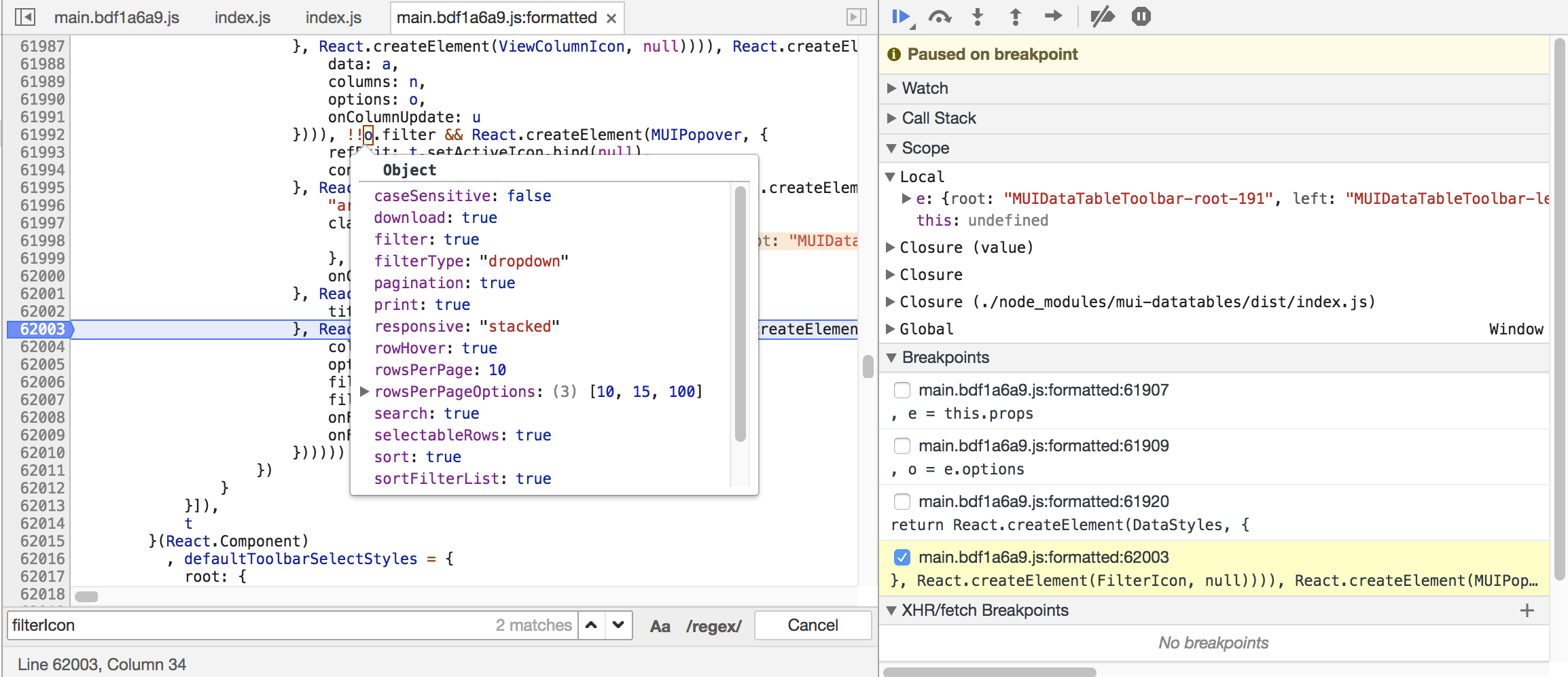
So the options are there when the Toolbar component renders. I think the next step will be to isolate the MUIPopover component and see if that just does not work with react-hot-loader.
gregnb
on 11 May 2018
So after digging around the issue is coming from react-hot-loader because every component is wrapped in a ProxyComponent. More on the issue here: https://github.com/gaearon/react-hot-loader/issues/304
Because of this MUIPopover would fail because the child.type would never match MUIPopoverContent or MUIPopoverTarget. A simple work around:
if (child.type === MUIPopoverContent || child.type === <MUIPopoverContent />.type) {
and
} else if (child.type === MUIPopoverTarget || child.type === <MUIPopoverTarget />.type) {
I'll do a release this weekend and that should solve the issue
gregnb
on 12 May 2018
This issue should be resolved. Upgrade to the latest version
gregnb
on 13 May 2018
Related issues
vikaskr0697
·
19Comments
 Primajin
·
22Comments
Primajin
·
22Comments
 rooby
·
32Comments
rooby
·
32Comments
 HyungNLee
·
16Comments
HyungNLee
·
16Comments
 wroughtec
·
17Comments
wroughtec
·
17Comments