Brief summary of issue / Description of requested feature:
In mudlet "featured" mud list "Achaea", "Lusteria" and others have Discord flag enabled on connection. Clessidra hasn't but we implement that https://wiki.mudlet.org/w/Standards:Discord_GMCP
Can someone help us discover what is wrong with our GMCP implementation?
Steps to reproduce the issue / Reasons for adding feature:
- Open mudlet and connect to Clessidra (HOST: mud.clessidra.it PORT: 4002)
- Show negotiation of External.Discord
- Clessidra send appid and inviteurl, but Mudlet don't recognize it
Error output / Expected result of feature
I think mudlet should enable Discord flag for Clessidra, or maybe our implementation is wrong?
Extra information, such as Mudlet version, operating system and ideas for how to solve / implement:
Windows 10, Mudlet 4.4.0
 wiploo
All 21 comments
I'll check this out!
 vadi2
on 29 Jan 2020
vadi2
on 29 Jan 2020
Wasn't there a list of "known" games at the start of discord.cpp with some HostUrl aliases so that Mudlet could identify from a MUD's server URL that it could short-cut identifying whether the MUD had Discord integration. I wonder whether that is interfering with the GMCP protocol to also do that...? :thinking:
 SlySven
on 5 Feb 2020
SlySven
on 5 Feb 2020
Yes, there is a list in discord.cpp line 53. Can someone include Clessidra? So GMCP Discord protocol is almost useless without this integration?
wiploo
on 5 Feb 2020
That's incorrect, that list is entirely optional.
vadi2
on 5 Feb 2020
I tried the character instructions from https://github.com/Mudlet/Mudlet/issues/3319, but it doesn't seem to work.
vadi2
on 9 Feb 2020
No need to login (however I fixed login problem in #3319), External.Discord negotiation is done at connection time not after pg login.
wiploo
on 9 Feb 2020
As far as I see, the game isn't responding with anything to Mudlet's External.Discord.Hello message. Are you sure you're sending a response - can you double check?
vadi2
on 9 Feb 2020
We double check and will be back for report! Thanks!
wiploo
on 10 Feb 2020
Hi, we have fixed the problem on server mud.clessidra.it port 4002, but nothing happend. What are we doing wrong?
wiploo
on 12 Feb 2020
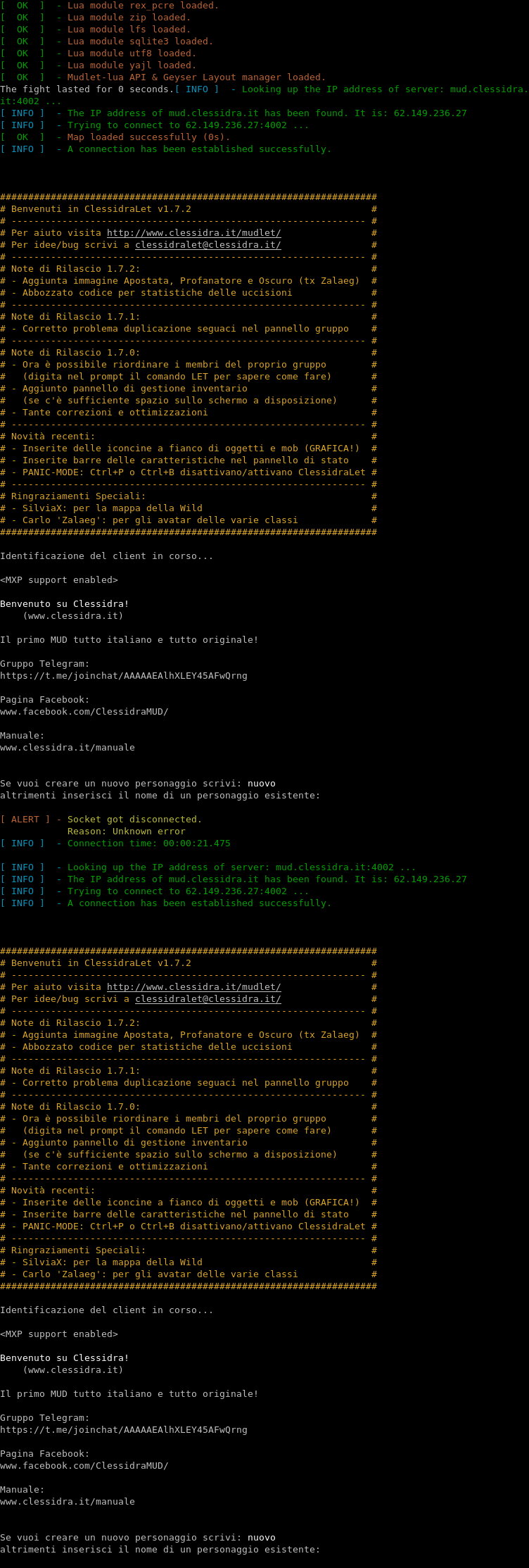
Still not seeing External.Discord.(Status|Info).
Should I have gotten it here?
vadi2
on 13 Feb 2020
We check again, now it should be sent at connection with protocol negotiation. Can you check if is all right this time? How can we check if mudlet recognize it correctly?
Thanks
wiploo
on 2 Mar 2020
I'm still not seeing it. Can you show me how you're doing it?
You can see if Mudlet recognised it yourself by launching mudlet.exe so the terminal output shows and looking for one of these messages: https://github.com/Mudlet/Mudlet/blob/development/src/Host.cpp#L2058
So Achaea for example would print:
TMap::restore( "" ) INFO: restoring map of Profile: "Achaea"  URL: "achaea.com"
Server sent telnet IAC WILL EOR (25)
EOR enabled
WE send telnet IAC DO EOR (25)
Server sent telnet IAC WILL ATCP (200)
Server sent telnet IAC WILL GMCP (201)
WE send telnet IAC DO GMCP (201)
GMCP enabled
Server sent telnet IAC WILL MCCP2 (86)
WE send telnet IAC DO MCCP2 (86)
MCCP v2 negotiated!
Server sent telnet IAC DO TTYPE (24)
We ARE willing to enable telnet option TERMINAL_TYPE
WE send telnet IAC WILL TTYPE (24)
checking mccp start seq...
MCCP version 2 starting sequence
-1 , -6 , 86 , -1 , -16
Game is using custom server Discord application ID
Maybe you're filtering by client ID?
vadi2
on 2 Mar 2020
I tried it out just now, connecting to port 4002. Upon login, my client sends the GMCP message External.Discord.Hello and then the server sends me
Comm.Channel with the appropriate data that would be attached to a External.Discord.Info message.
 atari2600tim
on 2 Mar 2020
atari2600tim
on 2 Mar 2020
Many thanks @atari2600tim, you are right (damn copy/paste). Now informations are handled correctly by Mudlet and the check for Discord is available, but I have some question:
- Should be more user-friendly if Discord check is enabled by default when Server send Discord information for the first time? I think that Discord should be ever enabled and if someone don't want to use them, he have to deactivate the check.
- How works the check Discord, you have to install the discord app or works even for discord website (many use it)? Maybe someone can insert a dedicated icon in toolbar to fast connect?
- When mudlet send "External.Discord.Get" ?
Best Regards
PS: thanks @vadi2, ever :-D
wiploo
on 3 Mar 2020
Maybe someone can insert a dedicated icon in toolbar to fast connect?
I don't know if anyone is working on it, but issue #3115 has a note asking someone to make the invitation available in Mudlet. I think that the invite URL is just held onto in a variable but not used for now. The button goes to the Mudlet Discord regardless of what you do, until someone makes that change.
- When mudlet send "External.Discord.Get" ?
I think that "External.Discord.Get" is sent only when the Discord box on the profile screen gets enabled. I assume that when it is unchecked, any status messages are discarded, and then when the check comes on, it now has to ask what the status is because it was not making note of it.
If I understand it, when receiving "External.Discord.Hello" from the game client, the game should reply with both "External.Discord.Info" and "External.Discord.Status". When receiving "External.Discord.Get", then the game should reply with just the "External.Discord.Status". Then whenever the player does something in the game and their status changes, notify their client with another "External.Discord.Status".
atari2600tim
on 3 Mar 2020
Thanks @atari2600tim
Someone can verify it on source code, so we can start to safely implement it?
Thanks
wiploo
on 11 Mar 2020
The source code implements the standard, it's all accessible on https://wiki.mudlet.org/w/Standards:Discord_GMCP and https://wiki.mudlet.org/w/Manual:Scripting#Discord_Rich_Presence for the tutorial.
Everything @atari2600tim said is correct, because the same thing is said in the standard:
External.Discord.Get
Retrieves an External.Discord.Status from the server.
External.Discord.Hello
Sent to announce one’s Discord information from the MUD and receive an official server invite URL (if any).
Where are you having trouble with?
vadi2
on 11 Mar 2020
I want to understand when send External.Discord.Status because Mudlet never ask for that using External.Discord.Get.
Can I send it whenever i want or I must wait for request?
Thanks
wiploo
on 11 Mar 2020
Okay - I've clarified it:
Send "External.Discord.Status" whenever you need to send data to the client, and fill it with the values have changed since the last status. Discord has some ideas for filling it in.
And:
==== External.Discord.Status ====
- Send this whenever you need to send new status data to the client
Is this wording better?
vadi2
on 11 Mar 2020
Did you get this working?
vadi2
on 29 Jan 2021
Related issues
 Kebap
·
9Comments
Kebap
·
9Comments
 xekon
·
5Comments
xekon
·
5Comments
 Edru2
·
5Comments
vadi2
·
8Comments
Edru2
·
5Comments
vadi2
·
8Comments
 jacben
·
7Comments
jacben
·
7Comments