Mudlet: Windows Mudlet missing voices that OS has
Brief summary of issue / Description of requested feature:
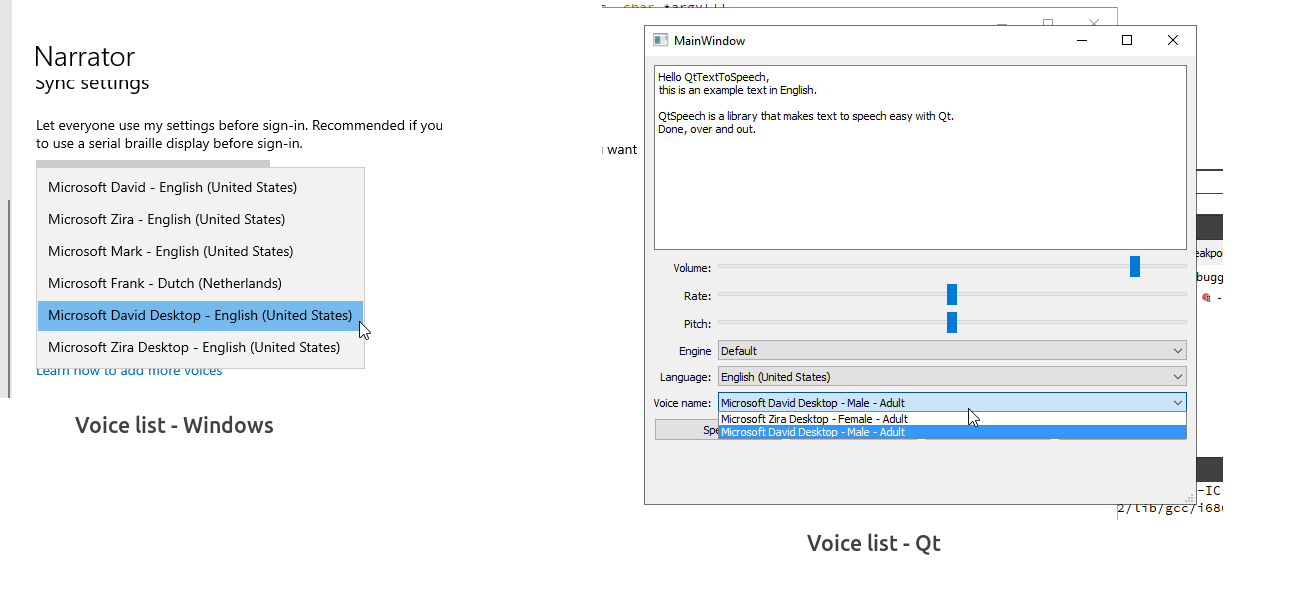
Some voices which are available in OS are not available in Mudlet. This is a Qt bug.
Steps to reproduce the issue / Reasons for adding feature:
Compare list of voices visible in Windows' voice settings vs. Mudlet's ttsGetVoices() output:
Error output / Expected result of feature
Mudlet should receive all available voices from OS through Qt framework
Extra information, such as Mudlet version, operating system and ideas for how to solve / implement:
Mudlet 4.8
Win 10
Not sure if other OS are affected as well
 Kebap
Kebap
All 9 comments
Player A
Win 10 Pro
ver 1903
compilation 18362.778
 mwarzec
on 14 May 2020
mwarzec
on 14 May 2020
I just clarified the title of the issue a bit. Looking into the differences now.
 vadi2
on 14 May 2020
vadi2
on 14 May 2020
Did you check Linux and MacOS are not affected by this then?
Kebap
on 14 May 2020
macOS lists all voices, even has an extra one. Linux does not have sound output yet.
vadi2
on 14 May 2020
 vadi2
on 14 May 2020
vadi2
on 14 May 2020
I wonder what the "Desktop" in the voice name means. Anyone have an explanation from Windows on this?
vadi2
on 14 May 2020
Nope - but I suspect the Desktop variant makes the narrator work on the whole desktop and not just applications (c.f. Garmin Sat. Navs - which often have two voices in each gender and locale - one of which reads the street names out and one which does not!)
 SlySven
on 21 May 2020
SlySven
on 21 May 2020
Here's what Qt had to say:
Triager here. My best guess is that this is because Qt Speech currently only currently supports one of the Speech API's on Windows: SAPI5. Newer language pack voices instead only support WinRT APIs.
vadi2
on 21 May 2020
This was actually noted way back in 2018 see point 5 here: #1881
ttsGetVoices - I have 2 voices installed and can change via OS. But GetVoices only ever lists the selected one, not the other
To which @jgh713 duly noted:
This is something to do with the QTSpeech interface. Changing your locale may make the other show, but there are certain voices I tried to install it just refused to recognize, no matter the locale set.
Kebap
on 26 May 2020
Related issues
Kebap
·
7Comments
 Edru2
·
5Comments
Edru2
·
5Comments
 xekon
·
5Comments
vadi2
·
7Comments
xekon
·
8Comments
xekon
·
5Comments
vadi2
·
7Comments
xekon
·
8Comments