Mu: Unable to access microbit file system in Mu
What you were trying to do
Add a file to microbit using 'Files' button in Mu 1.0.0 beta 15 (and earlier versions of mu)What steps you took to make this happen,
I connected two different microbits in turn, flashed a Python program which runs on microbit ok, then pressed 'Files' button in Mu.What you expected to happen:
To see a list of files on microbit and computer so I can transfer files between computer and microbit.What actually happened:
In Mu 1.0.0. beta 15 I either see two empty windows, or I get a message saying no microbit connected or I get an error message 'There was a problem getting the list of files on the micro:bit.' (see log extract below).
Older version of Mu just hangs (spinning pizza wheel of death until microbit unplugged) when I try this, and Mu 0.9.13 on a Raspberry Pi just crashes/quits with same microbits when I press the Files button.Why this difference is problematic (it may not be a bug!),
I think I should see a list of local files in /mu_code/ directory that I can add to microbit filesystem. There are many files in this folder.Technical details like the version of Mu you're using, your OS version and
other aspects of the context in which Mu was running.
Mu 1.0.0 beta 15 on a MacBook Air running OS X Yosemite 10.10.5. I updated the firmware on both microbits, it did not make any difference. I think the Raspberry Pi was running Raspbian Jesse and it has Mu version 0.9.13.
Please remember to attach a copy of the full log files for Mu:
018-04-28 15:05:31,490 - mu.modes.base:127(find_device) INFO: Found device on port: cu.usbmodem1412
2018-04-28 15:05:32,446 - mu.modes.microbit:272(toggle_files) INFO: Toggle filesystem off.
2018-04-28 15:05:32,493 - mu.modes.base:127(find_device) INFO: Found device on port: cu.usbmodem1412
2018-04-28 15:05:33,667 - mu.modes.microbit:269(toggle_files) INFO: Toggle filesystem on.
2018-04-28 15:05:33,677 - mu.modes.base:127(find_device) INFO: Found device on port: cu.usbmodem1412
2018-04-28 15:05:33,753 - mu.modes.microbit:78(ls) ERROR: read failed: device reports readiness to read but returned no data (device disconnected or multiple access on port?)
Traceback (most recent call last):
  File "/Library/Frameworks/Python.framework/Versions/3.6/lib/python3.6/site-packages/serial/serialposix.py", line 501, in read
    'device reports readiness to read but returned no data '
serial.serialutil.SerialException: device reports readiness to read but returned no data (device disconnected or multiple access on port?)

During handling of the above exception, another exception occurred:

Traceback (most recent call last):
  File "/Library/Frameworks/Python.framework/Versions/3.6/lib/python3.6/site-packages/mu/modes/microbit.py", line 75, in ls
    result = tuple(microfs.ls(microfs.get_serial()))
  File "/Library/Frameworks/Python.framework/Versions/3.6/lib/python3.6/site-packages/mu/contrib/microfs.py", line 143, in ls
    ], serial)
  File "/Library/Frameworks/Python.framework/Versions/3.6/lib/python3.6/site-packages/mu/contrib/microfs.py", line 97, in execute
    raw_on(serial)
  File "/Library/Frameworks/Python.framework/Versions/3.6/lib/python3.6/site-packages/mu/contrib/microfs.py", line 60, in raw_on
    serial.read_until(b'\n>')  # Flush buffer until prompt.
  File "/Library/Frameworks/Python.framework/Versions/3.6/lib/python3.6/site-packages/serial/serialutil.py", line 659, in read_until
    c = self.read(1)
  File "/Library/Frameworks/Python.framework/Versions/3.6/lib/python3.6/site-packages/serial/serialposix.py", line 509, in read
    raise SerialException('read failed: {}'.format(e))
serial.serialutil.SerialException: read failed: device reports readiness to read but returned no data (device disconnected or multiple access on port?)
2018-04-28 15:05:33,812 - mu.interface.main:650(show_message) DEBUG: There was a problem getting the list of files on the micro:bit. Please check Mu's logs for technical information. Alternatively, try unplugging/plugging-in your micro:bit and/or restarting Mu.
2018-04-28 15:05:33,812 - mu.interface.main:651(show_message) DEBUG: None
2018-04-28 15:05:33,813 - mu.modes.microbit:78(ls) ERROR: invalid syntax (<unknown>, line 1)
Traceback (most recent call last):
  File "/Library/Frameworks/Python.framework/Versions/3.6/lib/python3.6/site-packages/mu/modes/microbit.py", line 75, in ls
    result = tuple(microfs.ls(microfs.get_serial()))
  File "/Library/Frameworks/Python.framework/Versions/3.6/lib/python3.6/site-packages/mu/contrib/microfs.py", line 146, in ls
    return ast.literal_eval(out.decode('utf-8'))
  File "/Library/Frameworks/Python.framework/Versions/3.6/lib/python3.6/ast.py", line 48, in literal_eval
    node_or_string = parse(node_or_string, mode='eval')
  File "/Library/Frameworks/Python.framework/Versions/3.6/lib/python3.6/ast.py", line 35, in parse
    return compile(source, filename, mode, PyCF_ONLY_AST)
  File "<unknown>", line 1
    ceback (most recent call last):
                      ^
SyntaxError: invalid syntax
2018-04-28 15:05:34,489 - mu.modes.base:127(find_device) INFO: Found device on port: cu.usbmodem1412
2018-04-28 15:05:35,490 - mu.modes.base:127(find_device) INFO: Found device on port: cu.usbmodem1412
2018-04-28 15:05:36,490 - mu.modes.base:127(find_device) INFO: Found device on port: cu.usbmodem1412
2018-04-28 15:05:37,490 - mu.modes.base:127(find_device) INFO: Found device on port: cu.usbmodem1412
2018-04-28 15:05:38,490 - mu.modes.base:127(find_device) INFO: Found device on port: cu.usbmodem1412
2018-04-28 15:05:39,491 - mu.modes.base:127(find_device) INFO: Found device on port: cu.usbmodem1412
 blogmywiki
All 27 comments
I assume the beta 15 was installed using pip install mu-editor? How did you install it?
If I am not mistaken you have to issues:
a) Mu detecting an issue trying to read the files from micro:bit (like in this tweet https://twitter.com/blogmywiki/status/990230855837773824)
b) The files showing two empty panels (like in this tweet https://twitter.com/blogmywiki/status/990209444364587008)
Putting aside for a moment the fact that Mu is having trouble reading the micro:bit filesystem. I'd be interested to know what the log is when the "files" button is pressed, no error is thrown, but it shows both files panels empty as empty (as in tweet "b" https://twitter.com/blogmywiki/status/990209444364587008), as you were saying you definitely had files in the mu_code folder.
Could you close Mu, open it again, and click on the files once to get to that point, and then copy the log?
 carlosperate
on 28 Apr 2018
carlosperate
on 28 Apr 2018
Btw, did you say as well that the REPL works as expected?
Could you also try in a different session to open the REPL, execute the following and see what it prints?:
>>> MicroPython v1.9.2-34-gd64154c73 on 2017-09-01; micro:bit with nRF51822
Type "help()" for more information.
>>> import os
>>> os.listdir()
Response as follows:
>>> import os
>>> os.listdir()
[]
I installed Mu 1.0.0 beta 15 on the Mac using OS X instructions here: https://github.com/mu-editor/mu/tree/master/package#mac-os-x
blogmywiki
on 28 Apr 2018
Extract from Mu 1.0.0 beta 15 log on Mac when Files button pressed and windows appear empty:
018-04-28 19:29:02,992 - mu.modes.base:127(find_device) INFO: Found device on port: cu.usbmodem1412
2018-04-28 19:29:03,992 - mu.modes.base:127(find_device) INFO: Found device on port: cu.usbmodem1412
2018-04-28 19:29:04,993 - mu.modes.base:127(find_device) INFO: Found device on port: cu.usbmodem1412
2018-04-28 19:29:05,649 - mu.modes.microbit:269(toggle_files) INFO: Toggle filesystem on.
2018-04-28 19:29:05,993 - mu.modes.base:127(find_device) INFO: Found device on port: cu.usbmodem1412
2018-04-28 19:29:06,992 - mu.modes.base:127(find_device) INFO: Found device on port: cu.usbmodem1412
2018-04-28 19:29:07,994 - mu.modes.base:127(find_device) INFO: Found device on port: cu.usbmodem1412
2018-04-28 19:29:08,996 - mu.modes.base:127(find_device) INFO: Found device on port: cu.usbmodem1412
I also have problems with Mu 0.9.13 on Raspbian - app crashes/quits/vanishes when Files button pressed with microbit attached by USB.
blogmywiki
on 28 Apr 2018
Thanks @blogmywiki. From the log it should tell you where the settings.json file is located, could you find it in your file system and copy the contents here?
About the instructions, are you sure it was the one you linked? Those are a bit old and for creating the single file executables.
Did you clone the repository anywhere before installing it, or was it installed with a pip install mu-editor?
carlosperate
on 28 Apr 2018
I honestly can't remember how I installed it - quite possibly with pip install mu-editor as you suggest. I know I couldn't run the compiled OS X app because I am on an older version of OS X.
settings.json file contents as follows:
{
  "theme": "day",
  "mode": "microbit",
  "paths": [
    "/Users/gilesbooth/mu_code/flu-game.py",
    "/Users/gilesbooth/mu_code/hotcold-beacon.py",
    "/Users/gilesbooth/mu_code/hotcold-player2.py",
    "/Users/gilesbooth/mu_code/voter-master2.py",
    "/Users/gilesbooth/mu_code/voter2.py",
    "/Users/gilesbooth/mu_code/sound.py"
  ],
  "workspace": "/Users/gilesbooth/mu_code",
  "microbit_runtime_hex": null
}
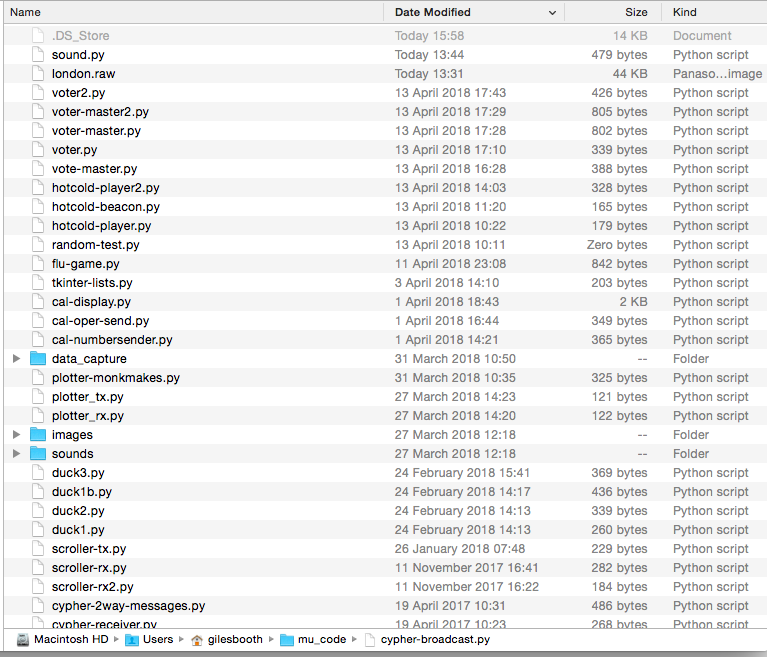
Thanks Giles, and just to double check, you've definitely got .py files in the /Users/gilesbooth/mu_code directory, but they don't show in the panel, is that right?
carlosperate
on 28 Apr 2018
Yes, many files and folders:
blogmywiki
on 28 Apr 2018
Hi @blogmywiki I've just tried (and failed) to recreate your problem. Sadly (for you, but not for me) Mu works as expected with my Mac and the latest code from master (N.B. the code for the files on Microbit hasn't changed since beta.15).
What version OSX are you running (I'm on whatever is the latest). Have you tried completely un-installing Mu, and starting from scratch..?
My feeling (since I can't reproduce this) is that its something about your machine or the way you set it up. This is a completely legitimate problem to have and we should make sure we make it easy for people to set up Mu for themselves (we're working on it!).
All feedback greatly received...!
 ntoll
on 30 Apr 2018
ntoll
on 30 Apr 2018
Hi @ntoll - I'm running Mu beta 15 on a MacBook Air under OS X Yosemite 10.10.5 - but I'm also having similar problems with Mu 0.9.13 on a Raspberry Pi. It is probably something about the way I installed it, you are right. Alas I can't update from OS X Yosemite 10.10.5 as it will break some other software that I really need and cannot afford to replace.
blogmywiki
on 30 Apr 2018
Hello @ntoll again. Today David Whale helped me make some progress with this, we think the problem is with the particular Python program that I am flashing, and this would explain why I'm having problems with Mu 0.9.13 and 1.0.0 beta 15 on MacOS X and Raspberry Pi - and also why @nbogie had problems with accessing the file system in Mu when using his program.
If I flash an empty Python file to my microbit I can then access the filesystem in Mu. If I flash the following program, Mu hangs as soon as I press the 'files' button. So it seems there is something about this particular program (from https://gist.github.com/nbogie/4b2e68e1e4217862b358f232b9c38ece) that causes a problem in Mu's file system feature:
from microbit import display, sleep, button_a
import audio

def frames_from_file(sndfile, frame):
    while(sndfile.readinto(frame, 32) > 0):
        yield frame

def play_snd(fname):
    frame = audio.AudioFrame()
    with open(fname, 'rb') as sndfile:
        audio.play(frames_from_file(sndfile, frame),wait=False)
        sleep(1000)
        audio.stop()
    del frame

display.show('r')
while True:
    if button_a.is_pressed():
        play_snd('clip.raw')
    sleep(200)
I find this odd because the program, I think, should not attempt to play the audio or call the functions until button A is pressed, it should just be executing display.show('r') and sleep(200) - but something is causing a conflict with the file system as soon as the program runs.
I'd be really interested if someone could flash the above program to a Microbit and press the Files button in Mu and see if they get the same hanging behaviour I'm getting.
blogmywiki
on 1 May 2018
I've done a bit more testing, removing bits of the program until I ended up with a very simple program with no audio etc and this also seems to hang Mu when I click on the Files button:
from microbit import display, sleep, button_a

display.show('r')
while True:
    if button_a.is_pressed():
        display.show('a')
    sleep(200)
Curiouser and curiouser!
blogmywiki
on 1 May 2018
More tests... it seems I'm having problems with any program that includes a while True: loop - seems very strange. Remove while True: and I can access the filesystem using the Files button:
from microbit import *

while True:
    a = 23
Thank you for persevering with this issue, I can definitely replicate in macOS.
I had a look and tried to debug a bit the situation, I found that when your example program is running on the micro:bit then no data is sent back by the microbit when Mu (well, in this case microfs) tries to execute commands on the raw REPL and read the data back, so it get’s into an infinite loop waiting for data.
Then I added an extra print statement into your example micro:bit Python code, and while microfs expects MicroPython to have stoped the user code and already be running in Raw mode, it was actually still executing the Python code and printing data to the serial port.
I’ll continue debugging, perhaps the raw mode activation has a bug.
carlosperate
on 1 May 2018
So it looks like within the function microfs that configures the raw mode, the first step serial.write(b'\x03') # Send Ctrl+C doesn't always take.
I'm not sure if this is a MicroPython issue or a PySerial issue, but I cannot replicate with any of the other terminal programs I've got around, and the REPL panel (which uses QtSerial) always works, so it kind of points out to be a PySerial problem.
I looked into the PySerial docs in case there is a "wait until ready" or similar and coudn't find anything. The serial write method does report the data as successfully sent as well, so as far as the python code is concerned it has sent the data.
I tried forcing the input/output to be flushed before and after attempting to send the Ctrl+C, but that didn't do anything either. Sending the Ctrl+C command a bunch of times, with or without delayes in-between, didn't fix it either. The only thing that got around the issue was:
send out the `Ctrl+C` -> reading the serial in -> send out `Ctrl+C` again.
So the only solution I've found is to wrap it in a while loop and attempt to send Ctrl+C up to 3 times. In all the tests I've run it works fine the second time, but I honestly don't know the actual reason it only works in this specific combination of events.
It's quite late so this is probably as far as I'll get at the moment. @ntoll I'll submit a PR to microFS.
carlosperate
on 2 May 2018
Sending the Ctrl+C command a bunch of times, with or without delayes in-between, didn't fix it either. The only thing that got around the issue was:
send out theCtrl+C-> reading the serial in -> send outCtrl+Cagain.
That's strange indeed, that that is the only fix. I've never seen this problem before so it could be a combination of Pyserial+MacOS+micro:bit.
 dpgeorge
on 2 May 2018
dpgeorge
on 2 May 2018
@carlosperate you super star. This is epic debugging and I see the PR in microfs which I'll review immediately. Hopefully we can land the fix into Mu's master today and I'll cut a new microfs release on PyPI. I'll also ensure I test this on Linux and Windows (10).
I concur with @dpgeorge that it's a strange fix: it feels a bit "stand on one leg, stick your finger in your ear, then whistle 'God Save the Queen' backwards and ONLY THEN will it work". ;-) But we are where we are. @carlosperate given that QtSerial works and PySerial doesn't, care to report this edge case upstream to PySerial..? (Good community collaboration is what keeps our projects going).
Thanks @blogmywiki for finding this edge case -- that's why it's important to take the time to contribute back bug reports -- if we don't know what's wrong, how can we possibly fix it?
Awesome work everyone!
ntoll
on 2 May 2018
Thanks @ntoll, I feel a bit iffy about the proposed fix as well, but taking in consideration it does look like a PyInstaller thing (either a bug or us not using it right), this kind of forces the entry into the raw mode a bit more. I'll submit a report to the PySerial GitHub, but I'm not sure if we'll get any response, repo hasn't been tuched since August (I submitted a PR a little while ago, and I woudn't really expect a response in the near future).
Interestingly as well, if instead of doing send(Ctrl+C) -> read() -> send(Ctrl+C) I just did read() -> send(Ctrl+C), it worked most of the time, but every once in a while it would still break. I also tried different variations of @blogmywiki code, so maybe it depends on how much data the micro:bit might be sending as well.
To help with the Pyserial report, could anybody else test if current Mu in Windows and Linux has this files issue with @blogmywiki example code?
carlosperate
on 2 May 2018
Thank you everyone for your amazing work on this. As I said before, I have similar issues on a Raspberry Pi so it would indeed be great if others could test my code on other platforms.
blogmywiki
on 2 May 2018
Thanks to @carlosperate this has been fixed and tested on Linux, OSX and Windows in the latest version of microfs (the library used to facilitate file-system interaction with the micro:bit). These changes have just found their way into Mu's master branch and will be in the next beta release. See: 28819c1bc4090f54e60a4601cc3265ec89c9183f.
ntoll
on 3 May 2018
cc @nbogie
 DavidWhaleMEF
on 3 May 2018
DavidWhaleMEF
on 3 May 2018
Interestingly, @nbogie spotted this problem in Mu originally and moved to microfs to fix the problem. Neill, can you confirm what OS platform you saw this issue in, and did using the existing microfs fix it for you?
I have had related problems with Raw REPL in my bitio package and PySerial that turned out to be related to it finding an older (broken) version of PySerial in the distpackages. Some versions of Ubuntu linux for example have a broken PySerial in dist packages and one has to work really hard to get Python to use the (fixed) version of PySerial bundled in your app (using much PACKAGE_PATH voodoo).
DavidWhaleMEF
on 3 May 2018
FWIW cc @carlosperate @ntoll , in bitio, I take a 3-pronged approach to get a REPL prompt, which waits for the response from CTRL-C and also sends a CTRL-B in case it is already in raw mode from a previous attempt, with timeouts in all receive calls, to stop the app just sitting there spinning a beach-ball forever. The higher level app can also then call to_raw() multiple times if it wants to.
https://github.com/whaleygeek/bitio/blob/master/src/microbit/repl/repl.py
    def to_raw(self):
        ##print("**** WAITING FOR PROMPT")
        if not self.wait_prompt():
            ##print("**** SENDING CTRL-C to force a prompt")
            self.ctrl_c() # try to stop running user program
            self.ctrl_b() # also if already at raw REPL, trigger exit from it
            ##print("**** waiting for prompt response")
            if not self.wait_prompt():
                raise REPLException("could not get a prompt")

        ##print("**** SENDING CTRL-A to get raw repl")
        self.ctrl_a() # enter raw REPL mode
        self.wait_repl_response()
        ##print("**** GOT RAW REPL")

    def wait_prompt(self):
        try:
            ##print("*** waiting for prompt")
            self.receive(".*>>> ", timeout=2, idle_timeout=1)
        except REPLException as e:
            ##print("*** REPLEXCEPTION:%s" % str(e))
            return False
        return True

    def wait_repl_response(self):
        self.receive("\r\nraw REPL; CTRL-B to exit\r\n>", timeout=2)
@carlosperate @ntoll I also had to create my own receive() wrapper for PySerial (follow the github link for that) to make the code work both for sad-case as well as happy-case.
DavidWhaleMEF
on 3 May 2018
In this case pyserial is not bundled, so it always uses virtualenvs or whatever site_packages is configured for the python interpreter running Mu.
Old versions of pyserial have been a problem in the past, but raspbian has been packing a much newer version for a while now, so that's no longer an issue.
One of the main issues for this turned out to be the need for delays after the Serial port is opened and closed, more info in can be found in the discussion from https://github.com/ntoll/microfs/pull/9.
carlosperate
on 3 May 2018
@DavidWhaleMEF I ran into the issue in macOS 10.13.4 and Mu 0.9.13 - not the beta. I did try installing the Mu beta a couple of days ago to help test this issue but I ran out of time at "Could not find a version that satisfies the requirement pyqt5==5.10 (from mu-editor)" My python installation(s) are pretty unhealthy.
Yes, installing microfs (1.2.2) for the ufs put command was a fine alternative for me. It behaved well once I figured out err 28 ;)
 nbogie
on 3 May 2018
nbogie
on 3 May 2018
Related issues
 ladyada
·
4Comments
ladyada
·
4Comments
 hwiguna
·
8Comments
hwiguna
·
8Comments
 Franci85
·
4Comments
carlosperate
·
7Comments
Franci85
·
4Comments
carlosperate
·
7Comments
 gbaman
·
6Comments
gbaman
·
6Comments
Most helpful comment
Thanks to @carlosperate this has been fixed and tested on Linux, OSX and Windows in the latest version of microfs (the library used to facilitate file-system interaction with the micro:bit). These changes have just found their way into Mu's
masterbranch and will be in the next beta release. See: 28819c1bc4090f54e60a4601cc3265ec89c9183f.