The GPIO Zero Python library includes a cross-platform feature whereby the user can specify a "pin factory" to use: by default, the pin factory used is one which accesses real GPIO pins on a Raspberry Pi. Other pin factories include a GPIO library which allows remote GPIO connections, and a "mock" pin library.
The remote GPIO feature is also useful for programming the GPIOs of a Pi Zero (without an SD card) using the USB Boot GUI (see this post).
It's possible hot-swap pin factories within code, but that's not what I'm talking about here. I'm just talking about default pin factories. The default pin factory can be set using environment variables.
Use cases
Use case 1: I'm on a Windows/Mac/Linux machine and I have a Pi on same the network. I want to be able to specify an IP address (and port) and remotely access that Pi's GPIO pins. I should be able to enter the IP address (and port) somewhere, but write code as if I were on the Pi (i.e. it should be configured to do so once I've specified the IP).
Use case 2: I'm on Windows/Mac/Linux/Pi and I want to emulate some gpiozero code using mockpin. I should be able to run normal gpiozero code and inspect the values of the device objects (e.g. see that an LED's value is changing when I run led.blink() or when my mock button is pressed).
Use case 3: I'm on Windows/Mac/Linux/Pi and I want to plug in a Pi Zero and program the GPIOs. I should be able to plug in the Pi Zero, click a button to USB boot it, and have the IP address field auto-filled.
This final use case would be a killer feature, but requires the USB-booting logic found on rpiboot and usbbootgui.
So all I think is required for the mode is the ability to choose between "Remote GPIO" and "Mock GPIO", and that value to be injected into the GPIOZERO_PIN_FACTORY environment variable, and then for remote mode, to also specify an IP address and port number, and for those values to be injected into environment variables PIGPIO_ADDR and PIGPIO_PORT before loading the script and running it under regular Python 3 mode.
 bennuttall
All 26 comments
I'm positive about this. We should discuss how this could work.
 ntoll
on 14 Feb 2018
ntoll
on 14 Feb 2018
I forgot to mention: I'm happy to help make this happen :)
I'm sure I'll be in a better position once the lower-hanging-fruit of #334 is underway 👍
bennuttall
on 14 Feb 2018
ping @waveform80
bennuttall
on 21 Feb 2018
😍ོ😍ོ
 yonghuming
on 26 Feb 2018
yonghuming
on 26 Feb 2018
I have managed to get a very simple proof of concept working by injecting values into the environment variables. This might not be the best idea, but I'm just testing it out. I've implemented a simple GPIO Zero Mode based on the Python 3 one.
I've hard-coded it to use the default address of the Pi Zero when USB-booted, but ideally this would be configurable in a panel somewhere.
I've pushed to a branch on my fork but it's extremely light at present. I probably should have looked at the documentation before I started but it was easy enough to work out from the existing modes.
bennuttall
on 27 Feb 2018
I know you like videos @ntoll...
bennuttall
on 27 Feb 2018
It's all documented here:
https://mu.readthedocs.io/en/latest/modes.html#create-a-new-mode
Thanks for the spike, I'll take a look at your branch later.
My initial thoughts are:
- Getting it to work is easy, getting it to work in a way that's easy to use is hard and needs plenty of thought.
- The use of envars is nice and simple. :-)
- Who and how do you imagine changing the envars? Please bear in mind that we don't want to have "button overload". Can you describe the steps this would involve?
- Could this all just be done in Python mode if we expose some way to configure envars? This would allow users to, for example, add things to PYTHONPATH for other stuff to work.
Thoughts?
I like this! :-)
ntoll
on 27 Feb 2018
Also, is there a logo / icon for GPIOZero that we could re-use in the mode selector..?
ntoll
on 27 Feb 2018
It's all documented here
Yep, found that after I finished, but as I said, it was intuitive enough :)
Getting it to work is easy, getting it to work in a way that's easy to use is hard and needs plenty of thought.
Absolutely!
Who and how do you imagine changing the envars?
These should be configurable for any user, but we can give them a helping hand by autocompleting them under certain circumstances. For example, they plug in a Pi Zero, it should set the pin factory to pigpio and the address to that of the Pi Zero, e.g. fe80::1%usb0. But for those who want to do something different, like access another Pi over the network, they would override these values.
Please bear in mind that we don't want to have "button overload". Can you describe the steps this would involve?
It could either be a single button to open up the GPIO Zero options in a prompt (like the modes one), or something in a side panel, like the plotter. Probably the former, in case we want to use the plotter too some day. It would probably want to include a dropdown for pin factory selection (only showing those available), and two text fields for PiGPIO address and port.
Could this all just be done in Python mode if we expose some way to configure envars? This would allow users to, for example, add things to PYTHONPATH for other stuff to work.
Yes - that's not out of the question. It's certainly worth considering this not being a mode if not absolutely necessary.
Also, is there a logo / icon for GPIOZero that we could re-use in the mode selector..?
No, but we can just use something like an LED graphic.
By the way, I couldn't see where to change the mode name in the panel at the bottom right by the cog - mine still says "Python" there, and "Changing to Python mode" in the bottom left.
bennuttall
on 27 Feb 2018
OK... in terms of the mechanism to allow people to set envars in Python3 mode (thus facilitating GPIOZero fun), how about we re-use the "cog" icon on the bottom right of Mu. It's a "cog" because it's all about the way Mu works. Currently, when you click it, you see the contents of the current log file. However, this could be a tabbed dialog with the logs in one tab and, in the other, a key/value table to represent the envars to set when running Python3 scripts.
How does this feel as a solution..?
ntoll
on 1 Mar 2018
good idea, i love gpiozero we do this,
yonghuming
on 9 Mar 2018
@bennuttall wanderfull work, i love gpiozero, let's make this happen
yonghuming
on 9 Mar 2018
How does this feel as a solution..?
Sorry @ntoll I thought I'd replied to this. Yes, under the cog would be good. Would GPIO Zero stuff always be present, or would there be some logic to showing it when it's required?
bennuttall
on 9 Mar 2018
I'm thinking each mode could provide a config widget and only that of the current mode would be visible
 ZanderBrown
on 11 Mar 2018
ZanderBrown
on 11 Mar 2018
Hmm... we should tread carefully here... so tempting to add "just one more feature" when Mu's philosophy is to encourage people to "graduate" to something more powerful. Let me think about this... ;-)
ntoll
on 12 Mar 2018
If you're thinking of GPIO Zero still being a mode, then this would make sense (and I can't see the per-mode config being quite handy all round, and a good way to keep extra stuff out of the way)
bennuttall
on 12 Mar 2018
So I'm about to land a fix for #358 which separates things into two files:
session.json- containing state-related information about how the user has worked with Mu (current theme, open tabs, current mode etc...)settings.json- containing information about how the admin wants Mu to behave (e.g. use a certain microbit hex file, override the working directory etc...).
The contents of the first file should be accessible and changeable by the user via interacting with Mu. The contents of the second file requires you to edit a json file (i.e. it's intentionally NOT beginner friendly).
Given this impending setup, we could store things like envars in session and, in the future, this could be re-used by modes to store other information too.
ntoll
on 12 Mar 2018
:+1:
bennuttall
on 12 Mar 2018
By the way, I couldn't see where to change the mode name in the panel at the bottom right by the cog - mine still says "Python" there, and "Changing to Python mode" in the bottom left.
Going back to this: I discovered that this was down to my mode not actually being loaded due to what I'd consider a bug in the logic:
- When a mode is selected by the user, the string of the mode's icon filename (without extension) is passed around as a unique identifier for the mode
- As I didn't have a logo for GPIO Zero, I just left it as the
python.pngicon, and so my mode identifier waspython, so thePython 3mode was being used - The mode name as shown in the bottom-right is actually just the icon name capitalised, rather than what I'd expect it to be (the
nameproperty in the mode class) - The environment variables were being changed regardless, due to their presence in the mode's
__init__rather than at the point the mode is selected (this one's my bug, not yours)
So @waveform80 and I hacked around and looked at where the icon reference was being used, and applied a fix for it. I'm not sure if it's ready for PR but I will look at it when I get chance.
bennuttall
on 12 Mar 2018
OK... so it should be easy to use GPIOZero in Python3 mode now that 40fbd75c46f5ae10c458fb478bf5b0af98d1416c has landed.
This is a refactor of the log dialog so it becomes a generic "admin" dialog with tabbed areas. Currently there are only two tabs: logs and environment variables (see screenie) although I can imagine adding at least one more to allow people to select that MicroPython scripts are minified using @ZanderBrown's recent work and/or override the default hex file to use.
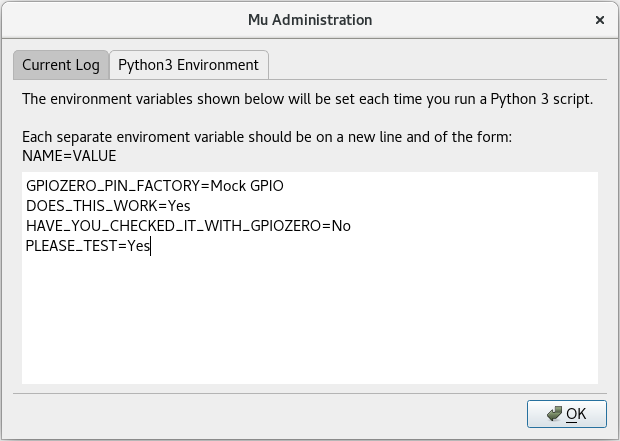
The user defined environment variables are injected into the context of the child processes running either Python 3 or PyGameZero. Furthermore, these environment variables are also injected into the context for the Jupyter REPL -- however, there is a bug in the upstream Jupyter Client project that stops these being set. Please see: https://github.com/jupyter/jupyter_client/issues/365 for my bug report and an attached PR to fix it. I've pinged @takluyver so someone in the Jupyter project can see our block/dependency on this getting fixed and released.
THIS HAS NOT BEEN TESTED WITH GPIOZero although I can confirm that, with the patched version of Jupyter Client, the environment variables are available via os.environ, as one would expect, when both running a Python3 script, debugging a Python3 script and running a REPL session. @bennuttall please can you test using the latest Windows installer found here (http://mu-builds.s3-website.eu-west-2.amazonaws.com/?prefix=windows/) and/or from source with the latest master on a Raspberry Pi.
As always, if there are any problems, please shout (on a new ticket). In the meantime I'll close this one.
ntoll
on 23 Mar 2018
:+1: on a nudatus switch but a "You could try" prompt may also be good
Workspace directory is also worth adding I think but how would we categorise that?
Clearly the current tabs make sense but workspace is a 'General' option, hex is a 'micro:bit' option & nudatus is a 'MicroPython' option. Lots to think about and we don't really want tabs with only one option.
ZanderBrown
on 23 Mar 2018
I'm on it!
bennuttall
on 24 Mar 2018
Can confirm it works on a Raspberry Pi! Great work @ntoll
bennuttall
on 24 Mar 2018
Hurrah..! So is that enough for GPIOZero and Mu..? (As a first pass I mean, given a year of doing things this way, I'm sure we'll learn of various niggles.)
BTW... I think I've found a way to get around the REPL problem... I'm flying to New York tomorrow, so may hack something together on the flight. :-)
ntoll
on 24 Mar 2018
Well, GPIO Zero works fine in regular Python 3 mode when you're on a Pi (no env vars required).
Simple configuration of env vars as implemented here helps users use the regular remote GPIO feature, but they need to know what they're doing to set that up.
However, the bigger picture (this won't happen overnight) is that a user can plug in a Pi Zero into their PC, and Mu will USB-boot it and pre-configure the env vars to the right thing, so that they can access the GPIOs seamlessly.
The env vars work that's in master certainly now makes this last feature easier, but the USB-booting tool is still required separately, and obviously the env vars need setting manually.
The process to get this to work now (on Ubuntu):
- Add the Raspberry Pi PPA and install usbbootgui
- Install Mu from pip
- Plug in Pi Zero with USB cable, click OK to boot
- Set up env vars in Mu
- Write gpiozero code in Mu and see effect on Pi Zero
Ideally (in a perfect world), this would be the experience across all operating systems:
- Install Mu
- Plug in Pi Zero with USB cable, click OK to boot
- Write gpiozero code in Mu and see effect on Pi Zero
But that requires the usbbootgui to be bundled with Mu.
Read more about this feature here: http://bennuttall.com/raspberry-pi-zero-gpio-expander/
bennuttall
on 25 Mar 2018
That would be a really cool workflow, so what we are saying is that we have achieved the ideal goal but long term we can do better
Because of the nature of usbbootgui perhaps GPIOZero mode should be distributed separately? If nothing else it would make it easier to maintain albeit complicating the initial setup, I'm largely rambling at this point
ZanderBrown
on 25 Mar 2018
Related issues
 Franci85
·
4Comments
Franci85
·
4Comments
 hwiguna
·
8Comments
hwiguna
·
8Comments
 the-stanely
·
7Comments
the-stanely
·
7Comments
 whaleygeek
·
8Comments
whaleygeek
·
8Comments
 carlosperate
·
7Comments
carlosperate
·
7Comments
Most helpful comment
OK... so it should be easy to use GPIOZero in Python3 mode now that 40fbd75c46f5ae10c458fb478bf5b0af98d1416c has landed.
This is a refactor of the log dialog so it becomes a generic "admin" dialog with tabbed areas. Currently there are only two tabs: logs and environment variables (see screenie) although I can imagine adding at least one more to allow people to select that MicroPython scripts are minified using @ZanderBrown's recent work and/or override the default hex file to use.
The user defined environment variables are injected into the context of the child processes running either Python 3 or PyGameZero. Furthermore, these environment variables are also injected into the context for the Jupyter REPL -- however, there is a bug in the upstream Jupyter Client project that stops these being set. Please see: https://github.com/jupyter/jupyter_client/issues/365 for my bug report and an attached PR to fix it. I've pinged @takluyver so someone in the Jupyter project can see our block/dependency on this getting fixed and released.
THIS HAS NOT BEEN TESTED WITH GPIOZero although I can confirm that, with the patched version of Jupyter Client, the environment variables are available via
os.environ, as one would expect, when both running a Python3 script, debugging a Python3 script and running a REPL session. @bennuttall please can you test using the latest Windows installer found here (http://mu-builds.s3-website.eu-west-2.amazonaws.com/?prefix=windows/) and/or from source with the latestmasteron a Raspberry Pi.As always, if there are any problems, please shout (on a new ticket). In the meantime I'll close this one.