Mtasa-blue: triggerLatentServerEvent doesn't work sometimes with bandwidth over 16384 bytes
Describe the bug
triggerLatentServerEvent doesn't work sometimes with bandwidth over 16384 bytes.
I think it is related to VS2019 update (https://github.com/multitheftauto/mtasa-blue/commit/b908aa8684b305a5c2fe564e6211c458022eb23d).
To reproduce
- Download latent_event_test.zip and start it.
- Connect to the server and enter
testevent 16384 3000in the console. The event will reach the server. - Enter
testevent 16385 3000. Notice the bandwidth is just 1 byte higher. - The event will not reach the server and it will block all subsequent latent events.
Expected behaviour
Latent events should work normally at any speed.
Version
Client: Multi Theft Auto v1.5.7-release-20339
Server: MTA:SA Server v1.5.7-release-20320
and
Client: Multi Theft Auto v1.5.7-release-20340
Server: MTA:SA Server v1.5.7-release-20339
 StrixG
All 26 comments
I can't reproduce this with client & server 1.5.7-release-20339
(Server was Windows 32 bit)
Is the server you tested with Windows or Linux, 32 or 64 bit?
 ccw808
on 29 Oct 2019
ccw808
on 29 Oct 2019
Local Windows 10 64 bit and hosted Linux 32 bit.
Can't reproduce this on 20324 client.
20324:
https://youtu.be/xcWB4FLZV2o
20339:
https://youtu.be/6ogCeJa-ibo
StrixG
on 29 Oct 2019
Eventually, the data reaches the server. But it takes 42 minutes.
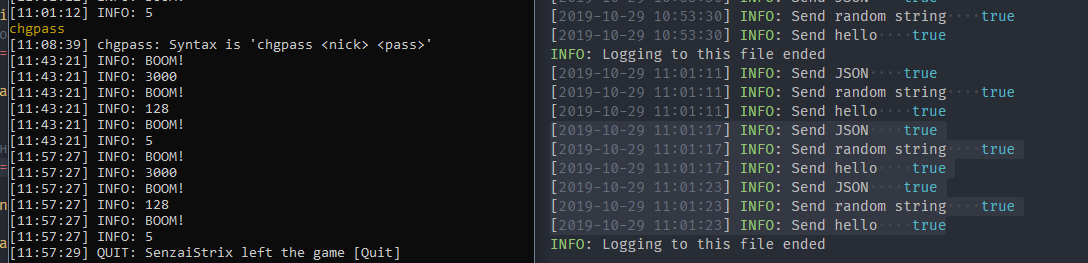
On 20324 it takes less than 5 seconds.
StrixG
on 29 Oct 2019
Thanks for the videos. Unfortunately, I can't reproduce here, so the bug is intermittent or depends something else.
What is the FPS of the client when you are running the tests?
ccw808
on 31 Oct 2019
75 FPS in both cases.
StrixG
on 31 Oct 2019
Please test and show me the video using this modified version of your resource latent_event_test2.zip
ccw808
on 2 Nov 2019
20324:
https://youtu.be/lFkBcwthnBg
20340:
https://youtu.be/N2vfVuG2mBc
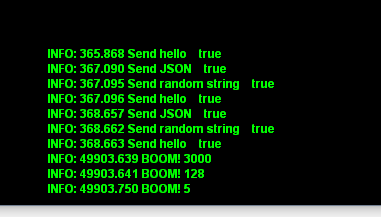
23 minutes later:
StrixG
on 2 Nov 2019
Actually, once I saw similar behaviour with triggerServerEvent for unknown reason (before it, it worked fine for months). Client tried send some data on server (not much, just some short strings as json), but server didn't receive it and then any triggerServerEvent didn't work until reconnect. (In my case it was solved using triggerLatentEvent)
 dmi7ry
on 2 Nov 2019
dmi7ry
on 2 Nov 2019
I can't reproduce this bug when I build MTA with the latest changes on my computer. I can reproduce it only on nightly builds from 20325.
StrixG
on 2 Nov 2019
@StrixG zip up the client MTA folder and upload to https://upload.mtasa.com/
ccw808
on 2 Nov 2019
StrixG
on 2 Nov 2019
Still can't repro here.
What happens if you try 16385 first?
What happens if you try 16384 two times?
What CPU have you got?
ccw808
on 3 Nov 2019
I have Intel Core i5-3570
Results: https://youtu.be/uS6VOXGjgdE
Also reproducible on another computer with the same processor.
StrixG
on 3 Nov 2019
Please try latest build 20342
ccw808
on 5 Nov 2019
The problem is partly gone. Now it's not that slow. But it's still somewhat slower than in 20324 build.
20324: https://youtu.be/kRiMQrT11Cs
20342: https://youtu.be/ZXnrPTWozt0
StrixG
on 5 Nov 2019
Use the command shownetstat and make a video whilst holding the CTRL key
ccw808
on 5 Nov 2019
20324: https://youtu.be/AG6ac61wZ1Q
20342: https://youtu.be/zk-veJy1fAY
StrixG
on 5 Nov 2019
Have you got any other resources running?
ccw808
on 5 Nov 2019
admin, ajax, runcode. These resources affect nothing, just checked it.
Without these resources: https://youtu.be/VfYVMUv1I5Y
StrixG
on 5 Nov 2019
The Packets recv/sent stats are increasing at a much faster rate than expected.
I wonder what is causing that
ccw808
on 5 Nov 2019
Start performancebrowser and using a web browser check:
Performance stats->server->Packet usage
ccw808
on 6 Nov 2019

StrixG
on 6 Nov 2019
In mtaserver.conf, what is bandwidth_reduction and the xxx_sync_intervals set to?
ccw808
on 6 Nov 2019
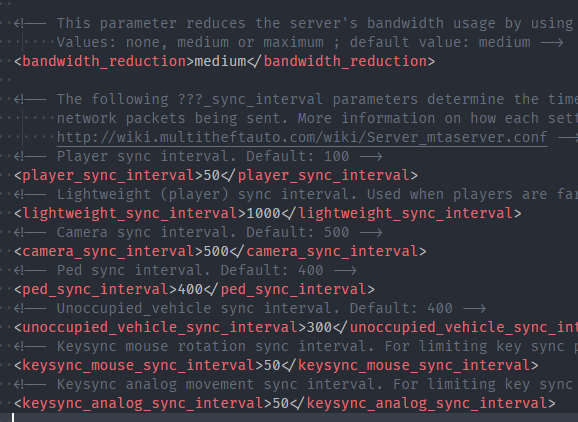
Packet usage is less active with default values.
StrixG
on 6 Nov 2019
Yay, I can reproduce the problem now
ccw808
on 6 Nov 2019
Fixed in r20343
ccw808
on 6 Nov 2019
Related issues
 umitemre
·
4Comments
umitemre
·
4Comments
 commanderagu
·
3Comments
commanderagu
·
3Comments
 rk-r
·
4Comments
rk-r
·
4Comments
 CrosRoad95
·
3Comments
CrosRoad95
·
3Comments
 PlatinMTA
·
3Comments
PlatinMTA
·
3Comments
Most helpful comment
Fixed in r20343