Msteams-docs: Deep linking mobile doesn't work
Deep links don't work in a mobile teams.
We're using deep links to transfer the focus to another static tab when the user clicks a react-router link. On desktop and teams for web the links work. However on mobile, a message appears "link not supported. you cannot open this link on the mobile app. Please open it on a desktop or web app."
I'm aware the part of the part of the docs:
Currently, shareDeepLink does not work on mobile platforms.
But we aren't using that part of the api. Instead we're using microsoftTeams.executeDeepLink.
Document Details
⚠ Do not edit this section. It is required for docs.microsoft.com ➟ GitHub issue linking.
- ID: 45541337-ecd7-5cf6-cbe4-3f0d2f39aa79
- Version Independent ID: 6b4203f0-2844-06c9-eaa3-9cc03e6f76c0
- Content: Create deep links - Teams
- Content Source: msteams-platform/concepts/build-and-test/deep-links.md
- Product: msteams
- GitHub Login: @laujan
- Microsoft Alias: lajanuar
 xanderfehsenfeld
All 23 comments
Hi xanderfehsenfeld! Thank you for bringing this issue to our attention. We will investigate and if we require further information we will reach out in one business day. Please use this link to escalate if you don't get replies.
Best regards, Teams Platform
![msftbot[bot] picture](https://avatars.githubusercontent.com/in/26612?v=4&s=40) msftbot[bot]
on 3 May 2021
msftbot[bot]
on 3 May 2021
Hi @xanderfehsenfeld - Are you following this sample deeplink https://teams.microsoft.com/l/entity/<appId>/<entityId>?webUrl=<entityWebUrl>&label=<entityLabel>&context=<context>. This error will occurs when you give incorrect entityId or appId. Please make sure to add correct values.
 Mamatha-MSFT
on 4 May 2021
Mamatha-MSFT
on 4 May 2021
@Mamatha-MSFT Yes, I am following that pattern, or more specifically
https://teams.microsoft.com/l/entity/<appId>/<entityId>?webUrl=<entityWebUrl>
I assume I'm using the right pattern because it works on the Teams desktop app as well as the "Teams for web" site. Is there a discrepancy between mobile and desktop? If so, what is it?
xanderfehsenfeld
on 4 May 2021
Hi @xanderfehsenfeld Could you please try to uninstall the existing app and create a new app. Let me know if you still persists the issue.
Mamatha-MSFT
on 6 May 2021
@xanderfehsenfeld Please let us know if your issue has been resolved.
Mamatha-MSFT
on 10 May 2021
Hi @xanderfehsenfeld is your issue got resolved?
Mamatha-MSFT
on 14 May 2021
I need your help, I am developing a bot for ms teams and in my scenario the user must be redirected from chat to tab, for this I use a deep link here is an example link
https://teams.microsoft.com/l/entity/${process.env.APPLICATION_ID}/${process.env.TAB_ID}
and it works great everywhere in the browser in the desktop version and in window and in ubuntu and even on Android, but as it turned out, it does not work on IOS, and specifically in the ms teams application for IOS
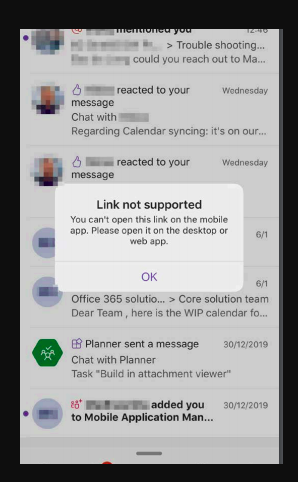
however in the app on IOS I get the following.
Any hints and tips any advice that can help me solve this problem
UPDATE: a small addition today I put a desktop application on a macbook and there was no such problem. So the problem occurs only in the mobile application
 Krukovich
on 14 May 2021
Krukovich
on 14 May 2021
@xanderfehsenfeld Could you please add webUrl in your deeplink and try. Let me know if the issue still persists.
Mamatha-MSFT
on 14 May 2021
@xanderfehsenfeld Thanks for the quick response, I tried your suggestion and got the following behavior after clicking on the button, the browser was opened, then there I was redirected back to the application, after which this error was reproduced again
this is an example link
https://teams.microsoft.com/l/entity/${process.env.APPLICATION_ID}/${process.env.TAB_ID}?webUrl=https://teams.microsoft.com/l/entity/${process.env.APPLICATION_ID}/${process.env.TAB_ID}
Krukovich
on 14 May 2021
@xanderfehsenfeld - the weburl should be static tab content url which you gave in manifest like https://tasklist.example.com/123
Example: https://teams.microsoft.com/l/entity/fe4a8eba-2a31-4737-8e33-e5fae6fee194/tasklist123?webUrl=https://tasklist.example.com/123
Mamatha-MSFT
on 14 May 2021
@Mamatha-MSFT
Yes I have a static tab in my manifest here is an example
js
  "staticTabs": [
    {
      "entityId": "example",
      "name": "example",
      "contentUrl": "https://{{HOSTNAME}}/pdTab/?name={loginHint}&tenant={tid}&theme={theme}",
      "scopes": [
        "personal"
      ]
    }
  ],
it turns out that my link should look like this
https://teams.microsoft.com/l/entity/${process.env.APPLICATION_ID}/${process.env.TAB_ID}?webUrl=https://${process.env.HOSTNAME}/pdTab/?name=${name}&tenant=${tenantId}
and replacing the path I get the following behavior opens a new window in the browser and gets me out of the Teams app, is this the correct behavior?
Krukovich
on 14 May 2021
@Krukovich - We have a backlog bug item for this and will inform you if it gets resolved.
Mamatha-MSFT
on 14 May 2021
@Krukovich - Could you please share the complete deeplink url your using and manifest.
Mamatha-MSFT
on 17 May 2021
@Mamatha-MSFT yes of course I can send it to you by mail. Write to me where to send you this information
Krukovich
on 17 May 2021
@Krukovich Please write a mail to [email protected]
Mamatha-MSFT
on 17 May 2021
@Mamatha-MSFT I sent you our manifest and a small example of code how we use deep link by e-mail
Krukovich
on 17 May 2021
I can confirm the same behaviour as described above. Tested multiple apps, and all of them not working on IOS mobile.
 Renevdo
on 20 May 2021
Renevdo
on 20 May 2021
Same here. Deep links work in MS Teams web client, Windows desktop, Android, but no luck using iOS mobile.
 marcinburak
on 20 May 2021
marcinburak
on 20 May 2021
@Renevdo @marcinburak we have created a bug for this issue and concerned team is working on it.
Mamatha-MSFT
on 20 May 2021
This issue has been automatically marked as stale because it has been marked as requiring author feedback but has not had any activity for 3 days. It will be closed if no further activity occurs within 3 days of this comment.
msftbot[bot]
on 23 May 2021
@Krukovich @Renevdo There was a fix done for this issue in latest store app. Please check.
Mamatha-MSFT
on 25 May 2021
Tell us about your experience!
Hi xanderfehsenfeld! This issue is closed in our system. We would like your feedback on your experience with our support team and Platform.
Best regards,
Teams Platform
msftbot[bot]
on 25 May 2021
I can confirm that it's fixed on IOS in Teams!
Renevdo
on 27 May 2021
Related issues
 tabinnorway
·
6Comments
tabinnorway
·
6Comments
 Wajeed-msft
·
5Comments
Wajeed-msft
·
5Comments
 oyvindam
·
5Comments
oyvindam
·
5Comments
 paulconlin
·
5Comments
paulconlin
·
5Comments
 aosolis
·
4Comments
aosolis
·
4Comments
Most helpful comment
I can confirm the same behaviour as described above. Tested multiple apps, and all of them not working on IOS mobile.