Msteams-docs: Blank Notifications on macOS Catalina
On macOS Catalina 10.15.4, the chat notifications in the notification centre show up blank in the corner of the screen until you click on them.
This makes them not very useful.
 zorro2b
All 67 comments
Hi zorro2b! Thank you for bringing this issue to our attention. We will investigate and if we require further information we will reach out. Best regards, Teams Platform
![msftbot[bot] picture](https://avatars.githubusercontent.com/in/26612?v=4&s=40) msftbot[bot]
on 31 Mar 2020
msftbot[bot]
on 31 Mar 2020
@zorro2b , Thanks for reporting this. This is a known issue. we are looking into this.
 Trinetra-MSFT
on 5 Apr 2020
Trinetra-MSFT
on 5 Apr 2020
This issue still exists. I wonder why the bug has been acknowledged and then closed?
 AndyBehr
on 26 May 2020
AndyBehr
on 26 May 2020
Same issue for me, it also freezes my video calls
 vandenbergrobin
on 27 May 2020
vandenbergrobin
on 27 May 2020
@Trinetra-MSFT, is there a bug ticket that we can watch on a different platform if this is not the correct medium?
 joshwhatk
on 28 May 2020
joshwhatk
on 28 May 2020
Had this issue for at least a couple of months with video freezing when notifications come in. Lots of updates along the way, but none that address this very annoying issue!
 markgammon
on 9 Jun 2020
markgammon
on 9 Jun 2020
@Trinetra-MSFT please re-open the issue. This has not been resolved.
vandenbergrobin
on 9 Jun 2020
I'm having this issue also. I get video freezing with every. single. notification. It is really annoying.
Also, my notifications are blank. Why is this issue closed?
Teams version 1.3.00.9271
OS Catalina 10.15.5 (19F101)
 barrand
on 11 Jun 2020
barrand
on 11 Jun 2020
It seems like this happens only on company MBP (remotely administerable) or on newer HW.
I have 2 MBP, one personal (MBP 15", 2017) and one from my company (MBP 16", 2019). Both on same Catalina (10.15.5) and with same Teams (1.3.00.9271).
I see blank notifications only on the newer one. Hope this could help to resolve the issue.
 petr-ujezdsky
on 15 Jun 2020
petr-ujezdsky
on 15 Jun 2020
OMG @Trinetra-MSFT please fix your shitty software. This bug is so frustrating and you just close?!.
 jennasalau
on 17 Jun 2020
jennasalau
on 17 Jun 2020
Issue still exists...
 mash1t
on 1 Jul 2020
mash1t
on 1 Jul 2020
The fix for this issue has been released but it is going to take some time to reach the public builds. Thanks!
 Gousia-Begum
on 3 Jul 2020
Gousia-Begum
on 3 Jul 2020
I have macOS Catalina Version 10.15.5 with Microsoft Teams Version 1.3.00.15561 installed and I still get this very same issue. It's really annoying and a detriment to the experience 😞.
 rmebjesus
on 15 Jul 2020
rmebjesus
on 15 Jul 2020
The fix for this issue has been released but it is going to take some time to reach the public builds. Thanks!
In which build is the issue fixed?
rmebjesus
on 15 Jul 2020
Still have the issue a couple weeks now since the update that a fix was released. It would be nice to know which build has the fix.
markgammon
on 16 Jul 2020
I'm on macOS Catalina 10.15.5 with Microsoft Teams Version 1.3.00.15561 and issue is still here.
Like all others, blank notification freezes video calls and presentations.
Please switch to macos native notifications.
 noizo
on 17 Jul 2020
noizo
on 17 Jul 2020
Me too. macOS Catalina. Teams version 1.3.00.18164
 brosiusad
on 29 Jul 2020
brosiusad
on 29 Jul 2020
Any update on when this fix might be released? Thanks
 rominronin
on 7 Aug 2020
rominronin
on 7 Aug 2020
Still an issue for me and has been for months. REALLY annoying having to nudge the mouse to reactivate the video call everytime a notification comes in
 yacobwood
on 7 Aug 2020
yacobwood
on 7 Aug 2020
Starting to doubt that anyone from the development is reading these comments as the issue status is Closed.
rmebjesus
on 7 Aug 2020
yes, it is very upsetting. The issue is still here. For months and months now.
AndyBehr
on 7 Aug 2020
Checking latest status on this.
This issue is closed because this issue list is for Microsoft Teams App development, product support channels are listed here. However, we have raised bug internally to Product team for tracking purpose.
 Wajeed-msft
on 7 Aug 2020
Wajeed-msft
on 7 Aug 2020
Checking latest status on this.
This issue is closed because this issue list is for Microsoft Teams App development, product support channels are listed here. However, we have raised bug internally to Product team for tracking purpose.
Thanks, deeply appreciated.
When can we expect to have some feedback from the Product team regarding a fix?
rmebjesus
on 7 Aug 2020
Could you please share your Desktop app version?
Wajeed-msft
on 7 Aug 2020
Microsoft Teams Version 1.3.00.18164 running on macOS Catalina Version 10.15.6 (19G73).
rmebjesus
on 7 Aug 2020
The fix has not reached general ring yet for Mac desktop. I am checking with desktop team on this.
Wajeed-msft
on 8 Aug 2020
@Wajeed-msft Any updates on when this is going to be reaching general ring?
vandenbergrobin
on 21 Aug 2020
Any plans to support OSXs built-in notification API? Currently Teams does not respect "Do Not Disturb" mode on my OS and notifications will pop up even though I am in DnD mode. This is a pretty big security issue because private chats will pop-up on my desktop potentially when I am screen-sharing with a client or presenting in from of an audience.
 BrandonMathis
on 28 Aug 2020
BrandonMathis
on 28 Aug 2020
Hard to believe this is still an issue.... 6 months later.
 hooper303
on 8 Sep 2020
hooper303
on 8 Sep 2020
7 month later still....
You have Microsoft Teams Version 1.3.00.18164. It was last updated on 9/30/20.
 manuros
on 2 Oct 2020
manuros
on 2 Oct 2020
@Wajeed-msft have you already received feedback from the the desktop team?
mash1t
on 2 Oct 2020
Yeah still an issue for me too. So painful that its still an issue for this long!
yacobwood
on 2 Oct 2020
The fix has reached the public ring/R4 too. If you still see this issue please update your Teams desktop client
Trinetra-MSFT
on 5 Oct 2020
@Trinetra-MSFT
You have Microsoft Teams Version 1.3.00.18164. It was last updated on 05/10/2020.
Issue still present. Please advise on exact version number this will be available on.
vandenbergrobin
on 5 Oct 2020
Same issue on macOS Big Sur 11.0 beta (20A5384c)
 erwinc1
on 8 Oct 2020
erwinc1
on 8 Oct 2020
Hi zorro2b! Thank you for bringing this issue to our attention. We will investigate and if we require further information we will reach out. Best regards, Teams Platform
msftbot[bot]
on 12 Oct 2020
We made a fix for macOS Catalina 10.15 meanwhile Could you please confirm what you are seeing "white" toasts or blank "purple" toasts?
Trinetra-MSFT
on 12 Oct 2020
Having the same issue. I can only see blank purple toasts and avatars for all notifications. @Trinetra-MSFT
 cnhx
on 13 Oct 2020
cnhx
on 13 Oct 2020
Same, the toast is now purple instead of just blank. sometimes it is half purple half white.
AndyBehr
on 13 Oct 2020
I still get blank notifications, and it still freezes my video calls until I move my mouse over the video call window.
vandenbergrobin
on 14 Oct 2020
I get blank toasts on the latest version of teams and running BigSur
 simonc101
on 15 Oct 2020
simonc101
on 15 Oct 2020
macOS Big Sur Beta here and getting blank purple toast notifications. Teams version 1.3.00.26266
 joebutnotexotic
on 20 Oct 2020
joebutnotexotic
on 20 Oct 2020
Could you please do an update to latest OS (I believe Beta 10) and Teams version and and let us know if issue is still there?
Trinetra-MSFT
on 22 Oct 2020
I am already on Beta 10 and still getting the issue
simonc101
on 22 Oct 2020
Issue has been observed on Big Sur Beta 11 as well. @Trinetra-MSFT Any updates
 ushaikh648
on 22 Oct 2020
ushaikh648
on 22 Oct 2020
Same problem Big Sur Beta 11 / Teams 1.3.00.24758
 matthieugd
on 23 Oct 2020
matthieugd
on 23 Oct 2020
@Trinetra-MSFT Blank toasts with Avatars is observed on Teams native client on Mac OS Big Sur Beta 11, Teams 1.3.00.26266.
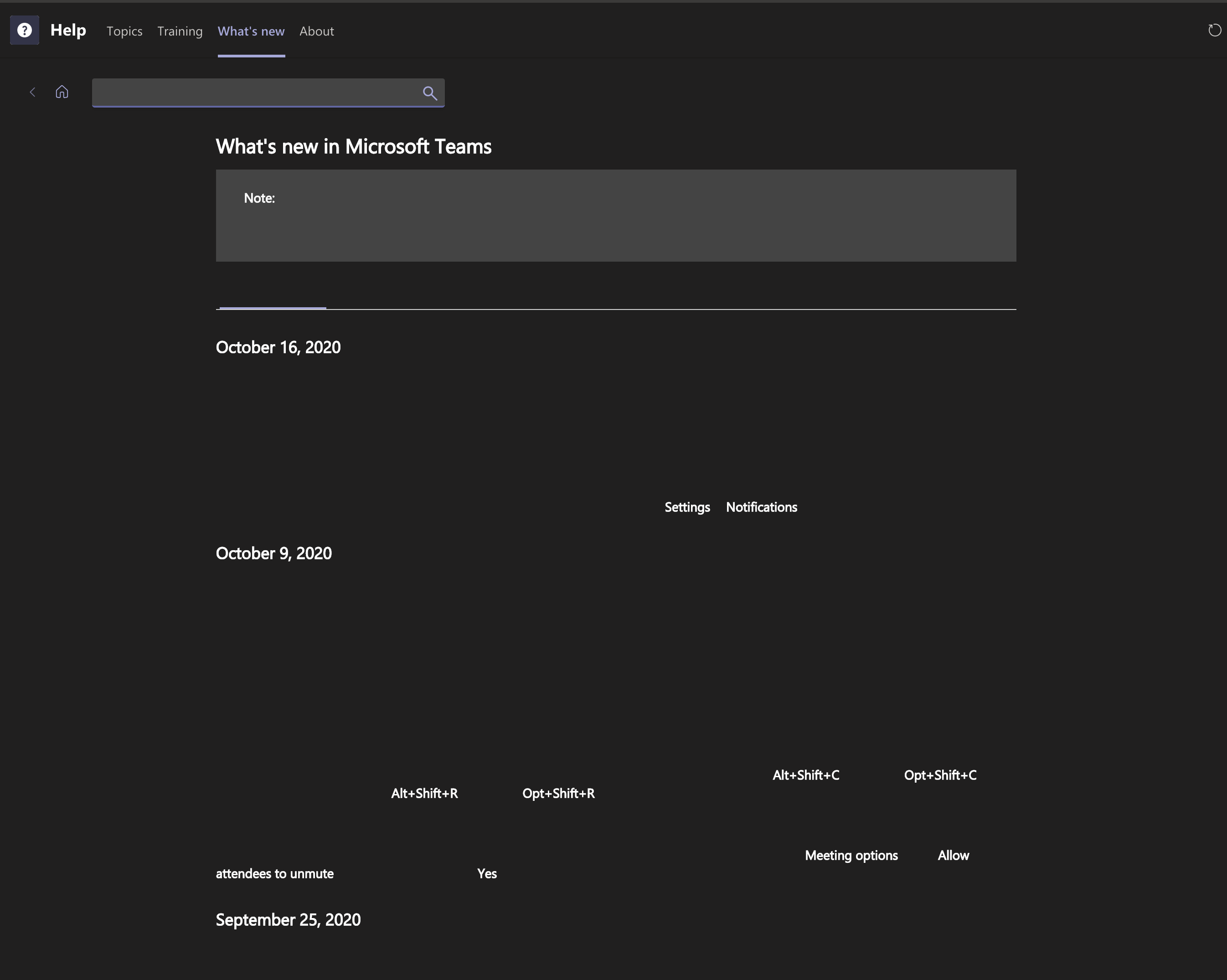
By the way, for those of you with Mac OS / Blank Toast problems, have you noticed that you get bad web rendering inside the teams client, for example click on Help -> What's New. I get this regardless of theme; and office online docs also fail to render inside teams (but fine in browser).
 gscott
on 26 Oct 2020
gscott
on 26 Oct 2020
Just wanted to add that this has been going on for months now. First on macOS Catalina and now on Big Sur. Notifications are just blank purple boxes. I'm running macOS Big Sur 11.0 Beta (20A5395g) and MS Teams 1.300.26266.
 owellsjr
on 26 Oct 2020
owellsjr
on 26 Oct 2020
Also on macOS Big Sur 11.0 Beta (20A5395g) and MS Teams 1.300.26266 on MBP 16" same issues with notifications and document rendering with Teams windows.
 ggsperring
on 28 Oct 2020
ggsperring
on 28 Oct 2020
@Trinetra-MSFT The issue of the blank notifications and document rendering resolved for me with 1.3.00.28778 which installed today, 28 October.
gscott
on 29 Oct 2020
Can anyone confirm if this issue still persist for them?
Trinetra-MSFT
on 29 Oct 2020
How do I force Teams to update to the latest version 1.3.00.28778 - still on 1.300.26266 - used the Check for Updates function but no new version?
ggsperring
on 29 Oct 2020
I can confirm updating to 1.3.00.28778 (on Big Sur Beta 11) fixes the toast notifications. This can only be done in developer preview right now. You can enable Developer Preview in Office 365 Admin portal and then in Teams go to Profile (icon)>About>Developer Preview. Once Teams restarts, it will update.
joebutnotexotic
on 29 Oct 2020
I'm on a MacBook Pro (15-inch, 2018) running MacOs Catalina 10.15.7 with Microsoft Teams Version 1.3.00.28778.
Still have the problem of a blank MS Teams notification window. This is annoying because I can't switch to the app using cmd+tab.
Any solution, please?
 stefanorainieri
on 2 Nov 2020
stefanorainieri
on 2 Nov 2020
@stefanorainieri, can you please try developer preview and let me know if issue still persists.
 Abhijit-MSFT
on 10 Nov 2020
Abhijit-MSFT
on 10 Nov 2020
Hi @Abhijit-MSFT, issue still there.
stefanorainieri
on 10 Nov 2020
This issue has been resolved for me in 1.3.00.28778. I don't have access to the developer preview so this must be the production release that installed automatically.
owellsjr
on 10 Nov 2020
The fix has been deployed to GA , Please feel free to reopen if you still have this issue.
Trinetra-MSFT
on 12 Nov 2020
Issue is still around with Catalina 15.6 and teams version 1.3.00.28778
 tudorPersonal
on 12 Nov 2020
tudorPersonal
on 12 Nov 2020
Exactly the same for me as for @tudorPersonal
stefanorainieri
on 12 Nov 2020
I'm on a MacBook Pro (15-inch, 2018) running MacOs Catalina 10.15.7 with Microsoft Teams Version 1.3.00.28778.
Still have the problem of a blank MS Teams notification window. This is annoying because I can't switch to the app using cmd+tab.
Any solution, please?
Hi, for me the solution is to assign the MS Teams to all desktops (right click on the icon -> options -> assign to...). After that I'm able to use cmd+tab to switch directly to chat window, instead of the blank one.
HTH.
 imitov
on 19 Nov 2020
imitov
on 19 Nov 2020
I'm on a MacBook Pro (15-inch, 2018) running MacOs Catalina 10.15.7 with Microsoft Teams Version 1.3.00.28778.
Still have the problem of a blank MS Teams notification window. This is annoying because I can't switch to the app using cmd+tab.
Any solution, please?Hi, for me the solution is to assign the MS Teams to all desktops (right click on the icon -> options -> assign to...). After that I'm able to use cmd+tab to switch directly to chat window, instead of the blank one.
HTH.
Hi @imitov
Thanks a lot for you workaround. It works also for me.
Even if it's not the best for my usual "workspace".. but probably it's only me by being obsessed in having one defined desktop for each app.
At the end, anyway , it's strange to have an blank window in MS Teams.. I hope they will fix it.
Thank you
stefanorainieri
on 19 Nov 2020
I'm on a MacBook Pro (15-inch, 2018) running MacOs Catalina 10.15.7 with Microsoft Teams Version 1.3.00.28778.
Still have the problem of a blank MS Teams notification window. This is annoying because I can't switch to the app using cmd+tab.
Any solution, please?Hi, for me the solution is to assign the MS Teams to all desktops (right click on the icon -> options -> assign to...). After that I'm able to use cmd+tab to switch directly to chat window, instead of the blank one.
HTH.
Unfortunately for me, it did not work. Happy that it is a solution to you and others.
tudorPersonal
on 20 Nov 2020
@stefanorainieri : Let me check this with team for Catalina 15.6 and teams version 1.3.00.28778. I will get back to you in sometime
Trinetra-MSFT
on 24 Nov 2020
@stefanorainieri : Let me check this with team for Catalina 15.6 and teams version 1.3.00.28778. I will get back to you in sometime
Hi, my MS Teams Version is now 1.3.00.30874 (previously it was 1.3.00.28778).
Now the issue seems solved.
I think there was an update yesterday, because today I can see some UI changes, more specifically call buttons changed.
Thanks to all!
stefanorainieri
on 10 Dec 2020
Sorry, but it still does not work. Once a notification comes, the notification window always takes precedence - on a Mac.
tudorPersonal
on 10 Dec 2020
Sorry, but it still does not work. Once a notification comes, the notification window always takes precedence - on a Mac.
You are right, it's not working AGAIN also for me... :'(
stefanorainieri
on 11 Dec 2020
Related issues
 XimenaWang
·
6Comments
XimenaWang
·
6Comments
 paulconlin
·
5Comments
paulconlin
·
5Comments
 tabinnorway
·
6Comments
tabinnorway
·
6Comments
 krishnajaju
·
6Comments
krishnajaju
·
6Comments
 assarbad
·
7Comments
assarbad
·
7Comments
Most helpful comment
The fix for this issue has been released but it is going to take some time to reach the public builds. Thanks!