Msteams-docs: MS Teams ignores RFC 3986 and garbles the URL
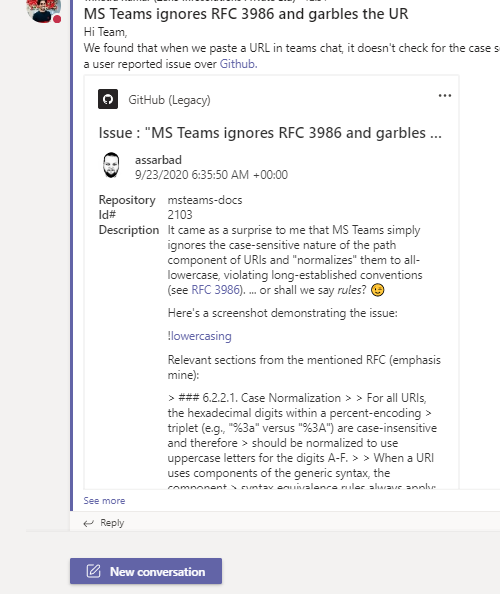
It came as a surprise to me that MS Teams simply ignores the case-sensitive nature of the path component of URIs and "normalizes" them to all-lowercase, violating long-established conventions (see RFC 3986). ... or shall we say _rules_? 😉
Here's a screenshot demonstrating the issue:

Relevant sections from the mentioned RFC (emphasis mine):
6.2.2.1. Case Normalization
For all URIs, the hexadecimal digits within a percent-encoding
triplet (e.g., "%3a" versus "%3A") are case-insensitive and therefore
should be normalized to use uppercase letters for the digits A-F.When a URI uses components of the generic syntax, the component
syntax equivalence rules always apply; namely, that the scheme and
host are case-insensitive and therefore should be normalized to
lowercase. For example, the URI HTTP://www.EXAMPLE.com/ is
equivalent to http://www.example.com/. The other generic syntax
components are assumed to be _case-sensitive_ unless specifically
defined otherwise by the scheme (see Section 6.2.3).
The section referenced in the quoted excerpt contains then:
Some schemes define additional subcomponents that consist of case-
insensitive data, giving an implicit license to normalizers to
convert this data to a common case (e.g., all lowercase). For
example, URI schemes that define a subcomponent of path to contain an
Internet hostname, such as the "mailto" URI scheme, cause that
subcomponent to be case-insensitive and thus subject to case
normalization (e.g., "mailto:[email protected]" is equivalent to
"mailto:[email protected]", even though the generic syntax considers
the path component to be case-sensitive).
What's most annoying is that MS Teams links such pasted URI and there is no way to prevent it from doing so (not that I found one, at least). So when you send the message you have to tell the person on the other end to attempt to copy the _text_ of the URI (not the link) which then requires some fumbling and precise navigation with the mouse and may even inadvertently lead to clicking the _link_. Then the person needs to paste _that_ into the browser and should then see the correct content from what was originally intended.
As a side-note: this behavior _also_ happens when typing in the usual Markdown syntax in the text field: [description](https://localhost/some/URI/with/UPPERCASE/Letters)! This is almost worse, because there is no visible indication that the URI was originally a completely different one.
This was reproducible with the latest Windows and Linux clients.
With best regards,
Oliver
PS: RFC 1738 may also be relevant.
 assarbad
All 7 comments
Hi assarbad! Thank you for bringing this issue to our attention. We will investigate and if we require further information we will reach out. Best regards, Teams Platform
![msftbot[bot] picture](https://avatars.githubusercontent.com/in/26612?v=4&s=40) msftbot[bot]
on 22 Sep 2020
msftbot[bot]
on 22 Sep 2020
@assarbad , We have forwarded your query to product channel for investigation.
 Trinetra-MSFT
on 24 Sep 2020
Trinetra-MSFT
on 24 Sep 2020
Hi assarbad! This issue will be closed because this issues list is intended for Microsoft Teams Application Development questions.
For Microsoft Teams product issues/failures your tenant Admin can reach out to Microsoft 365 Product Support.
For general questions about Microsoft Teams please post your question on Microsoft Teams Community.
msftbot[bot]
on 24 Sep 2020
Apologies that it's the wrong place. Sure thing. I'm not going to report it again, though. The ticket as it stands took long enough to write up (not as long as trying to get your conversation partner to _not click_ a link and instead copy the link text, though). And (yeah, I realize I'm talking to a bot, @msftbot) the closing comment doesn't help me to find where to turn to either.
Sent a link to this ticket via Help icon > Give feedback.
The first result that came up in a search was to the Microsoft Teams Community, which had a thread on where to file defects and that led to 404. After much searching I found _this_ issue tracker and the comment alongside the link leading here suggested it's the right place.
assarbad
on 24 Sep 2020
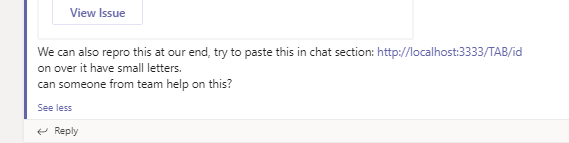
@assarbad , We are working on your request. This is more of product specific query. we tried to repro it and forwarded this to one of our product channel for further investigation.
Trinetra-MSFT
on 24 Sep 2020
Hi assarbad! Thank you for bringing this issue to our attention. We will investigate and if we require further information we will reach out. Best regards, Teams Platform
msftbot[bot]
on 24 Sep 2020
Any updates, perchance? I was trying this out today and it seems there is no change as of yet.
Is there perhaps another public ticket I can track somewhere else? Such as via the feedback hub or so? I am a VS Pro subscriber, so there's a slim chance I already have an account where ever the (underlying) ticket lives now.
assarbad
on 18 Jan 2021
Related issues
 chris31389
·
5Comments
chris31389
·
5Comments
 tabinnorway
·
6Comments
tabinnorway
·
6Comments
 dbalabka
·
3Comments
dbalabka
·
3Comments
 Navyjetfixer
·
4Comments
Navyjetfixer
·
4Comments
 kafka-yu
·
5Comments
kafka-yu
·
5Comments