Msteams-docs: Not authorized / no permissions
After following the instructions building and uploading in manifest editor, when I click "Install" I am told I am not authorized to add the app to this team
Document Details
⚠ Do not edit this section. It is required for docs.microsoft.com ➟ GitHub issue linking.
- ID: 2f98c73d-bb68-3088-6e7d-2c576a8292f6
- Version Independent ID: 08b9df7d-4997-c681-e73a-235ec1e4fc7b
- Content: Get started with C#/.NET - Teams
- Content Source: msteams-platform/tutorials/get-started-dotnet-app-studio.md
- Product: msteams
- GitHub Login: @clearab
- Microsoft Alias: anclear
 nicowitteman
All 14 comments
Closed prematurely
nicowitteman
on 21 Dec 2019
@nicowitteman Could you please share a screenshot of the error message you see while you try to upload your manifest?
 Gousia-Begum
on 23 Dec 2019
Gousia-Begum
on 23 Dec 2019
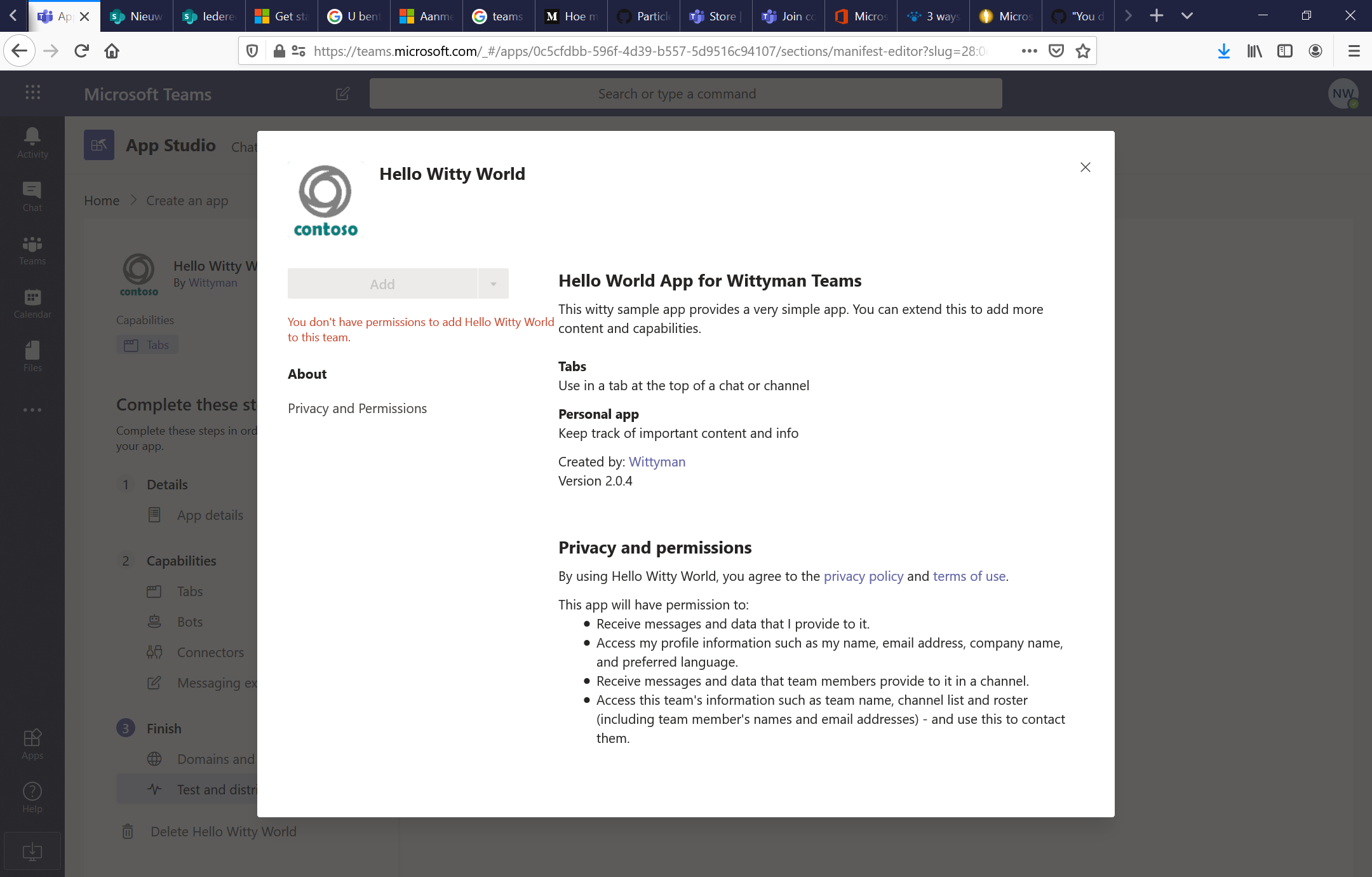
I am able to add the app via Apps --> Upload a custom app and then add it to a specific team, and then the app works as expected, but this does not offer the opportunity to edit the manifest like described above.
nicowitteman
on 23 Dec 2019
Same thing here...
 NickPl
on 13 Jan 2020
NickPl
on 13 Jan 2020
I have the same issue
 justinlee12
on 27 Feb 2020
justinlee12
on 27 Feb 2020
Could you please ensure you have sideloading enabled for your tenant?
Gousia-Begum
on 3 Mar 2020
Certainly.
Nico
Op 3 mrt. 2020 om 10:17 heeft Gousia-MSFT notifications@github.com het volgende geschreven:
Could you please ensure you have sideloading enabled for your tenant?—
You are receiving this because you were mentioned.
Reply to this email directly, view it on GitHub, or unsubscribe.
nicowitteman
on 3 Mar 2020
This is happening as well for me. Side loading is enabled. I used the workaround of editing the manifest within app studio then 'downloading' the package. I then upload the downloaded package that has those edits.
 jtan89
on 11 Mar 2020
jtan89
on 11 Mar 2020
Got the same problem here. So I cannot move to the testing step.
 iv230
on 16 Apr 2020
iv230
on 16 Apr 2020
I have the same issue, has anyone been able to solve it?
 JGGALVISR
on 17 Apr 2020
JGGALVISR
on 17 Apr 2020
Looks like we have to go to our organisation settings to enable the custom application uploading.
iv230
on 17 Apr 2020
Same issue here
 franciscojgonzalez
on 15 May 2020
franciscojgonzalez
on 15 May 2020
I am able to add the app via Apps --> Upload a custom app and then add it to a specific team, and then the app works as expected, but this does not offer the opportunity to edit the manifest like described above.
Workaround: From App Studio -> Manifest Editor -> Test and distribute -> Click download to download the updated zipped manifest, then install it manually from Apps -> Upload a custom app
 letnel
on 29 May 2020
letnel
on 29 May 2020
Tell us about your experience!
Hi nicowitteman! This issue is closed in our system. We would like your feedback on your experience with our support teams.
Best regards,
Teams Platform
![msftbot[bot] picture](https://avatars.githubusercontent.com/in/26612?v=4&s=40) msftbot[bot]
on 23 Aug 2020
msftbot[bot]
on 23 Aug 2020
Related issues
 tabinnorway
·
6Comments
tabinnorway
·
6Comments
 paulconlin
·
5Comments
paulconlin
·
5Comments
 oyvindam
·
5Comments
oyvindam
·
5Comments
 XimenaWang
·
6Comments
XimenaWang
·
6Comments
 Arefu
·
6Comments
Arefu
·
6Comments
Most helpful comment
I am able to add the app via Apps --> Upload a custom app and then add it to a specific team, and then the app works as expected, but this does not offer the opportunity to edit the manifest like described above.