Msteams-docs: "You don't have permissions to add Hello World to this team."
When I click Install under Test and Distribute, this is what I see:

The dialog UI appears to have changed since this tutorial was written, so I'm not quite sure of the issue. There is no option for "Add for you", nor is there even a place to search for a team. "This team" implies that I chose a team, but I didn't.
 norachuga
All 19 comments
@norachuga Are you trying to upload the app from App Studio? Could you please try downloading the manifest and sideload it?
There is no option for "Add for you", nor is there even a place to search for a team
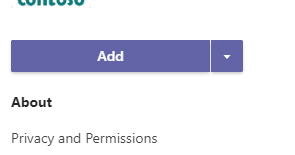
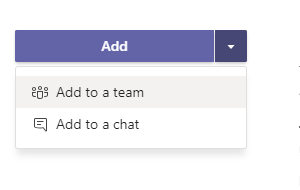
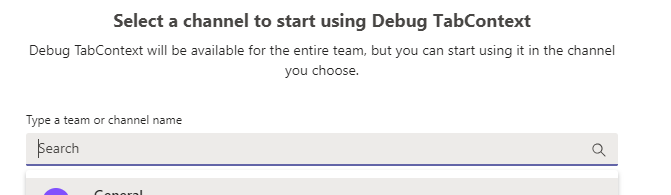
Clicking on Add directly adds the app in your personal scope. If you want to add the app to a team, you could choose "Add to a team" from the dropdown and you will get an option to search for the team you want to add the app to.
 Gousia-Begum
on 11 Oct 2019
Gousia-Begum
on 11 Oct 2019
Yes, I was trying to add through the Apps Studio.
My UI does not match what is shown in the sideload doc either, and I do not have the options it offers.
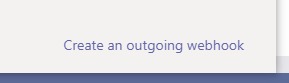
In the first option, there is not a Store icon. Instead, it says Apps (as well as Help instead of a Feedback option). As you can also see, there is no "Upload a custom app" option.
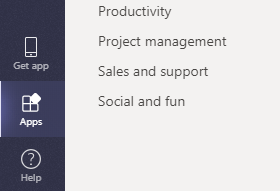
The screenshot is from the desktop app (1.2.00.26774), but the same is true of the webapp as well.
In the second option, there is no "Upload a custom app" option on the Apps tab either.
norachuga
on 11 Oct 2019
@norachuga Could you please check if Sideloading is enabled in Setup Policies?
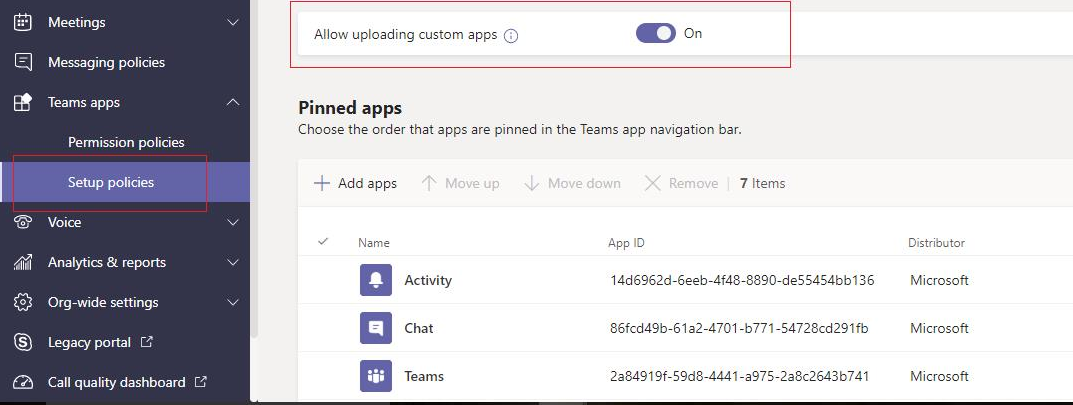
Please follow this document to enable sideloading if you haven't done it already.
Gousia-Begum
on 14 Oct 2019
There appears to be a very long delay between enabling/disabling "Allow uploading custom apps" and the functionality appearing/disappearing.
The features eventually showed up with no further action from myself, but I did not keep track of how long it took. It could be more than a day.
I have now disabled sideloading, but the features remain completely available. It has been 2 hours since I disabled it, and I was still able to upload a new custom app, as well as update an existing one.
I have made note of when I disabled it and will be keeping an eye on it. I will update when it actually becomes disabled.
norachuga
on 16 Oct 2019
It seems that the features appear to appear/disappear at different rates from each other as well.
6 hours after disabling:
- Teams > Apps tab - _Upload a custom app_ option is no longer visible
- App Studio > Test and Distribute > Install > Add is disabled
23 hours after disabling:
- Apps > _Upload a custom app_ is still available. I was able to upload a new app using it.
norachuga
on 17 Oct 2019
@norachuga App setup policies usually take some time to update. Were you able to add the app to the Team? Is your issue resolved?
Gousia-Begum
on 18 Oct 2019
Sure, I guess my issue is resolved. I was able to add the app.
I feel like it should probably be made clear on any or all of these pages that it takes more than entire day for a change in settings to take effect. Otherwise, a reasonable person would assume the documents are wrong, they have done something wrong, or there was a bug.
https://docs.microsoft.com/en-us/microsoftteams/platform/get-started/get-started-dotnet-app-studio
https://docs.microsoft.com/en-us/microsoftteams/platform/get-started/get-started-configure-teams
https://docs.microsoft.com/en-us/microsoftteams/platform/get-started/get-started-tenant
norachuga
on 18 Oct 2019
@norachuga Thanks for the feedback!
Gousia-Begum
on 21 Oct 2019
Same problem here
 Afshin1980
on 14 Nov 2019
Afshin1980
on 14 Nov 2019
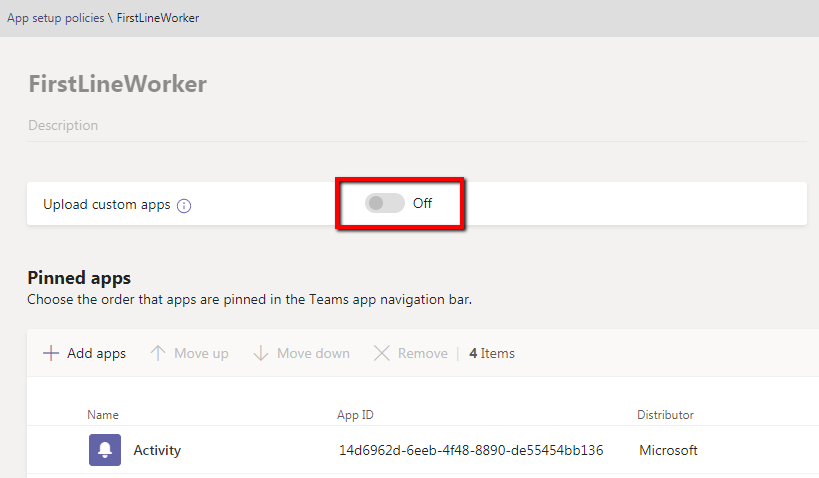
I have same issue and tried to enable Sideloading in Setup Policies. However the toggle button is disabled in the "First Line Worker" policy section. I am logged in with tenant admin credentials.
(I was able to to enable the upload custom apps to ON for "Global (Org-wide default)" policies).
Am I missing something here? please guide. Thank you.
 PranavJoshi1070
on 20 Nov 2019
PranavJoshi1070
on 20 Nov 2019
Many of the policies in Teams take hours to be enforced. This seems to be atypical for M365 services. Is there are reason, and considering that many of these would be deemed as security related should it be so?
 acmcg
on 15 Jan 2020
acmcg
on 15 Jan 2020
Maybe someone will help this link.
https://techcommunity.microsoft.com/t5/teams-developer/you-don-t-have-permissions-to-add-for-adding-a-bot/m-p/918612
 Zalutskii
on 27 Mar 2020
Zalutskii
on 27 Mar 2020
When I click Install under Test and Distribute, this is what I see:
The dialog UI appears to have changed since this tutorial was written, so I'm not quite sure of the issue. There is no option for "Add for you", nor is there even a place to search for a team. "This team" implies that I chose a team, but I didn't.
For following a tutorial , this is way too involved, not sure why a walkthrough would be posted without vetting that it's working properly
 abpatel
on 29 May 2020
abpatel
on 29 May 2020
I am having the same message "you don't have permissions to add MyApp to this teams". I have system administrator role. I have created a policy with "Upload custom apps" turned on and wait for about half day and still I am having the same issue. Some advise please. Thanks.
 Jio-AL
on 4 Jun 2020
Jio-AL
on 4 Jun 2020
Im having this issue too.
 Jacko1394
on 4 Jun 2020
Jacko1394
on 4 Jun 2020
I have the same problem
 davidgv88
on 4 Jun 2020
davidgv88
on 4 Jun 2020
Same here..
 yiannismanatos4Innexys
on 20 Jun 2020
yiannismanatos4Innexys
on 20 Jun 2020
I'm having the same issue.
 jyothsnag29
on 14 Jul 2020
jyothsnag29
on 14 Jul 2020
Please how do you watch the live sessions?
 m-dayoub
on 14 Jul 2020
m-dayoub
on 14 Jul 2020
Related issues
 chris31389
·
5Comments
chris31389
·
5Comments
 Arefu
·
6Comments
Arefu
·
6Comments
 krishnajaju
·
6Comments
krishnajaju
·
6Comments
 Wajeed-msft
·
8Comments
Wajeed-msft
·
8Comments
 XimenaWang
·
6Comments
XimenaWang
·
6Comments
Most helpful comment
Same problem here