Msteams-docs: HttpPOST from MessageCard invoke failed
The HttpPOST request failed.
Any request has not been reached target endpoint.
I posted MessageCard using Incoming Webhooks with payload below.
  {
    "@type": "MessageCard",
    "@context": "http://schema.org/extensions",
    "text": "Larry Bryant created a new task",
    "potentialAction": [
        {
          "@type": "HttpPOST",
          "name": "Add comment",
          "target": "http://xxxxxxxxx.ngrok.io/comment"
        }
    ]
  }
Error messages.
[O365ActionPaneController.makeHttpPOSTRequestForConnector()] Http invoke failed: {"data":{"errorCode":"InternalServerError","message":"Failed to execute AEA backend request ConnectorActionRequest. Request Url: https://outlook.office.com/actions/b9a9ddf0-c129-4524-8ea3-bf87fbc8b05d/executeAction/?culture=ja-jp, Request Method: POST, Response Status Code: InternalServerError, Response Headers: X-MSEdge-Ref: Ref A: 28F5CFD870AC4CA88541821C84BC7ED7 Ref B: HK2EDGE0720 Ref C: 2018-11-07T15:32:41Z\r\nDate: Wed, 07 Nov 2018 15:32:41 GMT\r\nX-AspNet-Version: 4.0.30319\r\n"},"status":500,"config":{"method":"POST","transformRequest":[null],"transformResponse":[null],"url":"https://teams.microsoft.com/api/mt/jp/beta/users/connectors/19:[email protected];messageid=1541604731447/1541604731447/executeAction","data":{"inputParameters":[],"actionId":"bf7861fe-9714-4514-bacb-df560bcb82a8","potentialAction":"{\"@type\":\"HttpPOST\",\"@id\":\"bf7861fe-9714-4514-bacb-df560bcb82a8\",\"name\":\"Add comment\",\"target\":\"https://xxxxxxxxx.ngrok.io/comment\",\"headers\":[],\"body\":\"\",\"bodyContentType\":\"\"}","name":"action/connector","integrationId":"lu6xw8mk4k","meta":"{\"connectorSenderGuid\":\"203a1e2c-26cc-47ca-83ae-be98f960b6b2\",\"providerAccountUniqueId\":null,\"connectorConfigurationAlternateId\":\"3de8496598f2482bae4186726f5fc0cf\"}","clientInfo":{"locale":"ja-jp","country":"jp","platform":"Web","clientVersion":"1415/1.0.0.2018101638"}},"headers":{"X-Skypetoken":"pii","Authorization":"pii","Accept":"application/json, text/plain, */*","Content-Type":"application/json;charset=utf-8","X-RingOverride":"general","x-ms-scenario-id":"666","x-ms-user-type":"user","x-ms-client-type":"web","x-ms-client-env":"msteams-web-prod-asea-02","x-ms-client-version":"1415/1.0.0.2018101638","x-ms-session-id":"405f5e5b-f586-ed45-5753-64faa20c8247"},"counter":"ext_actionable_card_http_post","decrementNetworkRequests":null,"hostName":"teams.microsoft.com"},"statusText":""}
Document Details
⚠ Do not edit this section. It is required for docs.microsoft.com ➟ GitHub issue linking.
- ID: c0fd8e4d-f110-36f8-5bd3-db3325b14c01
- Version Independent ID: 717ea854-1d3a-2c15-e495-b6f170fe7aff
- Content: Using Office 365 Connectors - Teams
- Content Source: msteams-platform/concepts/connectors/connectors-using.md
- Product: msteams
- GitHub Login: @o365devx
- Microsoft Alias: o365devx
 ikosin
All 37 comments
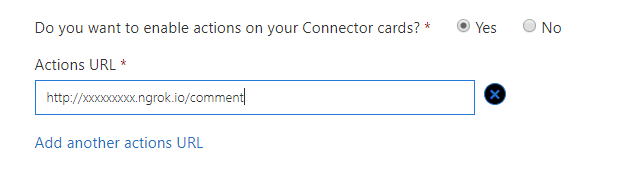
@ikosin - We are looking into this. Meanwhile, could you please confirm if you have enabled actions on your Connector cards in Connector Portal?
 Wajeed-msft
on 8 Nov 2018
Wajeed-msft
on 8 Nov 2018
@Wajeed-msft - Thank you for your reply.
I did not know that each Connector has a setting to enable action.
However, the one I used for posting is not my own Connector, but the Incoming Webhook Connector which is written in "Setting up a custom incoming webhook".
The Incoming Webhook connector is not set to enable actions?
ikosin
on 8 Nov 2018
I thought it might be a problem with the environment of my account. I used "Microsoft Teams for Free" for development, but I upgraded to a paid "Office 365 Business Essentials". Then an HttpPOST request reached to the endpoint.
ikosin
on 9 Nov 2018
@Wajeed-msft Running into the same issue. Using the demo code, and trying to send any data through HttpPOST with the "Incoming webhook connector" on a Microsoft Teams for Free account - and only receiving errors. Not able to submit any http/https post requests so far.
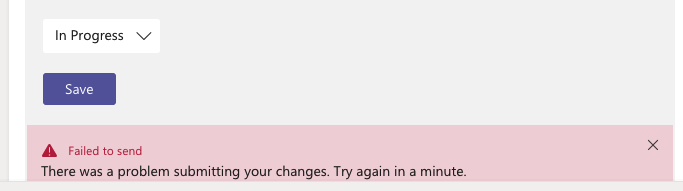
And console error :

errorCode:InternalServerError,
message:Failed to execute AEA backend request ConnectorActionRequest
PS: Also weird that this issue doesn't come up in google searches. Was only able to find it by going through the closed comments on this article.
 mastef
on 26 Nov 2018
mastef
on 26 Nov 2018
@Wajeed-msft Same thing here. We created now a "Office 365 Developer" account, and then incoming webhooks seem to be able to send HttpPOST requests.
So the question is if customers using the free account would be able to take advantage of MessageCard's with HttpPOST actions that come in through incoming webhooks?
mastef
on 27 Nov 2018
Reopening.
 billbliss
on 27 Nov 2018
billbliss
on 27 Nov 2018
We are investigating issue with HttpPost for Freemium user.
Wajeed-msft
on 27 Nov 2018
I'm also having the same issue - using the incoming web hook connector and trying to make an HttpPOST
the error I get is a little different:
2019-01-11T19:22:58.027Z Err   [O365ActionPaneController.makeHttpPOSTRequestForConnector()] Http invoke failed: {"data":{"errorCode":"Unknown","message":"Object reference not set to an instance of an object."},"status":500,"config":{"method":"POST","transformRequest":[null],"transformResponse":[null],"url":"https://teams.microsoft.com/api/mt/amer/beta/users/connectors/19:[email protected];messageid=15xxxxxx259/154xxxxxxx9/executeAction","data":{"inputParameters":[],"actionId":"e31907e8-xxx-xxx-xxx-85a65...
2019-01-11T19:22:58.027Z War    HTTP request  failed: POST "https://teams.microsoft.com/api/mt/amer/beta/users/connectors/19:[email protected];messageid=15472xxxxxxxx59/154xxxxxxx9/executeAction", status: 500, response: {"errorCode":"Unknown","message":"Object reference not set to an instance of an object."}, errorCode: Unknown, requestId: undefined, correlationId: undefined
 pauldfreeman
on 11 Jan 2019
pauldfreeman
on 11 Jan 2019
@pauldfreeman - Are you also facing this only on Microsoft Teams Free account? For freemium users we have identified the issue and our team is working on fixing it. I'll update this thread once change is rolled out.
Wajeed-msft
on 14 Jan 2019
Hi
Yes - it was due to our accounts being inadvertantly set to being free accounts. We’ve reapplied our licensing and the issue looks to have gone away. So can confirm this was to do with it being a free account.
On 14 Jan 2019, at 11:25, Wajeed-msft notifications@github.com wrote:
@pauldfreeman https://github.com/pauldfreeman - Are you also facing this only on Microsoft Teams Free account? For freemium users we have identified the issue and our team is working on fixing it. I'll update this thread once change is rolled out.
—
You are receiving this because you were mentioned.
Reply to this email directly, view it on GitHub https://github.com/MicrosoftDocs/msteams-docs/issues/316#issuecomment-453973684, or mute the thread https://github.com/notifications/unsubscribe-auth/AS1sTMggu-lNCI5hmIyzItt12stvkr2Eks5vDGk7gaJpZM4YSsHN.
pauldfreeman
on 15 Jan 2019
@Wajeed-msft closing the ticket - does that mean it was fixed now for free accounts?
mastef
on 30 Jan 2019
We are still tracking this issue. This is still not fixed for Freemium account.
Wajeed-msft
on 30 Jan 2019
How is this not fixed yet? Right now we need to use a workaround with opening a webpage to do the action which is just stupid if teams offers the ability to do post request actions.
 finalgamer
on 6 Mar 2019
finalgamer
on 6 Mar 2019
@finalgamer - Just to be sure, are you facing this for Microsof Teams Free user account?
Wajeed-msft
on 7 Mar 2019
@Wajeed-msft We are not using Microsoft Teams Free. We have subscriptions for Office 365 Business Premium and Office 365 Business Essentials.
finalgamer
on 7 Mar 2019
This is the error I get when performing the post action.
2019-03-07T09:35:48.547Z [O365ActionPaneController.makeHttpPOSTRequestForConnector()] Http invoke failed: {"data":{"errorCode":"InternalServerError","message":"Failed to execute AEA backend request ConnectorActionRequest. Request Url: https://outlook.office.com/actions/7c14631a-xxxx-xxxx-xxxx-xxxxxxxxxxxx/executeAction/?culture=en-us, Request Method: POST, Response Status Code: InternalServerError, Response Headers: X-MSEdge-Ref: Ref A: 1BD83EEEB58149B5B87E359F797E7706 Ref B: AM3EDGE0315 Ref C: 2019-03-07T09:35:48Z\r\nDate: Thu, 07 Mar 2019 09:35:48 GMT\r\nX-AspNet-Version: 4.0.30319\r\n"},"status":500,"config":{"method":"POST","transformRequest":[null],"transformResponse":[null],"url":"https://teams.microsoft.com/api/mt/emea/beta/users/connectors/19:a396e1863c…[email protected];messageid=xxxxxxxxxxxxx/xxxxxxxxxxxxx/executeAction","data":{"inputParameters":[{"id":"feedback","value":"asdf"}],"actionId":"f06e0fd8-xxxx-xxxx-xxxx-xxxxxxxxxxxx","potentialAction":"{\"@type\":\"HttpPOST\",\"@id\":\"f06e0fd8-xxxx-xxxx-xxxx-xxxxxxxxxxxx\",\"name\":\"Send Feedback\",\"target\":\"https://webhook.site/bbe50020-1390-419b-914c-1864a04f6981\",\"headers\":[],\"body\":\"\",\"bodyContentType\":\"\"}","name":"action/connector","integrationId":"u8xxxxxxxx","meta":"{\"connectorSenderGuid\":\"203a1e2c-xxxx-xxxx-xxxx-xxxxxxxxxxxx\",\"providerAccountUniqueId\":null,\"connectorConfigurationAlternateId\":\"xxxxxxxxxxxxxxxxxxxxxxxxxxxxxxxx\"}","clientInfo":{"locale":"en-us","country":"us","platform":"Web","clientVersion":"1415/1.0.0.2019022139"}},"headers":{"X-Skypetoken":"pii","Authorization":"pii","Accept":"application/json, text/plain, */*","Content-Type":"application/json;charset=utf-8","X-RingOverride":"general","x-ms-scenario-id":"2234","x-ms-user-type":"user","x-ms-client-type":"web","x-ms-client-env":"msteams-web-prod-ukso-02","x-ms-client-version":"1415/1.0.0.2019022139","x-ms-session-id":"xxxxxxxx-xxxx-xxxx-xxxx-xxxxxxxxxxxx"},"counter":"ext_actionable_card_http_post","decrementNetworkRequests":null,"hostName":"teams.microsoft.com"},"statusText":""}
I x'ed out some information I would not like to post publicly.
Request should have been sent to https://webhook.site/bbe50020-1390-419b-914c-1864a04f6981 which is a simple online request capture tool.
Action is taken from an example in the teams doc.
finalgamer
on 7 Mar 2019
Could you please share your Connector id?
Wajeed-msft
on 7 Mar 2019
Is it one of these?
integrationId: "u8xiqgdofv"
"connectorSenderGuid":"203a1e2c-26cc-47ca-83ae-be98f960b6b2"
"connectorConfigurationAlternateId":"a67dd67ef9d44af58a7c05260916cf3f"
finalgamer
on 7 Mar 2019
@finalgamer - Are you trying Incoming Webhook? Or Did you create your own Connector?

Wajeed-msft
on 7 Mar 2019
We are using Incoming Webhook
finalgamer
on 7 Mar 2019
@finalgamer - Could you please share the email id of user who performed the action? If it's not a demo accout which you could share publicly then you could share it via email to us on our Developer Support alias.
Wajeed-msft
on 8 Mar 2019
@Wajeed-msft They were added by my account: michele.dellaneve (at) livesystems.ch
finalgamer
on 11 Mar 2019
@finalgamer - Could you please try this again and provide latest failure details?
Wajeed-msft
on 27 Mar 2019
@Wajeed-msft - Hi, I'm also having the same issue - using the connector I registered ( and I added the Target url in the Actions URL of Connector Portal ) , and trying to make an HttpPOST .
my connector portal follows:
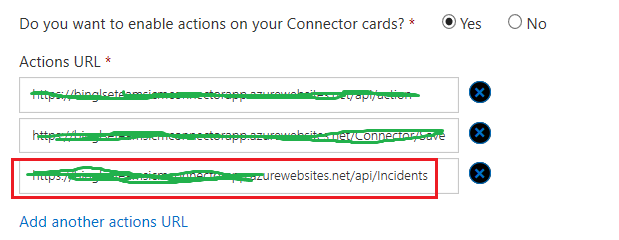
my json payload follows:
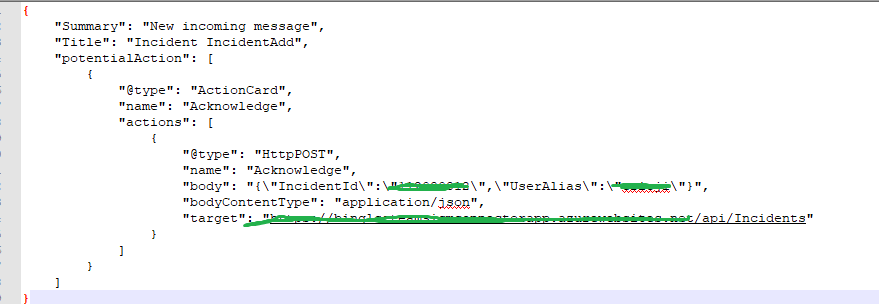
the error follows:

Can you give me some advice, thanks!
 XimenaWang
on 24 Apr 2019
XimenaWang
on 24 Apr 2019
@XimenaWang - Are you trying this for Freemium user? This is still not supported for Freemium user.
If you are getting this for normal O365 tenant member, could you please share the email id of user who performed the action?
Wajeed-msft
on 24 Apr 2019
@Wajeed-msft If this is not officially supported for freemium users, please add a note or warning in the documentation, instead of having people run into this when following the documentation's test setup.
Because right now the documentation starts with "Any user can connect a team to services...", but only freemium users get these cryptic errors.
mastef
on 24 Apr 2019
@mastef it _should_ work, but it doesn't. We are continuing to work with the team that owns that codepath to fix this.
billbliss
on 25 Apr 2019
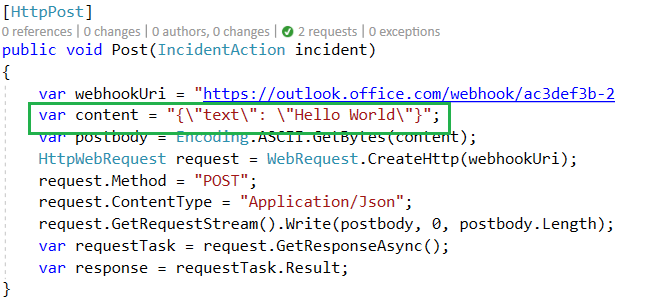
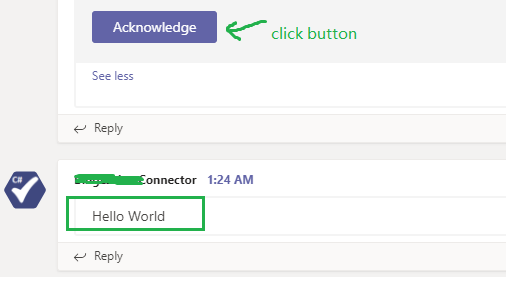
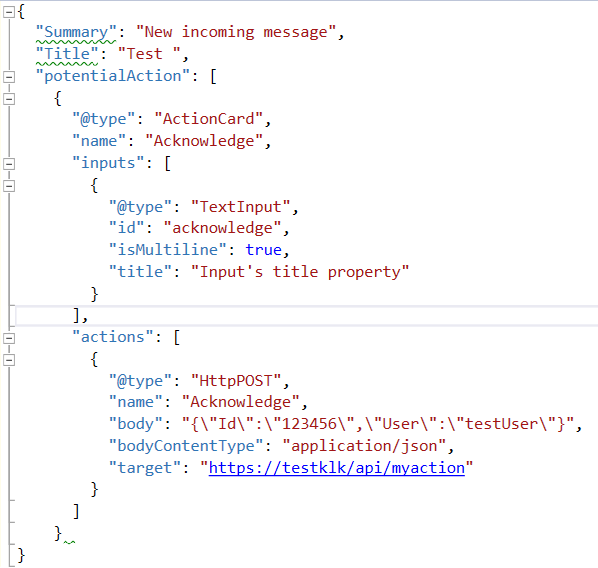
@mastef - Hi, Teams can send post to my API successfully. I just replaced my previous logic with this simple code "hello world", and after clicking the button "acknowledge", I got this message "Hello World". So the post of Teams works, just can't execute my API previous function through Teams, may be a permission issue. You can have a try to send the message only in the API. Hope it helps.
my API simple code:
the success Post:
my json payload:
XimenaWang
on 28 Apr 2019
@Wajeed-msft . I am facing the same issue and unable to perform httppost action from message card. need help !
 kumarkunal229
on 3 Dec 2019
kumarkunal229
on 3 Dec 2019
 iabukai
on 14 Jan 2020
iabukai
on 14 Jan 2020
@iabukai - Are you facing this issue for non Freemium user? Also, HTTP post action work only in the same tenant where Connector is registered unless it's approved and published in App Store.
Wajeed-msft
on 31 Jan 2020
I am a non freemium user and having this issue as well. It doesn't matter what domain I use. Having to Publish it first is counter productive since I don't want to publish until I know it actually works. Can we get some clear communication and documentation as to how this is actually supposed to work because clearly what is there is wrong.
 mcouvill
on 7 May 2020
mcouvill
on 7 May 2020
Same +1
 timdonovanuk
on 11 Jun 2020
timdonovanuk
on 11 Jun 2020
Hi ,
I have an internal API that I’m making available through my prod server. Now I want to call that API from a MessageCard HTTPPost action in Teams. When I click on the action button I do not see any errors, and Fiddler shows me a 200 response and I can see the token in the authorization header and the below in the body:{"status":"Completed","actionId":"7e3b1ab6-3320-4f11-92e3-8db3909dcb1f","performedAt":"2020-07-29T04:38:11.5903214Z","properties":{"displayMessage":""}}
But nothing happens after that on the Teams (im expecting an rely commnet).
Can you please share the card JSON which we can use.
As per some docs i have tried keeping headers={
“content-type”:”application/json;charset=UTF-8″,
“CARD-UPDATE-IN-BODY”: true,
“CARD-ACTION-STATUS”: "has been Approved”
}
 balu1343
on 29 Jul 2020
balu1343
on 29 Jul 2020
I'm also encountering the issue and supposing that come from timeout error.
It always happen when working heavy process at server side.
 totechite
on 22 Aug 2020
totechite
on 22 Aug 2020
Is there any clear documentation on what is and isn't allowed? I'm using a free version of Teams and am running into this issue with incoming webhook. I would like to allow the user to enter text on the card, submit, then post that text back out to a 3rd party system. I consistently get Could not complete the requested action. Please try again later.
Is there a bug, is this not allowed for Free accounts, or are non-marketplace webhooks unable to post back to external services?
 taylor-clark
on 18 Sep 2020
taylor-clark
on 18 Sep 2020
@taylor-clark I have the same question. We have a business account and it doesn't work as advertised for us either. Either their documentation is flat out wrong or it is just broken. They haven't replied in months on this issue. This an other reasons is why we ditched Teams and moved to slack.
mcouvill
on 18 Sep 2020
Related issues
 DamienDoumer
·
7Comments
DamienDoumer
·
7Comments
 kafka-yu
·
5Comments
kafka-yu
·
5Comments
 krishnajaju
·
6Comments
krishnajaju
·
6Comments
 camiloxs
·
6Comments
camiloxs
·
6Comments
 oyvindam
·
5Comments
oyvindam
·
5Comments