Hi,
I've a really strange problem that I thought was related to the vsts build vs solution task but I have been able to repro it on my end here too.
Basically I have a class library project targeting .net core 2, in the project there are a couple of TypeScript files I want to compile, and have the output of these files added as embedded resources to the generated dll.
Within VS 2017 on desktop all was ok, due to building/rebuilding but problem appeared on vsts when code was pulled down to a clean folder structure that contained no build outputs like js files or dlls. With a but of playing I was able to reproduce the behavior with a sample project.
Basically if you (from command line) do a solution clean and then a solution build, the js files will be generated but not added as embedded resources to the assembly.
The important bits of the csproj are as follows:
<PropertyGroup>
<TargetFramework>netcoreapp2.0</TargetFramework>
<OutputType>Library</OutputType>
</PropertyGroup>

<ItemGroup>
  <EmbeddedResource Include="Scripts\dist\*.js" />
</ItemGroup>

<ItemGroup>
  <TypeScriptCompile Include="Scripts\src\spSampleForTest001.ts" />
  <TypeScriptCompile Include="Scripts\src\spSampleForTest002.ts" />
</ItemGroup>
In the sample solution there is a solution item domsbuild.cmd that issues the clean and build commands and if you look at the generated dll you will see no resources.
Using VS 2017 15.6.7
MSBuild.exe 15.6.85.37198
Any ideas greatly appreciated
 dmcweeney
All 7 comments
Apologies I renamed the solution file to shorten it and didn't update the cmd file to reflect the change. After a but more hacking I notice that if I do the following in the cmd file it embeds the resources.
msbuild sol /t:build
and immediately after
msbuild sol /t:rebuild
Any ideas
dmcweeney
on 4 May 2018
The Scripts\dist\*.js files are generated during the build by a TypeScript compiler process, right?
If so, the problem is that you're including them as static items (outside of a Target), which means the wildcard is expanded _before running any targets_. So the order of operations becomes
- Expand the wildcard, find nothing, and store no new entries in
@(EmbeddedResource) - Run the TypeScript compiler, creating the
.jsfiles - Run the C# compiler, passing
@(EmbeddedResource)(which doesn't contain the newly-created files).
On the _second_ and subsequent runs, step 1 runs after the previous run's step 2, so it _does_ find files to include.
You can fix this by explicitly adding the generated files to @(EmbeddedResource) _after they're generated_. For example:
<Target Name="EmbedGeneratedJavascript" AfterTargets="GetTypeScriptOutputForPublishing">
<ItemGroup>
<EmbeddedResource Include="Scripts\dist\*.js" />
</ItemGroup>
</Target>
or better yet
<EmbeddedResource Include="@(GeneratedJavascript)" />
Which is an item populated by the CompileTypeScript target.
I don't know the TypeScript targets super well, so I'm making an educated guess on the hook point GetTypeScriptOutputForPublishing.
 rainersigwald
on 4 May 2018
rainersigwald
on 4 May 2018
@rainersigwald thanks for the quick response. I've "quickly" tried both options and neither fixes it.
So I will need to do more hacking on Tuesday.
dmcweeney
on 4 May 2018
Ah, naturally it was more complicated! The problem is that @(EmbeddedResource) is adjusted in the PrepareResources target, which runs (by default) before TypeScript compilation (which happens before Compile). Without adjustments, the items get ignored.
Forcing TypeScript compilation to happen early enough is very difficult, unfortunately. But you can specify all the required metadata:
diff --git a/EmbedResReproSol/src/ClassLibrary/ClassLibrary.csproj b/EmbedResReproSol/src/ClassLibrary/ClassLibrary.csproj
index dd63967..c025d40 100644
--- a/EmbedResReproSol/src/ClassLibrary/ClassLibrary.csproj
+++ b/EmbedResReproSol/src/ClassLibrary/ClassLibrary.csproj
@@ -9,13 +9,14 @@
      <OutputType>Library</OutputType>
   </PropertyGroup>

-   <ItemGroup>
-       <EmbeddedResource Include="Scripts\dist\*.js" />
-   </ItemGroup>
-
    <ItemGroup>
        <TypeScriptCompile Include="Scripts\src\spSampleForTest001.ts" />
        <TypeScriptCompile Include="Scripts\src\spSampleForTest002.ts" />
    </ItemGroup>

+   <Target Name="EmbedGeneratedJavascript"  AfterTargets="GetTypeScriptOutputForPublishing">
+       <ItemGroup>
+           <EmbeddedResource Include="@(GeneratedJavascript)" WithCulture="false" Type="Non-Resx" />
+       </ItemGroup>
+   </Target>
 </Project>
@rainersigwald thanks for mill for this. It does certainly fix the sequencing problem.
I think I am going to have to give up on this route and resort to gulp as next phase of this will be concatenating some of the GeneratedJavascript files and it will be these concatenated files that will get embedded as resources. See this link for the detail: TypeScript enhancement request
Thanks again, Donal
dmcweeney
on 8 May 2018
I have the same problem. I want to embed my React static files to the assembly and read it from using EmbeddedFileProvider.
Interesting thing is that when I put the related code to the root it's including the files as expected and also the app is working without any problem. But I want to have this code on a Target and be able to embed the file after the npm run build.
This is the current configuration:
<Target Name="EmbedClientResources" BeforeTargets="PrepareForBuild">
       <ItemGroup>
      <EmbeddedResource Include="$(SpaRoot)build\**" Exclude="$(SpaRoot)build\**\*.js.map" WithCulture="false" Type="Non-Resx" />
    </ItemGroup>
  </Target>
After running the project in can find my index.html file. But the javascript files in nested js directory can not be found.
I changed the code to
<Target Name="EmbedClientResources" BeforeTargets="PrepareForBuild">
    <ItemGroup>
      <EmbeddedResource Include="$(SpaRoot)build\**" Exclude="$(SpaRoot)build\**\*.js.map" WithCulture="false" Type="Non-Resx" >
        <Link>ClientApp\%(RecursiveDir)\%(Filename)%(Extension)</Link>
      </EmbeddedResource>
    </ItemGroup>
  </Target>
this time I'm getting a compile time error:
Resource identifier 'EPaperApi.ClientApp' has already been used in this assembly
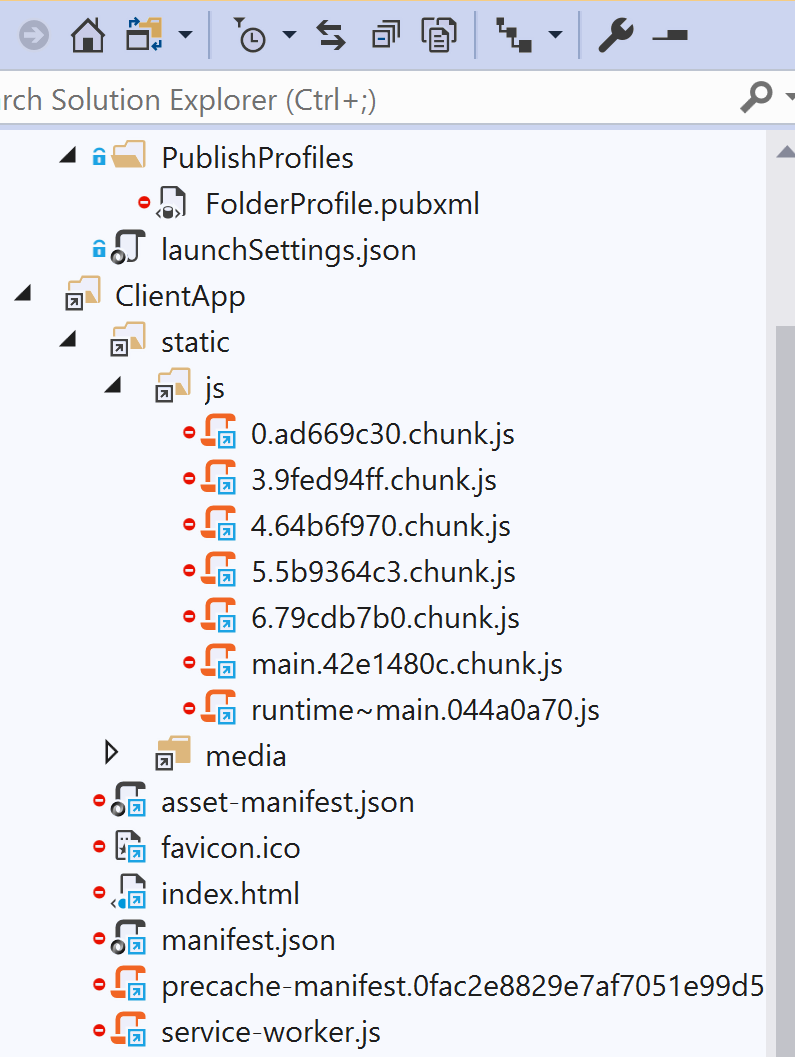
When I put the second code outside of the Target tag it loads all the expected files and show them on solution explorer. Also the app is working correctly. But the files are the old built files and are not the updated ones.
Can anybody please help me with this?
this is the screenshot when the files are loaded outside of Target tag.
 mohsenno1
on 18 Jul 2019
mohsenno1
on 18 Jul 2019
@mohsenno1 Im facing the same problem, did you solve it ?
In my case the resources are added but without the folder structure
 AsmisAlan
on 16 Sep 2020
AsmisAlan
on 16 Sep 2020
Related issues
 ackh
·
3Comments
ackh
·
3Comments
 KirillOsenkov
·
3Comments
KirillOsenkov
·
3Comments
 dsplaisted
·
4Comments
dsplaisted
·
4Comments
 hubuk
·
3Comments
hubuk
·
3Comments
 rokups
·
3Comments
rokups
·
3Comments
Most helpful comment
Ah, naturally it was more complicated! The problem is that
@(EmbeddedResource)is adjusted in thePrepareResourcestarget, which runs (by default) before TypeScript compilation (which happens beforeCompile). Without adjustments, the items get ignored.Forcing TypeScript compilation to happen early enough is very difficult, unfortunately. But you can specify all the required metadata: