Msbuild: MSBuild ToolsVersions missing from hklm\software\Microsoft\MSBuild\ToolsVersions registry key
All previous versions of MSBuild left a registry entry in hklm\software\Microsoft\MSBuild\ToolsVersions you could use to enumerate what versions of MSBuild are installed and where to find them.
Visual Studio 2017 doesn't create a hklm\software\Microsoft\MSBuild\ToolsVersions\15.0 so our build tool doesn't see that it is installed.
According to MSBuild Toolset (ToolsVersion):
bq. Toolset properties specify the paths of the tools. MSBuild uses the value of the ToolsVersion attribute in the project file to locate the corresponding registry key, and then uses the information in the registry key to set the Toolset properties. For example, if ToolsVersion has the value 12.0, then MSBuild sets the Toolset properties according to this registry key: HKLM\Software\Microsoft\MSBuild\ToolsVersions12.0.
MSBuild 15.0 breaks this contract.
 splatteredbits
All 14 comments
Assigned label documentation for us to track.
This is by design. You can install multiple versions of Visual Studio side by side so we can no longer keep ToolsVersions in the global registry. The definition for 15.0 is now stored in the MSBuild app.config here. We will make sure documentation is updated to reflect this.
 AndyGerlicher
on 16 Aug 2017
AndyGerlicher
on 16 Aug 2017
How do find that file?
splatteredbits
on 16 Aug 2017
@splatteredbits can you describe what you're trying to do at a high level?
 rainersigwald
on 16 Aug 2017
rainersigwald
on 16 Aug 2017
I'm authoring a build tool. Users can choose what version of MSBuild to use, e.g. 14.0, 4.0, etc. I need to know if that version is installed or not and where I can find MSBuild.exe. I don't want to do string math, e.g. Path.Combine(rootPath, "MSBuild\15.0\Bin\MSBuild.exe"). I want to be able to lookup where a given version of MSBuild is installed so all I have to do is Path.Combine(rootPath, "MSBuild.exe"). When I have to do more than that, Visual Studio's installation logic has leaked into my build tool.
splatteredbits
on 16 Aug 2017
@AndyGerlicher Aren't all versions of Visual Studio side-by-side? I've got 2013, 2015, and 2017 installed at the moment. Why can't the VS2017 installer create a hklm\software\Microsoft\MSBuild\ToolsVersions\15.0 with an MSBuildToolsPath that points to C:\Program Files (x86)\Microsoft Visual Studio\2017\Professional\MSBuild\15.0\Bin\amd64 (or wherever MSBuild.exe is installed)?
What if I'm on a 32-bit OS? Is there still a C:\Program Files\Microsoft Visual Studio\2017\Professional\MSBuild\15.0\Bin\amd64 directory? Or should I use C:\Program Files\Microsoft Visual Studio\2017\Professional\MSBuild\15.0\Bin? What edition of Visual Studio is installed? What if I can't use the VSSetup PowerShell module because I'm using Java or C# or some other tool?
Without the registry key, I have to worry about and code solutions that handle the architecture of the OS along with all the editions of Visual Studio. Ugh. That's a pretty leaky abstraction.
splatteredbits
on 16 Aug 2017
This a critical issue. Previous version of Build Tools for Visual Studio 2017 was working fine but new version released recently (I suppose it follow 15.3 Visual Studio update) returns an exception Microsoft.Build.Exceptions.InvalidProjectFileException: the tools version "15.0" is unrecognized. Available tools versions are "2.0", "3.5", "4.0".
When using this code:
var projectCollection = new Microsoft.Build.Evaluation.ProjectCollection();
var project = new Microsoft.Build.Evaluation.Project(null, null, projectCollection);
We have a product where we ask users to either install Visual Studio or Build Tools for Visual Studio 2017. Now if new users try to use our product they will fail to build their project because of this issue.
I tried on a fresh VM with nothing installed. It was working fine until VS 15.3 was released and now it fails.
 Kryptos-FR
on 16 Aug 2017
Kryptos-FR
on 16 Aug 2017
@AndyGerlicher You said:
This is by design. You can install multiple versions of Visual Studio side by side so we can no longer keep ToolsVersions in the global registry. The definition for 15.0 is now stored in the MSBuild app.config here. We will make sure documentation is updated to reflect this.
What's the point of having every tool builder ship their own copy of MS Build? Why can't it work if we just ask users to install the one provided by either Visual Studio or Build Tools for Visual Studio (btw what's the point of this package if it can't be used in the end)?
As a tool maker if we have to ship a version of MS Build ourselves it means:
- it's one more dependency to deal with that we will rather not have to
- for each update of MS Build we need to make an update of our tool to ship the new version, whereas if we could use the one provided by either VS or Build Tools (handled by the VS installer) we won't have to worry about it
- why breaking the behavior between 15.2 and 15.3? Isn't an API supposed to keep working between minor versions? 15.2 was able to find tool version "15" but 15.3 is not capable. What a strange and unexpected regression.
- this breaking change was completely unexpected for a lot of people including other .net teams (see the issue in docfx).
Kryptos-FR
on 17 Aug 2017
@Kryptos-FR Can you please file a new issue on the behavior change between 15.2 and 15.3? That is distinct from the original bug here. Please include details about how you're referencing MSBuild and what you deploy with your application.
To be clear, you should NOT need to ship MSBuild yourself.
EDIT: no need for a new bug, we have #2369.
rainersigwald
on 17 Aug 2017
@rainersigwald Can you take a look at my last comment on this https://github.com/dotnet/roslyn/issues/15056 issue. It seems to me that its related. Not sure whether its a Roslyn issue or msbuild issue.
 sanilpaul
on 17 Aug 2017
sanilpaul
on 17 Aug 2017
@splatteredbits
Aren't all versions of Visual Studio side-by-side? I've got 2013, 2015, and 2017 installed at the moment.
What's new is that you can have multiple side-by-side VS2017s. For example, you might have both the preview channel and the stable channel installed on a machine.
Why can't the VS2017 installer create a
hklm\software\Microsoft\MSBuild\ToolsVersions\15.0with anMSBuildToolsPaththat points toC:\Program Files (x86)\Microsoft Visual Studio\2017\Professional\MSBuild\15.0\Bin\amd64(or wherever MSBuild.exe is installed)?
Because there might be many MSBuild instances on a machine with ToolsVersion 15.0, but there's only one registry location.
What if I'm on a 32-bit OS? Is there still a
C:\Program Files\Microsoft Visual Studio\2017\Professional\MSBuild\15.0\Bin\amd64directory?
We do install 64-bit MSBuild everywhere, but it won't work on 32-bit machines.
Or should I use
C:\Program Files\Microsoft Visual Studio\2017\Professional\MSBuild\15.0\Bin?
It sounds like you're conflating two different questions here: locating MSBuild, and deciding whether to invoke 64-bit or 32-bit MSBuild. Since the introduction of 64-bit MSBuild, it's been something that users can choose to use. On 64-bit Windows, the Developer Command Prompt for Visual Studio puts 32-bit MSBuild on the PATH. Generally tooling (like VSTS build) provides a selectable option for MSBuild architecture. This is because MSBuild accepts user plugins (in the form of tasks) which may be architecture-specific, so a given project may build _only_ with one or the other architecture of MSBuild.
What if I can't use the
VSSetupPowerShell module because I'm using Java or C# or some other tool?
The Visual Studio setup folks have provided "Setup Configuration APIs" at a low level (COM) so you can call it from anywhere. The VSSetup repo can be used as a guide to calling them from C#, and links to previously-published samples in C++. I assume it's possible to call COM from Java, though I haven't tried.
The vswhere command-line tool is also included at a fixed location when Visual Studio 15.2 or higher is installed.
rainersigwald
on 17 Aug 2017
@sanilpaul Yes, that sounds like what @Kryptos-FR is seeing, and #2369 is the bug for that.
rainersigwald
on 17 Aug 2017
@rainersigwald Thanks for the answer. I'll continue the discussion on #2369.
I was under the impression that now it was necessary to ship MSBuild because of https://github.com/Microsoft/msbuild/blob/master/documentation/consuming-nuget-package.md#microsoftbuildruntime
This documentation might need some clarification.
Kryptos-FR
on 18 Aug 2017
Just wanted to give an update on this issue. I published a package for a utility helper to find MSBuild.
Package: https://dotnet.myget.org/feed/msbuild/package/nuget/Microsoft.Build.MSBuildLocator
Source: https://github.com/Microsoft/MSBuildLocator/
You can look at the sample app that builds in that repo for usage. I tried to make it as simple as possible to query for installed locations and "register" (add assembly resolver). This should allow you to reference our NuGet package for compile time and not have to ship MSBuild binaries with an app that wants to build or evaluate using our API and the installed toolset.
Please do give feedback in that repo if it works or doesn't for your needs. Thanks!
AndyGerlicher
on 14 Sep 2017
I had the same question and filed for help in MSDN forums and no one answered. My question was:
"Where in the registry is MSBuildToolsPath defined for VS2017?
For VS2015 it isComputer\HKEY_LOCAL_MACHINE\SOFTWARE\Microsoft\MSBuild\ToolsVersions14.0 and MSBUILD path points to C:\Program Files (x86)\MSBuild14.0\Bin
For VS2017 the MSBUUILD path is C:\Program Files (x86)\Microsoft Visual Studio\2017\Professional\MSBuild\15.0\Bin
But I don’t see that path defined in the registry. Please help"
The reason why I wanted this was to define my own path variable. In my csproj file I have statements like:
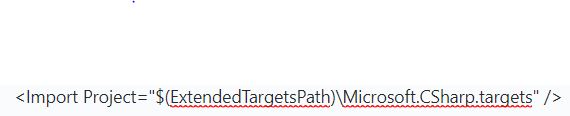
I do not want to modify my csproj file but just wanted to define ExtendedTargetsPath to point to MSBuildToolsPath. I was doing this redefinition in the registry for VS2015 and it had worked. Hence I was looking for the reg entry for VS2017.
Just now I found the solution. The solution is just add this one line in MSBuild.exe.config

Would this new information help SplatterBits for your issue.
 agvardha
on 23 Jul 2018
agvardha
on 23 Jul 2018
Related issues
 dasMulli
·
4Comments
dasMulli
·
4Comments
 vatsan-madhavan
·
3Comments
vatsan-madhavan
·
3Comments
 hubuk
·
3Comments
rainersigwald
·
3Comments
hubuk
·
3Comments
rainersigwald
·
3Comments
 dsplaisted
·
4Comments
dsplaisted
·
4Comments
Most helpful comment
This a critical issue. Previous version of Build Tools for Visual Studio 2017 was working fine but new version released recently (I suppose it follow 15.3 Visual Studio update) returns an exception
Microsoft.Build.Exceptions.InvalidProjectFileException: the tools version "15.0" is unrecognized. Available tools versions are "2.0", "3.5", "4.0".When using this code:
We have a product where we ask users to either install Visual Studio or Build Tools for Visual Studio 2017. Now if new users try to use our product they will fail to build their project because of this issue.
I tried on a fresh VM with nothing installed. It was working fine until VS 15.3 was released and now it fails.