Mremoteng: RDP doesn't respect desktop scaling
After upgrading to 1.77.0.41307 the RDP connections don't respect the desktop scaling , showing the remote desktop in 100% scaling.
Prior to this upgrade, the remote desktop connections inherit the desktop scaling.
 luisarnauth
All 6 comments
Got the same problem.
Also an option to manually scale the size would be nice for hosts that doesn't support scalling for exampe 125% , 150% , 200 % .
 2ramiro
on 4 May 2019
2ramiro
on 4 May 2019
Same problem. Also like @2ramiro suggested, would like to see manual scaling or zooming options when scaling is not properly detected.
 warmdev
on 14 May 2019
warmdev
on 14 May 2019
With 2 monitors with different scale on each - situation is more "fun" (#1438)
 7OH
on 16 May 2019
7OH
on 16 May 2019
Same problem here... kind hard if you have a 4k screen.
https://i.postimg.cc/5t3cNp6G/mremoteng.jpg
But the worst is that tryed to revert to v1.76.20 and lost all saved credentials :(
 mdio33
on 25 May 2019
mdio33
on 25 May 2019
it's very strange. But this is not working for me even in v1.76.20 :( I connect from Win7 machine with 125% dpi to various Win10 machines and all of them showing in 100% dpi :(
I began use mRemoteNG exactly because this feature, and now it's suddenly stop working :(( I use portable version, was trying 1.77.1 and clean run - no luck :( Any advise?
----UPD-----
Got it. it's stop working, if _Use Windows Xp style DPI scaling_ is checked:
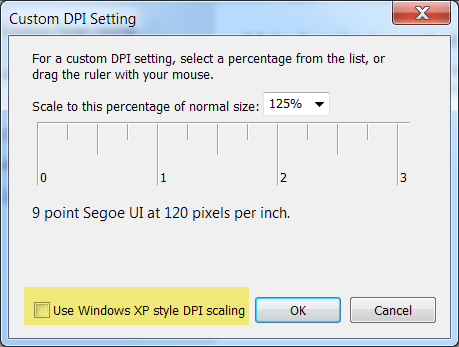
Without it v1.76.20 works well.
And I agree with all above that, manually selecting dpi per connection very needed. Native Win10Store app and JumpRDP (MacOS) have this feature...
 kirsan31
on 7 May 2020
kirsan31
on 7 May 2020
Same problem here, a fix would be very helpful.
Had to revert to 1.76.20 because 1.77 is unusable with 4k laptop
 luigirosa
on 3 Aug 2020
luigirosa
on 3 Aug 2020
Related issues
 senseof94
·
4Comments
senseof94
·
4Comments
 sparerd
·
3Comments
sparerd
·
3Comments
 luke-weller
·
4Comments
sparerd
·
3Comments
luke-weller
·
4Comments
sparerd
·
3Comments
 kmscode
·
5Comments
kmscode
·
5Comments
Most helpful comment
Got the same problem.
Also an option to manually scale the size would be nice for hosts that doesn't support scalling for exampe 125% , 150% , 200 % .