Mremoteng: Can't change inheritance on folders direclty under root Connections
On the root Connection I have enable Inherit All = yes
When I now create a new folder I can only change the name. In previous versions I was able to disable the inheritance for specific options like username, password etc. But now the Inheritance button is greyed out.
For subfolders it is not an issue only on folder directly under the root Connection.
|Detail|Value|
|--:|---|
|Operating system | Windows 10 x64 |
|mRemoteNG version| 1.75.7011.34996 |
 LIyoai
All 16 comments
It's also not posible to sort the connections anymore.
In version mRemoteNG 1.75.7000 this works fine.
 janborup
on 21 Nov 2017
janborup
on 21 Nov 2017
Im able to replicate this. When a folder is directly under the root connections node, it should have inheritance completely disabled. I'll look into this.
 sparerd
on 21 Nov 2017
sparerd
on 21 Nov 2017
I believe inheritance should be enabled when I select "Inherit All" on the root Connections.
But I should be able to disable it again on selected fields.
LIyoai
on 22 Nov 2017
It doesn't make much sense to allow items to inherit from the root connections node since no connection properties can be changed on that node.
I also re-read a line in your original post on this thread:
On the root Connection I have enable Inherit All = yes
And this should not even be possible. Since the root connection node has no parents, the inheritance button should not be available on it.
sparerd
on 22 Nov 2017
For example on the root Connections I set the default protocol RDP and Key Combination to yes.
On the first folder I disabled only username, password and domain from inheritance and configured them. And then all subfolders/hosts would inherit from the first folder which inherits its settings from the root Connections.
If I remember correct in an older version (1.72?) it was necessary to enable Inherit All on the root Connections, otherwise inheritance was not automatically set on the hosts and needed to be enabled always manually. Which was quite annoying.
LIyoai
on 22 Nov 2017
If I remember correct in an older version (1.72?) it was necessary to enable Inherit All on the root Connections, otherwise inheritance was not automatically set on the hosts and needed to be enabled always manually. Which was quite annoying.
Ahh I think you are talking about default connection inheritance, which will set the inheritance for new items. This does not change already created connections/folders. The requirement of "When a folder is directly under the root connections node, it should have inheritance completely disabled" was also the behavior in v1.72.
sparerd
on 30 Nov 2017
Resolved the bug around inheritance not being disabled when a connection/container's parent is the root node. Commit b03d355
sparerd
on 30 Nov 2017
@LIyoai I'm going to close this issue for now, but please reopen it if you think this issue is not resolved or if you have any other questions
sparerd
on 1 Dec 2017
I try to explain it on the screenshot.
In the past, I don't know when, the "Inheritance" button was available on Admin.
Now it is not available on Admin only on subfolders.

LIyoai
on 4 Dec 2017
That is the correct behavior. Setting an inheritance item on the Admin folder is saying "the Admin folder should inherit this value from its parent (Connections)". Since the Connections node is not meant to hold connection information, it doesn't make sense for its direct children to inherit values from it. Since the Admin folder does have configurable connection details, its children (Active Directory) are allowed to inherit from it.
sparerd
on 4 Dec 2017
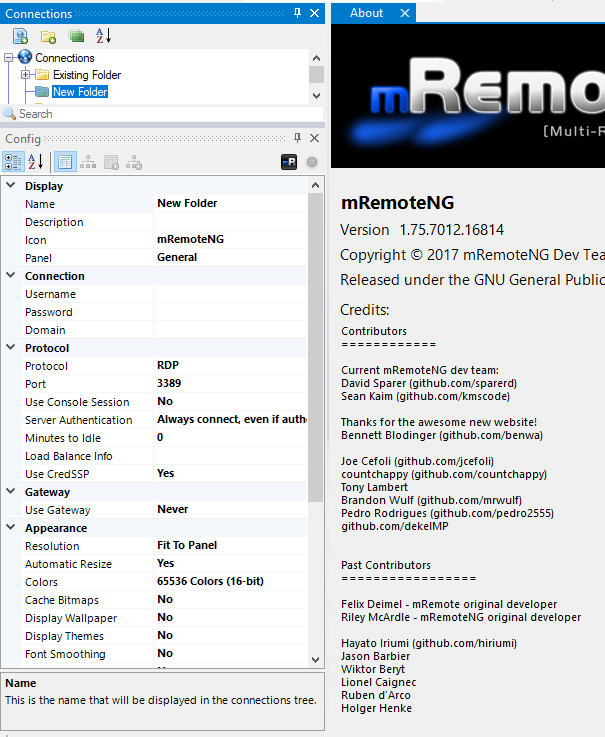
@sparerd That makes sense, but existing folders on the root are now missing fields in the config panel that had values inherited from "Connections". How do we make those fields reappear?
For clarification see the two attached screenshots of the Config of an existing folder vs a new folder. The existing folder is missing "Description", "Icon", "Panel", etc from the Config panel. They are present in the a newly created folder.

 4fd81048-Brian
on 4 Dec 2017
4fd81048-Brian
on 4 Dec 2017
That is definitely a bug, and one that the recent release (1.75.7012) was supposed to address. It may be that deserialization doesnt trigger inheritance to be disabled.
A work around would be to put that folder into another folder, then move it back under the Connections node. That should trigger the logic that turns off inheritance.
Ill keep looking into this.
sparerd
on 4 Dec 2017
The work around is working. Thank you.
LIyoai
on 5 Dec 2017
Kicking this issue forward to v1.76 since we are reaching the end of development for that version anyways
sparerd
on 20 Feb 2018
Ok, so it looks like deserialization is the culprit here. If the connections/containers are created within mRemoteNG or are moved under within the connection tree, the right thing happens. But, if connections are imported from csv/xml (or added to the confCons by hand and reloaded) with inheritance turned on, then the config window will hide the fields which have been inherited. I'll write up some tests and then figure out a fix.
sparerd
on 10 Mar 2018
Commit 5076f13 should resolve this issue. This will be available in the next v1.76 pre-release
sparerd
on 10 Mar 2018
Related issues
 archonik
·
3Comments
archonik
·
3Comments
 agiz10
·
4Comments
agiz10
·
4Comments
 nerddtvg
·
3Comments
nerddtvg
·
3Comments
 seth-c-stenzel
·
4Comments
seth-c-stenzel
·
4Comments
 Taelyn
·
4Comments
Taelyn
·
4Comments