Mremoteng: All ssh sessions opening disconnected from mRemoteNG main window
|||
|--:|---|
|Operating system | Windows 10 x64 v1703 build 15063.332 |
|mRemoteNG version| 1.75.7006.16707 |
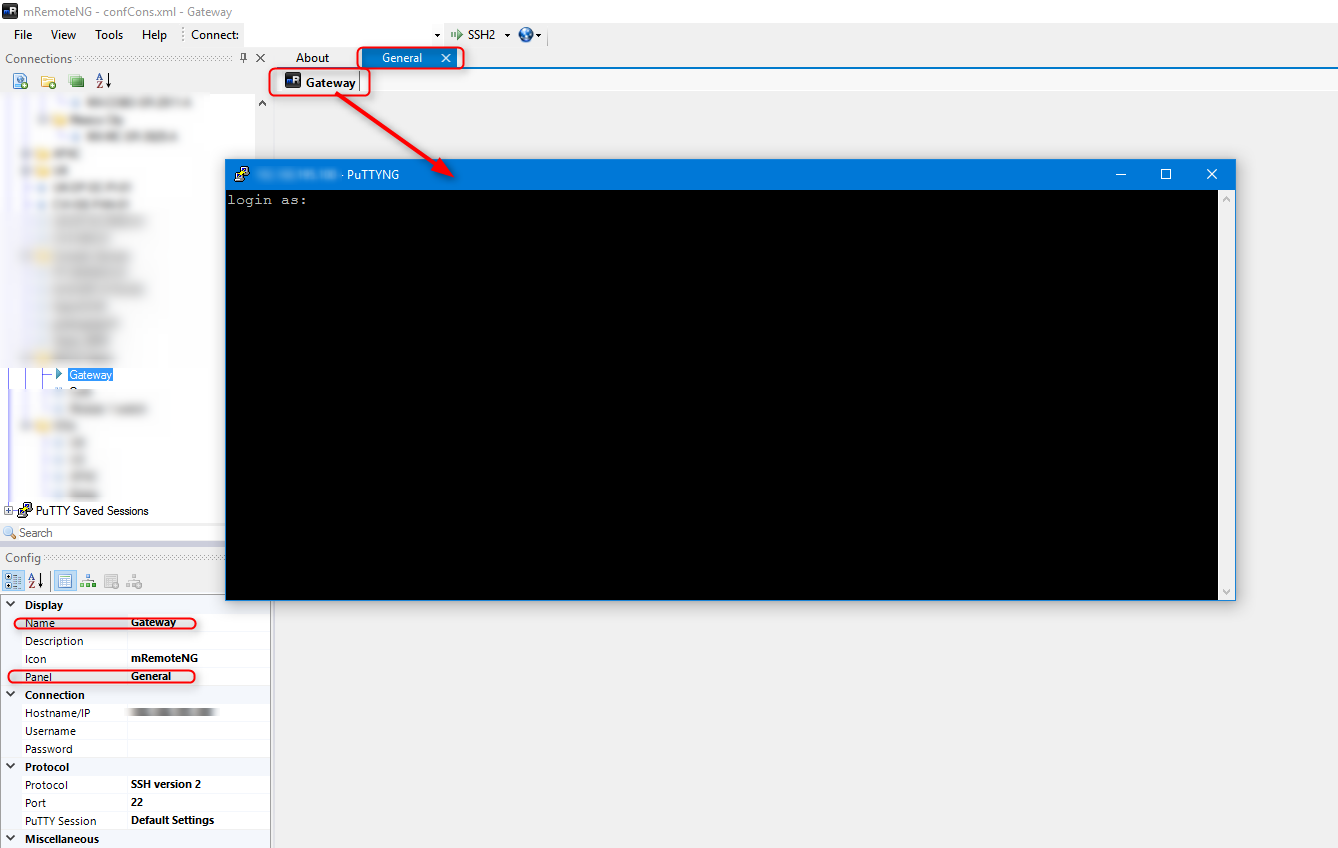
I just upgraded to this version of mRemoteNG from 7001 (or 7000 cannot recall), and upon trying to open any pre-existing ssh entry from the tree on left, the connection opens in a separate window rather than in a tab or panel like it was doing before the upgrade. See image below.

 AcousticRand
All 20 comments
I'm also seeing this behaviour after upgrading from the previous stable release to 1.75.7006.16707.
PuTTYNG identifies itself as:
PuTTYNG

Release 0.69

Build platform: 32-bit Windows
Compiler: Visual Studio 2015 / MSVC++ 14.0 (_MSC_VER=1900)
Source commit: b1829b81b5c0d12dcc91f6b50b0b4d83c3df6a8e
I'm running Microsoft Windows 10 Enterprise x64 10.0.14393 Build 14393.
 syndgr
on 13 Jun 2017
syndgr
on 13 Jun 2017
Hi, I have the same issue after updated mremote
 davidjbv
on 13 Jun 2017
davidjbv
on 13 Jun 2017
The panel opens. The connection tab is displayed. But the PuTTYNG window is not embedded in the tab.
If I close the "General" panel, it closes PuTTYNG. If I right click the connection tab ("Gateway"), I can control PuTTYNG still (e.g. "Disconnect" closes PuTTYNG).
Screenshot:
syndgr
on 13 Jun 2017
Same result here on version 1.75.7006.16707.
 walteryee
on 14 Jun 2017
walteryee
on 14 Jun 2017
Same issue here with a fresh install of version 1.75.7006.16707
 pandvan
on 14 Jun 2017
pandvan
on 14 Jun 2017
Same for me, after (manually) upgrading to version 1.75.7006.16707
 fabricat
on 14 Jun 2017
fabricat
on 14 Jun 2017
same here "1.75.7006 (2017-06-13)"
 svenruetz
on 14 Jun 2017
svenruetz
on 14 Jun 2017
Same issue after upgrading to latest 1.75.7006.16707 on Windows 7 x86 & x64.
But previous version 1.75.7005.28220 behaves ok.
 grassreaper
on 14 Jun 2017
grassreaper
on 14 Jun 2017
Downloading PuTTYNG 0.67 (from here: https://github.com/mRemoteNG/PuTTYNG/releases) and replacing the EXE in the mRemoteNG installation resolves the issue.
I also tried PuTTYNG 0.68 (from here: https://github.com/mRemoteNG/mRemoteNG/blob/69f310c02c89d3df8993f8112fbcce4a8154fa73/mRemoteV1/Resources/PuTTYNG.exe) but the same issue occurs.
Issue appears to be related to PuTTYNG versions 0.68 and 0.69 and mRemoteNG version 1.75.7006.16707.
Nota: PuTTYNG 0.69 contains an important security fix from upstream PuTTY - downgrade at your own risk, etc etc :)
syndgr
on 14 Jun 2017
Hey all - taking a look at this now
 sparerd
on 14 Jun 2017
sparerd
on 14 Jun 2017
I'm reviewing as well... Not sure why this is happening. I've been running with 0.68 and 0.69 for like a combined 2-3 months on previous builds and I didn't have this problem before flipping the switch yesterday.
Sorry everyone. We'll get this squared away ASAP.
 kmscode
on 14 Jun 2017
kmscode
on 14 Jun 2017
testing some new builds puttyng builds now that look promising.
kmscode
on 14 Jun 2017
Same issue, win 8.1.
MremoteNG 1.75.7006.16707
PuttyNG 0.69
Also of note, whatever panel you picked for that SSH session closes when you close the external putty window. So there seems to be some sort of association with the panels happening, at least =)
IMHO: this lack of functionality is a deal breaker for mremoteNG, the sole reason I have for using it is the consolidation/grouping/tabbing of all my SSH sessions into a single window/UI. Hope this is if fixed soon.
 blutgens
on 14 Jun 2017
blutgens
on 14 Jun 2017
I found a work-around. If you go to Tools > Options > Advanced. Under "Use custom PuTTY path" I navigated to the non-PuttyNG (downloaded from http://www.putty.org/) location and used that. Now all of my SSH sessions launch within mRemoteNG.
 sibernetik
on 14 Jun 2017
sibernetik
on 14 Jun 2017
Looks like the MSI build didn't pick up the new puttyng.exe binary... Looking into that now. However replacing your current puttyng.exe with this one should take care of the problem.
kmscode
on 14 Jun 2017
That worked.
On Jun 14, 2017 10:19 AM, "sibernetik" notifications@github.com wrote:
I found a work-around. If you go to Tools > Options > Advanced. Under "Use
custom PuTTY path" I navigated to the non-PuttyNG (downloaded from
http://www.putty.org/) location and used that. Now all of my SSH sessions
launch within mRemoteNG.—
You are receiving this because you commented.
Reply to this email directly, view it on GitHub
https://github.com/mRemoteNG/mRemoteNG/issues/583#issuecomment-308465286,
or mute the thread
https://github.com/notifications/unsubscribe-auth/AA6Ghj6gYNK2CgiThkKedM80IF3mm-8hks5sD_odgaJpZM4N5HHs
.
blutgens
on 14 Jun 2017
I am actually still having the issue after upgrading to 1.75.7007 (2017-06-14). Will be sticking with the work-around from above.
sibernetik
on 14 Jun 2017
That fixed it too! Thnx
On Jun 14, 2017 10:46 AM, "Sean Kaim" notifications@github.com wrote:
Looks like the MSI build didn't pick up the new puttyng.exe binary...
Looking into that now. However replacing your current puttyng.exe with this
one
https://github.com/mRemoteNG/mRemoteNG/raw/master/mRemoteV1/Resources/PuTTYNG.exe
should take care of the problem.—
You are receiving this because you commented.
Reply to this email directly, view it on GitHub
https://github.com/mRemoteNG/mRemoteNG/issues/583#issuecomment-308473419,
or mute the thread
https://github.com/notifications/unsubscribe-auth/AA6GhvziOh0Rj7KRzDAUz1vQHTd3inYOks5sEABPgaJpZM4N5HHs
.
blutgens
on 14 Jun 2017
@sibernetik the new puttyng.exe doesn't seem to have been picked up by out automated build for some reason - even though the same process builds the portable release and that was picked up properly... 😕
Looking into that further now...
kmscode
on 14 Jun 2017
By the way - I posted the original bug without even saying the following:
Fantastic software and I really appreciate your hard work and dedication! Your prompt responses on this issue just proves that dedication.
AcousticRand
on 14 Jun 2017
Related issues
sparerd
·
3Comments
 Taelyn
·
4Comments
Taelyn
·
4Comments
 agiz10
·
4Comments
agiz10
·
4Comments
 nerddtvg
·
3Comments
nerddtvg
·
3Comments
 PCNerd2001
·
3Comments
PCNerd2001
·
3Comments
Most helpful comment
By the way - I posted the original bug without even saying the following:
Fantastic software and I really appreciate your hard work and dedication! Your prompt responses on this issue just proves that dedication.