Computers using HiDPI windows scalling with non hidpi apps will blur the interface (it will scale the interface like a bitmap, not like a vector).
To add HiDPI Support, just add this to manifest file.
VS2015 already have it, just need to uncomment the section.
<assembly xmlns="urn:schemas-microsoft-com:asm.v1" manifestVersion="1.0"
          xmlns:asmv3="urn:schemas-microsoft-com:asm.v3" >
 <asmv3:application>
   <asmv3:windowsSettings xmlns="http://schemas.microsoft.com/SMI/2005/WindowsSettings">
     <dpiAware>true</dpiAware>
   </asmv3:windowsSettings>
 </asmv3:application>
</assembly>
 ghc4
ghc4
All 61 comments
nooice
 ghost
on 26 Dec 2016
ghost
on 26 Dec 2016
I know that I've tested this in mRemote3G... But I'm also thinking that it's not as simple as just uncommenting the entries in the app.manifest. For some reason I want to say that this caused some other unintended problems... I can't remember what they were of course... In any case, we'll see about doing this in the future towards the beginning of a dev cycle to flush out any bugs associated with it... Tentatively scheduled for 1.76.
 kmscode
on 26 Dec 2016
kmscode
on 26 Dec 2016
thanks. if you need help for testing, I can do it for you.
ghc4
on 26 Dec 2016
+1 (HiDPI notebooks are becoming a standard)
 balor
on 5 Jan 2017
balor
on 5 Jan 2017
+1 for hidpi, but there will be other issues. just take a look at the new problems that remote desktop connection manager had: version 2.2 was not hidpi aware, while 2.7 now is.
if not handled properly, all server 2003 or windowed 2008r2+ connections will display at native (tiny) resolution. only full screen connections to 2008r2+ will inherit local dpi scaling settings and should be fine.
this is all fine on a small surface display, but if you have a big hidpi display maybe you want to view something else besides the server screen, so full screen is not ideal. so rdcman 2.7 has two fundamental issues on hidpi: no zoom support for older operating systems and no option for dpi matching on windowed connections (but this is an issue that microsoft has to solve, too)..
 oaksboard
on 31 Jan 2017
oaksboard
on 31 Jan 2017
+1. Now it looks blurry on 4k screen.
 cuiliang
on 15 Feb 2017
cuiliang
on 15 Feb 2017
+1 2K looks blurry too
 nicozimmermann94
on 16 Feb 2017
nicozimmermann94
on 16 Feb 2017
+1
 johnarnold
on 3 Mar 2017
johnarnold
on 3 Mar 2017
+1, Pls upgrade as soon as possible as it will enhance the GUI in a great way. The workaround is to change to HighDPI in the compatibiliti settings of the exe but some of the elements in the GUI looks then a bit strange...
 BuehRe
on 20 Mar 2017
BuehRe
on 20 Mar 2017
Adding for later reference:
This article was posted to our twitter account. Not sure how useful it will ultimately be, but worth having a look once implementation starts.
 sparerd
on 4 Apr 2017
sparerd
on 4 Apr 2017
+1 for high dpi
 igordata
on 22 Apr 2017
igordata
on 22 Apr 2017
+1
 milika
on 26 Apr 2017
milika
on 26 Apr 2017
This is mouse cursor only and only after the windows 10 creators update. Main display is HiDPI laptop, but the HDMI connection, 1920 x 1080 monitor is where I have mRemoteNG and the full screen desktop. The remote host is windows 2012 R2.
The display itself is sharp and clear. If I open another remote desktop to another server FROM the 2012 R2 machine, the mouse cursor is back to normal.
 mj9652
on 29 Jun 2017
mj9652
on 29 Jun 2017
Same Issue here.
- Computer: Surface 4 Pro with HighDPI
- OS: Windows 10 10.0.15063
- mRemoteNG Version: 1.75.7008.17907
RDP Display sharp and clear, but when i enter e.g. an Editor like powershell ise or Notepad the Cursor disappears.
No Problems with Windows RDP (mstsc.exe) Client.
 eich0rn
on 30 Jun 2017
eich0rn
on 30 Jun 2017
Just dropping by to share that some Windows 10 update added options for High DPI scaling under compatibility. Selecting "System (Enhanced)" makes things look pretty good, with minimal fuzz in menus and no fuzz in SSH sessions (have not tested with others)
 Cacasapo
on 1 Jul 2017
Cacasapo
on 1 Jul 2017
@Cacasapo tried your suggestion. does not work for me. Only when i have the mremote scrren on the tablet display it works. on attached second screen still the same issue
eich0rn
on 3 Jul 2017
@eich0rn Yeah, I only have a single screen and was only dealing with the fuzzy or microscopic interface, which the workaround more or less fixed.
Cacasapo
on 3 Jul 2017
+1 - same issue as the user eich0rn listed:
Computer: Precision Mobile 5510 4k monitor
OS: Windows 10 10.0.15063
mRemoteNG Version: 1.75.7008.17907
RDP Display sharp and clear, but when i enter e.g. an Editor like powershell ise or Notepad the Cursor disappears.
No Problems with Windows RDP (mstsc.exe) Client.
 ravirxz
on 5 Jul 2017
ravirxz
on 5 Jul 2017
+1 - Issue on all "newer" Macs as they have high resolutions and need DPI scaling.
 buzzy
on 22 Oct 2017
buzzy
on 22 Oct 2017
+1 for mouse disappearing in editor windows with white space. I love this tool too much to leave just because of this. Please help!!!
ravirxz
on 18 Jan 2018
+1,
All the texts in mRemoteNG and RDP sessions look vague and unclear. I'm using a 4K resolution monitor.
 tifosi1988
on 16 Mar 2018
tifosi1988
on 16 Mar 2018
+1
 bereldhuin
on 20 Mar 2018
bereldhuin
on 20 Mar 2018
If I use mstsc than my mouse appears as it should.
Via mRemoteNG my mouse is not shown in for example Management Studio.
Hopefully this can be fixed soon (it's been bothering me for over a year now)
 fmientjes
on 30 Mar 2018
fmientjes
on 30 Mar 2018
I know this is a pretty important bug/enhancement for a lot of you. I thought we would be able to get this into v1.76 but so far it has not worked out. I am going to move this issue to v1.77 so we can at least release v1.76 with what is currently available. This will be a top issue for v1.77
sparerd
on 26 May 2018
Following solution worked for me with mRemoteNG 1.76
Right click on mRemoteNg.exe in explorer -> properties -> compatibility tab -> Change high DPI setting -> check Override high DPI scaling behaviour, Scaling perfomed by: Application
 slobokot
on 14 Aug 2018
slobokot
on 14 Aug 2018
This solution does not work - and in turn it makes the entire display bad. The reason why I was using this application was that on a 4k monitor it would enhance the RDP session so everything is human readable. But changing the display settings as suggested by slobokot makes it hard to read and it does not resolve the mouse disappearing issue either. I hope there is a fix for this soon.
ravirxz
on 23 Aug 2018
This solution did not work for me either. It actually makes it worse. Is there further development or fixes occurring for this product? I have had to abandon it and use MS RDP.
mj9652
on 23 Aug 2018
Same here. :-(
eich0rn
on 23 Aug 2018
Yes, though I'm not able to get updates out as fast as I'd like. We actually had another alpha release last night.
There is a little good news for HiDPI support. I haven't had a HiDPI screen to develop with, which makes testing any sort of fix difficult. I recently ordered a new laptop and made sure to get a HiDPI screen for this issue. Beginning of next month I should be able to start on this.
sparerd
on 23 Aug 2018
I've taken a small look into the hidpi scaling issue and how we can fix it. The summary is that WinForms does not have great support for implementing scaling.
We will need to look at scaling issues for individual controls and fix each as they come up. Here are the main things I've found so far:
- Every icon and image will need scaling. We might need higher resolution icons or vector graphics.
- The quick connect and external tools toolbars have an incorrect height applied.
- Layouts need to be redone using table layout panels in many windows (component check, external tools, ssh file transfer, port scan, some Options pages, about page, updates page, help pages, most of the dialog windows)
Some resources I've found helpful so far:
- https://stackoverflow.com/questions/4075802/creating-a-dpi-aware-application
- https://stackoverflow.com/questions/26073635/windows-forms-dpi-scaling
- https://www.telerik.com/blogs/winforms-scaling-at-large-dpi-settings-is-it-even-possible-
Need to be aware of this bug in table layout panels:
sparerd
on 1 Sep 2018
Some updates:
- Adding
<add key="EnableWindowsFormsHighDpiAutoResizing" value="true" />to app.config took care of image scaling. - The quick connect and ext. tools toolbars had a max size of 25px set. Removing that allows them to scale appropriately.
sparerd
on 3 Sep 2018
Thank you for working on this!! Would this also fix the issue with the
mouse cursor disappearing on a white background?
Thank you,
On Sun, Sep 2, 2018 at 6:27 PM David Sparer notifications@github.com
wrote:
Some updates:
- Adding
/> to app.config took care of image scaling. - The quick connect and ext. tools toolbars had a max size of 25px
set. Removing that allows them to scale appropriately.—
You are receiving this because you commented.
Reply to this email directly, view it on GitHub
https://github.com/mRemoteNG/mRemoteNG/issues/321#issuecomment-417964161,
or mute the thread
https://github.com/notifications/unsubscribe-auth/Acdi3Rf8Z1jVK20Hi1wbRc5ZREiJEbXhks5uXFs6gaJpZM4LV2LD
.>
~rAvi...
'Give or Take, Its always learning both ways'
ravirxz
on 3 Sep 2018
@ravirxz It's likely to help, but not guaranteed. I'll need to test it myself to see if we need to do anything special with the RDP library to tell it when we are scaling. We should be able to fix it either way though, It's just whether it will be more work or if we will fix that issue for "free". (Reference #532 for mouse cursor disappearing bug)
sparerd
on 3 Sep 2018
This post is also very helpful when troubleshooting: https://stackoverflow.com/questions/22735174/how-to-write-winforms-code-that-auto-scales-to-system-font-and-dpi-settings#29766847
sparerd
on 3 Sep 2018
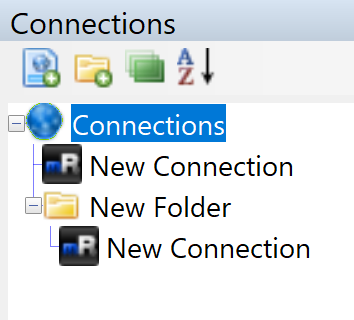
The connection tree is proving difficult to correctly scale. Images can scale correctly with some coercion, but spacing, expand buttons, and the pipe graphics connecting parents/children. It fairly minor, so I'll move on and come back to this later. Worst case we will need to completely override the rendering of the control.
sparerd
on 3 Sep 2018
Hi David,
I am willing to pay for this software if that is what it takes. Honestly I
like your software too much to let it go. And I am sure there a lot of
people like me who would pay for this software.
Thank you again for all your work!!!
Regards,
Ravi
On Sun, Sep 2, 2018 at 6:48 PM David Sparer notifications@github.com
wrote:
@ravirxz https://github.com/ravirxz It's likely to help, but not
guaranteed. I'll need to test it myself to see if we need to do anything
special with the RDP library to tell it when we are scaling. We should be
able to fix it either way though, It's just whether it will be more work or
if we will fix that issue for "free". (Reference #532
https://github.com/mRemoteNG/mRemoteNG/issues/532 for mouse cursor
disappearing bug)—
You are receiving this because you were mentioned.Reply to this email directly, view it on GitHub
https://github.com/mRemoteNG/mRemoteNG/issues/321#issuecomment-417965250,
or mute the thread
https://github.com/notifications/unsubscribe-auth/Acdi3XuA-lh2uRC4iDb3m3rWaNT-O11Nks5uXGA5gaJpZM4LV2LD
.>
~rAvi...
'Give or Take, Its always learning both ways'
ravirxz
on 3 Sep 2018
Guys! I am surprised to see so many of you claiming that you stick to Windows just for this program. What exactly is missing in the application "Royal TS" that makes you stick to mRemoteNG? Sure, it's not open source, but it works on Windows, Linux and OS X. And it supports tunneling connections through an SSH server which is a pretty big thing not even mRemoteNG can do.
buzzy
on 3 Sep 2018
@buzzy it has the same issue on high dpi :-D even the mouse disappearing problem is the same ;-)
eich0rn
on 3 Sep 2018
@eich0m Ok. Works fine on my Macbook Pro.
buzzy
on 4 Sep 2018
@buzzy - also I don’t have the luxury to use my own device at work. So
stuck with Windows and a device provided that has a 4K res. I really need
this to work.
On Mon, Sep 3, 2018 at 8:03 PM buzzy notifications@github.com wrote:
@eich0m Ok. Works fine on my Macbook Pro.
—
You are receiving this because you were mentioned.
Reply to this email directly, view it on GitHub
https://github.com/mRemoteNG/mRemoteNG/issues/321#issuecomment-418207589,
or mute the thread
https://github.com/notifications/unsubscribe-auth/Acdi3UPdLxBnnueSDooh8vXzsT-jf-Twks5uXcNpgaJpZM4LV2LD
.>
~rAvi...
'Give or Take, Its always learning both ways'
ravirxz
on 4 Sep 2018
I think most of the scaling issues are resolved now. There are probably some minor things that I've missed, but we can address those as they come up.
sparerd
on 23 Sep 2018
I've had issues getting RDP connections to scale properly. This thread hints at a hidden RDP property that can be set with extended properties: https://social.msdn.microsoft.com/Forums/sqlserver/en-US/93cb63d8-b4ff-40dd-8d11-66867db6258f/rdp-activex-and-restrictedadminmode?forum=winforms
sparerd
on 11 Oct 2018
I did a bit of research on the mstscax dll today and found a property that seems promising: DesktopScaleFactor. I've been able to read the property, but any attempts to set the property so far have failed. It seems to require a ULONG value, but I can't be completely sure of that. It might also just be a pointer to a struct (which would make sense since scaling factors usually have a width & height, like SizeF).
I've created a page to document some of what I've found in the DLL: https://github.com/mRemoteNG/mRemoteNG/wiki/MSTSCAX-Properties. Many of the settings are available in the .Net interop wrapper that we use, but some are not. I'll try to keep it updated with what I find.
sparerd
on 21 Oct 2018
Ok, seems DesktopScaleFactor does have to have a struct provided to it. Here are the results of passing the property several different types:
- ULONG throws
HRESULT E_FAIL - SizeF (class) throws
HRESULT E_FAIL - System.Windows.Size (struct) throws
Value does not fall within the expected range - Color (struct) throws
Value does not fall within the expected range. This at least confirms it wants a struct type, though I'm not sure the layout of the struct it expects. - Custom struct type still throws
Value does not fall within the expected range. Tried calling it with a scaling factor like (2, 2) and with a desktop resolution like (3840, 2160).
private struct ScaleFactor
{
    public ulong dX;
    public ulong dY;

    public ScaleFactor(ulong dx, ulong dy)
    {
        dX = dx;
        dY = dy;
    }
}
I am able to retrieve the current value in the DesktopScaleFactor property, but it always returns 0 (zero). At first I thought this might be a literal ULONG 0 value, but now it is more likely just a null pointer.
Without more advanced decompiling it might be impossible to tell what struct layout this property is expecting. I'm also not sure if this has a dependency on another property too. We may have to set another property to a certain value before this one is allowed to be set.
@kmscode I know you are better with C/C++ than I am, would you be able to take a look or do you have any sleuthing tips for how to investigate this further?
sparerd
on 21 Oct 2018
I was able to find at least one usage of the scaling factor. I can't be 100% sure it takes the same struct type as the property, but it is likely given the argument naming is identical. If we can infer the types of each argument, I might be able to find the method in the disassembly based on the method signature.
RDPEmulationMonitors(
monitorId,  <- int?
LeftCoordinate,  <- int?
TopCoordinate,  <- int?
width,  <- int?
height,  <- int?
physicalWidth,  <- int?
physicalHeight,  <- int?
orientation,  <- struct or int?
desktopScaleFactor,  <- struct?
modernScaleFactor,  <- struct?
flags  <- int?
)
Based on some FreeRdp code, it looks like the DesktopScaleFactor needs to be an int between 100 and 500 indicating the percentage of scaling.
CommandLineSwitchCase(arg, "scale-desktop")
{
    unsigned long desktopScaleFactor = strtoul(arg->Value, NULL, 0);

    if (errno != 0)
        return COMMAND_LINE_ERROR_UNEXPECTED_VALUE;

    if (desktopScaleFactor >= 100 && desktopScaleFactor <= 500)
    {
        settings->DesktopScaleFactor = desktopScaleFactor;
    }
    else
    {
        WLog_ERR(TAG, "scale:  invalid desktop scale factor (%d)", desktopScaleFactor);
        return COMMAND_LINE_ERROR;
    }
}
The final piece of the puzzle came from the RDP protocol specs. RDP connections now properly scale. I think this is the last major piece of the HiDPI feature that needed to be completed.
https://msdn.microsoft.com/en-us/library/dn393534.aspx
Specifically:
DesktopScaleFactor (4 bytes): A 32-bit, unsigned integer that specifies the desktop scale factor of the monitor. This value MUST be ignored if it is less than 100 percent or greater than 500 percent, or if DeviceScaleFactor is not 100 percent, 140 percent, or 180 percent.
DeviceScaleFactor (4 bytes): A 32-bit, unsigned integer that specifies the device scale factor of the monitor. This value MUST be ignored if it is not set to 100 percent, 140 percent, or 180 percent or if DesktopScaleFactor is less than 100 percent or greater than 500 percent.<1>
- Set DesktopScaleFactor to the proper unsigned int scale percentage (between 100 and 500)
- Set DeviceScaleFactor to unsigned int 100 (not sure what 140 or 180 would do)
sparerd
on 27 Oct 2018
This was quite a bit of work, but HiDPI is done! 🍾 🎉
It will be available in the first v1.77 alpha release (with hopefully few bugs).
sparerd
on 8 Nov 2018
Thank you @sparerd! I don't mean to rush anything, but is there a rough timeline for the 1.77 alpha (eg. expected by next week, or next month, or next 3 months)?
 Daniel15
on 29 Nov 2018
Daniel15
on 29 Nov 2018
I would say ~month is reasonable. Hopefully before the end of the year I can get the first alpha out.
sparerd
on 4 Dec 2018
Hi,
Just following up on your last email on the Alpha release. Has there been
any updated kit or was there a new release date? Very desperately waiting
for this kit.
Thank you!!
On Tue, Dec 4, 2018 at 4:26 PM David Sparer notifications@github.com
wrote:
I would say ~month is reasonable. Hopefully before the end of the year I
can get the first alpha out.—
You are receiving this because you were mentioned.
Reply to this email directly, view it on GitHub
https://github.com/mRemoteNG/mRemoteNG/issues/321#issuecomment-444264390,
or mute the thread
https://github.com/notifications/unsubscribe-auth/Acdi3cxaSkBkqXnvO19plywSmU11MXX8ks5u1uiIgaJpZM4LV2LD
.
--
~rAvi...
'Give or Take, Its always learning both ways'
ravirxz
on 15 Feb 2019
@ravirxz - discussed this with @sparerd
We should be able to get a 1.77 alpha out by the end of February.
It's currently very stable, but we wanted to just clean up a few things before getting to that type of milestone. It's not feature complete for the full 1.77, but what is complete is solid save for a few remaining bugs that shouldn't be a major impact in an alpha.
Thanks for your patience and following up!
kmscode
on 15 Feb 2019
I just installed 1.77. Is this working for anyone? I'm on a high-dpi screen with 150% scale. The mRemoteNg UI looks scaled fine, but the remote RDP session is not scaling at all in windowed or fullscreen. It scales with the native RDP client in fullscreen mode.
 wpbrown
on 14 May 2019
wpbrown
on 14 May 2019
I just installed 1.77. Is this working for anyone? I'm on a high-dpi screen with 150% scale. The mRemoteNg UI looks scaled fine, but the remote RDP session is not scaling at all in windowed or fullscreen. It scales with the native RDP client in fullscreen mode.
same issue here, remote session does not scale
 StodaraHodan
on 28 Aug 2019
StodaraHodan
on 28 Aug 2019
Still the whole app looks fuzzy/blurry on my 4K screen. Any fixes so far?
 nightrider77
on 25 Nov 2019
nightrider77
on 25 Nov 2019
+1
 MISTADOBALINA
on 17 Dec 2019
MISTADOBALINA
on 17 Dec 2019
+1
 superjim02
on 22 Dec 2019
superjim02
on 22 Dec 2019
Any plan for 1.77 to come out of alpha? Currently the latest stable is still 1.76 after 1+ years.
 changbowen
on 8 Apr 2020
changbowen
on 8 Apr 2020
+1
bereldhuin
on 15 Jun 2020
+1 Need that hiDPI!!!
 mcdonamw
on 25 Jul 2020
mcdonamw
on 25 Jul 2020
+1
 neonVoice
on 26 Sep 2020
neonVoice
on 26 Sep 2020
Related issues
kmscode
·
5Comments
sparerd
·
4Comments
 mmcnay
·
4Comments
mmcnay
·
4Comments
 agiz10
·
4Comments
agiz10
·
4Comments
 senseof94
·
4Comments
senseof94
·
4Comments
Most helpful comment
This was quite a bit of work, but HiDPI is done! 🍾 🎉
It will be available in the first v1.77 alpha release (with hopefully few bugs).