Mpandroidchart: How to programmatically select values in PieChart?
hi ,
i have a listview. i want click on item of listview then selected section of piechart.
how can i do?
Regards fatemeh
 fatemeh2sh
All 11 comments
i down it.....:-)
fatemeh2sh
on 26 Nov 2014
You can use the method public void highlightValues(Highlight[] highs) to highlight values.
Example
Highlight h = new Highlight(x-index, dataSetIndex); // dataset index for piechart is always 0
chart.highlightValues(new Highlight[] { h });
 PhilJay
on 26 Nov 2014
PhilJay
on 26 Nov 2014
@PhilJay
Thanks alot
fatemeh2sh
on 26 Nov 2014
I try this, but it not trigger OnChartValueSelectedListener() , what should I do ? @PhilJay
 smile21
on 30 Dec 2014
smile21
on 30 Dec 2014
If you want to trigger the listener, call highlightTouch(...)
PhilJay
on 30 Dec 2014
@PhilJay
Hi!
I click a value on the graph and it gets selected. When I then call highlightValues(...) or highlightTouch(...) it gets deselected, but the next click on the graphic is ignored. It looks like it's waiting for that click to deselect the value...
Is there a way around this behavior?
Thanks!
 Manhazito
on 29 May 2015
Manhazito
on 29 May 2015
@Manhazito Hi !
Did you find the solution ?
I have the same problem ... I still need to click twice on the slice to re-select it ...
thx
 jeanbaptisteODE
on 29 Apr 2017
jeanbaptisteODE
on 29 Apr 2017
@jeanbaptisteODE
I did not! :-/
Manhazito
on 30 Apr 2017
@jeanbaptisteODE
@Manhazito
mChart.highlightValue(null); worked for me
 IvanSimovic
on 4 May 2017
IvanSimovic
on 4 May 2017
Hello Everyone,
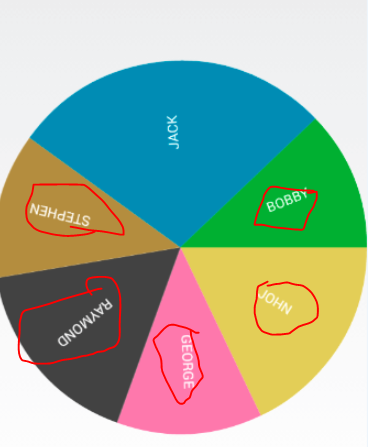
How to set text format in Reverse like in circle wise,Please check attached image i want to set text like this in app using MPchart Lib in android.
 anilthummar
on 28 Mar 2018
anilthummar
on 28 Mar 2018
I leave a comment for you guys.
I could call onValueSelected() in my RecyclerView Adapter.
pieChart.highlightValue(highlight, true);
 @Override
    public void onBindViewHolder(ViewHolder holder, int position) {

        holder.rl_root.setOnClickListener(new View.OnClickListener() {
            @Override
            public void onClick(View v) {
                Highlight highlight = new Highlight((float)position, 0.0f, 0);
                //pieChart.highlightValue(highlight); //doesn't call onValueSelected()
                pieChart.highlightValue(highlight, true); //call onValueSelected()
            }
        });

    }
 mazend
on 4 Oct 2019
mazend
on 4 Oct 2019
Related issues
 jaredsburrows
·
21Comments
jaredsburrows
·
21Comments
 enginebai
·
14Comments
enginebai
·
14Comments
 Shadie6
·
31Comments
Shadie6
·
31Comments
 onyame
·
116Comments
onyame
·
116Comments
 hongsonitptit
·
22Comments
hongsonitptit
·
22Comments
Most helpful comment
You can use the method
public void highlightValues(Highlight[] highs)to highlight values.Example