Moveit: RViz broken Interactive Marker in "Scene Objects" Tab
The MotionPlanning panel provides a tab called "Scene Objects" that can be used to move objects in the PlanningScene maintained by move_group.
In order to do so, the user chooses one of the objects in the scene from the list on the left and an interactive marker appears that can be used to move the object.

However, this marker has a few issues:
- [ ] If the user disables and reenables the MotionPlanning display (the panel disappears and reappears too), suddenly a (fixed-size?) coordinate system and some black lines, that jump around when the camera is moved, appear. Neither of them should be there:
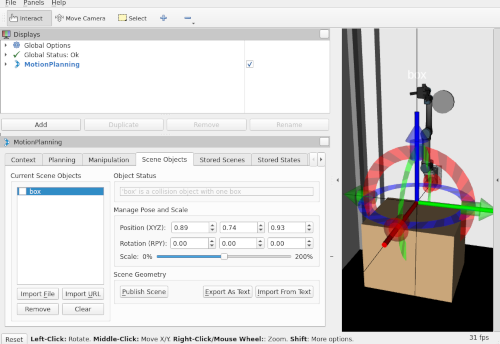
- [ ] The scale of the marker is independent of the size of the CollisionObject. It appears to big for small objects and can be hidden by big objects:
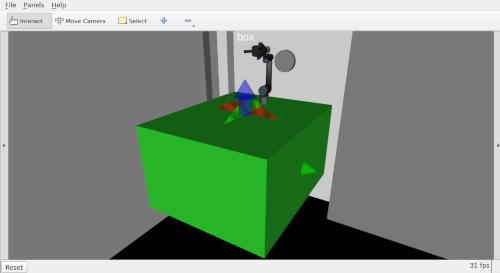
- [ ] The coupling between the Marker and the MotionPlanning display seems to be insufficient. When RViz additionally contains an PlanningScene this can result in glitches where the Marker becomes active even when the MotionPlanning display is disabled:
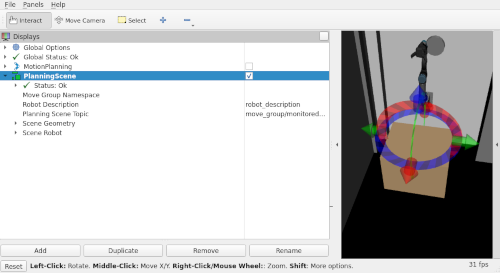
To reproduce (does not necessarily happen every time):
- add a MotionPlanning and a PlanningScene display to RViz
- disable the PlanningScene display
- select the "Scene Objects" tab in the Motion Planning Panel and select an object from the list
-> an interactive marker appears - disable the MotionPlanning display
-> the marker disappears - enable the PlanningScene display
-> sometimes the marker reappears
These are partially overlapping issues, but probably warrant different pull-requests.
Your environment
- ROS Distro: Kinetic
- OS Version: Lunar-Linux / similar on Ubuntu
- Source or Binary build? Both
 v4hn
v4hn
All 7 comments
@v4hn
I'm trying to reproduce the same error.
Especially for the first error, the situation is a little bit different.
f the user disables and reenables the MotionPlanning display (the panel disappears and reappears too), suddenly a (fixed-size?) coordinate system and some black lines, that jump around when the camera is moved, appear. Neither of them should be there:
I did the same procedure, and I got following...
- When I re-enable the MotionPlanning Display, "the black coordinate line" will appear.
- But, a few seconds later, when the program seems to finish the loading of scene file, the black line will disappear.
You can check the movie from the following link.
https://goodroad.work/owncloud/index.php/s/axTUkfn38Kmnvup
https://goodroad.work/owncloud/index.php/s/wapMmKR3ops8hcP
Also, my environment is following.
| | |
|---|---|
|OS| Ubuntu 16.04 LTS|
|Kernel| 4.15.0-36-generic|
|ROS|Kinetic|
|Moveit!|Build from source code. The division is 8620ed73c0681febed279c7f20a180ea8c09a1a6 (the latest version of kinetic-devel branch) |
Is this bug already fixed ?
Thank you forward.
Best regards.
From World Moveit! day Tokyo.
 RyodoTanaka
on 26 Oct 2018
RyodoTanaka
on 26 Oct 2018
@v4hn
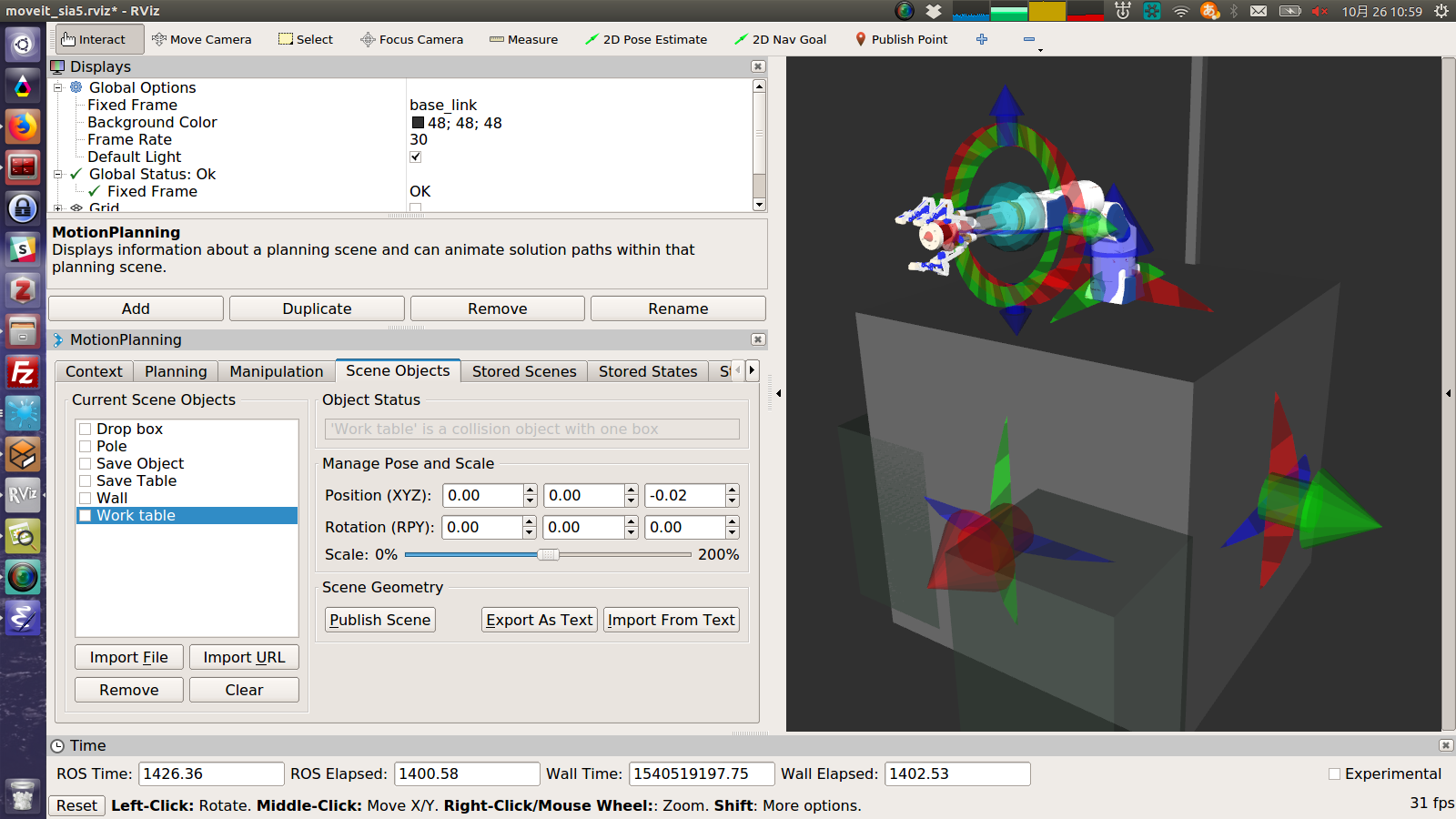
The second one, I could reproduce it.
RyodoTanaka
on 26 Oct 2018
@v4hn
The third one, I also reproduced it.
When the moment of disable MotionPlanning Display, the error looks not occurred. But the few seconds later the same error will occurred like following video.
https://goodroad.work/owncloud/index.php/s/fPm3ilzMl9ank6w
RyodoTanaka
on 26 Oct 2018
@v4hn
Now, I partly fixed the second error ( the scale problem ).
The following video shows the result.
https://goodroad.work/owncloud/index.php/s/b8tLw8wWSGIb17k
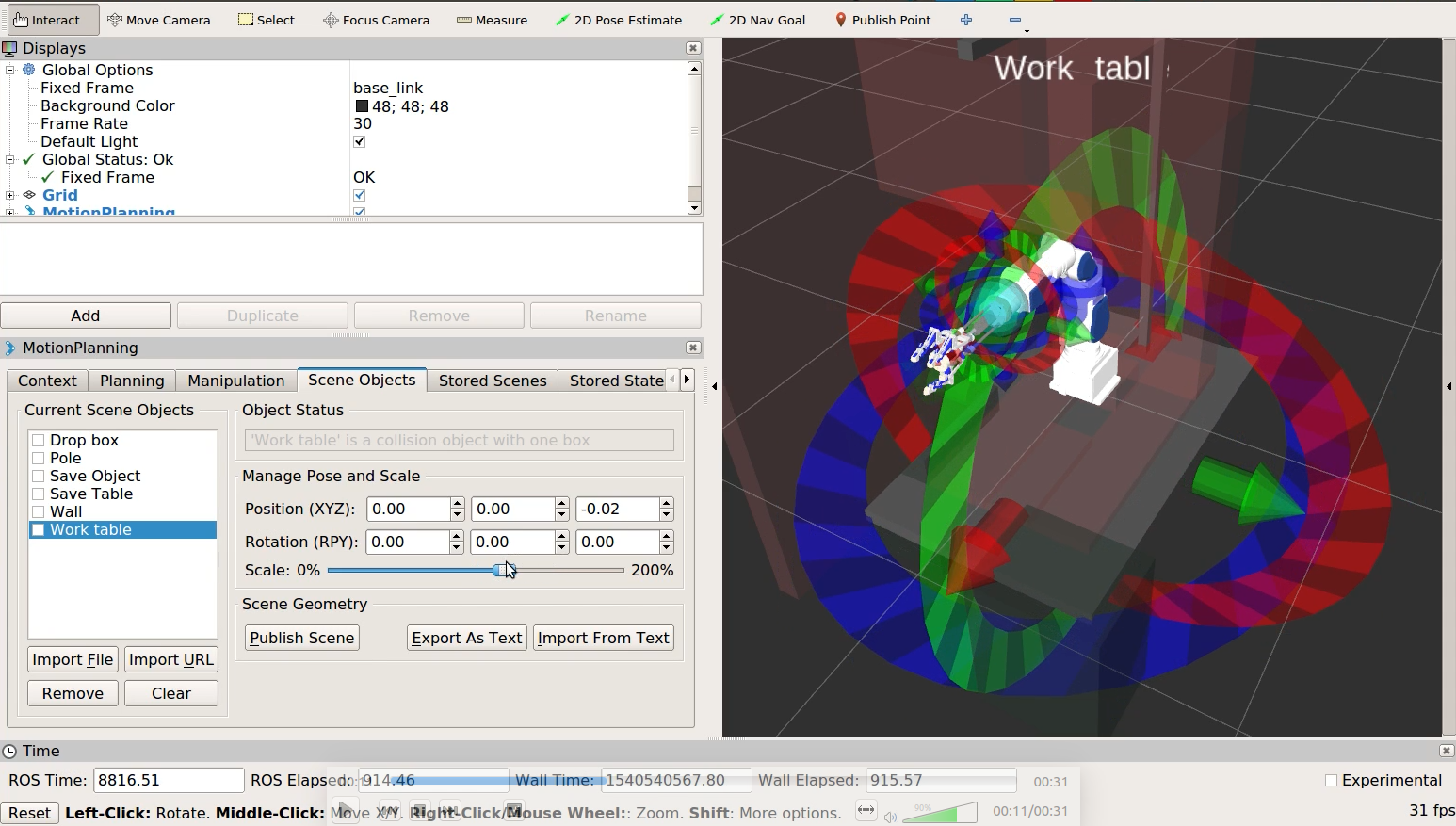

Only just the rotating marker scale will change dynamically depending on the size of object.
Now, I am trying to implement not only the rotate marker but also the position marker.
RyodoTanaka
on 26 Oct 2018
@RyodoTanaka What became of your attempts here?
I will add the WMD label, as I'm not aware of upstream fixes for any of the mentioned problems.
If anyone wants to look into this, it makes sense to reproduce and work on a fix for one of these issues only and file a pull-request.
v4hn
on 15 Nov 2019
@v4hn
I am sorry, I do not complete fixing.
On the next WMD2019 in Tokyo, I will address to this.
Sorry again for so late fixing.
Best Regards.
RyodoTanaka
on 15 Nov 2019
@v4hn
Sorry for late correspondence.
I fixed this issue, and opend the PR for master and melodic-devel branches.
Best Regards.
RyodoTanaka
on 1 Dec 2019
Related issues
 rickstaa
·
4Comments
v4hn
·
8Comments
rickstaa
·
4Comments
v4hn
·
8Comments
 giusebar
·
5Comments
giusebar
·
5Comments
 SammyRamone
·
3Comments
SammyRamone
·
3Comments
 rhaschke
·
7Comments
rhaschke
·
7Comments
Most helpful comment
@v4hn
Sorry for late correspondence.
I fixed this issue, and opend the PR for master and melodic-devel branches.
Best Regards.