Moveable: ngx-movable scrolling issue
Environments
- Framework name: Angular
- Framework version: v8
- Moveable Component version: 0.5.5-rc
- Testable Address(optional):
Description
Hi,
Thanks for your amazing component.
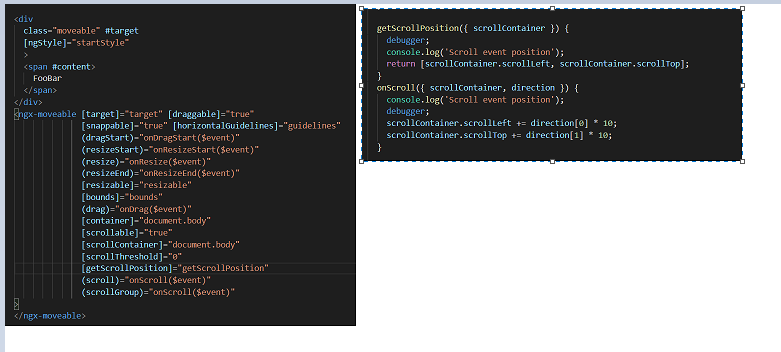
Now, I am using ngx-movable, I have scrolling issue, but I don't know how can I fix it.
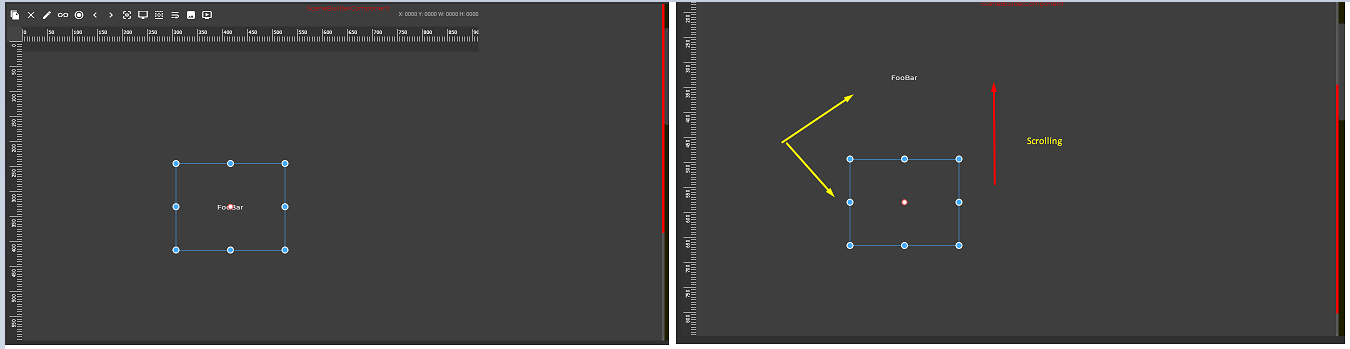
Whenever mouse scrolling, target and border is separated.
I used scrolling props, but it works nothing.
I am really glad if you let me know about it.
Thanks.
 Xumochuan
All 7 comments
@Xumochuan
I don't know why. Do you want to update?
It is now 0.9.4.
 daybrush
on 29 Jan 2020
daybrush
on 29 Jan 2020
Hi, @daybrush
Thanks so much for your support.
I have updated ngx-moveable #0.9.4.
But when I mouse scrolling, target and ball is still separated. Only target is scrolled, but blue-balls are not moved.
Please look at this image.

Hope your kind contact again.
Many thanks
Xumochuan
on 29 Jan 2020
@Xumochuan
remove container props.
daybrush
on 29 Jan 2020
Hi, @daybrush
Thanks for your reply.
I have tried, but same as.
When scrolling, target and border is separated.
Hope your kind solution.
Thanks
Xumochuan
on 31 Jan 2020
@Xumochuan
Oh right. The default value was added to document.body.
Set the container to your app
constructor(elRef: ElementRef) {}

<ngx-moveable
      #moveable
      [container]="elRef.nativeElement" />
Hi, @daybrush
Really Thanks. I have solved issue.
This is know-how technology.
At first, moveable object was created in body (out of app-root), but now it is created in
nativeElement
elRef: any;
constructor(private elementRef: ElementRef) { elRef= elementRef}

<ngx-moveable
      #moveable
      [container]="elRef.nativeElement" />
Thanks for your kind suggestion.
A+++++++!
Xumochuan
on 31 Jan 2020
hi ,
I am using this library its working fine in local but in production build i am facing issue.
any idea how to resolve the null issues
ERROR TypeError: this.moveable is undefined
kindly help
 maheshts
on 5 Oct 2020
maheshts
on 5 Oct 2020
Related issues
 pistell
·
4Comments
pistell
·
4Comments
 tesmem101
·
3Comments
tesmem101
·
3Comments
 ajinkya-dev
·
3Comments
ajinkya-dev
·
3Comments
 copthuy
·
4Comments
copthuy
·
4Comments
 probil
·
4Comments
probil
·
4Comments
Most helpful comment
@Xumochuan
Oh right. The default value was added to document.body.
Set the container to your app