Motioneyeos: Feature Request - Enable / Disable Motion detection by Mobile connected over WLan?
Hi ccrisan,
ok, there are many issues to this wish, but perhaps (I don't know this) this idea is easy progammable (for you) and include an automatic login and logout. Perhaps it is possible for someone to write a script/cronjob that can make this job?
Would it be possible to check by motioneyeos on the WLan-router if a (or two) mobile is logged in? I think most people who use your system have a mobile an use it at home over wlan. So if someone come home the mobile log into the wlan automaticly. The motioneyeos should then deactivate motiondetection. If someone turn off the mobile or leave the house/flat the router will loose the connection to the mobile an motioneyeos should then activate motiondetection.
Michael
 CampoES
All 13 comments
EDIT:
with this small shell-script I can check if a mobile with fixed IP is logged in:
`#!/bin/bash
if echo $(ping -c 1 192.168.1.xx) | grep Unreachable &>/dev/null; # Mobile
then echo "activate Motioneyeos.";
else echo "deactivate Motioneyeos";
fi`
But how can I toggle motion detection? Is there a way?
CampoES
on 24 Jan 2017
EDIT 2:
can I do that this way:
`#!/bin/bash
if echo $(ping -c 1 192.168.1.xx) | grep Unreachable &>/dev/null; # Mobile
then motion -c /data/etc/motion.conf; # activate motion
else if test -f /tmp/motion.pid; then kill $(cat /tmp/motion.pid); fi; # deactivate motion
fi`
CampoES
on 24 Jan 2017
https://github.com/ccrisan/motioneyeos/issues/464
I played around for a while but never got it to work as I'm woefully deficient in programing. If you figure it out please post. I'd really like to make it work.
 snagglewest
on 27 Jan 2017
snagglewest
on 27 Jan 2017
Hi snagglewest,
there is a solution for "normal" Linux-systems: see issue #203.
I changed some parts for my motioneyeos on rasp pi3+ like this an it works (comments are in german). The script is called every x minutes over a cronjob:
`#!/bin/bash
#
#
MotioneyeOS CiudadDE durch Anwesenheit/Abwesenheit eines eingeschalteten Mobiltelefon aktivieren/deaktivieren
#
#
Mobile_IPs=("192.168.x.xx" "192.168.x.xx"); # Mobile numbers
Mobile_present=0;
for Mobile in "${Mobile_IPs[@]}"
do
ping -c 1 $Mobile &>/dev/null && Mobile_present=1
done
if test -e /tmp/motioneye.pid; # läuft Motioneye?
then # ja, Motioneye läuft bereits
if [[ $Mobile_present -eq 1 ]]; # Mobile at home?
then # ja
/bin/bash /etc/init.d/S85motioneye stop; # dann Motioneye stoppen
fi
else # nein, Motioneye läuft nicht
if [[ $Mobile_present -eq 0 ]]; # Mobile at home?
then # nein
/bin/bash /etc/init.d/S85motioneye start; # dann Motioneye starten
fi
fi
`
Hope this helps you too.
Michael
CampoES
on 28 Jan 2017
I did a lot of testing on another system trying to detect if my phone (iOS) is connected or not to the network. In my case, it was always terrible due to the phone entering a sleep mode.
My solution was to use Bluetooth instead. I was actually really impressed on how reliable it is. This would be a nice feature to integrate to motioneye.
 nicolasbisi
on 15 Mar 2017
nicolasbisi
on 15 Mar 2017
Closing this issue due to interest. If still interested please post your question in the forum page.
 bortek
on 1 Jun 2017
bortek
on 1 Jun 2017
If anyone is looking for this, I was able to build on the above (thanks @CampoES ) and turn on motion detection only when I'm not home. I didn't want to turn the entire system off because it has other cameras running through it that I want to keep running.
First I made an action button containing the following script:
#!/bin/bash
Mobile_IPs=("YOUR.PHONES.IP.ADDRESS"); # Mobile numbers
Mobile_present=0;
for Mobile in "${Mobile_IPs[@]}"
do
ping -c 1 $Mobile &>/dev/null && Mobile_present=1
done
if test -e /tmp/motioneye.pid;
then # yes
# in case this is a transition turn the motion detection on or off
motion_key="@motion_detection"
config_file="/data/etc/thread-1.conf"
if [[ $Mobile_present -eq 1 ]]; # Mobile at home?
then # yes
#debug echo "You are at home"
sed -i 's/@motion_detection on/@motion_detection off/g' $config_file
../../sbin/reboot
else # no
#debug echo "You are away from home"
sed -i 's/@motion_detection off/@motion_detection on/g' $config_file
../../sbin/reboot
fi
fi
After the action button is set up, you can trigger it with a web request like:
http://your.publicport.com:xx/action/1/preset1/?_=YOURGENERATEDKEY&_username=YOURLOGIN&_signature=YOURPASSWORDSIGNATURE**
When I leave it triggers via geolocation, so when I'm out of range of my home network it will check for my phone IP, find it's not there, reset the thread-1.conf and reboot. When I come home it triggers via wifi connecting to my network (since I may enter the geolocation ring before my phone connects to the network), checks for my phone IP, resets the thread-1.conf, and reboots.
Initially I had it sending from a webhook in IFTTT but the geolocation through the IFTTT app was terrible, so I switched to sending it via Tasker App through the Net -> Post option.
If @ccrisan has an idea about how to accept the changed conf file without reboot, that would be the best possibility, but I wasn't able to figure that one out.
**You can get your url request by using the Chrome Inspect/Network tool and clicking on the action button (It helps to "record" just that action so you can narrow it down) from there you can see the request that is sent.
 sfgabe
on 12 Feb 2018
sfgabe
on 12 Feb 2018
@sfgabe thanks for the script. Variation below of your script which uses arp-scan for devices which can't be pinged. This one is specific to starting and stopping motion, motioneye and homebridge but can be adapted and plugged into cron.
#!/bin/bash
MAC_ADDRESSES=("you.mobile.wifi.mac.address"); # DEVICE numbers
DEVICE_PRESENT=0;
for DEVICE in "${MAC_ADDRESSES[@]}"
do
OUTPUT=$(sudo arp-scan -l | grep $DEVICE)
if [ -n "$OUTPUT" ];
then
logger "$DEVICE detected on network"
DEVICE_PRESENT=1;
else
logger "$DEVICE not detected on network"
fi
done
INACTIVE=$(systemctl status motioneye | grep "inactive")
if [ -n "$INACTIVE" ];
then
MOTIONEYE=0;
else
ACTIVE=$(systemctl status motioneye | grep "active")
if [ ! -z "$ACTIVE" ];
then
MOTIONEYE=1;
fi
fi
if [[ $DEVICE_PRESENT -eq 1 ]] && [[ $MOTIONEYE -eq 1 ]];
then
logger -s -t $(basename -s .sh $0) "You are at home & motioneye is active. Stopping motioneye."
sudo systemctl stop motion motioneye homebridge
elif [[ $DEVICE_PRESENT -eq 1 ]] && [[ $MOTIONEYE -eq 0 ]];
then
logger -s -t $(basename -s .sh $0) "You are at home & motioneye is already inactive. Nothing to do..."
elif [[ $DEVICE_PRESENT -eq 0 ]] && [[ $MOTIONEYE -eq 1 ]];
then
logger -s -t $(basename -s .sh $0) "You are away & motioneye is already active. Nothing to do..."
elif [[ $DEVICE_PRESENT -eq 0 ]] && [[ $MOTIONEYE -eq 0 ]];
then
logger -s -t $(basename -s .sh $0) "You are away from home & motioneye is inactive. Starting motioneye."
sudo systemctl start motion motioneye
sudo systemctl start homebridge
fi
 milmber
on 12 May 2018
milmber
on 12 May 2018
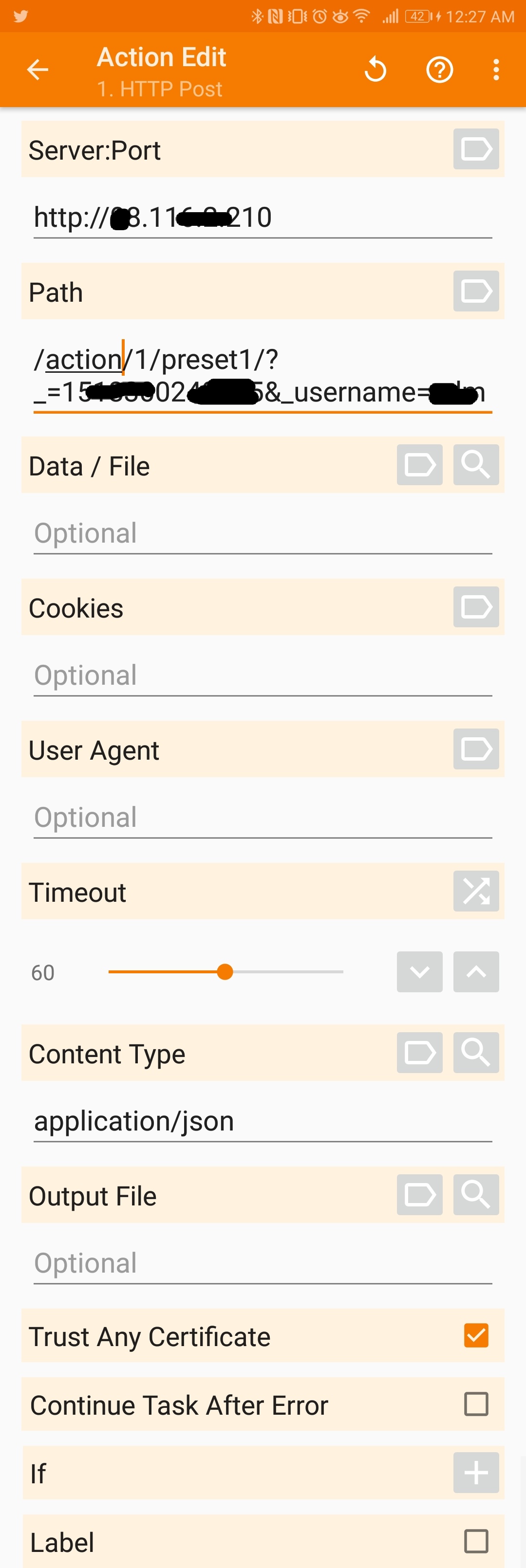
@sfgabe thank you for your script. I'm trying to trigger the web request through the app Tasker as you suggested, but without success. Could you explain how you configure the HTTP Post in Tasker?
 lagunabravo
on 3 Jun 2018
lagunabravo
on 3 Jun 2018
@lagunabravo here's a shot of my tasker settings:
(The path will be the long one with the key and signature that you got from the chrome network tool - it's just getting cut off in the screenshot. Note it does not include the base URL at the beginning.)
sfgabe
on 7 Jun 2018
Brilliant! Thank you @sfgabe
lagunabravo
on 11 Jun 2018
Looks like this may be implemented in the future? (MAC presence on LAN is listed in https://github.com/ccrisan/motioneyeos/wiki/Roadmap)
Meanwhile, would it make sense to have page in the wiki with these instructions?
Edit: I just saw #251
 pereorga
on 22 Nov 2018
pereorga
on 22 Nov 2018
I modified @milmber script to be used on another Ubuntu/Raspbi server because I use MotionEyeOS on one camera and I couldn't figure out how to disable motion by using a stop server command, plus it's on an Rpi B+ so it doesn't do very well with extra tasks.
My script detects if any of the 3 devices are on the network using arp-scan, then checks whether or not motion detection is actually active on my MotionEyeOS cam, then runs through enabling or disabling it accordingly. It also logs everything because I don't know what I'm doing and needed to figure out what was happening as I was modifying this script to actually work properly.
#!/bin/bash
MAC_ADDRESSES=("12:ab:c3:45:67:d8" "12:ab:c3:45:67:d8" "12:ab:c3:45:67:d8"); #Add device MAC addresses
DEVICE_PRESENT=0; #Boolean variable for device presence
MOTIONEYE=0; #Boolean variable for motion on or off
LOGFILE="/var/log/detection.log"; #logfile location
DATE=`date "+%Y-%m-%d %H:%M:%S"`; #get current date

for DEVICE in "${MAC_ADDRESSES[@]}" #For each device in MAC_ADDRESS array
do
    OUTPUT=$(sudo arp-scan -l | grep $DEVICE) #Find device using arp-scan
    if [ -n "$OUTPUT" ];
    then
        echo "$DATE: $DEVICE detected!" >> $LOGFILE #Print result to log file
        DEVICE_PRESENT=1; #Device is detected so change boolean to on
    else
        echo "$DATE: $DEVICE not detected!" >> $LOGFILE #Print results to log file
    fi
done

if curl -sSf "http://192.168.1.100:7999/1/config/list" | grep -q "emulate_motion</a> = on" #Connect to webserver and check if motion detection is on
then
    echo "$DATE: Motion is on!" >> $LOGFILE #Write to log file
    MOTIONEYE=1; #Motion is on so change boolean to on
else
    echo "$DATE: Motion is off!" >> $LOGFILE #Write to log file #Write to log file
fi

if [[ $DEVICE_PRESENT -eq 1 ]] && [[ $MOTIONEYE -eq 1 ]]; #If you're home and motion detection is on
then
    echo "$DATE: You are at home & motioneye is active. Stopping motioneye." >> $LOGFILE #Write to log file
    wget -q -O- "http://192.168.1.100:7999/1/config/set?emulate_motion=off" >/dev/null #Connect to URL to turn off motion detection

elif [[ $DEVICE_PRESENT -eq 1 ]] && [[ $MOTIONEYE -eq 0 ]]; #If you're home and motion detection  is off
then
    echo "$DATE: You are at home & motioneye is already inactive. Nothing to do..." >> $LOGFILE #Write to log file
elif [[ $DEVICE_PRESENT -eq 0 ]] && [[ $MOTIONEYE -eq 1 ]]; #If you're not home and motion detection is on
then
    echo "$DATE: You are away & motioneye is already active. Nothing to do..." >> $LOGFILE #Write to log file
elif [[ $DEVICE_PRESENT -eq 0 ]] && [[ $MOTIONEYE -eq 0 ]]; #If you're not home and motion detection is off
then
    echo "$DATE: You are away from home & motioneye is inactive. Starting motioneye." >> $LOGFILE #Write to log file
    wget -q -O- "http://192.168.1.100:7999/1/config/set?emulate_motion=on" >/dev/null #Connect to URL to turn motion detection on
fi
After you create the script you need to make it executable (sudo chmod +x script.name), and then add it to crontab (sudo crontab -e, * * * * * /path/to/script.name). I have mine running every minute and it's pretty reliable if I use multiple devices (phones usually disconnect from the network after a while so it motion would randomly start up after not using my phone for a while so I have it detecting my phone and laptop (wireless and ethernet) since I'm usually on one or the other when I'm home)
I'm 100% the script can be improved but it works well enough for me.
 Apathialol
on 11 Jan 2019
Apathialol
on 11 Jan 2019
Related issues
 careyer
·
3Comments
careyer
·
3Comments
 JasonMorris1
·
5Comments
JasonMorris1
·
5Comments
 Zach0331
·
3Comments
Zach0331
·
3Comments
 jangix
·
5Comments
jangix
·
5Comments
 nusspli
·
5Comments
nusspli
·
5Comments
Most helpful comment
I modified @milmber script to be used on another Ubuntu/Raspbi server because I use MotionEyeOS on one camera and I couldn't figure out how to disable motion by using a stop server command, plus it's on an Rpi B+ so it doesn't do very well with extra tasks.
My script detects if any of the 3 devices are on the network using arp-scan, then checks whether or not motion detection is actually active on my MotionEyeOS cam, then runs through enabling or disabling it accordingly. It also logs everything because I don't know what I'm doing and needed to figure out what was happening as I was modifying this script to actually work properly.
After you create the script you need to make it executable (sudo chmod +x script.name), and then add it to crontab (sudo crontab -e, * * * * * /path/to/script.name). I have mine running every minute and it's pretty reliable if I use multiple devices (phones usually disconnect from the network after a while so it motion would randomly start up after not using my phone for a while so I have it detecting my phone and laptop (wireless and ethernet) since I'm usually on one or the other when I'm home)
I'm 100% the script can be improved but it works well enough for me.