Motioneyeos: Not able to connect! MotionEyeOS not working!
Hi there,
sorry...I´am really really upset right now.
An electrician mounted the camera yesterday at its final place... everything worked fine: motion, google drive, mail notification, stream...everything.
Today from one minute to the other nothing is working anymore... first it took ages to login ... now it is not possible anymore. The login screen doesn´t appear ... and the site is loading and loading and loading...I ve waited for ages now.
I ve cutted the power supply in order to reboot it... nothing changed. Restarted Wifi...nothing changed.
I can see the raspberry at the router menu --> it gets IP adress. But as soon as i try to connect to this IP adress --> loading loading loading loading...no error, nothing!
https://www2.pic-upload.de/img/33869558/nologin.png
Please help. It is really annoying, as that was thought to be my solution for home surveillance...but it seems it is quite unreliable.
Nuss
e:/ It is not even possible to connect via Bitvise SSH with correct IP and login. "Connection Failed".
 nusspli
All 5 comments
First of all, you don't just buy some hardware and install an opensource surveillance software you find online and expect it to work out-of-the-box as your home surveillance, flawlessly, without some serious testing. Moreover, you don't mount it in a final, hard-to-reach area, on the first day.
motionEyeOS is a piece of software that's in the process of being developed and its features are far from perfect. It incorporates many functionalities and it aims to run on a variety of boards, with a variety of cameras, Wi-Fi adapters and so on. motionEyeOS is not some final product, a software + hardware bundle that just works! There are many combinations (both hardware and software) that may fail miserably.
Second of all, given the symptoms you describe here, I suspect you're asking too much of your system: live streaming, video encoding, recording, motion detection, upload to google drive, notifications and what not. These are all fine if your board is powerful enough to support them. You never mentioned your board model (except that it's some sort of Raspberry PI). You never said anything about the local storage you're using or your network configuration. Nor did you mention the version of the OS you're using.
Please give us more details and please keep in mind that, while I understand why you're upset, it is hardly my (or motionEyeOS's) fault.
 ccrisan
on 5 Sep 2017
ccrisan
on 5 Sep 2017
Hi ccrisan,
thank you for your response... don´t get me wrong: of course I was testing the whole system before mounting it. Everything worked well... then we mounted it and the camera quit working within one day. :(
Ok, we reinstalled motioneyeos (latest version available) and remounted it again. Everything works fine beside the know problem of really slow framerates (0,1 - 1,5 fps stream).
Today I face the following error while trying to login:
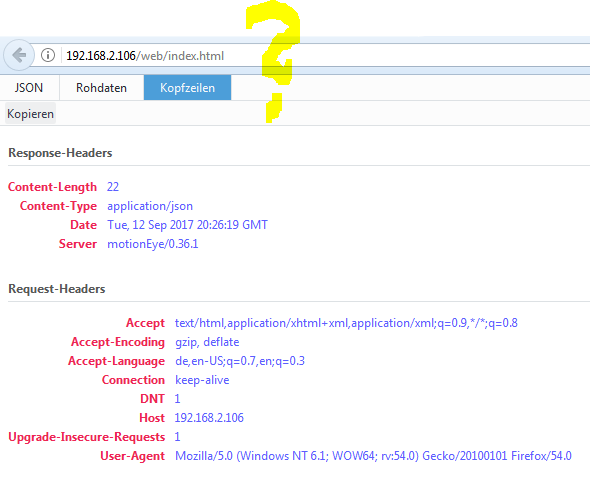
It occurs after I have replaced the WLAN repeater to a stronger one and restarted the whole system (Motioneye, Router, Repeater). The device connects to the repeater...but as soon as I want to open the web interface to log in, a error pops up.
connecting via SSH is no problem... but even after manually restarting the GUI (init.d/S85motioneye restart) I am not able to login at the web interface.
What do I have to do? Please don´t tell me we need to unmount a second time and reinstall again. :(
nusspli
on 12 Sep 2017
Why and how did you get to access /web/index.html? That's not a valid URL for motionEye.
ccrisan
on 13 Sep 2017
Hi ccrisan,
it happens automatically as soon as I enter the IP of the rasp/motioneyeos cam.
Maybe and I guess its an IE thing, because it only happens when using IE... using Chrome or any mobile works perfectly.
IE sticks to this behaviour even if the IP has changed... a bit strange, but ok... I will use Chrome. :)
Thank you again for your quick response.
nusspli
on 13 Sep 2017
It probably is some extension for IE that messes up with the page.
ccrisan
on 13 Sep 2017
Related issues
 manianac
·
5Comments
manianac
·
5Comments
 leehonan
·
7Comments
leehonan
·
7Comments
 CLUB777ONE
·
4Comments
CLUB777ONE
·
4Comments
 andrei-volkau
·
3Comments
andrei-volkau
·
3Comments
 kmckmc01
·
7Comments
kmckmc01
·
7Comments
Most helpful comment
First of all, you don't just buy some hardware and install an opensource surveillance software you find online and expect it to work out-of-the-box as your home surveillance, flawlessly, without some serious testing. Moreover, you don't mount it in a final, hard-to-reach area, on the first day.
motionEyeOS is a piece of software that's in the process of being developed and its features are far from perfect. It incorporates many functionalities and it aims to run on a variety of boards, with a variety of cameras, Wi-Fi adapters and so on. motionEyeOS is not some final product, a software + hardware bundle that just works! There are many combinations (both hardware and software) that may fail miserably.
Second of all, given the symptoms you describe here, I suspect you're asking too much of your system: live streaming, video encoding, recording, motion detection, upload to google drive, notifications and what not. These are all fine if your board is powerful enough to support them. You never mentioned your board model (except that it's some sort of Raspberry PI). You never said anything about the local storage you're using or your network configuration. Nor did you mention the version of the OS you're using.
Please give us more details and please keep in mind that, while I understand why you're upset, it is hardly my (or motionEyeOS's) fault.