Motioneyeos: RPi 3 using network share as storage device
I've got Motioneyeos up and running successfully (many thanks for a great bit of software!).
The only thing I can't do is save files to a network server.
Within Windows file explorer I can access 192.168.1.234, and a shared folder on that called "picam".
I can also see my RPi3 and the folders "sdcard" and "storage", so it looks like the Pi and my PC are quite happily seeing each other.
However, no matter what I enter into the "Network Server" and "Share Name" boxes I can't get files to save. I suspect I'm missing some simple step, but so far I've been unable to work out what it is.
For "Storage Device" i chose "Network Share"
For "Network Server" i chose "192.168.1.234
For "Share Name" I chose "picam" (which is the name of a shared folder on the server).
The folder is readable/writable without a username or password
What am I missing...?

 goldiemctraveller
All 27 comments
Your settings seem alright. How do you know it doesn't work? Could you attach your motioneye.log file here?
 ccrisan
on 25 Mar 2016
ccrisan
on 25 Mar 2016
Hi Calin
Thanks for your very quick (and unexpected!) response!
Motioneye.log attached.
I can “see” the pi from my Windows pc ok. (see screenshot below)
Here are my “Storage Device” options.
The first two options are on the SD card, and when I take pictures I can retrieve them through the web interface, but I can’t access them through Windows file explorer.
I think the settings below are right, but (a) the camera stops working and (b) it’s showing 5% usage of 7GB, whereas it should be showing around 1800GB.
Hope you can help, as I really like this program and want it work!
Cheers
Ian.
From: Calin Crisan [mailto:[email protected]]
Sent: Friday, 25 March 2016 10:12 PM
To: ccrisan/motioneyeos [email protected]
Cc: goldiemctraveller [email protected]
Subject: Re: [motioneyeos] RPi 3 using network share as storage device (#231)
Your settings seem alright. How do you know it doesn't work? Could you attach your motioneye.log file here?
—
You are receiving this because you authored the thread.
Reply to this email directly or view it on GitHub https://github.com/ccrisan/motioneyeos/issues/231#issuecomment-201213892 https://github.com/notifications/beacon/AROdIfNiBei34kVAR-7u2QqAcCkBNnOYks5pw6bqgaJpZM4H4iBG.gif
No virus found in this message.
Checked by AVG - www.avg.com http://www.avg.com
Version: 2016.0.7497 / Virus Database: 4545/11880 - Release Date: 03/25/16
goldiemctraveller
on 26 Mar 2016
I'm not sure what you're trying to achieve here. Do you want to configure your PI as a network share server or do you want it to use another network share server to write its media files?
P.S. attach files on github, never by email.
ccrisan
on 26 Mar 2016
I want the pi to take photos and save them on a network share server. The two main reasons are (a) to take timelapse sequences and (b) to act as a security camera. (Not both reasons at the same time!)
I want the images to be saved elsewhere than on the pi itself. I can achieve the same effect by having another piece of software on a pc (“YAWCAM”) monitor motioneye’s live stream and save snapshots, but I think it’s more elegant for the pi to save the snapshots directly to a server. Motioneye’s configuration seems to offer that through “storage” but I just can’t get it to work. I’m guessing that I’m missing some simple little thing.
Again, thanks for taking the time to respond!
Cheers
Ian.
From: Calin Crisan [mailto:[email protected]]
Sent: Sunday, 27 March 2016 6:42 AM
To: ccrisan/motioneyeos [email protected]
Cc: goldiemctraveller [email protected]
Subject: Re: [motioneyeos] RPi 3 using network share as storage device (#231)
I'm not sure what you're trying to achieve here. Do you want to configure your PI as a network share server or do you want it to use another network share server to write its media files?
P.S. attach files on github, never by email.
—
You are receiving this because you authored the thread.
Reply to this email directly or view it on GitHub https://github.com/ccrisan/motioneyeos/issues/231#issuecomment-201904528 https://github.com/notifications/beacon/AROdIWaAfDXSGxJTBWidu6QEB3UyoUmcks5pxW_vgaJpZM4H4iBG.gif
No virus found in this message.
Checked by AVG - www.avg.com http://www.avg.com
Version: 2016.0.7497 / Virus Database: 4545/11889 - Release Date: 03/26/16
goldiemctraveller
on 27 Mar 2016
Please attach your motioneye.log file. But this time please attach it to github, not to the email.
ccrisan
on 27 Mar 2016
Did you verify that under the STILL IMAGES settings that Capture mode is set to Motion Triggered?Also is under SERVICES is the Samba Server ON and Authentication OFF?
If you multiple cameras then I would advise under FILE STORAGE to change the setting of Root Directory from just / to /camera1 for the first camera and /camera2 for the second camera and so on.
 digitizing
on 27 Mar 2016
digitizing
on 27 Mar 2016
From: digitizing [mailto:[email protected]]
Sent: Monday, 28 March 2016 10:04 AM
To: ccrisan/motioneyeos [email protected]
Cc: goldiemctraveller [email protected]
Subject: Re: [motioneyeos] RPi 3 using network share as storage device (#231)
Did you verify that under the STILL IMAGES settings that Capture mode is set to Motion Triggered?
No, I had capture mode set to “Interval Snapshots” as I’m not interested in capturing movement- just time lapse.
Also is under SERVICES is the Samba Server ON
Yes
and Authentication OFF?
Yes
If you multiple cameras then I would advise under FILE STORAGE to change the setting of Root Directory from just / to /camera1 for the first camera and /camera2 for the second camera and so on.
I’ve only got one camera. I’ve tried all three “Storage device” options (“SU02G 0x217f274f (dev/mmcblk0p3)”, “Custom path” and “Network share”.
With the first 2 I assume it’s on the pi SD card, but the only thing I can see from my windows pc is “sdcard” and “storage”. If I change Root Directory setting from just “/” to “/camera1” I’m unable to see the “/camera1” anywhere except on the configuration page. I’m kind of expecting it to be visible from my Windows pc inside the “sdcard” folder, bit it’s not showing up.
“sdcard” is empty regardless of which “Storage device” option I choose.
If I choose “Network Share” the ip address and Share name appear as a new folder inside the “storage” folder.
If the ip address is “192.168.234” (which is valid) and the share name is “picam” (which is valid), the new folder’s name is “motioneye_192_168_1_234_picam”. This new folder is visible but not writeable from my Windows pc.
—
You are receiving this because you authored the thread.
Reply to this email directly or view it on GitHub https://github.com/ccrisan/motioneyeos/issues/231#issuecomment-202144935 https://github.com/notifications/beacon/AROdIe9TV7ETfnUYIZR2LtrRWXZE3GT6ks5pxvCvgaJpZM4H4iBG.gif
No virus found in this message.
Checked by AVG - www.avg.com http://www.avg.com
Version: 2016.0.7497 / Virus Database: 4545/11897 - Release Date: 03/27/16
goldiemctraveller
on 28 Mar 2016
Here's my motioneye.log.
I've had to rename it with ".txt" on the end as I was unable to upload a ".log" file.
(Apologies for breaking any etiquette rules - I'm new to all this stuff!)
motioneye.log.txt
goldiemctraveller
on 28 Mar 2016
Yeap, there's a line clearly indicating the network share problem:
ERROR: failed to mount smb share "//192.168.1.234/picam" at "/data/media/motioneye_192_168_1_234_picam"
What version of motionEyeOS do you currently use?
At this point I'm going to ask you if you could log in remotely via SSH/putty and type in some commands:
mkdir -p /data/media/motioneye_192_168_1_234_picam
mount.cifs //192.168.1.234/picam /data/media/motioneye_192_168_1_234_picam -o guest
If this fails, you could try the following, in turn:
mount.cifs //192.168.1.234/picam /data/media/motioneye_192_168_1_234_picam -o guest,sec=none
mount.cifs //192.168.1.234/picam /data/media/motioneye_192_168_1_234_picam -o guest,sec=ntlm
mount.cifs //192.168.1.234/picam /data/media/motioneye_192_168_1_234_picam -o guest,sec=ntlmv2
mount.cifs //192.168.1.234/picam /data/media/motioneye_192_168_1_234_picam -o guest,sec=ntlmv2i
mount.cifs //192.168.1.234/picam /data/media/motioneye_192_168_1_234_picam -o guest,sec=ntlmsspi
I have the same problem. From what I gather, you have to configure the "workgroup" as well. But I haven't been able to get it to work. I have an LG NAS and it's quite old, so the SMB implementation might not be up to date.
What is your storage? A NAS or a Window box?
 nduc
on 5 Apr 2016
nduc
on 5 Apr 2016
I've got a Windows 10 pc with an external usb HDD attached.
That drive has a shared, writeable, readable folder on it. At least it's rw from another Windows 10 pc on the same network, but seemingly not from the Pi.
It occurs to me that perhaps it's a Windows firewall thing, so I'll try (temporarily!) disabling that.
goldiemctraveller
on 8 Apr 2016
Tried disabling firewall - no difference. Tried using a different Windows 10 computer - it worked! So I've established the problem's at my end and not with Motioneye.
goldiemctraveller
on 8 Apr 2016
@ccrisan :+1: Thank you for the command lines! I had been racking my brain for several days trying to mount to a Mac file share - those command lines did the trick!!!
 ashrimplin
on 9 Jun 2016
ashrimplin
on 9 Jun 2016
I also want to save the images to a network share, and my problem is, that I cannot set up a specific folder on the share, to save to. Whenever I put the valid path of /link/to/camerafiles/ and try the setup, a message comes up, that "Accessing network share failed: cannot create root directory!"
Even the log shows this:
"ERROR: access to network share //xxx.xxx.xxx.xxx/share failed: cannot create root directory"
If I put only "/" there, the message shows that: "Accessing network share succeeded!"
 benoe77
on 16 Jan 2017
benoe77
on 16 Jan 2017
And when I set up "/" the images gets there, but I cannot browse them with the picture browser saying: "Pictures taken by ...
(no media files)"
And there are no attachements in the notification mail, even when I set the time span to 20.
benoe77
on 16 Jan 2017
my solution was to specify a username of a current user on a remote windows laptop in a "share username". password is not needed though.
 shinji2009
on 25 Feb 2017
shinji2009
on 25 Feb 2017
Hi, I am having similar issues mounting a share located on a QNAP NAS. Its driving me nuts. Motion eye log says failed to mount, Test button the same. I tried what I have read here but nothing fixes my issue. eg Changed Motioneye workgroup to WORKGROUP and I see Motion eye on my network and can see new folders created in storage folder using the file storage field data I entered . From console mount.cifs gives error 115 operation in progress. I tried existing usernames already working for other cameras on the share but they didn't work for MotionEye. Please help... I would like to build several more RPi cameras to replace existing IP cameras. This is a test project before I buy the kit. Using a network share will be essential, so its a no go so far.
Software looks very good otherwise and could easily replace my much more expensive IP cameras.
Thanks Mark.
 m4rky-m4rk
on 8 Mar 2017
m4rky-m4rk
on 8 Mar 2017
Well it's kind of hard to troubleshooting this remotely. Have you check that you can mount this same share on another windows PC? Check username, password, they way you enter the share name using \
Take a look at these URLS and see what they suggest for your error. There must be something specific to your NAS, the way it exposes the share perhaps.
http://superuser.com/questions/430163/cifs-share-mount-errors
http://www.linuxquestions.org/questions/linux-newbie-8/mount-error-115-on-some-shares-4175499264/
Then more specifically search for this "mount error 115 operation in progress QNAP nas" there are numerous hits on this keywords so look through them.
Post your question on the project google groups forum and let some other users help you out too.
 bortek
on 8 Mar 2017
bortek
on 8 Mar 2017
@m4rky-m4rk do you use fhd cameras with rpi? how many fps do you get on fhd? i can't get more than 4.
shinji2009
on 9 Mar 2017
I have MotionEye on RPi2b with RPi V2.1 camera module and also connected to other 1080 IP cameras on my network.
(v2 Rpi camera...... 8 megapixel native resolution sensor-capable of 3280 x 2464 pixel static images.
Supports 1080p30, 720p60 and 640x480p90 video.)
Just checked from my phone with TinyCam app and it reports the RPi camera is 10fps 486kb/s . Not sure what I set it at in Motioneye but think it was 10fps.
Re my Samba share issue. I have Y-Cam cameras successfully using the same share that Motioneye has a problem with. I also created new user just for MotionEye but it didn't work, Also tried my laptop and Y-Cam credentials and still no joy for MotionEye...
@bortek Does the share need entering as '\Recordings' or 'Recordings' in MotionEye? In all the screenshots I have seen, including the one in this thread the \ is not entered in share field.
m4rky-m4rk
on 9 Mar 2017
OK.. an update. a bit embarrassing but I learned a some UNIX stuff along the way. My problem was because my NAS only allows access from a restricted range of IP's. After adding motioneye Pi IP the drive mounts but I now get an error message 'cannot create root' directory.. Like shinji2009 above
I just ignored the error and applied the settings. Seems to work anyway. Images are being saved in the correct folder.
m4rky-m4rk
on 11 Mar 2017
strange that i can't get more than 5fps at fhd on motioneyeos from rpi camera. i've try another software and get 25fps at fhd and get cpu -10 dergrees colder. looks like gpu not work at all on motioneyeos on rpi3b
shinji2009
on 12 Mar 2017
The GPU is not used at all by motionEyeOS, that is true.
ccrisan
on 12 Mar 2017
this is confusing because of gpu reserved memory option in motionEyeOS, even in fast network camera mode.
shinji2009
on 7 Jun 2017
I'm not sure if this issue belongs here but I thought I'd mention it. I have 3 rpi cameras: 1 usb cam on a rpi3 and 2 rpi cameras each on a rpi zero w. I have gotten it to work pretty well and the next step was to log all the vido/pics to a network share. I have a wdmycloud WDMyCloud v04.05.00-315 that I got a couple of years ago. I create a share with public access permissions.
I find that when I try to log to share name
When I first set up logging on the rpi3, I did it the second way and it worked but I could not get the rpiz's to access the path. After fiddling with it for a while, it stopped working and finally, I switched both the rpi3 and rpiz's to the first setup, it was happy again and the "test share" indicated success.
Perhaps the wdmycloud implements shares in a way different from windows 10 and this problem is not of much interest but it could give a clue to others who have issues.
 petermeigs
on 17 Sep 2017
petermeigs
on 17 Sep 2017
I still have similar issues with mounting a NAS network share. It works fine first time, images are saved to NAS, but 5 mins later the camera stream stops and the mount has failed. The test works fine first time but on repeat test it then fails with access error. It seems to be inconsistent. Working and then not working with a reboot needed to get it working again. I haven't had the time to figure it out any more and gave up and bought another IP camera instead. Also, it doesn't seem to like using subfolders only root which is pain. All my other cameras create their own sub folders. If I do not mount the network share then everything is stable with Motioneye. I have many IP cameras and none have issues with saving to my NAS. (QNAP TS253)
Next plan if get a chance was to create a local folder and manually mount the share to that from linux and then point motioneye to the local folder instead.
m4rky-m4rk
on 19 Sep 2017
I just realized that the markdown feature made my comments make no sense. The paragraph
"I find that when I try to log to share name / and to root directory /, it works fine. But if I try to log to share name and root directory / I get a directory access error."
Would be better written as:
If I put the path with the sharename and and leave the root directory field as just a slash, it works. If I try to put anything other than slash in the root directory field, it doesn't work for me.
Here is an image where it works for me.
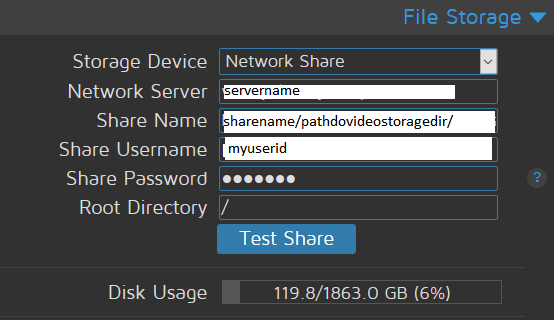
I haven't had any issues with this failing once I switched to the shown method.
I hope this helps.
petermeigs
on 20 Sep 2017
Related issues
 CLUB777ONE
·
4Comments
CLUB777ONE
·
4Comments
 SuneBielefeldt
·
4Comments
SuneBielefeldt
·
4Comments
 kmckmc01
·
7Comments
kmckmc01
·
7Comments
 zorrotenai
·
3Comments
zorrotenai
·
3Comments
 nusspli
·
5Comments
nusspli
·
5Comments
Most helpful comment
I just realized that the markdown feature made my comments make no sense. The paragraph
"I find that when I try to log to share name / and to root directory /, it works fine. But if I try to log to share name and root directory / I get a directory access error."
Would be better written as:
If I put the path with the sharename and and leave the root directory field as just a slash, it works. If I try to put anything other than slash in the root directory field, it doesn't work for me.
Here is an image where it works for me.
I haven't had any issues with this failing once I switched to the shown method.
I hope this helps.