Motioneye: Software Update Check Fails on Raspbian
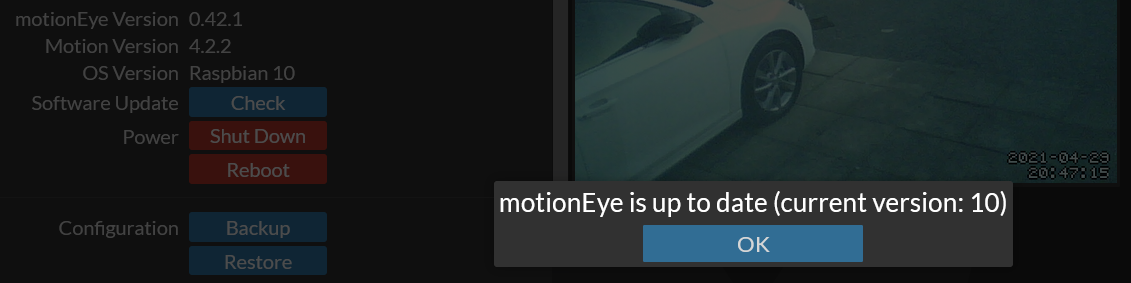
As in the below screenshot, the Software Update Check system fails on Raspbian. I've had motionEye installed on my Raspberry Pi 3B for a while and completely didn't think about checking for updates, I think I assumed apt-get would include motionEye even though I know I didn't install it that way. I have no excuse. Anyway, when I just thought about it and hit the Check button, I get a little loading spinner and then a message saying "motionEye is up to date (current version: 9.11)" which obviously relates to Raspbian, not to motionEye.

Thankfully, in coming here to report this, I found out that I would need to run a special script if I want my camera feeds to work, so it was a blessing in disguise?
 Ultrabenosaurus
All 22 comments
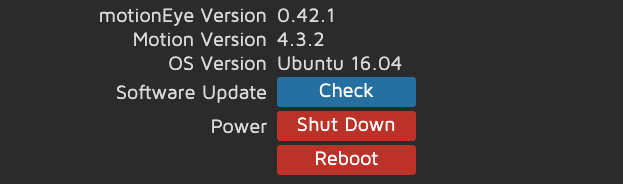
+1 for this to be fixed - clicking check update reports 'up to date - 16.04' - which is my Ubuntu version.
 will-mckeand
on 29 Apr 2021
will-mckeand
on 29 Apr 2021
Considering "Check For Updates" doesn't exist in Settings in
non-motionEyeOS setups, where are you getting it?
On Thursday, April 29, 2021, will-mckeand @.*> wrote:
+1 for this to be fixed - clicking check update reports 'up to date -
16.04' - which is my Ubuntu version.—
You are receiving this because you are subscribed to this thread.
Reply to this email directly, view it on GitHub
https://github.com/ccrisan/motioneye/issues/1516#issuecomment-828974016,
or unsubscribe
https://github.com/notifications/unsubscribe-auth/AEZTUHMIMATRKWEQIQDCNUTTLD4H7ANCNFSM4JFMQCVA
.
--
Thanks
Kevin Shumaker
Personal Tech Support https://kevinshumaker.wixsite.com/thethirdlevel
N38° 19' 56.52"
W85° 45' 8.56"
Semper Gumby
“Don't tell people how to do things. Tell them what to do and let them
surprise you with their results.” - G.S. Patton, Gen. USA
Ethics are what we do when no one else is looking.
Quis custodiet ipsos custodes?
“There is no end to the good you can do if you don’t care who
gets the credit.” - C Powell
You know we're sitting on four million pounds of fuel, one nuclear weapon
and a thing that has 270,000 moving parts built by the lowest bidder. Makes
you feel good, doesn't it?
 starbasessd
on 29 Apr 2021
starbasessd
on 29 Apr 2021
See below. Surely more intuitive to check for motioneye updates than OS updates:
will-mckeand
on 29 Apr 2021
Ubuntu 16.04 was EOLd yhis month, may I recommend Installing 20.04 or
21.04, and using motionEye install instructions from here?
https://github.com/ccrisan/motioneye/wiki/%28Install-On-Ubuntu-%2820.04-or-Newer%29
Flagged for Feature or Enhancement.
On Thu, Apr 29, 2021 at 4:32 AM will-mckeand @.*>
wrote:
See below. Surely more intuitive to check for motioneye updates than OS
updates:[image: Screenshot 2021-04-29 at 09 28 58]
https://user-images.githubusercontent.com/69539253/116522850-8949a880-a8cd-11eb-91e9-ad3563cc601f.png—
You are receiving this because you commented.
Reply to this email directly, view it on GitHub
https://github.com/ccrisan/motioneye/issues/1516#issuecomment-829043978,
or unsubscribe
https://github.com/notifications/unsubscribe-auth/AEZTUHODZX6EL33NVYA5GL3TLEKQRANCNFSM4JFMQCVA
.
--
Thanks
Kevin Shumaker
Personal Tech Support https://kevinshumaker.wixsite.com/thethirdlevel
N38° 19' 56.52"
W85° 45' 8.56"
Semper Gumby
“Don't tell people how to do things. Tell them what to do and let them
surprise you with their results.” - G.S. Patton, Gen. USA
Ethics are what we do when no one else is looking.
Quis custodiet ipsos custodes?
“There is no end to the good you can do if you don’t care who
gets the credit.” - C Powell
You know we're sitting on four million pounds of fuel, one nuclear weapon
and a thing that has 270,000 moving parts built by the lowest bidder. Makes
you feel good, doesn't it?
starbasessd
on 29 Apr 2021
I wouldn't have thought enhancement is the correct classification. See below, it's referring to 16.04 as the motioneye version which is not correct:

will-mckeand
on 29 Apr 2021
Yeah this isn't a new feature or an enhancement, it's an existing feature that doesn't work at all. That's a bug.
Ultrabenosaurus
on 29 Apr 2021
My primary production System on Ubuntu 20.04, fully updated, following the
instructions from
https://github.com/ccrisan/motioneye/wiki/%28Install-On-Ubuntu-%2820.04-or-Newer%29
does not have the option: "Update Software" under Settings, General.
I am creating 2 other builds, both on Pi3B+, one Ubuntu 20.04 Lite, and one
on RaspberryPiOS 2021-03-04 Lite, and will report shortly. If you have any
other setups you would like checked, please let me know.
On Thu, Apr 29, 2021 at 1:12 PM Dan Bennett @.*>
wrote:
Yeah this isn't a new feature or an enhancement, it's an existing feature
that doesn't work at all. That's a bug.—
You are receiving this because you commented.
Reply to this email directly, view it on GitHub
https://github.com/ccrisan/motioneye/issues/1516#issuecomment-829440330,
or unsubscribe
https://github.com/notifications/unsubscribe-auth/AEZTUHMIFDIXRTN6KHAN4EDTLGHOFANCNFSM4JFMQCVA
.
--
Thanks
Kevin Shumaker
Personal Tech Support https://kevinshumaker.wixsite.com/thethirdlevel
N38° 19' 56.52"
W85° 45' 8.56"
Semper Gumby
“Don't tell people how to do things. Tell them what to do and let them
surprise you with their results.” - G.S. Patton, Gen. USA
Ethics are what we do when no one else is looking.
Quis custodiet ipsos custodes?
“There is no end to the good you can do if you don’t care who
gets the credit.” - C Powell
You know we're sitting on four million pounds of fuel, one nuclear weapon
and a thing that has 270,000 moving parts built by the lowest bidder. Makes
you feel good, doesn't it?
starbasessd
on 29 Apr 2021
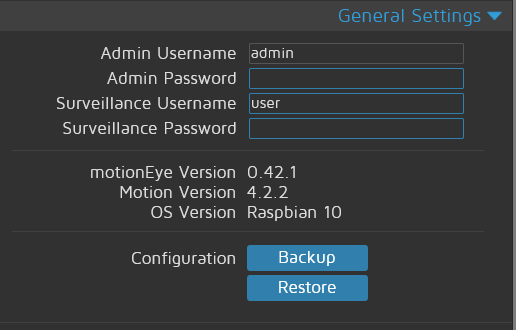
Set up motion/motionEye on RaspberryPiOS using instructions:
No option for software update
starbasessd
on 29 Apr 2021
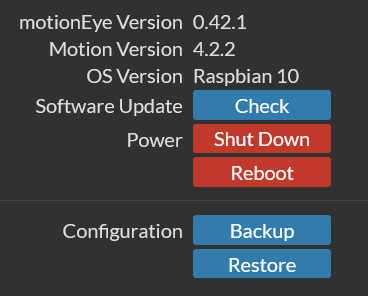
This is on a Raspberry Pi 4B running Raspbian installed from a V3.4.0 NOOBS SD card less than 2 months ago:
Ultrabenosaurus
on 29 Apr 2021
That is very strange. The Power Buttons are also not in the motion/motionEye standard install image. I will pull down the Noobs Image and see what I get.
starbasessd
on 29 Apr 2021
Just to clarify, motionEye wasn't installed via NOOBS. I used the wget line on the Raspbian instruction page of the wiki to download and install this .deb file:
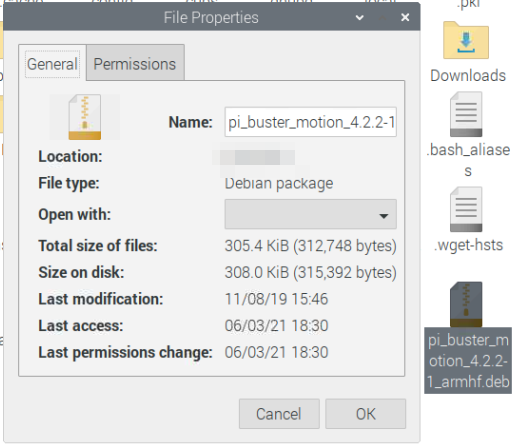
Followed by pip install motioneye, of course.
Ultrabenosaurus
on 29 Apr 2021
3.6 is the latest version of Noobs, did you use Noobs or Lite, and which OS did you install. RPi Full, Desktop, or Lite? RPiFoundation no longer recommends NOOBS, either, suggesting using RPiImager for WIN/MAC/Linux instead.
starbasessd
on 29 Apr 2021
I would guess that the 'check', 'shutdown' and 'reboot' buttons are somehow mistakenly left in from motioneyeos and shouldn't be there at all on motioneye. That might explain why 'check' checks the OS version and why the buttons aren't consistent across operating systems.
That said, a working 'check' button on the motioneye GUI would be handy.
will-mckeand
on 29 Apr 2021
They aren't in by default in the motion/motionEye installation, just like the Power buttons. There is a way to 'enable' the Power buttons in the /etc/motioneye/motioneye.conf file:enable_reboot true (# remarked out by default)
but I've never seen anything for updates in motion/motioneye, only motioneyeOS and when installing another OS, then installing motion/motioneye it should have been wiped and cleaned.
starbasessd
on 29 Apr 2021
I just ordered a NOOBS SD along with the Pi 4B out of convenience on 4th March and my order history on the website says it was NOOBS v3.4.0. It was all delivered the next day, and then on Saturday 6th March I installed full Raspbian from NOOBS. I guess it could have been listed as Raspberry Pi OS at the time, but the system still calls itself "Raspbian GNU/Linux 10 (buster)" when I run cat /etc/os-release. After making sure all default packages were up to date the first thing I did was install motionEye according to the Raspbian installation guide in this repo's wiki.
I fail to see how my OS or the version of NOOBS or the Foundation's recommend installation method matters here.
We're talking about the check for updates button that has always been in the Raspberry Pi release of motionEye since I started using it late 2018 / early 2019 on my previous 3B. Unless you're saying that motionEye has a massive security hole that allows NOOBS-installed Raspbian to arbitrarily add random buttons to the web GUI that don't work properly for some odd reason? Except will-mckeand isn't using Raspbian, they're on Ubuntu 16.04, so any Debian-based OS can insert buttons into the web GUI without user consent?
That seems like way more than a feature or enhancement level of bug to me.
Ultrabenosaurus
on 29 Apr 2021
I am trying to reproduce your setup. Every test install I've done, and my
production system, using various flavors of Linux, and the instructions
from the wiki, has never produced the issue you are reporting. If you copy
files from/to the etc/motioneye folder, in order to minimize rebuilding
your setup, I could see _possibly_ an old version of the motioneye.conf
file having something in it that is causing this issue. I try not to
automatically say 'everything is a bug', nor am I denying it's not until it
can be reproduced.
The only system(s) I can get Check Updates and the Power Buttons to appear
is in motionEyeOS, unless I enable the enable_reboot option in
/etc/motioneye.conf in any other OS.
On Thu, Apr 29, 2021 at 5:33 PM Dan Bennett @.*>
wrote:
I just ordered a NOOBS SD along with the Pi 4B out of convenience on 4th
March and my order history on the website says it was NOOBS v3.4.0. It was
all delivered the next day, and then on Saturday 6th March I installed full
Raspbian from NOOBS. I guess it could have been listed as Raspberry Pi OS
at the time, but the system still calls itself "Raspbian GNU/Linux 10
(buster)" when I run cat /etc/os-release. After making sure all default
packages were up to date the first thing I did was install motionEye
according to the Raspbian installation guide in this repo's wiki
https://github.com/ccrisan/motioneye/wiki/Install-On-Raspbian.I fail to see how my OS or the version of NOOBS or the Foundation's
recommend installation method matters here.We're talking about the check for updates button that has always been
in the Raspberry Pi release of motionEye since I started using it late 2018
/ early 2019. Unless you're saying that motionEye has a massive security
hole that allows NOOBS-installed Raspbian to arbitrarily add random buttons
to the web GUI that don't work properly for some odd reason? Except
will-mckeand isn't using Raspbian, they're on Ubuntu 16.04, so any
Debian-based OS can insert buttons into the web GUI without user consent?That seems like way more than a feature or enhancement level of bug to me.
—
You are receiving this because you commented.
Reply to this email directly, view it on GitHub
https://github.com/ccrisan/motioneye/issues/1516#issuecomment-829610700,
or unsubscribe
https://github.com/notifications/unsubscribe-auth/AEZTUHJWKBOJ7TZKLEGVHCLTLHGDBANCNFSM4JFMQCVA
.
--
Thanks
Kevin Shumaker
Personal Tech Support https://kevinshumaker.wixsite.com/thethirdlevel
N38° 19' 56.52"
W85° 45' 8.56"
Semper Gumby
“Don't tell people how to do things. Tell them what to do and let them
surprise you with their results.” - G.S. Patton, Gen. USA
Ethics are what we do when no one else is looking.
Quis custodiet ipsos custodes?
“There is no end to the good you can do if you don’t care who
gets the credit.” - C Powell
You know we're sitting on four million pounds of fuel, one nuclear weapon
and a thing that has 270,000 moving parts built by the lowest bidder. Makes
you feel good, doesn't it?
starbasessd
on 29 Apr 2021
Sorry Github mangled a paste.
I renamed the file to motioneye.conf.txt and attached it.
motioneye.conf.txt
starbasessd
on 30 Apr 2021
Ok, I've solved this on my setup at least. I had restored motioneye from a motioneyeos config (a year ago) - hence the check/power properties were enabled in motioneye.conf.
After setting both to false, the options are removed from the GUI.
If others have done the same - perhaps motioneye needs to ignore those properties unless running on motioneyeos
will-mckeand
on 30 Apr 2021
How about you, @Ultrabenosaurus ?
starbasessd
on 30 Apr 2021
I guess the thing is that MotionEye (the application) that is bundled in MotionEyeOS is the same one as the standalone version, and thus the config options that are only meant to be used on MEOS act funnily with the standalone version. But yeah, since it's already getting the base OS name somehow, it shouldn't be too difficult to ignore that option (or at least keep the update button invisible despite the config option) when the base OS isn't MEOS.
 zagrim
on 30 Apr 2021
zagrim
on 30 Apr 2021
As an aside, @zagrim would you agree that it's not a 'bug' but could be an enhancement to maybe pull the update via the pip command if it is motionEye, or the full motioneyeos update if appropriate?
starbasessd
on 30 Apr 2021
I wouldn't call this a bug really, more like a slight design flaw.
If ME was to be made able to update itself also on a non-MEOS installation, that would be a topic of a feature request.
However, I don't think it's feasible to try to make that work on an arbitrary setup. Just how many different variations of python/pip related issues have we had here? :fearful: I don't say it would be impossible to get that working for at least 95% of cases, but I'm saying it would be hard, and it would need regular maintenance as Python and the Linux distributions evolve. Things might get easier for a while when Python3 support is released, though.
And then there's the docker build. If the container is built according to best practices (I don't know if it is), it shouldn't include the tools that are needed to upgrade the app inside it. So there it would not work, and while I guess it would possible to detect if the code is running inside a container, I'm not certain if that detection could be made 100% proof.
I've no authority here to say what should be done and what not, of course, and someone might still volunteer to do that. I just don't think that'll ever happen.
zagrim
on 30 Apr 2021
Related issues
 regolo76
·
5Comments
regolo76
·
5Comments
 sambul13
·
6Comments
sambul13
·
6Comments
 rvdeijk
·
4Comments
rvdeijk
·
4Comments
 toshibochan
·
5Comments
toshibochan
·
5Comments
 apla2016
·
5Comments
apla2016
·
5Comments
Most helpful comment
Ok, I've solved this on my setup at least. I had restored motioneye from a motioneyeos config (a year ago) - hence the check/power properties were enabled in motioneye.conf.
After setting both to false, the options are removed from the GUI.
If others have done the same - perhaps motioneye needs to ignore those properties unless running on motioneyeos