There are so many better ways of organizing the repo without using Protobuild:
- using shared projects
- using the new csproj format + few wildcards
- using the old csproj format + few wildcards
For the first pass we would just need to generate all the .csproj files, this way we won't be changing anything for the build system, and afterwards we could slowly do modifications over time with smaller changes.
Alternatively we could make it only generate the MonoGame.Framework and MonoGame.Framework.Net projects, while everything else is made of static projects.
 harry-cpp
All 45 comments
I'm for this. Just want to pick a good path forward.
What we want to avoid is having multiple csprojs to update to add code that works on all platforms.
We also need a solution that works for all our target platforms including mobile and consoles. For consoles generally we have a standard C# project with a few extra references, .targets. .props and defines.
wildcards
Wildcards could work for a lot of our needs.
using the new csproj format
My only concern is what platforms won't support the new format. This is why we've always stayed a bit behind the bleeding edge on C# versions.
 tomspilman
on 23 Feb 2018
tomspilman
on 23 Feb 2018
@cra0zy - Speaking of consoles this is how that looks:

Notice the blue circles... these are folders with the MonoGame console repos. They are not submodules, just another git repo with the console specific bits of MonoGame.
Note the red circles and how there is a MonoGame.Framework within the XboxOne folder (also within the other console folders). This is where the other partial class files are for the platform specific C# bits.
How Protobuild works now for consoles is nice in that it generates a XboxOne .csproj and .sln if the folder exists combining the data in the main MonoGame repo as well as what is defined in the console folder.
To move beyond Protobuild we would have to find a new way to do this.
It could be we have a XboxOne specific .csproj in the XboxOne folder that does wildcard includes. Or maybe we do some sort of .targets files that includes stuff conditionally?
Another thing to notice is the XboxOne/MonoGame.Framework.Content.Pipeline folder. This has the bits needed to build content for XB1. It is also automatically sucked up by Protobuild when the Windows build of the pipeline projects are built.
This is a pretty major thing to consider as console specific versions of MG will always have these private bits. So it is critical we find a good way to include it without breaking things.
tomspilman
on 2 Mar 2018
I was gonna write this after the 3.7 release, but I guess I should do it now. Here is my proposal for the structure of the repo:
- MonoGame
- MonoGame.Framework
- Shared
- DesktopGL
- OpenGL
- Xbox
- WindowsDX
- DirectX
- MonoGame.Framework.Shared.shproj - Shared Project
- MonoGame.Framework.DesktopGL.csproj
- MonoGame.Framework.WindowsDX.csproj
- MonoGame.Framework.Xbox.csproj
- MonoGame.Framework.Content.Pipeline
- Shared
- Xbox
- MonoGame.Framework.Shared.shproj - Shared Project
- MonoGame.Framework.Windows.csproj
- MonoGame.Framework.Linux.csproj
- MonoGame.Framework.Xbox.csproj
harry-cpp
on 5 Mar 2018
Here is my proposal for the structure of the repo
If i understand what you are saying here it cannot be this way. The console bits are one repo per-platform. It cannot be split and put one folder in Framework and another in Content.Pipeline.
Still if we have to completely change the repo structure then shared projects and/or wildcards will not work for us. We would be better off with a tool to build projects in a smart way.
tomspilman
on 5 Mar 2018
If i understand what you are saying here it cannot be this way. The console bits are one repo per-platform. It cannot be split and put one folder in Framework and another in Content.Pipeline.
They don't need to be split, I just split them up like so for the convinience of understanding the idea. ie. this is also valid:
- MonoGame
- MonoGame.Framework
- Shared
- DesktopGL
- OpenGL
- MonoGame.Framework.Shared.shproj - Shared Project
- MonoGame.Framework.DesktopGL.csproj
- MonoGame.Framework.Content.Pipeline
- Shared
- MonoGame.Framework.Content.Pipeline.Shared.shproj - Shared Project
- MonoGame.Framework.Content.Pipeline.Windows.csproj
- Xbox
- MonoGame.Framework.Xbox.csproj
- MonoGame.Framework.Content.Pipeline.Xbox.csproj
Still if we have to completely change the repo structure then shared projects and/or wildcards will not work for us.
No wildcards needed in the above example actually, you can just static link the files since most of the files are getting linked by the shared project anyways. And I also kept where the .csproj files are located the same, so no need to make any changes to the build system.
harry-cpp
on 5 Mar 2018
They don't need to be split
That is better for sure.
MonoGame.Framework.Content.Pipeline.Xbox.csproj
So this is not how pipeline support works. Support for consoles is added into the Windows pipeline project. So there has to be a conditional include of files if Xbox or another console platform folder exists.
tomspilman
on 5 Mar 2018
So this is not how pipeline support works. Support for consoles is added into the Windows pipeline project. So there has to be a conditional include of files if Xbox or another console platform folder exists.
Well, MonoGame.Framework.Content.Pipeline.Shared.shproj actually already contains all the cs code since the content pipeline projects are the same between Windows/Linux/Mac (well except shader support).
Sorry about the following, I know its a bit of topic, but I wanted to mention it because it helps for this situation, and it should be fairly easy to implement.
Now as for the Pipeline Tool, I have a proposition, allow loading of custom MonoGame,Framework.Content.Pipeline.dll file. This has the following advantages:
- Console platforms would just need to reference the .dll file from the Pipeline Tool
- The newest Pipeline Tool could be used to build content for older versions of MonoGame
- I could do some tricks to make it so .mgcb files could use
MonoGame,Framework.Content.Pipelinefrom MGCB nuget - I could make a proper Pipeline Tool flatpak (Linux packaging) <- yes, this is the reason why I originally came up with the idea..
And yes, this would be a per project setting.
harry-cpp
on 5 Mar 2018
Well
MonoGame.Framework.Content.Pipeline.Shared.shprojactually already contains all the cs code
Except the code for XB1, Switch, PS4, and Vita textures, audio, and shaders. These are the bits that have to be added to the pipeline only if the user has access to those repos. And they should be able to build one pipeline that supports whatever combination of platforms they have access to. So if they only have access to PS4 and Switch ... they can build a version of the pipeline that can build all our platforms and PS4 and Switch.
I have a proposition, allow loading of custom
MonoGame,Framework.Content.Pipeline.dllfile.
I don't like the idea from the outset. Juggling multiple MonoGame.Framework.Content.Pipeline.dll and guessing which one to use or which one supports what is a huge step backwards for the pipeline from what we have today.
My actual plan has been to eventually add extension assemblies to the pipeline tool. Our current system of adding console support to the existing MonoGame.Framework.Content.Pipeline.csproj via Protobuild was just my first step towards this.
I could make a proper Pipeline Tool flatpak
I don't know what that means... but all console platforms require a Windows PC for development. So there is no concern for extending our pipeline on non-Windows PCs.
tomspilman
on 5 Mar 2018
Except the code for XB1, Switch, PS4, and Vita textures, audio, and shaders. These are the bits that have to be added to the pipeline only if the user has access to those repos. And they should be able to build one pipeline that supports whatever combination of platforms they have access to. So if they only have access to PS4 and Switch ... they can build a version of the pipeline that can build all our platforms and PS4 and Switch.
I see, well then, for this I think the best option is to use wildcards in the Windows version of Content Pipeline.
harry-cpp
on 6 Mar 2018
So the final structure so far should be:
- MonoGame
- MonoGame.Framework
- Shared/
- DesktopGL/
- OpenGL/
- MonoGame.Framework.Shared.shproj - Shared Project
- MonoGame.Framework.DesktopGL.csproj
- MonoGame.Framework.Content.Pipeline
- Shared/
- MonoGame.Framework.Content.Pipeline.Shared.shproj - Shared Project
- MonoGame.Framework.Content.Pipeline.Windows.csproj - has wildcard includes for console stuff, ie.
"../Xbox/MonoGame.Framework.Content.Pipeline/**/*" - Xbox
- MonoGame.Framework.Content.Pipeline/
- MonoGame.Framework.Xbox.csproj
harry-cpp
on 7 Mar 2018
So the final structure
Are you suggesting we re-arrange all the files in the repo as part of this?
I don't think this is necessary or desired.
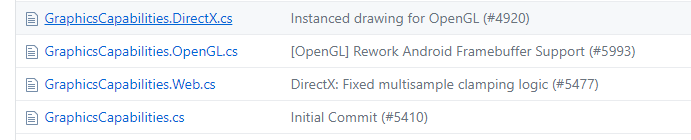
This is the new layout we moved too after the years of implementations split across folders. This is a feature and not something that needs fixing how i see it.
tomspilman
on 8 Mar 2018
Nah, no file moving, I just kept it that way for easier understanding of what .csproj files do.
harry-cpp
on 8 Mar 2018
Should we maybe do this for 3.7, I have enough free time to do this on Monday.
harry-cpp
on 10 Mar 2018
@cra0zy - If you want to prototype the change i am good with that. We need enough time to test how it works across all platforms including consoles.
It is a big change, so for now this should stay a 3.8 thing i think.
tomspilman
on 11 Mar 2018
Was thinking now that we can depend on msbuild on Mac and Linux. We can use more advanced msbuild scripting to define our projects too.
tomspilman
on 15 Mar 2018
Is there any use in keeping OpenGL? Isn't it the same as DesktopGL?
(Jumping in the discussion to keep track of this and eventually contribute to make things move forward.)
 mrhelmut
on 24 Apr 2018
mrhelmut
on 24 Apr 2018
Is there any use in keeping OpenGL? Isn't it the same as DesktopGL?
No (Android, iOS, etc. all use OpenGL stuff, but not DesktopGL (SDL) stuff)... Also do read the last 5 comments on the thread, they should explain stuff properly enough.
harry-cpp
on 24 Apr 2018
I've created some prototypes for a DesktopGL csproj file without Protobuild. @cra0zy brought up that IDE's don't play nice with wildcards, so we'll have to try some different stuff and see what works best (if we think that matters).
- Method 1: Move platform-specific files to a seperate folder that mirrors the directory structure of the shared folder. The linked commit uses globs to include them, but we could use separate entries for each platform-specific file as well.
- Method 2: Keep current structure. Use globs to exclude files with double extension (e.g.
GraphicsDevice.OpenGL.cs) and then include whatever is applicable to the platform with globs (e.g.**/*.OpenGL.cs). - Method 3: Same as method 2 but with include globs expanded.
I personally like method 2 best, but because of the wildcards IDE's might mess it up.
cc @tomspilman @cra0zy for feedback
(Note to self, forgot to fix AssemblyInfo in method 3)
 Jjagg
on 16 Nov 2018
Jjagg
on 16 Nov 2018
Move platform-specific files to a seperate folder that mirrors the directory structure of the shared folder.
The only issue is when we have mixed weird platforms where we need bits from one platform in another.
I personally like method 2 best, but because of the wildcards IDE's might mess it up.
Yeah i expect we'll get PRs with screwed up csproj files all the time. The good thing about protobuild is we don't get csprojs submitted to us... it just fails to build when the PR is submitted.
Could be moving the wildcard stuff into a separate .target file could help maybe? A benefit of that being we could have seperate .target file for common stuff... maybe a .target for things like OpenGL that we then include from a platform .target file? Or we can define properties before we include the .targets to trigger it to conditionally include different bits?
I think there is a ton we could to organize things with .target files if we embrace msbuild scripting fully.
tomspilman
on 25 Nov 2018
I like the setup I did in MG 5 repo, its method 1 for the most part, however no wildcards but instead you manually link each platform file. It makes really clean csprojs IMO and IDEs can't screw up:
Folder structure:
- MonoGame.Framework (contains non per platform logic)
- MonoGame.Framework.DesktopGL.csproj (it auto includes every .cs file in this folder)
- MonoGame.Framework.Platform (contains only per platform logic)
MonoGame.Framework.DesktopGL.csproj:
<ItemGroup>
    <Compile Include="..\MonoGame.Framework.Platform\SDL\SDLGamePlatform.cs">
    <Compile Include="..\MonoGame.Framework.Platform\SDL\SDLGameWindow.cs">
    ...
</ItemGroup>
@cra0zy have you considered this approach:
<ItemGroup Condition="'$(MonoGamePlatform)' != 'WinDesktopGL'">
    <Compile Remove="**\*.windeskgl.cs" />
    <None Include="**\*.windeskgl.cs" />
</ItemGroup>

<ItemGroup Condition="'$(MonoGamePlatform)' != 'WinDesktopDX'">
    <Compile Remove="**\*.windeskdx.cs" />
    <None Include="**\*.windeskdx.cs" />
</ItemGroup>

<ItemGroup Condition="'$(MonoGamePlatform)' != 'AndroidGL'">
    <Compile Remove="**\*.androidgl.cs" />
    <None Include="**\*.androidgl.cs" />
</ItemGroup>

<ItemGroup Condition="'$(MonoGamePlatform)' != 'AndroidVulkan'">
    <Compile Remove="**\*.androidvk.cs" />
    <None Include="**\*.androidvk.cs" />
</ItemGroup>
So, any "normal" file is always compiled for all platforms, and only files matching the additional platform extension are compiled, all others "extended" files are excluded.
This approach seamlessly allows to include any mongame platform specific file at any directory level within the project. I've been testing it on Visual Studio for a while and it works very well. I don't know about other IDEs, though.
 vpenades
on 26 Nov 2018
vpenades
on 26 Nov 2018
The problem that I am trying to solve are the wildcards.
Also there is no point in including all the item groups with condition as each csproj has its own files.
Also sever of the files conflict with each other so wildcards would need to be way more precise so that proper files would get included.
harry-cpp
on 26 Nov 2018
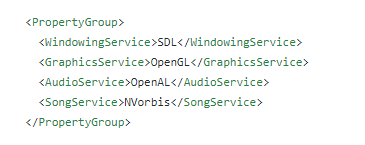
@tomspilman I followed your suggestion and implemented an alternative with a shared .targets file that checks for services defined in the .csproj files.
Links: MonoGame.Framework.DesktopGL.csproj and MonoGame.Framework.targets
I also tested this alternative with VS2017. It doesn't touch the .csproj file if added files are already included with wildcard.
Jjagg
on 9 Dec 2018
a shared .targets file that checks for services defined in the .csproj files.
I like that alot...
MonoGame.Framework.DesktopGL.csproj->
MonoGame.Framework.targets->
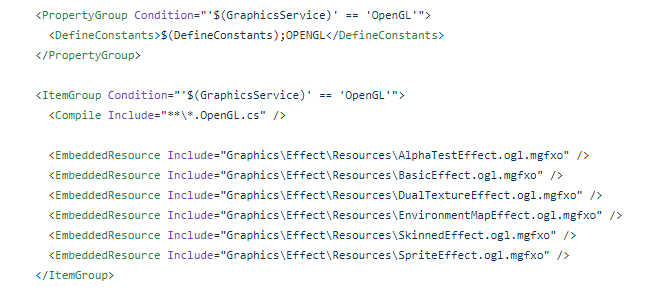
Moves most of the work to shared .targets file and potentially allows for us to mix and match services for different platforms.
I would have to test things, but i expect this technique could be made to work fine for our console releases.
My main concerns:
What version of Visual Studio do we target? We would have to keep around .sln files which can be VS version specific.
What happens if a use adds files via VS to the MonoGame.Framework.DesktopGL.csproj and saves? Does it make a mess?
Does this technique work well for Mac/Linux where you use some form of VSCode or Xamarin tools?
Will this method play well with future versions of .NET like .NET Standard?
tomspilman
on 10 Dec 2018
What version of Visual Studio do we target? We would have to keep around .sln files which can be VS version specific.
I think only 2017 supports the SDK-style .csproj. With the community version being free IMO that is not an issue. I've never heard of solutions depending on VS version.
What happens if a use adds files via VS to the MonoGame.Framework.DesktopGL.csproj and saves? Does it make a mess?
If the file is already included by the wildcards in the .csproj no changes are made by VS. If a file is added that's not included, it's added in the .csproj file in the ItemGroup with exceptions. I expect most changes to be covered by the wildcards.
Does this technique work well for Mac/Linux where you use some form of VSCode or Xamarin tools?
VSCode doesn't touch the project files. I think there's nothing special going on with mobile platforms if that's what you mean by Xamarin Tools.
Maybe MonoDevelop doesn't play as nice as VS, but if we stick to the lowest common denominator we're always gonna be behind the curve. I'm using VS Code on Linux and I wouldn't trade it for anything else. I even switched to Code on Windows.
Will this method play well with future versions of .NET like .NET Standard?
Yes, in fact the linked project target .NET Standard 2.0. It's also easy to multi-target with the SDK style csproj, so we could still target a version of .NET Framework if that's desirable.
Jjagg
on 10 Dec 2018
I think we can do better, my turn, muahaha.
harry-cpp
on 10 Dec 2018
I would ask all of you to leverage these project configurations against the possibility of letting visual studio generating the nuget packages properly, specially the "portable class/netstandard" nuget package, instead of the crazy awkward trick being used right now, which is to take one of the platform assemblies and hammering it with the "portable class" assembly signature.
new csproj files have the <GeneratePackageOnBuild>true<> that creates the nuget package of the assembly straight away after compiling, very very handy. It would be nice if all the csproj changes allow for that.
vpenades
on 10 Dec 2018
@vpenades What do you mean letting VS generate the NuGet packages?
I agree we should include the NuGet configuration in the .csproj files.
Jjagg
on 10 Dec 2018
@vpenades What do you mean letting VS generate the NuGet packages?
dotnet pack I assume. I use it for all my nuget packages.
Also msbuild /t Pack.
harry-cpp
on 10 Dec 2018
Sorry, I didn't notice auto correction ate the property name, I meant to write this:
< GeneratePackageOnBuild >true< ... >
This csproj property, along with other associated properties let the csproj to create the nugget package straight away.
Even if the project targets multiple frameworks, the nugget package will include all of them, allowing for single packages to include platform specific assemblies seamlessly
vpenades
on 11 Dec 2018
< GeneratePackageOnBuild >true< ... >
Yup, does exactly what my commands above do. Its better to not include it in the .csproj tho, as passing it as a command line argument makes more sense since you don't always want a generated package.
harry-cpp
on 11 Dec 2018
Update on my progress!
In my branch I've now ported the DesktopGL platform, the WindowsDX platform and the DesktopGL.MacOS platform (DesktopGL with Mac VideoPlayer). I've moved files around for consistency, but haven't fixed the Protobuild definition. Not sure if it's best if we remove Protobuild all at once or add the new .csproj files in steps.
EDIT: @tomspilman probably best to make sure I don't break the .definition file for consoles, or is that totally separate?
DesktopGL builds for netstandard2.0. WindowsDX doesn't currently build for .NET Standard because it uses WinForms. I added an exception to allow building for .NET Core 3.0 already (they added WinForms support) so users can easily target it if they choose to (by default it only builds for .NET Framework 4.5 like we do currently), though I haven't tested it yet.
Jjagg
on 15 Dec 2018
You can multitarget frameworks, ie: netstandard2.0;net471 is a valid value for the target framework.
Also I still think https://github.com/Jjagg/MonoGame/blob/kill-pb-targets/MonoGame.Framework/MonoGame.targets is way too complex for what it needs to do.
harry-cpp
on 15 Dec 2018
@cra0zy
You can multitarget frameworks, ie: netstandard2.0;net471 is a valid value for the target framework.
I'm aware, but not sure what your point is.
Also I still think https://github.com/Jjagg/MonoGame/blob/kill-pb-targets/MonoGame.Framework/MonoGame.targets is way too complex for what it needs to do.
You've mentioned that. Could you make some arguments for it though, because I don't see why your method would be better. What's too complex and why is that an issue? How does your method improve it?
Jjagg
on 15 Dec 2018
Quick example: https://github.com/cra0zy/MonoGame/blob/noprot/Source/MonoGame.Framework/MonoGame.Framework.DesktopGL.csproj
Edit:
I might as well add more context, all I want from a project file is not to be a nightmare of wildcards that works, but something that if you never saw once before, you could easily make adjustments to.
Some code you can write in a single line, but by doing so you will be loosing on some valuable code readability.
harry-cpp
on 15 Dec 2018
I'm aware, but not sure what your point is.
You can target multiple frameworks for DesktopGL, requires some tweaking of its nuget targets file to have it running on both older versions of .NET Framework and .NET Core when compiled into a nuget.
harry-cpp
on 15 Dec 2018
Yours is way nicer :p
You can target multiple frameworks for DesktopGL, requires some tweaking of its nuget targets file to have it running on both older versions of .NET Framework and .NET Core when compiled into a nuget.
I don't think we need to. .NET Standard 2.0 is compatible with .NET Framework 4.6.1+ (unless we want to support .NET Framework 4.5 or something).
Jjagg
on 15 Dec 2018
I don't think we need to. .NET Standard 2.0 is compatible with .NET Framework 4.6.1+ (unless we want to support .NET Framework 4.5 or something).
Long story short, runtime stuff does not work with .NET Framework, and .NET Standard 2.0 does not properly support frameworks before .NET Framework 4.7.1. If you are interested in me explaining either of those topics, I can go into more detail.
harry-cpp
on 15 Dec 2018
I'll take your word for it :)
@tomspilman What do you think about @cra0zy's proposal I think it's way cleaner than what I was doing.
Jjagg
on 15 Dec 2018
My point on nuggets and the cross platform thing was about to explore the possibility of simplify nugget package deployment by having more "intelligent" nugget packages.
Right now monogame uses nuget packages as little more than assembly containers; although this might be enough to be able to say that "monogame supports nuget", it is not using the nuget features that make them really useful, like having multiple platform assemblies on a single nuget package.
I am aware this has been discussed many times, I am just saying to take this in account, to try to avoid making things even more difficult for future improvements related to nuget deployment
vpenades
on 16 Dec 2018
@vpenades Oh, you're talking about the discussion in #5724 .
There's nothing special we need to take into account if we do decide to unify packages in some way. NuGet management in general will be way easier once Protobuild is gone. Both dependency NuGets and our NuGets.
Regarding NuGet unification, I'm against the proposal. I think it's not worth the hassle. In the end users still have to pick their platform in some cases (e.g. Windows where we have 3 platforms). I'd rather see us keep the way users handle NuGets consistent. Also, it wouldn't really be different if we'd use a unified NuGet instead of a platform specific one as a replacement for PCL. There's still 1 assembly that determines the API surface.
Jjagg
on 16 Dec 2018
like having multiple platform assemblies on a single nuget package.
Thats would be a horrible horrible idea. Like for example WindowsDX and DesktopGL both target desktop, how do you choose which one should be used. And what about pointless size increases and download times as you would have to get "all" the platforms from a single nuget. Also what about platforms that require custom running procedures like the web platform.
although this might be enough to be able to say that "monogame supports nuget"
Tell me than what is "missing" from the MonoGame nuget? It automatically sets the correct MonoGame platform for the content tools and it automatically deploys any native libraries needed.
harry-cpp
on 16 Dec 2018
@cra0zy @tomspilman I've tried another approach for the .csproj files. I've moved platform specific files like @cra0zy did, but split off target files for OpenGL and OpenAL (also intend to do DirectX). I've not used wildcards. This keeps the benefit of the services method without overcomplicating things. We can include Platform\OpenGL.targets and Platform\OpenAL.targets for Android, iOS and DesktopGL to prevent duplicate work when adding e.g. an OpenGL file.
So basically it's the services approach, but only where we need it, without wildcards and with project includes instead of defining properties and including 1 big targets file.
Commit with project files: https://github.com/Jjagg/MonoGame/commit/526191b88a1b9e0ec49166263292dcafb9fdc240
@cra0zy What do you think?
Jjagg
on 16 Dec 2018
Looks fine to me.
harry-cpp
on 16 Dec 2018
Done, that was easy, took barely 5 minutes!
harry-cpp
on 25 Mar 2020
Related issues
 willmotil
·
5Comments
willmotil
·
5Comments
 griseus
·
5Comments
Jjagg
·
5Comments
griseus
·
5Comments
Jjagg
·
5Comments
 Halofreak1990
·
4Comments
Halofreak1990
·
4Comments
 monsieurmax
·
5Comments
monsieurmax
·
5Comments
Most helpful comment
Done, that was easy, took barely 5 minutes!