Monogame: 3.7.0.1248 - Exception loading a 3d model that loaded correctly in 3.7.0.1126
I've just upgraded to 3.7.0.1248 , and I get this exception when I do Content.Load<Model>("KinectV2");
Microsoft.Xna.Framework.Content.ContentLoadException
  HResult=0x80131500
  Message=Could not find ContentTypeReader Type. Please ensure the name of the Assembly that contains the Type matches the assembly in the full type name: Microsoft.Xna.Framework.Content.ReflectiveReader`1[[Microsoft.Xna.Framework.Content.Pipeline.Graphics.MaterialContent, MonoGame.Framework.Content.Pipeline, Version=3.7.0.1248, Culture=neutral, PublicKeyToken=null]] (Microsoft.Xna.Framework.Content.ReflectiveReader`1[[Microsoft.Xna.Framework.Content.Pipeline.Graphics.MaterialContent, MonoGame.Framework.Content.Pipeline]])
  Source=MonoGame.Framework
  StackTrace:
   at Microsoft.Xna.Framework.Content.ContentTypeReaderManager.LoadAssetReaders(ContentReader reader)
   at Microsoft.Xna.Framework.Content.ContentReader.InitializeTypeReaders()
   at Microsoft.Xna.Framework.Content.ContentReader.ReadAsset[T]()
   at Microsoft.Xna.Framework.Content.ContentManager.ReadAsset[T](String assetName, Action`1 recordDisposableObject)
   at Microsoft.Xna.Framework.Content.ContentManager.Load[T](String assetName)
   at Game1.Game1.LoadContent() in F:\tests\Game1.cs:line 53
   at Microsoft.Xna.Framework.Game.Initialize()
   at Game1.Game1.Initialize() in F:\tests\Game1.cs:line 39
   at Microsoft.Xna.Framework.Game.DoInitialize()
   at Microsoft.Xna.Framework.Game.Run(GameRunBehavior runBehavior)
   at Game1.Program.Main() in F:\tests\Program.cs:line 18
This is the 3D model (both the original and the XNB)
The model is a very basic Wavefront OBJ model with a material and a texture, processed with Open Asset Importer. The content pipeline processes it fine without complains.
Also, the model, nor the processing options, have not been changed since November last year, so It's a regression introduced recently.
Update: Digging inside the content importer, I've got this exception message:
Error loading shared resource. Expected type Effect, received type MaterialContent
 vpenades
All 22 comments
I assume you are using the stock ModelProcessor?
I suspect we should be handling the material changes in the OpenAssetImporter within that stock processor. Might need to do a little refactoring, but we can ensure it returns a BasicEffect like it did before.
This sound right?
 tomspilman
on 12 Feb 2018
tomspilman
on 12 Feb 2018
Yes, the importer is Open Asset Import Library and BasicEffect , and we haven't changed anything related to this asset in a while, so it's something that has changed very recently.
In fact, we might have the same issue with other wavefront models... keep in mind that MGCB processes the models correctly, they fail at runtime when you try to load them.
@tomspilman Sure, I think handling the materials in a general way should be good enough, Additionally, it could be good to add some wavefront obj files to the test cases.
vpenades
on 12 Feb 2018
Sure, I think handling the materials in a general way should be good enough,
Yeah there should be no reason for the ModelProcessor to ever return anything but a stock effect. This should occur regardless of the importer.
it could be good to add some wavefront obj files to the test cases.
If you have a simple OBJ model we could add to the unit tests i'm all for it.
tomspilman
on 12 Feb 2018
If you don't mind, there's some test wavefront objs in some public repositories, so far I know about these:
But if you don't feel confident about using them, I can prepare some test models.
In any case, we need this to be closed soon, since we have our development workflow stucked again!
vpenades
on 12 Feb 2018
There are several issues like this in the forums. It'd probably be better to put this issue in 3.7 to avoid skipping it
http://community.monogame.net/t/solved-content-load-model-contentloadexception/10355
http://community.monogame.net/t/contentloadexception-in-version-3-7-0-1232/10281
http://community.monogame.net/t/contentloadexception-in-version-3-7-0-1316/10371
 KakCAT
on 23 Feb 2018
KakCAT
on 23 Feb 2018
I suppose you already knew it, but the "_xnaCompatible" path (ImportXnaMaterials instead of ImportMaterials) makes the model work.
But if you're stuck and need the latest mgcb like me, changing the bool in the constructor of OpenAssetImporter class from false to true and recompiling works.
edit: I hadn't realized FbxImporter is still there, just switching to it would probably fix errors.
KakCAT
on 23 Feb 2018
Based on feedback by @KakCAT I found the current workaround is to use the FBX Importer, even with Wavefront OBJ files. I've changed the importer and the models appear again.
@tomspilman should I close the issue as resolved?
Since the Assimp importer is still failing, and as far as I know, it remains the default importer for OBJ files when you add them to a content project, at least I would change MGCB to use the FBX Importer by default.
vpenades
on 1 Mar 2018
@vpenades
should I close the issue as resolved?
No i plan to fix it here soon.
tomspilman
on 3 Mar 2018
I get the same exception with a simple textured cube in COLLADA format when I execute the line Content.Load
Microsoft.Xna.Framework.Content.ContentLoadException
  HResult=0x80131500
  Message=Could not find ContentTypeReader Type. Please ensure the name of the Assembly that contains the Type matches the assembly in the full type name: Microsoft.Xna.Framework.Content.ReflectiveReader`1[[Microsoft.Xna.Framework.Content.Pipeline.Graphics.MaterialContent, MonoGame.Framework.Content.Pipeline, Version=3.7.0.1371, Culture=neutral, PublicKeyToken=null]] (Microsoft.Xna.Framework.Content.ReflectiveReader`1[[Microsoft.Xna.Framework.Content.Pipeline.Graphics.MaterialContent, MonoGame.Framework.Content.Pipeline]])
  Source=MonoGame.Framework
  StackTrace:
   at Microsoft.Xna.Framework.Content.ContentTypeReaderManager.LoadAssetReaders(ContentReader reader)
   at Microsoft.Xna.Framework.Content.ContentReader.InitializeTypeReaders()
   at Microsoft.Xna.Framework.Content.ContentReader.ReadAsset[T]()
   at Microsoft.Xna.Framework.Content.ContentManager.ReadAsset[T](String assetName, Action`1 recordDisposableObject)
   at Microsoft.Xna.Framework.Content.ContentManager.Load[T](String assetName)
   at ColladaTest.Game1.LoadContent() in D:\dev\_tests\ColladaTest\Game1.cs:line 45
   at Microsoft.Xna.Framework.Game.Initialize()
   at ColladaTest.Game1.Initialize() in D:\dev\_tests\ColladaTest\Game1.cs:line 32
   at Microsoft.Xna.Framework.Game.DoInitialize()
   at Microsoft.Xna.Framework.Game.Run(GameRunBehavior runBehavior)
   at ColladaTest.Program.Main() in D:\dev\_tests\ColladaTest\Program.cs:line 17
Screenshot of model:
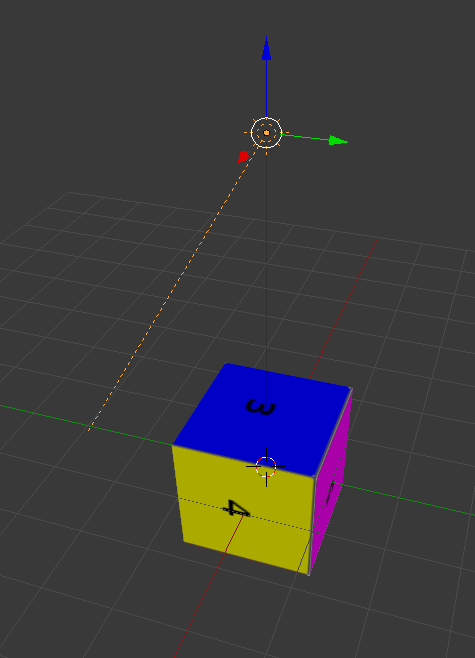
Exported COLLADA format:
textured_cube.zip
Blender source file:
textured_cube.zip
Content.mgcb:
#----------------------------- Global Properties ----------------------------#

/outputDir:bin/$(Platform)
/intermediateDir:obj/$(Platform)
/platform:DesktopGL
/config:
/profile:Reach
/compress:False

#-------------------------------- References --------------------------------#


#---------------------------------- Content ---------------------------------#

#begin textured_cube.dae
/importer:OpenAssetImporter
/processor:ModelProcessor
/processorParam:ColorKeyColor=0,0,0,0
/processorParam:ColorKeyEnabled=True
/processorParam:DefaultEffect=BasicEffect
/processorParam:GenerateMipmaps=True
/processorParam:GenerateTangentFrames=False
/processorParam:PremultiplyTextureAlpha=True
/processorParam:PremultiplyVertexColors=True
/processorParam:ResizeTexturesToPowerOfTwo=False
/processorParam:RotationX=0
/processorParam:RotationY=0
/processorParam:RotationZ=0
/processorParam:Scale=1
/processorParam:SwapWindingOrder=False
/processorParam:TextureFormat=Compressed
/build:textured_cube.dae
Tested on build 3.7.0.1371
 andrekoehler
on 6 Mar 2018
andrekoehler
on 6 Mar 2018
@andrekoehler - Yeah this issue has nothing to do with the model format. It has to do with how materials are processed.
I will have a fix soon.
tomspilman
on 7 Mar 2018
@tomspilman Anything I can do to help with this? Would be great to get this in 3.7.1.
 Jjagg
on 9 Oct 2018
Jjagg
on 9 Oct 2018
@Jjagg - First FYI...
https://twitter.com/Tesla3D/status/1047981452560936964
The issue is knowing when to process materials like legacy XNA and when to process them in a better way. XNA always returned a BasicEffect for models which throws away a lot of the material info the artist setup. This is fine if you just want the few features XNA and BasicEffect provided... not fine if you're wanting to do more.
So to do more i have it returning a MaterialContent passing along all the content info that AssImp provides. This allows someone to extended the processor to generate their own custom effects or material data.
The problem @vpenades and @andrekoehler are having is that they are trying to use the MonoGame OpenAssetImporter and assuming it will return BasicEffect objects and it is not. Our implementation of the XNA FbxImporter and ObjImporter do work like XNA. Since by convention importers in the XNA pipeline do not have properties it isn't like they can enable/disable this feature.
So i see three options here:
- Break compatibility and this is just how the
OpenAssertImporterworks. - Make a new importer like
XnaCompatibleOpenAssertImporterwhich sucks... but does what some want. - Add support for importer properties to our Pipeline tooling and MGCB.
3 is a long term good feature making the pipeline more flexible. 2 might be just what we need to do.
I really don't have any time to work on this so hopefully this helps someone move forward on this.
tomspilman
on 9 Oct 2018
Just an update of our status regarding this issue:
In the end, we took the hard and long path of modifying all our assets, so they look like they used to look before, but processed with the new processors.
New assets being added to our project use a custom glTF importer, so they use neither of the assimp importers.
So, on our side, choosing Tom option 1 of breaking compatibility is no longer a problem
vpenades
on 9 Oct 2018
@tomspilman I get the purpose of the change to the importer, but it would have been better if the processor had been changed so behavior of the model building pipeline didn't change/break. I don't think we should support importer parameters for this, but instead just drop the extra information in the processor. IMO we could make things a lot easier for users in a few simple steps:
- Have only 1 importer for models,
AssimpImporter(if for compatibility we have to keep the old ones, we can maybe just not display them in the Pipeline Tool) - Have only 1 processor for models that strips down the imported stuff and writes the XNA compatible xnb with the
BasicMaterialContent. - Write docs that explain that the imported model has additional data that can be accessed and made into an effect using a custom processor.
EDIT: Writing MaterialContent in the ModelWriter should probably fail, since it can't be loaded that way. Would be nice if we could check that what we write is actually an Effect.
Jjagg
on 9 Oct 2018
@Jjagg
So thinking about this more.
If MaterialProcessor (which is what ModelProcessor uses internally) was fixed to first convert plain MaterialContent into a BasicMaterialContent then it would solve the issue @vpenades ran into. This would just be a process of making a simple translation between them from the code here:
https://github.com/MonoGame/MonoGame/blob/develop/MonoGame.Framework.Content.Pipeline/OpenAssetImporter.cs#L352
https://github.com/MonoGame/MonoGame/blob/develop/MonoGame.Framework.Content.Pipeline/OpenAssetImporter.cs#L416
Then we can leave the existing OpenAssertImporter to export rich material info by default. Leaving it open for people to write custom processors (model or material processors) to exploit that info.
Have only 1 importer for models
Have only 1 processor for models
I think it is a bad idea to get into thinking one processor or one importer is enough. The reason importers and processors are separate is so you can mix and match them.
Writing
MaterialContentin theModelWritershould probably fail,
Yeah i think that is something we could consider doing.
tomspilman
on 11 Oct 2018
@tomspilman
If
MaterialProcessorwas fixed to first convert plainMaterialContentinto aBasicMaterialContent
Yeah, that's a good idea.
I think it is a bad idea to get into thinking one processor or one importer is enough. The reason importers and processors are separate is so you can mix and match them.
Regarding the importer my point was that it's redundant to have the XImporter and FbxImporter because they just delegate to the AssimpImporter and it's confusing to users. Functionally we only have 1 importer anyways. We already only have 1 built-in processor, but of course with the extra stuff that's imported now users can do whatever with a custom processor.
Jjagg
on 11 Oct 2018
@jjagg I agree, right now there's two importers but they both use assimp. I guess the only thing that changed between both importers is how assimp content is converted to xna content. In the other hand, I am worried that further changes may force us to reexport all our assets again,
vpenades
on 11 Oct 2018
Regarding the importer my point was that it's redundant to have the XImporter and FbxImporter because they just delegate to the AssimpImporter and it's confusing to users
Well they are there specifically because they behave like XNA does... including always returning BasicMaterialContent objects. If not any user custom processors could have to be re-written to support how OpenAssertImporter materials are generated.
In the other hand, I am worried that further changes may force us to reexport all our assets again,
We should be sure to check any change we make for this with your project @vpenades and be sure it didn't break it.
tomspilman
on 11 Oct 2018
Well they are there specifically because they behave like XNA does... including always returning BasicMaterialContent objects.
Oops, bit of an oversight on my part. Yeah, we definitely want an XNA compatible importer too.
Jjagg
on 11 Oct 2018
Seeing this issue currently on latest packages MonoGame.Content.Builder 3.7.0.9 and monogame.framework.desktopgl 3.7.1.189.
Seems to happen no matter which content importer I choose sadly.
Any suggestions for how I can import models without this failing upon content load?
 sami016
on 5 Nov 2019
sami016
on 5 Nov 2019
Ah, this could be a version mismatch. MonoGame.Content.Builder is a version published by Cra0zy, and is fairly out of date.
It would be nice if the nuget packages for this could be sorted out. Going through a dependency hell trying to get a simple game to work 😄
sami016
on 5 Nov 2019
Just a note that this is still happening in 3.8 but that the fix (use the FBX importer or write your own processor) still works :)
 roy-t
on 17 Dec 2020
roy-t
on 17 Dec 2020
Related issues
 SenpaiSharp
·
3Comments
SenpaiSharp
·
3Comments
 harry-cpp
·
5Comments
Jjagg
·
5Comments
harry-cpp
·
5Comments
Jjagg
·
5Comments
 Halofreak1990
·
4Comments
Halofreak1990
·
4Comments
 griseus
·
5Comments
griseus
·
5Comments