Mono: Orphaned mono-sgen64 processes occupy CPU
Starting with Mono MDK 5.16.0.220, there are numerous "orphaned" mono-sgen64 processes using the CPU even after the project is built and all IDEs are closed. We have to force-quit these processes (or restart).
NOTE: The issue was not present in Mono 5.12.0.309
Warning: I'm afraid this going to be one of "those" issue reports. Try as I might, I cannot seem to isolate this bug in a simple test project, therefore I cannot provide steps to reproduce this outside the context of our project (sigh I know! I hate issue reports like this too), which is closed-source. That said, I am happy to furnish additional information.
Steps to Reproduce
- Clone https://github.com/dbelcher/TestVBCompile
- Build TestVBCompile.
- Once the project is built, quit all applications including all IDEs, etc. Quit everything except Finder.
- Open macOS's Activity Monitor.app and sort descending on the CPU column.
Current Behavior
Numerous mono-sgen32 garbage collector processes are still active and occupying the CPU. Laptop fans are ON full blast.

Expected Behavior
Since all builds are finished and all apps closed, no mono-sgen32 processes are active nor appear in Activity Monitor.
On which platforms did you notice this
[X] macOS
[ ] Linux
[ ] Windows
Version Used:
NOTE: The following info is from Mono 5.16.0.221, which also exhibits this behavior.
=== Visual Studio Professional 2017 for Mac ===
Version 7.7 (build 1868)
Installation UUID: 3152b549-c736-4969-9316-62a0762b3ffa
GTK+ 2.24.23 (Raleigh theme)
Xamarin.Mac 4.4.1.178 (master / eeaeb7e6)
Package version: 516000221
=== Mono Framework MDK ===
Runtime:
Mono 5.16.0.221 (2018-06/b63e5378e38) (64-bit)
Package version: 516000221
=== NuGet ===
Version: 4.7.0.5148
=== .NET Core ===
Runtime: /usr/local/share/dotnet/dotnet
Runtime Versions:
2.1.2
2.1.1
2.0.5
2.0.3
2.0.0
1.1.1
1.0.4
SDK: /usr/local/share/dotnet/sdk/2.1.302/Sdks
SDK Versions:
2.1.302
2.1.301
2.1.4
2.0.3
2.0.0
1.0.3
MSBuild SDKs: /Library/Frameworks/Mono.framework/Versions/5.16.0/lib/mono/msbuild/15.0/bin/Sdks
=== Xamarin.Profiler ===
Version: 1.6.4
Location: /Applications/Xamarin Profiler.app/Contents/MacOS/Xamarin Profiler
=== Apple Developer Tools ===
Xcode 10.1 (14460.46)
Build 10B61
=== Xamarin.Mac ===
Version: 5.2.1.11 (Visual Studio Professional)
Hash: 5ef73d34
Branch:
Build date: 2018-11-21 00:03:25-0500
=== Xamarin.iOS ===
Version: 12.2.1.11 (Visual Studio Professional)
Hash: 5ef73d34
Branch: d15-9
Build date: 2018-11-21 00:03:24-0500
=== Xamarin.Android ===
Version: 9.1.0.38 (Visual Studio Professional)
Android SDK: /Users/dan/Library/Developer/Xamarin/android-sdk-macosx
Supported Android versions:
7.1 (API level 25)
SDK Tools Version: 26.1.1
SDK Platform Tools Version: 27.0.1
SDK Build Tools Version: 26.0.3
Java SDK: /Users/dan/Library/Developer/Xamarin/jdk/microsoft_dist_openjdk_1.8.0.9
openjdk version "1.8.0-9"
OpenJDK Runtime Environment (build 1.8.0-9-microsoft-b00)
OpenJDK 64-Bit Server VM (build 25.71-b00, mixed mode)
Android Designer EPL code available here:
https://github.com/xamarin/AndroidDesigner.EPL
=== Android Device Manager ===
Version: 7.7.1.0
Hash: 06ceaea1
=== Xamarin Inspector ===
Version: 1.4.3
Hash: db27525
Branch: 1.4-release
Build date: Mon, 09 Jul 2018 21:20:18 GMT
Client compatibility: 1
=== Build Information ===
Release ID: 707001868
Git revision: 8bcdfa96d67c8c88dc45728cc968a2f84b55322f
Build date: 2018-11-22 12:19:29+00
Build branch: release-7.7
Xamarin extensions: d66dbedcda237cd9b546abfecfeecafba6f8e3cb
=== Operating System ===
Mac OS X 10.14.1
Darwin 18.2.0 Darwin Kernel Version 18.2.0
Fri Oct 5 19:41:49 PDT 2018
root:xnu-4903.221.2~2/RELEASE_X86_64 x86_64
=== Enabled user installed extensions ===
RhinoCommon Plugin Support 7.4.3.1
 dbelcher
All 35 comments
These aren't "garbage collector" processes.
"sgen" in the name means "not Boehm".
Can you see the command line of any of these, like with "ps waux" or similar?
Can you attach a debugger to any of them?
 jaykrell
on 5 Dec 2018
jaykrell
on 5 Dec 2018
Is the project available to build? Git clone something? I looked a bit and didn't find it.
jaykrell
on 5 Dec 2018
These aren't "garbage collector" processes.
Ah, ok. I corrected it above. Thank you.
Can you see the command line of any of these, like with "ps waux" or similar?
Yes...
$ ps waux | grep mono-sgen
dan              87371 183.0  0.6  4570056  93508   ??  R     9:43AM   0:01.69 /Library/Frameworks/Mono.framework/Versions/5.16.0/bin/mono-sgen64 /Library/Frameworks/Mono.framework/Versions/5.16.0/lib/mono/msbuild/15.0/bin/Roslyn/csc.exe /noconfig @/var/folders/67/m_70v6ds2g10123wly66_1tcryj8w3/T/tmpeb92e72c3c384d9c8ef9fa4720846714.rsp
dan              87264 104.6  0.9  5072448 151632   ??  R     9:42AM   1:03.18 /Library/Frameworks/Mono.framework/Versions/5.16.0/bin/mono-sgen64 /Library/Frameworks/Mono.framework/Versions/5.16.0/lib/mono/msbuild/15.0/bin/Roslyn/VBCSCompiler.exe -pipename:dan.F.r0119c1WXIHloEthi8MMIM2Au
dan              87295  99.7  0.8  4531452 130972   ??  R     9:43AM   0:27.73 /Library/Frameworks/Mono.framework/Versions/5.16.0/bin/mono-sgen64 /Library/Frameworks/Mono.framework/Versions/5.16.0/lib/mono/msbuild/15.0/bin/Roslyn/VBCSCompiler.exe -pipename:dan.F.r0119c1WXIHloEthi8MMIM2Au
dan              87297  98.0  0.8  4529364 130580   ??  R     9:43AM   0:24.96 /Library/Frameworks/Mono.framework/Versions/5.16.0/bin/mono-sgen64 /Library/Frameworks/Mono.framework/Versions/5.16.0/lib/mono/msbuild/15.0/bin/Roslyn/VBCSCompiler.exe -pipename:dan.F.r0119c1WXIHloEthi8MMIM2Au
dan              87256  97.9  0.9  4617944 146884   ??  R     9:42AM   1:12.37 /Library/Frameworks/Mono.framework/Versions/5.16.0/bin/mono-sgen64 /Library/Frameworks/Mono.framework/Versions/5.16.0/lib/mono/msbuild/15.0/bin/Roslyn/VBCSCompiler.exe -pipename:dan.F.r0119c1WXIHloEthi8MMIM2Au
dan              87262  97.3  0.9  4602740 148488   ??  R     9:42AM   1:04.05 /Library/Frameworks/Mono.framework/Versions/5.16.0/bin/mono-sgen64 /Library/Frameworks/Mono.framework/Versions/5.16.0/lib/mono/msbuild/15.0/bin/Roslyn/VBCSCompiler.exe -pipename:dan.F.r0119c1WXIHloEthi8MMIM2Au
Can you attach a debugger to any of them?
No, but I'm not certain I'm doing it correctly. I might need a little hand-holding here.
Is the project available to build?
I'm afraid not. It's closed source, hence the Warnings above with the fear that this might be marked "Can't reproduce"
dbelcher
on 5 Dec 2018
No, but I'm not certain I'm doing it correctly. I might need a little hand-holding here.
lldb -p $PID. lldb is shipped with Xcode. Then do bt all in lldb and gist.github.com the output
 lewurm
on 5 Dec 2018
lewurm
on 5 Dec 2018
I guess this is the roslyn compiler server.
dan 87264 104.6 0.9 5072448 151632 ?? R 9:42AM 1:03.18 /Library/Frameworks/Mono.framework/Versions/5.16.0/bin/mono-sgen64 /Library/Frameworks/Mono.framework/Versions/5.16.0/lib/mono/msbuild/15.0/bin/Roslyn/VBCSCompiler.exe -pipename:dan.F.r0119c1WXIHloEthi8MMIM2Au
 Therzok
on 5 Dec 2018
Therzok
on 5 Dec 2018
Thanks @lewurm. Here you go:
https://gist.github.com/dbelcher/4349a21cb80699c2705eec84ae202c85
dbelcher
on 5 Dec 2018
Update: We noticed that the number of mono-sgen processes corresponded to the number of VB projects in our solution. When we unloaded those projects, this issue does not occur. We will do some more testing to see if we can reproduce this in a test project.
dbelcher
on 6 Dec 2018
Here is a test project that demonstrates the problem: https://github.com/dbelcher/TestVBCompile
(I've edited the initial report to reflect this.)
dbelcher
on 6 Dec 2018
I have a similar problem in an unrelated project (https://github.com/APSIMInitiative/APSIMClassic) building on linux/x64, mono 5.18.0.225. CPU load goes through the roof, and many sgen processes are running:
$ ps ax | grep mono-sgen
  701 pts/0    Sl+    2:12 /usr/bin/mono-sgen /usr/lib/mono/msbuild/15.0/bin/Roslyn/VBCSCompiler.exe -pipename:uqpdevo1.F.tDN4f_KHlERN6astJg5bAA10E
 1493 pts/0    Rl+    2:00 /usr/bin/mono-sgen /usr/lib/mono/msbuild/15.0/bin/Roslyn/VBCSCompiler.exe -pipename:uqpdevo1.F.tDN4f_KHlERN6astJg5bAA10E
 2149 pts/0    Rl+    1:53 /usr/bin/mono-sgen /usr/lib/mono/msbuild/15.0/bin/Roslyn/VBCSCompiler.exe -pipename:uqpdevo1.F.tDN4f_KHlERN6astJg5bAA10E
12558 pts/5    S+     0:00 grep --color=auto mono-sgen
29644 pts/0    Sl+    3:28 /usr/bin/mono-sgen /usr/lib/mono/msbuild/15.0/bin/Roslyn/VBCSCompiler.exe -pipename:uqpdevo1.F.tDN4f_KHlERN6astJg5bAA10E
29983 pts/0    Sl+    3:19 /usr/bin/mono-sgen /usr/lib/mono/msbuild/15.0/bin/Roslyn/VBCSCompiler.exe -pipename:uqpdevo1.F.tDN4f_KHlERN6astJg5bAA10E
30529 pts/0    Sl+    3:02 /usr/bin/mono-sgen /usr/lib/mono/msbuild/15.0/bin/Roslyn/VBCSCompiler.exe -pipename:uqpdevo1.F.tDN4f_KHlERN6astJg5bAA10E
31204 pts/0    Rl+    2:45 /usr/bin/mono-sgen /usr/lib/mono/msbuild/15.0/bin/Roslyn/VBCSCompiler.exe -pipename:uqpdevo1.F.tDN4f_KHlERN6astJg5bAA10E
31341 pts/0    Rl+    2:40 /usr/bin/mono-sgen /usr/lib/mono/msbuild/15.0/bin/Roslyn/VBCSCompiler.exe -pipename:uqpdevo1.F.tDN4f_KHlERN6astJg5bAA10E
31900 pts/0    Rl+    2:31 /usr/bin/mono-sgen /usr/lib/mono/msbuild/15.0/bin/Roslyn/VBCSCompiler.exe -pipename:uqpdevo1.F.tDN4f_KHlERN6astJg5bAA10E
31965 pts/0    Rl+    2:30 /usr/bin/mono-sgen /usr/lib/mono/msbuild/15.0/bin/Roslyn/VBCSCompiler.exe -pipename:uqpdevo1.F.tDN4f_KHlERN6astJg5bAA10E
 peter-devoil
on 14 Jan 2019
peter-devoil
on 14 Jan 2019
Hi @peter-devoil-
We found a workaround.
In _YourProject.vbproj_, try setting:
<UseSharedCompilation>false</UseSharedCompilation>
(You would need to do this for all _.vbproj_ files in your solution).
dbelcher
on 14 Jan 2019
@kg you touched the compile server lately, can you check this?
 directhex
on 7 Jun 2019
directhex
on 7 Jun 2019
This could be caused by bumping roslyn at all, since with the old broken roslyn VBCS would crash at startup or hang and maybe get killed. Once upstream roslyn fixed pipes + mono bumped to corefx pipes, this would happen if you enabled the compiler server. We'd have to downgrade roslyn
 kg
on 7 Jun 2019
kg
on 7 Jun 2019
Also, a couple other things I just remembered:
With older mono, VBCS would hang or close to it because our implementation of Timers was broken and because we had a really nasty performance issue in one of our BCL types. Newer mono should have both of these fixed, it's possible the mono being used here is too old. It should be possible to fix this by either downgrading mono or upgrading it.
You can also /p:UseSharedCompilation=false I think, though I'm not sure that will override your vbprojs.
kg
on 7 Jun 2019
I noticed that this happened to me when I stopped a compilation. This doesn't happen every time, I'd say that it's a 10% chance... currently also on Mac, build c# project
Details:
Visual Studio Enterprise 2019 for Mac (Preview)
Version 8.4 Preview (8.4 build 2535)
Installation UUID: 441dc911-f613-42cd-bc81-67b2e79f9c5f
GTK+ 2.24.23 (Raleigh theme)
Xamarin.Mac 5.16.1.24 (d16-3 / 08809f5b)
Package version: 606000155
Mono Framework MDK
Runtime:
Mono 6.6.0.155 (2019-08/296a9afdb24) (64-bit)
Package version: 606000155
Roslyn (Language Service)
3.4.0-beta4-19556-02+24c95872289fa92ce8d5d766b103179a39aca809
NuGet
Version: 5.3.0.6192
.NET Core SDK
SDK: /usr/local/share/dotnet/sdk/3.1.100-preview3-014645/Sdks
SDK Versions:
3.1.100-preview3-014645
3.1.100-preview2-014569
3.0.100
2.1.802
MSBuild SDKs: /Library/Frameworks/Mono.framework/Versions/6.6.0/lib/mono/msbuild/Current/bin/Sdks
.NET Core Runtime
Runtime: /usr/local/share/dotnet/dotnet
Runtime Versions:
3.1.0-preview3.19553.2
3.1.0-preview2.19525.6
3.0.0
2.1.13
Xamarin.Profiler
Version: 1.6.12.26
Location: /Applications/Xamarin Profiler.app/Contents/MacOS/Xamarin Profiler
Updater
Version: 11
Apple Developer Tools
Xcode 11.2.1 (15526.1)
Build 11B500
Xamarin.Mac
Xamarin.Mac not installed. Can't find /Library/Frameworks/Xamarin.Mac.framework/Versions/Current/Version.
Xamarin.iOS
Version: 13.8.2.2 (Visual Studio Enterprise)
Hash: 44c08f2c
Branch: xcode11.3
Build date: 2019-11-04 17:20:50-0500
Xamarin Designer
Version: 16.4.0.460
Hash: 39e78a265
Branch: remotes/origin/d16-4
Build date: 2019-11-12 15:38:34 UTC
Xamarin.Android
Version: 10.1.0.30 (Visual Studio Enterprise)
Commit: xamarin-android/d16-4/5e2fd06
Android SDK: /Users/leonardoferreira/Library/Developer/Xamarin/android-sdk-macosx
Supported Android versions:
None installed
SDK Tools Version: 26.1.1
SDK Platform Tools Version: 28.0.2
SDK Build Tools Version: 28.0.3
Build Information:
Mono: e1ef774
Java.Interop: xamarin/java.interop/d16-4@c4e569f
ProGuard: xamarin/proguard/master@905836d
SQLite: xamarin/sqlite/3.28.0@46204c4
Xamarin.Android Tools: xamarin/xamarin-android-tools/master@9f4ed4b
Microsoft Mobile OpenJDK
Java SDK: /Users/leonardoferreira/Library/Developer/Xamarin/jdk/microsoft_dist_openjdk_1.8.0.25
1.8.0-25
Android Designer EPL code available here:
https://github.com/xamarin/AndroidDesigner.EPL
Android SDK Manager
Version: 16.4.0.9
Hash: 3f7256f
Branch: remotes/origin/d16-4
Build date: 2019-11-14 12:51:30 UTC
Android Device Manager
Version: 16.4.0.26
Hash: 27a51e7
Branch: remotes/origin/d16-4
Build date: 2019-11-14 12:51:52 UTC
Xamarin Inspector
Version: 1.4.3
Hash: db27525
Branch: 1.4-release
Build date: Mon, 09 Jul 2018 21:20:18 GMT
Client compatibility: 1
Build Information
Release ID: 804002535
Git revision: cbe8924f8aa63cb0175329190b587b23ba956cbe
Build date: 2019-11-15 16:13:16+00
Build branch: release-8.4
Xamarin extensions: 73893e076fe7490046bfc342ce71b361c860dce2
Operating System
Mac OS X 10.14.6
Darwin 18.7.0 Darwin Kernel Version 18.7.0
Sat Oct 12 00:02:19 PDT 2019
root:xnu-4903.278.12~1/RELEASE_X86_64 x86_64
 Leonardo-Ferreira
on 3 Dec 2019
Leonardo-Ferreira
on 3 Dec 2019
@Leonardo-Ferreira how long is the stray process staying for? The Roslyn compile server should time out after a short while.
directhex
on 3 Dec 2019
on my case, it hangs forever... I've given it plenty of time to quit by itself (like 10-20 minutes), but it never did, so I assume it would continue forever...
Leonardo-Ferreira
on 3 Dec 2019
Is the mono-sgen64 process running VBCSCompiler? Please check using ps -auxf or some other process list tool that will show you command line arguments
kg
on 3 Dec 2019
Haven't seen this in a while
Therzok
on 23 Feb 2020
I have a similar issue.
When connected from my PC/VS2019 to the MAC, three mono-sgen64 starts, and one uses all CPU of Mac, even if everything is in idle, nothing happens.
Steps:
I had a clean macOS 10.15.2, then on PC, installed latest VS2019 (16.5.3) to work with Xamarin, and from my VS connected to Mac, and let VS to install all necessary stuff it needs (mono, ios sdk, etc).
Mono 6.8.0.99
Xamarin.iOS framework 13.16.0.13
Note:There is no VS installed on the Mac.
Everything works fine, however when I connect to the Mac from my VS2019 PC, on the MAC, the mono-sgen64 consumes all CPU, even if everything is in idle, nothing is being built, etc
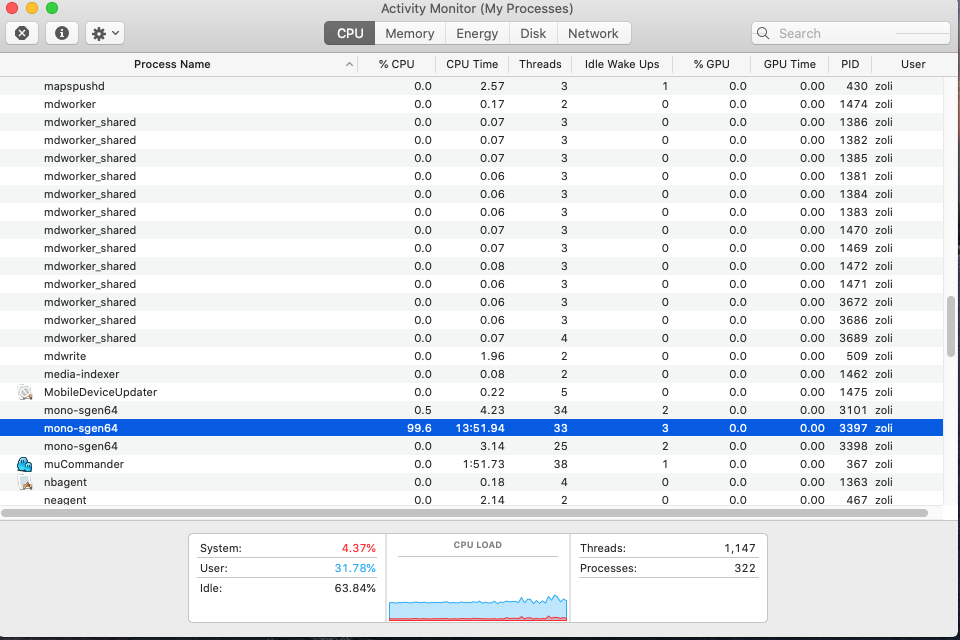
Running ps ax | grep mono-sgen64
zoli 3694 0.0 0.0 4268280 644 s000 R+ 6:42AM 0:00.00 grep mono-sgen64
When I close VS2019 (PC), then connection is disconnected to MAC, and all 3 mono-sgen64 are also terminated.
As everything works fine, I can accept it, but not seem to be normal (using 100% cpu in idle when VS2019 is connected)
 zoli13
on 11 Apr 2020
zoli13
on 11 Apr 2020
What are the arguments to that mono-sgen64 instance? I think they should show up in ps -auxf
kg
on 11 Apr 2020
/Library/Frameworks/Mono.framework/Versions/Current/bin/mono64 --debug /Users/zoli/Library/Caches/Xamarin/XMA/Broker/16.5.000.533/Broker.exe -port=56178 -sessionId=bc5ae106 -culture=en-US -version=16.5.000.533 -versionInfo=16.5.000.533-d16-5+9152e1b -processId=4048 -dateTime=2020-04-12__14-37-04

/Library/Frameworks/Mono.framework/Versions/Current/bin/mono64 --debug /Users/zoli/Library/Caches/Xamarin/XMA/Agents/Build/16.5.000.533/Build.exe -port=56178 -sessionId=d230b9ae -culture=en-US -version=16.5.000.533 -versionInfo=16.5.000.533-d16-5+9152e1b -processId=4048 -dateTime=2020-04-12__14-37-04

THIS ONE STRESSES THE CPU EVEN IN IDLE -->
/Library/Frameworks/Mono.framework/Versions/Current/bin/mono64 --debug /Users/zoli/Library/Caches/Xamarin/XMA/Agents/IDB/16.5.000.533/IDB.exe -port=56178 -sessionId=2805a1ec -culture=en-US -version=16.5.000.533 -versionInfo=16.5.000.533-d16-5+9152e1b -processId=4048 -dateTime=2020-04-12__14-37-04
`
zoli13
on 12 Apr 2020
Also experiencing this issue.
Windows 10 running VS 2019 Pro v16.5.3 connecting to Mac OS 10.15.4
Interestingly, the iOS Simulator seems to be working fine and I'm still able to build/deploy apps.
 ibebbs
on 13 Apr 2020
ibebbs
on 13 Apr 2020
Same bug for me.
VS 2019 16.5.3, Mac OS 10.15.3, XCode 11.4
 overzealus
on 14 Apr 2020
overzealus
on 14 Apr 2020
Thanks for the reports. IDB.exe is not related to this bug report, which was about MSBuild/Roslyn. The most likely explanation is that an update you installed to Xamarin changed its behavior, but I don't have any way to know.
If you still believe this is a bug in Mono please file a new issue so we can track it separately - any fix for the issue you're currently experiencing will not fix the issue that was reported here.
kg
on 14 Apr 2020
Same for me with latest VS2019 and Mac uptodate (OS, etc). mono-sgen64 occupies the CPU sometimes more than 100% (strange world !) and there are also other instances (with less CPU usage).
But I can't run the simulator on the PC, I've got the Simulator Window that is opened, saying I'm simulating an iPhone 11 Pro 13.4, but the Window is staying full black. While the mono-sgen64 is taking 100% on the Mac.
I can't even have the iOS home screen.
Is there a workaround or must I tell my customer I'm stopping iOS dev with Xamarin.Forms ? Any Advice ?
 odahan
on 12 May 2020
odahan
on 12 May 2020
Same for me with latest VS2019 and Mac uptodate (OS, etc). mono-sgen64 occupies the CPU sometimes more than 100% (strange world !) and there are also other instances (with less CPU usage).
But I can't run the simulator on the PC, I've got the Simulator Window that is opened, saying I'm simulating an iPhone 11 Pro 13.4, but the Window is staying full black. While the mono-sgen64 is taking 100% on the Mac.
I can't even have the iOS home screen.
Is there a workaround or must I tell my customer I'm stopping iOS dev with Xamarin.Forms ? Any Advice ?
As mentioned above, it matters which executable is being run by mono-sgen64. because mono-sgen64 is the runtime we need to know the full command line of the maxed processes - you can use ps -auxf to get them. They are only this bug if the executables are running VBCSCompiler.exe or csc.exe. If they are running something else you are dealing with a different bug, and filing an issue about that will start the process of getting to the bottom of it.
kg
on 12 May 2020
we need to know the full command line of the maxed processes
It is the whole VS 2019 that launches mono-sgen64,
I tested the same project with VS 2017 on the same machine and all is going right, I can see the emulator and my test App.
So the problem appears only from VS 2019 from the same PC with the same Mac and same exact setup on both sides.
The Mac and the PC are both up to date, SDKs, Xcode, VS for Mac too (not used in this test, all is done from the PC).
I'll give a try to "ps -auxf" from the Mac terminal and I'll come back if I succeed (I'm not a Mac person and even not a Linux one...).
Thanks for your help
odahan
on 13 May 2020
I also have a mono-sgen64/IDB.exe heating up my Mac.
 thomiel
on 19 May 2020
thomiel
on 19 May 2020
On my Mac things seems to be better since I did a NVRAM/PRAM reset. All the
OS updates had corrupted a bit the stability. Since I did it the sgen64
problem seems to be gone. Perhaps just the luck, but it is something that
can tested there is no real risks.
Le mar. 19 mai 2020 à 17:03, Thomas Mielke notifications@github.com a
écrit :
I also have a mono-sgen64/IDB.exe heating up my Mac.
—
You are receiving this because you commented.
Reply to this email directly, view it on GitHub
https://github.com/mono/mono/issues/11939#issuecomment-630880572, or
unsubscribe
https://github.com/notifications/unsubscribe-auth/ABGIXCADF3YRSXQAZMSL363RSKNVDANCNFSM4GIH753A
.
--
Olivier Dahan
odahan
on 19 May 2020
Today it went away with the new Xamarin-13-something update on the Mac that was needed for VS 2019 16.6.0.
thomiel
on 25 May 2020
I am still having this issue.
It mostly occurs when Visual Studio for Mac has been open for a significant time.
 amirvenus
on 7 Jun 2020
amirvenus
on 7 Jun 2020
Even when closing with VS, does the process really need to keep a complete core busy while its waiting for something to do? Can't you add sleep cycles when its idle? Could save some electricity cost and carbon dioxide pumped into the atmosphere. Just thinking...
thomiel
on 7 Jun 2020
Even when closing with VS, does the process really need to keep a complete core busy while its waiting for something to do? Can't you add sleep cycles when its idle? Could save some electricity cost and carbon dioxide pumped into the atmosphere. Just thinking...
Just want to repeat that if it's IDB.exe and not csc.exe or vbcscompiler.exe, it's most likely something we cannot fix by making changes to mono. It sounds like it's specific to Visual Studio or Visual Studio For Mac, so you'll need to file an issue with them to start the process of fixing it, we don't have the ability to fix it from the mono side unless it has been investigated and identified as a problem with mono.
When you make the bug report feel free to link to this one so they can see the discussions that have already happened here.
kg
on 7 Jun 2020
I opened an issue on xamarin-macios: https://github.com/xamarin/xamarin-macios/issues/8826
They deleted it and re-opened it here again. :D
https://github.com/mono/mono/issues/19951
thomiel
on 11 Jun 2020
@thomiel @kg I'll reopen the xamarin-macios issue and create a fresh DevOps ticket for VSMac to investigate with a link to this thread.
Apologies for transferring this to the wrong team!
 whitneyschmidt
on 11 Jun 2020
whitneyschmidt
on 11 Jun 2020
Related issues
 pettfre
·
37Comments
pettfre
·
37Comments
 tdiehl
·
38Comments
tdiehl
·
38Comments
 chamons
·
46Comments
chamons
·
46Comments
 brendanzagaeski
·
28Comments
brendanzagaeski
·
28Comments
 EddaAkikusa
·
34Comments
EddaAkikusa
·
34Comments
Most helpful comment
I noticed that this happened to me when I stopped a compilation. This doesn't happen every time, I'd say that it's a 10% chance... currently also on Mac, build c# project
Details:
Visual Studio Enterprise 2019 for Mac (Preview)
Version 8.4 Preview (8.4 build 2535)
Installation UUID: 441dc911-f613-42cd-bc81-67b2e79f9c5f
GTK+ 2.24.23 (Raleigh theme)
Xamarin.Mac 5.16.1.24 (d16-3 / 08809f5b)
Mono Framework MDK
Runtime:
Mono 6.6.0.155 (2019-08/296a9afdb24) (64-bit)
Package version: 606000155
Roslyn (Language Service)
3.4.0-beta4-19556-02+24c95872289fa92ce8d5d766b103179a39aca809
NuGet
Version: 5.3.0.6192
.NET Core SDK
SDK: /usr/local/share/dotnet/sdk/3.1.100-preview3-014645/Sdks
SDK Versions:
3.1.100-preview3-014645
3.1.100-preview2-014569
3.0.100
2.1.802
MSBuild SDKs: /Library/Frameworks/Mono.framework/Versions/6.6.0/lib/mono/msbuild/Current/bin/Sdks
.NET Core Runtime
Runtime: /usr/local/share/dotnet/dotnet
Runtime Versions:
3.1.0-preview3.19553.2
3.1.0-preview2.19525.6
3.0.0
2.1.13
Xamarin.Profiler
Version: 1.6.12.26
Location: /Applications/Xamarin Profiler.app/Contents/MacOS/Xamarin Profiler
Updater
Version: 11
Apple Developer Tools
Xcode 11.2.1 (15526.1)
Build 11B500
Xamarin.Mac
Xamarin.Mac not installed. Can't find /Library/Frameworks/Xamarin.Mac.framework/Versions/Current/Version.
Xamarin.iOS
Version: 13.8.2.2 (Visual Studio Enterprise)
Hash: 44c08f2c
Branch: xcode11.3
Build date: 2019-11-04 17:20:50-0500
Xamarin Designer
Version: 16.4.0.460
Hash: 39e78a265
Branch: remotes/origin/d16-4
Build date: 2019-11-12 15:38:34 UTC
Xamarin.Android
Version: 10.1.0.30 (Visual Studio Enterprise)
Commit: xamarin-android/d16-4/5e2fd06
Android SDK: /Users/leonardoferreira/Library/Developer/Xamarin/android-sdk-macosx
Supported Android versions:
None installed
SDK Tools Version: 26.1.1
SDK Platform Tools Version: 28.0.2
SDK Build Tools Version: 28.0.3
Build Information:
Mono: e1ef774
Java.Interop: xamarin/java.interop/d16-4@c4e569f
ProGuard: xamarin/proguard/master@905836d
SQLite: xamarin/sqlite/3.28.0@46204c4
Xamarin.Android Tools: xamarin/xamarin-android-tools/master@9f4ed4b
Microsoft Mobile OpenJDK
Java SDK: /Users/leonardoferreira/Library/Developer/Xamarin/jdk/microsoft_dist_openjdk_1.8.0.25
1.8.0-25
Android Designer EPL code available here:
https://github.com/xamarin/AndroidDesigner.EPL
Android SDK Manager
Version: 16.4.0.9
Hash: 3f7256f
Branch: remotes/origin/d16-4
Build date: 2019-11-14 12:51:30 UTC
Android Device Manager
Version: 16.4.0.26
Hash: 27a51e7
Branch: remotes/origin/d16-4
Build date: 2019-11-14 12:51:52 UTC
Xamarin Inspector
Version: 1.4.3
Hash: db27525
Branch: 1.4-release
Build date: Mon, 09 Jul 2018 21:20:18 GMT
Client compatibility: 1
Build Information
Release ID: 804002535
Git revision: cbe8924f8aa63cb0175329190b587b23ba956cbe
Build date: 2019-11-15 16:13:16+00
Build branch: release-8.4
Xamarin extensions: 73893e076fe7490046bfc342ce71b361c860dce2
Operating System
Mac OS X 10.14.6
Darwin 18.7.0 Darwin Kernel Version 18.7.0
Sat Oct 12 00:02:19 PDT 2019
root:xnu-4903.278.12~1/RELEASE_X86_64 x86_64