Mono: RestSharp breaks when upgrading mono from 5.10 to 5.12
Whenever RestSharp gets a response containing anything else other than a 2xx code, the response model returned from the method "Execute" contains all default values and an exception when run under mono 5.12.0.226 on Linux as described below. However, when running the same application under mono 5.12.0.226 on Windows or under mono 5.10.1.47 on Linux, everything works as intended. I also tried running the application using 5.14.0.161 on Linux but that failed the same way as when using 5.12.0.226.
I've provided a zip file with the smallest application I could manage to build showing the bug, two Dockerfiles with the different mono versions as well as the stacktrace found in the response provided by RestSharp.
Steps to Reproduce
- unzip mono-restsharp-test.zip
- cd mono-restsharp-test
- docker build -f Dockerfile-5.10.1.47 -t mono-restsharp-test:5.10.1.47 .
- docker build -f Dockerfile-5.12.0.226 -t mono-restsharp-test:5.12.0.226 .
- docker run --name wiremock -d -p 8080:8080 rodolpheche/wiremock
- docker run --network host mono-restsharp-test:5.10.1.47
- docker run --network host mono-restsharp-test:5.12.0.226
Current Behavior
Step 7 above returns:
Status Code: 0
Expected Behavior
Step 6 above returns:
Status Code: InternalServerError
On which platforms did you notice this
[ ] macOS
[x] Linux
[ ] Windows
Version Used:
5.10.1.47
5.12.0.226
5.14.0.161
Stacktrace
Exception:
Error getting response stream (ReadAsync): ReceiveFailure Value cannot be null.
Parameter name: src
  at System.Net.WebConnectionStream.Read (System.Byte[] buffer, System.Int32 offset, System.Int32 count) [0x00077] in <fc308f916aec4e4283e0c1d4b761760a>:0
  at RestSharp.Extensions.MiscExtensions.ReadAsBytes (System.IO.Stream input) [0x0001f] in <fbc1773820994329b6ad5765a24d59a5>:0
  at RestSharp.Http.ProcessResponseStream (System.IO.Stream webResponseStream, RestSharp.HttpResponse response) [0x0000e] in <fbc1773820994329b6ad5765a24d59a5>:0
  at RestSharp.Http.ExtractResponseData (RestSharp.HttpResponse response, System.Net.HttpWebResponse webResponse) [0x0004c] in <fbc1773820994329b6ad5765a24d59a5>:0
  at RestSharp.Http.GetResponse (System.Net.HttpWebRequest request) [0x00017] in <fbc1773820994329b6ad5765a24d59a5>:0

Inner Exception:
Value cannot be null.
Parameter name: src
  at System.Net.HttpWebRequest+<RunWithTimeoutWorker>d__244`1[T].MoveNext () [0x000ba] in <fc308f916aec4e4283e0c1d4b761760a>:0
--- End of stack trace from previous location where exception was thrown ---
  at System.Runtime.CompilerServices.TaskAwaiter.ThrowForNonSuccess (System.Threading.Tasks.Task task) [0x0003e] in <71d8ad678db34313b7f718a414dfcb25>:0
  at System.Runtime.CompilerServices.TaskAwaiter.HandleNonSuccessAndDebuggerNotification (System.Threading.Tasks.Task task) [0x00028] in <71d8ad678db34313b7f718a414dfcb25>:0
  at System.Runtime.CompilerServices.TaskAwaiter.ValidateEnd (System.Threading.Tasks.Task task) [0x00008] in <71d8ad678db34313b7f718a414dfcb25>:0
  at System.Runtime.CompilerServices.ConfiguredTaskAwaitable`1+ConfiguredTaskAwaiter[TResult].GetResult () [0x00000] in <71d8ad678db34313b7f718a414dfcb25>:0
  at System.Net.WebResponseStream+<ReadAsync>d__48.MoveNext () [0x00253] in <fc308f916aec4e4283e0c1d4b761760a>:0
 pettfre
All 37 comments
@baulig could you look into this issue?
 marek-safar
on 23 Jul 2018
marek-safar
on 23 Jul 2018
We are also having this issue. Please fix.
 mikkeljohnsen
on 15 Aug 2018
mikkeljohnsen
on 15 Aug 2018
Is there a work around to this problem? On Android, what version of Xamarin.Forms do I have to use to avoid using mono 5.12 and use mono 5.10?
 AmrAlSayed0
on 30 Aug 2018
AmrAlSayed0
on 30 Aug 2018
@baulig please check this again, looks like regression from async rewrite
marek-safar
on 31 Aug 2018
I debugged this and it's working just fine - both with current master and the most ancient version of Mono that I could find on my computer (which is 5.16.0.119).
However, there might be a misunderstanding between what you expect from RestSharp and what it actually does when it comes to errors since you're only printing IRestResponse.StatusCode in your test case.
I looked at RestSharp's source code and IRestResponse.StatusCode is only set if the request actually produced a response (so it will be zero on connection refused, for instance). However, IRestResponse.ResponseStatus is always set to Error when something went wrong.
 baulig
on 31 Aug 2018
baulig
on 31 Aug 2018
Hello, I can confirm I have also been getting this since doing a Visual Studio upgrade on my Xamarin Forms project targeted at Android 8.1 which updated the version of Mono. On the response from an ExecuteAsync I am now always seeing the "Error getting response stream" error with a Status Code of 0 even though the back end supplied a 401 HTTP code, see screenshot for the RestResponse.
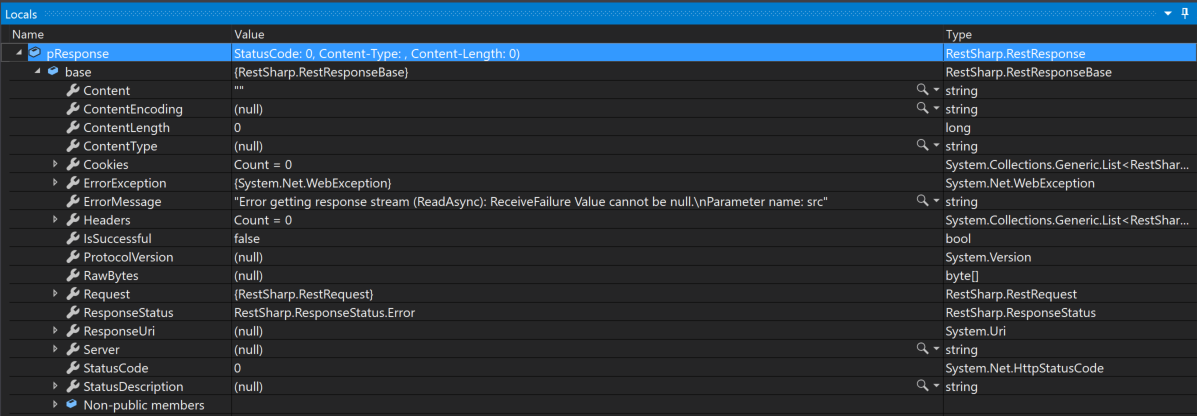
I need to find a workaround fairly quick, I just need to understand why this is occurring so I know what to revert.
Update: And the stack traces of the ErrorException (and its inner exception) in case they help are as follows:
Error getting response stream (ReadAsync): ReceiveFailure Value cannot be null.
Parameter name: src
  at System.Net.WebConnectionStream.Read (System.Byte[] buffer, System.Int32 offset, System.Int32 count) [0x00077] in <b78695579ed9422b8bc80218eeda782c>:0
  at RestSharp.Extensions.MiscExtensions.ReadAsBytes (System.IO.Stream input) [0x0001f] in <4b0c1fc6e5a94482990701acc6dec8b3>:0
  at RestSharp.Http.ProcessResponseStream (System.IO.Stream webResponseStream, RestSharp.HttpResponse response) [0x0000e] in <4b0c1fc6e5a94482990701acc6dec8b3>:0
  at RestSharp.Http.ExtractResponseData (RestSharp.HttpResponse response, System.Net.HttpWebResponse webResponse) [0x0004c] in <4b0c1fc6e5a94482990701acc6dec8b3>:0
  at RestSharp.Http+<>c__DisplayClass20_0.<ResponseCallback>b__0 (System.Net.HttpWebResponse webResponse) [0x00001] in <4b0c1fc6e5a94482990701acc6dec8b3>:0
  at RestSharp.Http.GetRawResponseAsync (System.IAsyncResult result, System.Action`1[T] callback) [0x00050] in <4b0c1fc6e5a94482990701acc6dec8b3>:0
  at RestSharp.Http.ResponseCallback (System.IAsyncResult result, System.Action`1[T] callback) [0x0005a] in <4b0c1fc6e5a94482990701acc6dec8b3>:0

Value cannot be null.
Parameter name: src
  at System.Net.HttpWebRequest+<RunWithTimeoutWorker>d__241`1[T].MoveNext () [0x000ba] in <b78695579ed9422b8bc80218eeda782c>:0
  --- End of stack trace from previous location where exception was thrown ---
  at System.Runtime.CompilerServices.TaskAwaiter.ThrowForNonSuccess (System.Threading.Tasks.Task task) [0x0003e] in <43dbbdc147f2482093d8409abb04c233>:0
  at System.Runtime.CompilerServices.TaskAwaiter.HandleNonSuccessAndDebuggerNotification (System.Threading.Tasks.Task task) [0x00028] in <43dbbdc147f2482093d8409abb04c233>:0
  at System.Runtime.CompilerServices.TaskAwaiter.ValidateEnd (System.Threading.Tasks.Task task) [0x00008] in <43dbbdc147f2482093d8409abb04c233>:0
  at System.Runtime.CompilerServices.ConfiguredTaskAwaitable`1+ConfiguredTaskAwaiter[TResult].GetResult () [0x00000] in <43dbbdc147f2482093d8409abb04c233>:0
  at System.Net.WebResponseStream+<ReadAsync>d__48.MoveNext () [0x00253] in <b78695579ed9422b8bc80218eeda782c>:0`
Further Update: I've just been doing a bit more research into this. To clarify, prior to this RestSharp did pass the correct StatusCode back, so the functionality has changed with the Mono update. This does look like it relates to the changes made in pull request 6125, however is this just that RestSharp should now be handling an ArgumentNullException from the Read call (if so, we can take this up with RestSharp team) or should the WebConnectionStream Read call not be generating this ArgumentNullException in this circumstance? Any guidance would be of assistance.
It looks like this is being discussed on the RestSharp github project as well here: RestSharp Issue 1163
And also another Mono issue which looks like is related to the same issue is here: Mono Issue 10304
 KCow
on 5 Sep 2018
KCow
on 5 Sep 2018
If possible, can this issue take priority? All the errors codes sent from our server is not received and it is breaking all kinds of functionality in our app. I have tried a lot but didn't find a workaround yet.
AmrAlSayed0
on 19 Sep 2018
This should be addressed by #9511 as well
marek-safar
on 24 Sep 2018
For a workaround, see https://stackoverflow.com/questions/52402634
 SteveInCO
on 28 Sep 2018
SteveInCO
on 28 Sep 2018
@marek-safar your last comment links to this issue
 lewurm
on 19 Oct 2018
lewurm
on 19 Oct 2018
I'm still having this issue, and the solution specified here it's not working for me. HELP!
 molidestroyer
on 25 Oct 2018
molidestroyer
on 25 Oct 2018
For the guys using Xamarin encountering this problem:
The last working Xamarin.iOS version I could find is 11.10 (download from Xamarin Jenkins) and for Xamarin.Android the version 8.3 (using Mono 5.10) seems to be working (download from Xamarin Jenkins).
We have to wait on Xamarin to get current versions including the fixed Mono version, the current Xamarin previews don't have the fix yet.
 steffenh13
on 7 Nov 2018
steffenh13
on 7 Nov 2018
@steffenh13 Will this cause any problems when using API 27/28 Build SDK? Do I have to downgrade? If I have to downgrade, won't this cause problems with Xamarin.Forms which is built using a newer version (ie. newer versions of support libraries) ?
Excuse me if I am misunderstanding something here. I don't fully understand how Xamarin.Android building work.
AmrAlSayed0
on 7 Nov 2018
@AmrAlSayed0
It might cause some problems if you are dependent on Android SDK 28 or iOS 12 SDK and you might need to downgrade to use this fix.
For me it didn't cause any problems as the projects still use 27 as target and we don't have yet any iOS 12 dependent stuff.
I also didn't test this on Visual Studio for Windows yet, only on Visual Studio for Mac, as we need both iOS and Android anyways.
steffenh13
on 7 Nov 2018
Chiming in to mention that downgrading mono did solve my problem for macs for now.
I just went to here and download the install the Visual Studio Channel version 15.10.1:
https://www.mono-project.com/download/stable/#download-mac
I created unit tests to make several calls using RestSharp and noticed some of them failing after updating Xamarin Studio for Mac and here are the things I noticed:
- Did not have any issues on Windows (all unit test passed), just running tests on Macs had failures
- 20% of my unit tests consistently failed which were mainly pointing to our public API
- Status Code 0 Timeout was what I been seeing from all the responses that failed
- When testing the call on Safari, it returned the correct data (so I ruled out network issue here)
 JLS-LDang
on 15 Nov 2018
JLS-LDang
on 15 Nov 2018
Hi all,
Our solution consists of 3 projects .
One is shared project whose dll is referenced in iOS project as well as Android. In shared project we use Rest client with RestSharp library version 105.2.3. However the api fails if token is expired. We used ExecuteTaskAsync function of Restclient and it is GET request. ExecuteTaskAsync generates web exception.
This code statement that generates exception
var response = await client.ExecuteTaskAsync(request);
The web exception it generates is : Error getting response stream (ReadAsync): ReceiveFailure Value cannot be null.
Parameter name: src
Restclient works properly if used with Visual studio community edition and also works fine for Previous version of Profession edition . But it fails with Visual studio Professional edition latest version version 7.6.9 (Xamarin.iOS 12.1.0.15)
Other apis which do not need authentication work fine.
I tried latest RestSharp library version 106.5.4 but it is causing same issue.
One more observation : We have web services running on UAT server as well as Live server. But on UAT our code works just fine.
There is Difference in response headers of UAT and LIVE.
UAT response headers contain 2 additional headers
- connection →keep-alive
2.transfer-encoding →chunked
I have yet to explore the relation of these headers with the issue we are facing.
Please suggest me the best approach to resolve this error.
 amolsarmalkar
on 15 Nov 2018
amolsarmalkar
on 15 Nov 2018
You have to manually downgrade Xamarin.iOS and Xamarin.Android versions for now so mono 5.10 will be used, as I wrote above: https://github.com/mono/mono/issues/9511#issuecomment-436584268
steffenh13
on 15 Nov 2018
Do I need to uninstall current version of Visual studio to utilise mono 5.10?
If yes then
- I want to know Visual studio for mac version corresponding to mono 5.10 .Can you please share documentation page which has details of visual studio version and its corresponding mono version.
2.What do I need to do download previous version of Visual studio?
amolsarmalkar
on 28 Dec 2018
@amolsarmalkar
You don't need to change the Visual Studio version. Uninstall/delete the currently installed Mono runtime, then install the mentioned Xamarin.Android and Xamarin.iOS versions and do not install any updates for them if Visual Studio prompts you to.
steffenh13
on 28 Dec 2018
@amolsarmalkar
You don't need to change the Visual Studio version. Uninstall/delete the currently installed Mono runtime, then install the mentioned Xamarin.Android and Xamarin.iOS versions and do not install any updates for them if Visual Studio prompts you to.
The link specified by you for Xamarin.iOS (https://jenkins.xamarin.com/view/Xamarin.MaciOS/job/macios-mac-d15-7/ ) refers to 11.10.1.178 version. Was it a stable version ?
The corresponding stable Mono version in 5.10 series is 5.10.0.160 (as given in https://www.mono-project.com/docs/about-mono/releases/5.10.0/) . But what is the jenkins link to download Mono 5.10.0160?
amolsarmalkar
on 1 Jan 2019
We have this problem with System.Net.HttpWebRequest.
 flensrocker
on 7 Jan 2019
flensrocker
on 7 Jan 2019
For me it appears that it works fine for 4XX requests, its that if the content length header is not set (using transfer-encoding: chunked), that it failed to do anything useful.
Changing our ASP.NET service to forcefully add content-length fixed any issues we had with any other status code when I woke up this morning to a world of joy.
 beeradmoore
on 30 Jan 2019
beeradmoore
on 30 Jan 2019
We switched to System.Net.Http.HttpClient.
flensrocker
on 30 Jan 2019
The good news from Restsharp is that they have fixed issue (Please refer the communication at [https://github.com/restsharp/RestSharp/issues/789#issuecomment-456302724] ) and it is about to come in their next release of nuget package 106.7.
amolsarmalkar
on 31 Jan 2019
For the guys using Xamarin encountering this problem:
The last working Xamarin.iOS version I could find is 11.10 (download from Xamarin Jenkins) and for Xamarin.Android the version 8.3 (using Mono 5.10) seems to be working (download from Xamarin Jenkins).We have to wait on Xamarin to get current versions including the fixed Mono version, the current Xamarin previews don't have the fix yet.
Starting march 2019, Apple will force using SDK 12 version. We won't be able to upload builds using old sdks.
amolsarmalkar
on 25 Feb 2019
For the guys using Xamarin encountering this problem:
The last working Xamarin.iOS version I could find is 11.10 (download from Xamarin Jenkins) and for Xamarin.Android the version 8.3 (using Mono 5.10) seems to be working (download from Xamarin Jenkins).
We have to wait on Xamarin to get current versions including the fixed Mono version, the current Xamarin previews don't have the fix yet.Starting march 2019, Apple will force using SDK 12 version. We won't be able to upload builds using old sdks.
Please! Release 106.7!
 carvalho-oak
on 2 Mar 2019
carvalho-oak
on 2 Mar 2019
The good news from Restsharp is that they have fixed issue (Please refer the communication at [https://github.com/restsharp/RestSharp/issues/789#issuecomment-456302724] ) and it is about to come in their next release of nuget package 106.7.
106.8.9 has been released and the issue is not fixed. @amolsarmalkar, could you please confirm if it is working for you?
carvalho-oak
on 4 Mar 2019
@carvalho-oak are you experiencing the exact same issue with the latest restsharp and the steps provided in the description?
/cc @baulig
marek-safar
on 4 Mar 2019
@marek-safar yes exactly the same as reported by @axa88 at https://github.com/restsharp/RestSharp/issues/1280
carvalho-oak
on 5 Mar 2019
The good news from Restsharp is that they have fixed issue (Please refer the communication at [https://github.com/restsharp/RestSharp/issues/789#issuecomment-456302724] ) and it is about to come in their next release of nuget package 106.7.
106.8.9 has been released and the issue is not fixed. @amolsarmalkar, could you please confirm if it is working for you?
No latest version 106.6.9 is not working for me.The issue seen is same as observed with previous versions of RestSharp.
We have used OAuth2 and we pass Access token in GET request. As long as the access token is alive, we get proper response. Once the access token expires, the response is received with blank content type , status code 0, content length 0 .Why this scenario fails?
Code we used is as follows:
var request = new RestRequest("/Endpoint Name/" + 123456765432, Method.GET);
                request.AddParameter("accessToken", "Access token cached");

            RestClient client = new RestClient("Server url");
            client.UseJson();

            request.RequestFormat = DataFormat.Json;
            request.Timeout = 20000;


            // Get the response
            var response = await client.ExecuteTaskAsync(request);
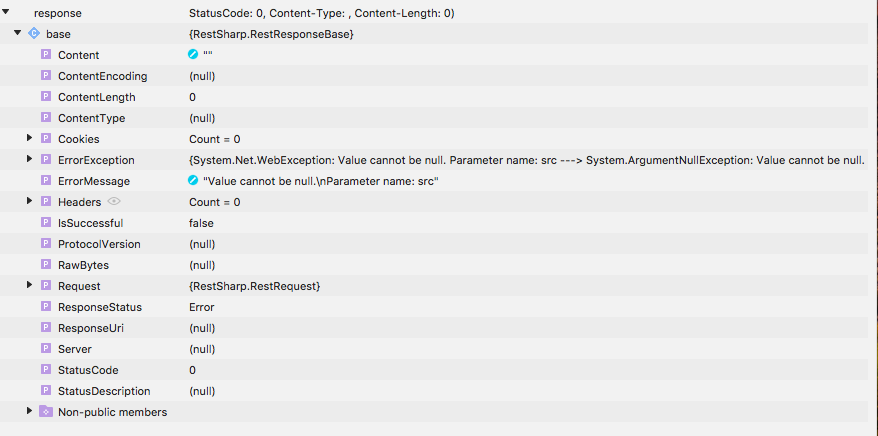
amolsarmalkar
on 5 Mar 2019
@baulig could you please check you can also reproduce @amolsarmalkar issue
marek-safar
on 5 Mar 2019
Have same issue when connect to .Net Core written backend. Can't wait to update to 106.7 version.
 greatvova
on 6 Mar 2019
greatvova
on 6 Mar 2019
I resolved this issue by disabling chunking in my net core api.
I know we don't all have control over the api's we query, but the issue appears to be that the rest client is missing it's content-type after the first chunk. This middleware solution resolved the issue: https://stackoverflow.com/questions/37966039/disable-chunking-in-asp-net-core/54355016#54355016
 taterjuice
on 21 Mar 2019
taterjuice
on 21 Mar 2019
@baulig , @marek-safar . Any update for @amolsarmalkar issue?
I have same error and all lastest version for visual studio update is not working for me.
I'm using Mono 5.18.1.3
 HonorFace-Shin
on 24 May 2019
HonorFace-Shin
on 24 May 2019
I have updated latest version of visual studio 2017 and visual studio 2019 found that it is working fine with visual studio 2019, try with visual studio 2019
 amitlodha
on 4 Jun 2019
amitlodha
on 4 Jun 2019
@amitlodha Thank you for reply.
I tried newest visual studio 2019, iOS is good works but Andoird is not.
Could you tell me any advice?
HonorFace-Shin
on 5 Jun 2019
For android you need to update all the library targeting to android 9 and then create a release apk which work fine
amitlodha
on 5 Jun 2019
Related issues
 equalent
·
4Comments
equalent
·
4Comments
 decriptor
·
4Comments
decriptor
·
4Comments
 alxchk
·
4Comments
alxchk
·
4Comments
 zulhfreelancer
·
4Comments
equalent
·
4Comments
zulhfreelancer
·
4Comments
equalent
·
4Comments
Most helpful comment
We are also having this issue. Please fix.