I have a SSL termination/load balancer/reverse proxy that sits in front of Monica. When trying to enter data, the site now warns that data may be sent insecurely, upon clicking 'ok' the site reloads and nothing is inserted.
Suggestions?

 jwynn6
All 22 comments
Interesting, looks like your on a mac but let's start with some other questions.
What browser are you using?
Do you connect to your reserver proxy over https?
 degan6
on 20 Jan 2018
degan6
on 20 Jan 2018
Hello, I am experiencing a similar issue and believe it is related to the closed issue #479.
I am receiving a warning about an insecure form submission when trying to add a significant other to a contact, and clicking submit then leads to the "Whoops, something went wrong" screen.
According to issue #479 it's due to use of HTTP calls... The noted work around is to enable HTTPS in the docker container directly. I've been trying to do that but being a docker newbie no luck as of yet (I've never built my own image before - and the base image doesn't include a2enmod so I'm stuck!)
Anyway other info -
Client browser: tested on both Chrome/Win10, Safari/Mac and Safari/iPhone.
Host: official MonicaHQ docker image on RancherOS.
Reverse Proxy: NGINX with SSL termination proxying to HTTP Monica port.
Please let me know if I can provide any useful logs etc.
Finally my apologies if this is a separate issue, in which case please disregard the above!
 t-rascal
on 20 Jan 2018
t-rascal
on 20 Jan 2018
I was on a Mac. I get the same result mobile or on Linux too. Firefox and Chrome.
Browser ----(https)--- nginx proxy ---- (http)--- Monica
Hope that diagram helps.
On January 19, 2018 10:10:41 PM PST, degan6 notifications@github.com wrote:
Interesting, looks like your on a mac but let's start with some other
questions.
What browser are you using?
Do you connect to your reserver proxy over https?--
You are receiving this because you authored the thread.
Reply to this email directly or view it on GitHub:
https://github.com/monicahq/monica/issues/835#issuecomment-359148877
--
Sent from my Android device with K-9 Mail. Please excuse my brevity.
jwynn6
on 20 Jan 2018
Today I experimented by changing the reverse proxy setup as follows:
Browser -----(http) --- nginx proxy ---- (http) --- Monica.
Result: adding significant others and other such form submissions work as expected.
Would still like to resolve the HTTPS issue properly though.
t-rascal
on 22 Jan 2018
Hey!
I was having the same issue with my installation in a similar configuration. Here is the fix I had:
Make sure to set in your .env the APP_ENV to production.
Once I did this and restarted my docker container my forms started working.
 realdavidops
on 24 Mar 2018
realdavidops
on 24 Mar 2018
Running an instance provisioned with cloudron.io
Getting insecure connection warnings for most form submissions, but data successfully submits if I make an exception.
Cloudron's Monica repo: https://git.cloudron.io/cloudron/monica-app
 uiharu-s
on 27 May 2018
uiharu-s
on 27 May 2018
Just writing to say that when running a similar setup to @jwynn6 the suggestion by @realdavidops doesn't work. My APP_ENV has been set to productionall along and I still get "parts of this page are not secure" warning. I have also tried setting APP_DEBUG to false, again with no effect.
 zaroth
on 30 May 2018
zaroth
on 30 May 2018
I can segregate the SSL warnings showed by the browser into two cases (my configuration is an NGINX reverse proxy providing SSL offloading for the docker container made from official image, see more here) :
- The avatars hosted by Monica seem to have URLs passed with a
http://prefix and therefore have to be redirected by the reverse proxy back to HTTPS (config here). This results in Firefox showing HTTPS warnings for parts of the website not being encrypted:

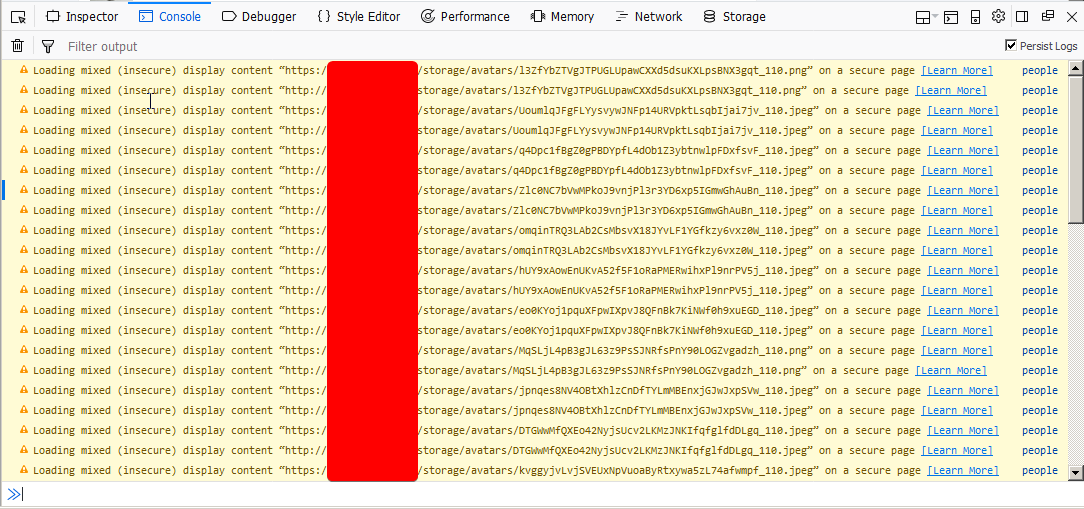
- When submitting
POSTrequests (like when confirming adding an activity to a contact) the URLs used are alsohttp. This results in this warning shown by Firefox:
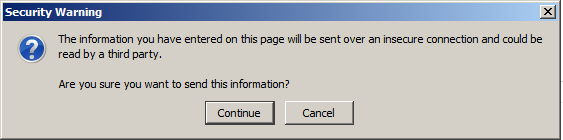
After confirming this dialog, the console log shows (I have APP_DEBUG=true):
Navigated to http://monica.example.com/activities/store/h:RqMJ9AaZ41GPbOgDp6
Which again shows that a http link was used for the POST.
I wish I could help more with this issue, but my PHP skills are quite lacking. I started digging into how the getAvatarUrl() function is implemented in Contact.php to see where the rogue http:// comes from, but I got lost on this line:
return asset(Storage::disk($this->avatar_location)->url($resized_avatar));
This Storage class seems to come from Laravel framework and I was unsure on how to proceed further with my limited knowledge. I'd appreciate some pointers here.
zaroth
on 30 May 2018
Is this still a problem?
 djaiss
on 10 Aug 2018
djaiss
on 10 Aug 2018
@djaiss Yeah, this is still an issue (on Cloudron atleast). I am debugging this to find out the root cause.
 gramakri
on 9 Sep 2018
gramakri
on 9 Sep 2018
@djaiss @uiharu-s The Cloudron issue is fixed by setting an appropriate value for APP_TRUSTED_PROXIES as suggested in https://github.com/monicahq/monica/issues/1535#issuecomment-415965254
gramakri
on 9 Sep 2018
I don't mean to hijack this post but since it's still open, I wanted to add that I'm self-hosting via docker and I'm experiencing the same exact issues.
Just to note, some of my settings are:
APP_ENV = production, APP_DEBUG = false, APP_TRUSTED_PROXIES = *
I'm using nginx to reverse proxy with a very similar config to @zaroth
 tscibilia
on 28 Sep 2018
tscibilia
on 28 Sep 2018
I also have this issue, although I am using Apache as the reverse proxy to do SSL.
APP_ENV = production, APP_DEBUG = true, APP_TRUSTED_PROXIES = *
(1/1) MethodNotAllowedHttpException
in RouteCollection.php line 255
at RouteCollection->methodNotAllowed(array('POST'))in RouteCollection.php line 242
at RouteCollection->getRouteForMethods(object(Request), array('POST'))in RouteCollection.php line 176
at RouteCollection->match(object(Request))in Router.php line 633
....
 DanTulovsky
on 30 Oct 2018
DanTulovsky
on 30 Oct 2018
Ok, in my case the problem stems from the fact that a form submission is using 'http' instead of 'https'. So it sends a request to http://myhost, which gets a 301 redirect, dropping the POST and making it a GET.
It looks like I might be able to fix this by serving a 307 redirect instead, but, why is the form submission using 'http' in this case?
Looking at the page... it looks like everything says http:// ... which I guess works fine for GET requests with a 301 redirect, but not for POST. I guess monica can always do something like:
https://...', is that no what's used to construct the links?
thank you
dan
DanTulovsky
on 30 Oct 2018
Ok, changing the redirect on 'http' in apache to a 308 fixed it. For those using mod_rewrite:
    RewriteEngine on
    RewriteCond %{SERVER_NAME} =monica.mydomain.com
    RewriteRule ^ https://%{SERVER_NAME}%{REQUEST_URI} [END,QSA,NE,R=308]
is what works for me.
DanTulovsky
on 30 Oct 2018
With #1997 getting merged, I think this can probably get closed.
@DanTulovsky Take a look at https://github.com/monicahq/monica/blob/master/docs/installation/ssl.md
 allanlw
on 14 Nov 2018
allanlw
on 14 Nov 2018
Ah, thank you. For apache, adding:
RequestHeader add X-Forwarded-Proto https
made the links show up as 'https'.
On Tue, Nov 13, 2018 at 6:46 PM Allan Wirth notifications@github.com
wrote:
With #1997 https://github.com/monicahq/monica/pull/1997 getting merged,
I think this can probably get closed.@DanTulovsky https://github.com/DanTulovsky Take a look at
https://github.com/monicahq/monica/blob/master/docs/installation/ssl.md—
You are receiving this because you were mentioned.
Reply to this email directly, view it on GitHub
https://github.com/monicahq/monica/issues/835#issuecomment-438482125,
or mute the thread
https://github.com/notifications/unsubscribe-auth/AAfHv2mwBdMMZ8kcucL172OEWq03LD1rks5uu1nIgaJpZM4RlTqi
.
DanTulovsky
on 14 Nov 2018
Hi,
I managed to get this working on my setup:
Browser ---(https)--- nginx proxy ---(http)--- (official docker image) Apache+Monica
in nginx i have this location block:
        location / {
                proxy_pass  http://127.0.0.1:7777;
                proxy_request_buffering         off;
                proxy_redirect                  off;
                proxy_set_header                Host $host;
                proxy_set_header                X-Real-IP $remote_addr;
                proxy_set_header                X-Forwarded-For $proxy_add_x_forwarded_for;
                proxy_set_header                X-Forwarded-Host $server_name;
                proxy_set_header                X-Forwarded-Proto $scheme;
        }
The login page would load over https but the browser would flag it insecure and all the URLs to css and the form post were http.
I also have the correct env setup:
APP_ENV=production
APP_URL=https://example.com
I know https://github.com/monicahq/monica/blob/f660c4fd98bd7aa70d4cd5af865efc3352a38aee/app/Providers/RouteServiceProvider.php#L67 has the switch to force the schema to https when APP_ENV=production BUT I had to change the app/Providers/AppServiceProvider.php file and add the same check in the boot method to get the login screen to work. Here is my AppServiceProvider.php file as it is now (for completeness):
<?php

namespace App\Providers;

use App\Helpers\DBHelper;
use Illuminate\Support\Facades\DB;
use Illuminate\Support\Facades\View;
use Illuminate\Support\Facades\Schema;
use Illuminate\Support\ServiceProvider;
use Illuminate\Support\Facades\URL;
use Illuminate\Support\Facades\App;

class AppServiceProvider extends ServiceProvider
{
    /**
     * Bootstrap any application services.
     *
     * @return void
     */
    public function boot()
    {
        View::composer(
            'partials.components.currency-select', 'App\Http\ViewComposers\CurrencySelectViewComposer'
        );

        View::composer(
            'partials.components.date-select', 'App\Http\ViewComposers\DateSelectViewComposer'
        );

        View::composer(
            'partials.check', 'App\Http\ViewComposers\InstanceViewComposer'
        );

        if (config('database.use_utf8mb4')
            && DB::connection()->getDriverName() == 'mysql'
            && ! DBHelper::testVersion('5.7.7')) {
            Schema::defaultStringLength(191);
        }

        if (App::environment('production')) {
            URL::forceScheme('https');
        }
    }

    /**
     * Register any application services.
     *
     * @return void
     */
    public function register()
    {
    }
}
When the user is not authenticated it seems ~RouteServiceProvider::boot~ RouteServiceProvider::map is never invoked.
@djaiss I am not sure if this is the correct place to put it so I won't make a PR but I think it is enough to point a maintainer int the right direction.
Best regards,
Fran
 FranPregernik
on 2 Feb 2019
FranPregernik
on 2 Feb 2019
Update to my last comment.
After upgrading to the new version 2.12.0 I had to apply my patch.
This time I moved the IF/forceSchema block to the top of the boot method of monica/app/Providers/RouteServiceProvider.php instead of the AppServiceProvider.
After this HTTPS is working like a charm.
Can we please merge this in the mainline?
Best regards,
Fran
FranPregernik
on 14 Feb 2019
@FranPregernik you are welcome to open a Pull Request for this change, this can help us! Thank you.
 asbiin
on 14 Feb 2019
asbiin
on 14 Feb 2019
@asbiin Will do..
FranPregernik
on 14 Feb 2019
Fixed
asbiin
on 17 May 2019
Related issues
 erdmenchen
·
4Comments
erdmenchen
·
4Comments
 mattdavenport
·
3Comments
mattdavenport
·
3Comments
 cynddl
·
3Comments
asbiin
·
4Comments
cynddl
·
3Comments
asbiin
·
4Comments
 vesper8
·
4Comments
vesper8
·
4Comments
Most helpful comment
I don't mean to hijack this post but since it's still open, I wanted to add that I'm self-hosting via docker and I'm experiencing the same exact issues.
Just to note, some of my settings are:
APP_ENV = production, APP_DEBUG = false, APP_TRUSTED_PROXIES = *
I'm using nginx to reverse proxy with a very similar config to @zaroth