Moneymanagerex: Attachment file path is not included in CSV import/export (I'm making a receipt program)
When doing a CSV import or export, attachment paths are not included or supported.
I'm making a receipt and invoice program that will do the OCR on receipts and invoices and put everything into a CSV ready to import into MMEX, eliminating all of the manual data entry and manually attaching the receipt or invoice to the transaction.
I can have the attachment automatically moved into the same MMEX archive folder and have the attachment file path put into the CSV so it can be directly opened in MMEX. As it is now I can only put the path into the notes section in which you would either have to copy/paste it into file explorer or manually navigate to it and open it to view it.
I'm making this for internal use but as soon as it's up and running I'll modify it for general purpose use so anyone can use it with MMEX.
 user8446
All 10 comments
Hi @vomikan The BUG label should probably be added also as attachments should have already been included in CSV import
user8446
on 3 Jan 2020
@user8446
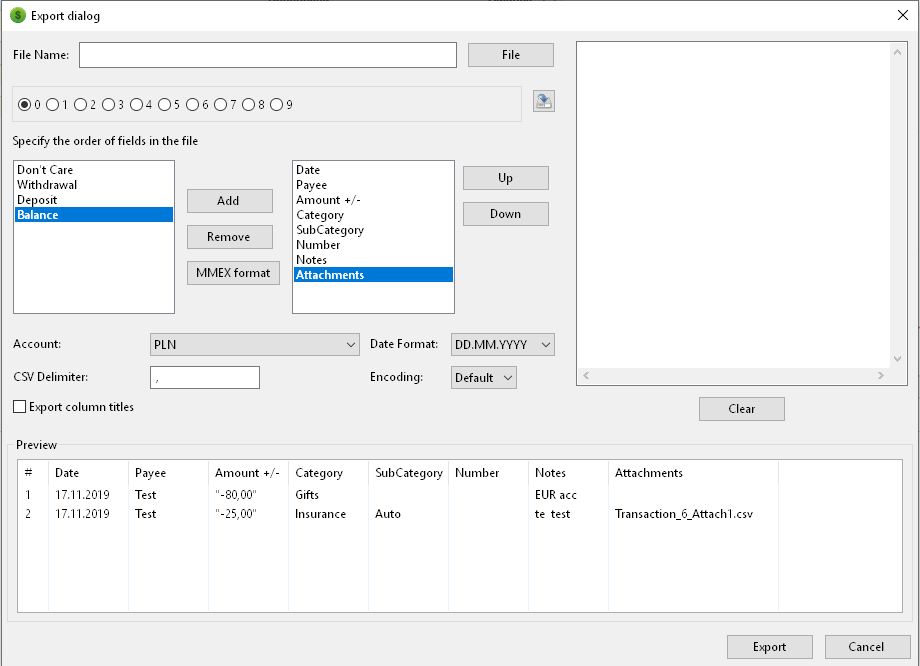
In this sample I've added first available file name.
Question: what is the best solution here?
 vomikan
on 4 Jan 2020
vomikan
on 4 Jan 2020
@vomikan
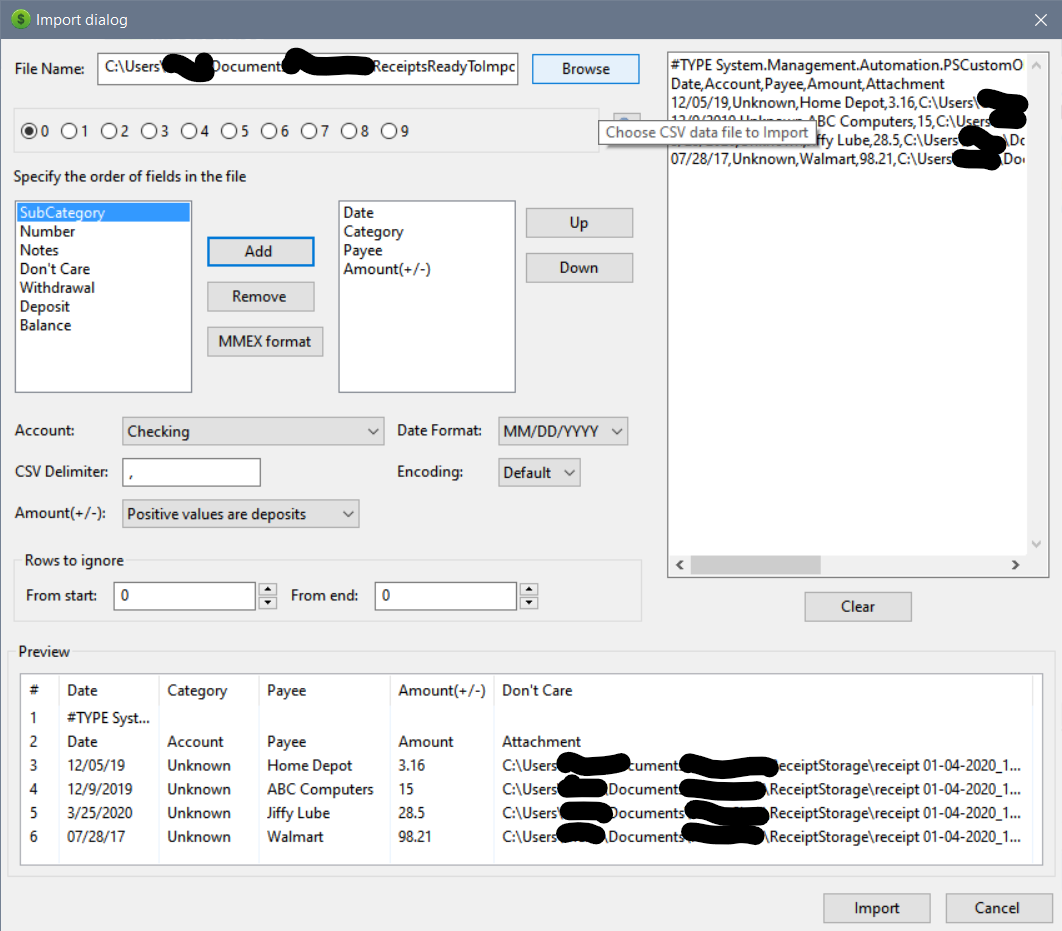
Hi, basically the attachment path would be an available field. That way, after import to view the attachment in MMEX all that would need to be done is click on "open attachments". The only field to put it in now would be "notes":
user8446
on 7 Jan 2020
I've added code for attachments file path but all attachments has description

vomikan
on 26 Jan 2020
@vomikan
That's great! If the attachment description will be a field then it can easily be populated with the payee, the word "receipt", the date, user defined, etc. on CSV import.
If not, a generic pre-populated title would even work such as "attachment".
user8446
on 27 Jan 2020
@user8446
Returning to this question ....
I've developed an export to JSON file. This feature is available in v1.3.4
In this format, the entirety of the data. There are no restrictions with the account currency, with transfers.
It is very difficult to make an adequate import from csv, given the diversity of formats.
JSON import not release yet.... To be developed.
vomikan
on 11 May 2020
@vomikan
Thank you and looking forward to the JSON import! As it develops please have the attachment field available for import. A path or URL to the receipt location can be put there and users can easily click to instantly take them to the receipt image.
user8446
on 11 May 2020
@user8446 FYI
WebApp has such functions like attachments import.
Look at this app too, it is very interesting. If more details are required, then I am ready to provide as ell as the author @gabriele-v, I am sure.
vomikan
on 11 May 2020
I agree with @vomikan, actually I think WebApp could be the closer thing that we have in MMEX to an Open JSON API. If you are a developer and look at MMEX Desktop WebApp integration code and WebApp itself (mainly services.php and functions.php), you should be able to replicate an embedded webserver in your application and act as a "fake" WebApp. It should be much easier and "strict" than a CSV or JSON.
 gabriele-v
on 11 May 2020
gabriele-v
on 11 May 2020
Thanks a bunch for the information... I will explore the WebApp
user8446
on 11 May 2020
Related issues
 jasonaleski
·
6Comments
vomikan
·
9Comments
jasonaleski
·
6Comments
vomikan
·
9Comments
 marjolin
·
8Comments
marjolin
·
8Comments
 fasson
·
5Comments
fasson
·
5Comments
 avma
·
9Comments
avma
·
9Comments