Moneymanagerex: Budget Income Categories showing red X
Version: Money Manager EX - Version: 1.3.3 (DB v.7)
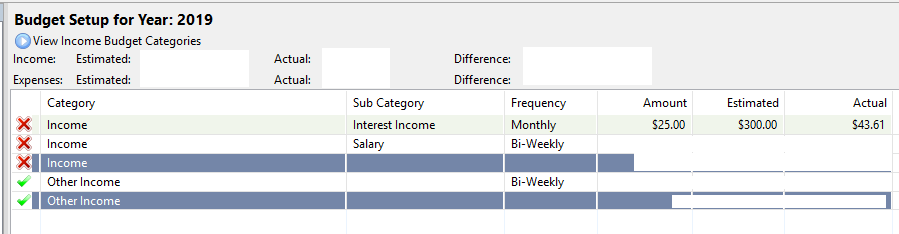
While working on a budget, three out of four budget items display a red "X" on the left side. The "Other Income" is working correctly, but it came with Money Manager. The other three, I've created myself.
I have three Income Categories
- [DEFAULT] Other Income
- [CUSTOM] Income
- [CUSTOM] Income :: Salary
- [CUSTOM] Income :: Interest Income
"Income" is just used as a holding category for sub accounts "Salary" and "Interest Income".
The Budget for these categories are configured as followed:
Category: Income; Sub Category:
Category: Income; Sub Category: Interest Income; Frequency: Monthly; Amount $25.00; Estimated: $300; Type: Income
Category: Income; Sub Category: Salary; Frequency: Bi-Weekly; Amount $1000.00; Estimated: $26000.00; Type: Income
Category: Other Income; Sub Category:
The transactions associated with each category are showing as Deposits. I've tried created non-sub categories for salary and interest income, but the results are the same. The Estimated Incomes at the top are correct.
I've tried changing the types to expenses, increasing and decreasing the budget amounts, but all result in the same.
I think this may be a bug, but I'm also willing to accept I'm doing something wrong. Any guides or suggestions? I can provide additional information as necessary.
 jasonaleski
All 6 comments
It's a feature not a bug.
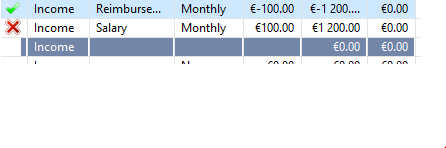
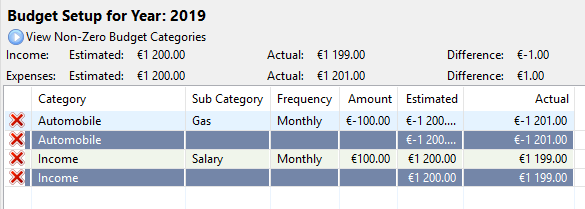
In case if summary of all included subcategories is OK the category is OK as well.
 vomikan
on 21 Feb 2019
vomikan
on 21 Feb 2019
Given the example above, your budget amount is 1200 monthly. If you enter $1300 as a transaction, you would be over the budget amount...which for income is a good thing; but see if it still displays a red X. I would think it should display a green check once you reach meet or exceed the amount for a budget entry of type "income".
I understand that is a feature...I like visual indicator to quickly identify where I am over/under budget...But it doesn't seem to work as expected for income. Expenses/negative balance budget accounts appear to work properly.
jasonaleski
on 22 Feb 2019
How to reproduce? I can't
vomikan
on 24 Feb 2019
@vomikan I agree with @jasonaleski. I've watching this feature to better undestand behavior. It seems that:
- If I've an income of 1.200,00 and a budget of 1.000, we expected a green mark, given that we received more than expected.
- If I've an income of 1.200,00 and a budget of 1.300,00 it's expected a red mark, since we received less than expected.
- If I've an expense of 1.000,00 and spent 900,00, it should be a good thing and show a green mark also. We spent less than planned.
* If I've an expense of 1.000,00 and spent 1.200,00, it's expected that a red mark be shown. It's more expensive that we planned.
So, IMO, these marks should work different to Expenses and Incomes. Every time that we spent more than expect, it's a hole on budget. And every time we received more than expected, it's a good thing, and maybe we can show a green mark.
Short words:
- if Income difference is POSITIVE, we've a good thing and a green mark
- if Income difference is NEGATIVE, we've a bad thing and a red mark
- if Expense difference is POSITIVE, we've a bad thing and a red mark
- if Expense difference is NEGATIVE, we've a good thing and a green mark
 andrepg
on 11 Jun 2019
andrepg
on 11 Jun 2019
My proposal:
- green up arrow ↑ icon for income category above budget target
- green down arrow ↓ icon for expense category below budget target
- red up arrow ↑ icon for expense category above budget target
- red down arrow ↓ icon for income category below budget target
 slodki
on 16 Jun 2019
slodki
on 16 Jun 2019
For me, green colour is good. The red colour means that something is going bad.
If you have spent more than planned that is bad.
If you have earned less than planned that is bad as well.
May be no arrows but lamps?
P.S. The sample DB is welcome.
vomikan
on 16 Jun 2019
Related issues
 ricardoglezf87
·
4Comments
ricardoglezf87
·
4Comments
 s33rd
·
4Comments
vomikan
·
9Comments
s33rd
·
4Comments
vomikan
·
9Comments
 tindoge
·
4Comments
tindoge
·
4Comments
 Big-Mug
·
10Comments
Big-Mug
·
10Comments
Most helpful comment
@vomikan I agree with @jasonaleski. I've watching this feature to better undestand behavior. It seems that:
* If I've an expense of 1.000,00 and spent 1.200,00, it's expected that a red mark be shown. It's more expensive that we planned.
So, IMO, these marks should work different to Expenses and Incomes. Every time that we spent more than expect, it's a hole on budget. And every time we received more than expected, it's a good thing, and maybe we can show a green mark.
Short words: