Monero-gui: unable to connect to monero network
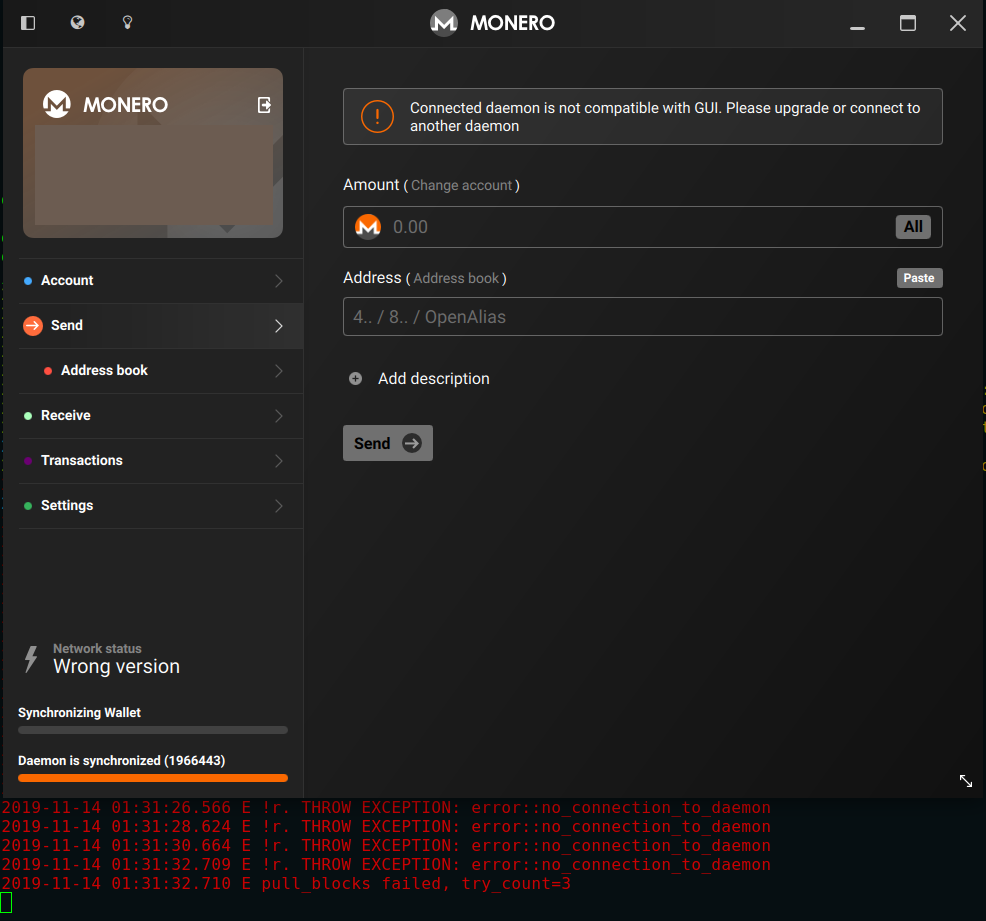
When launch the app, this is shown
Connected daemon is not compatible with GUI. Please upgrade or connect to another daemon
using current version, 0.14.1.0, any fix for this?
 jasonwee
All 19 comments
Are you using simple mode? If no, local/remote node?
 selsta
on 13 Nov 2019
selsta
on 13 Nov 2019
Not sure what you mean by your questions. But it only happen since today.
i start using the following command line,
./start-gui.sh
and then it show that error messages.
jasonwee
on 13 Nov 2019
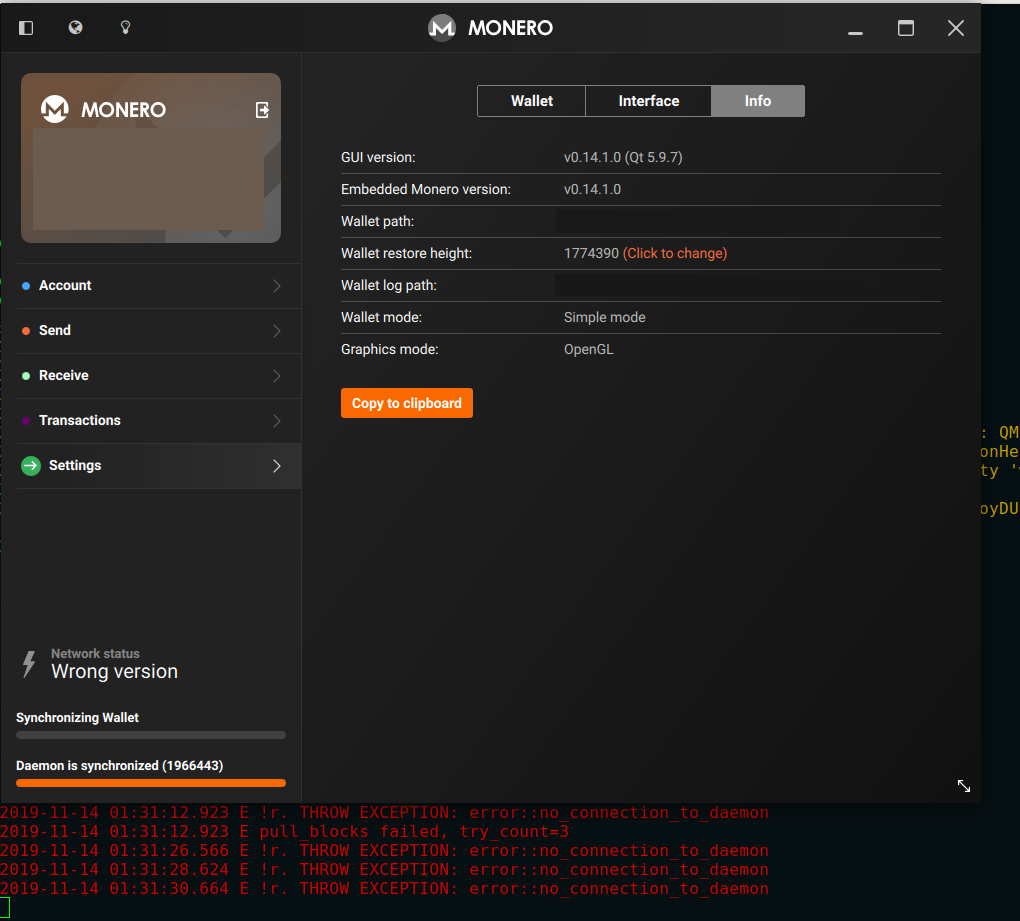
What does it say under settings -> info? Make sure to remove any sensitive details if you send screenshots.

 SamsungGalaxyPlayer
on 13 Nov 2019
SamsungGalaxyPlayer
on 13 Nov 2019
Sure, thank you for looking and below are the screenshots.
jasonwee
on 14 Nov 2019
I have been using this app for a while now and it rocks! But this problem only come yesterday and I'm puzzled as this is the current latest version. Not sure what should I do, can you tell me if I have to do anything manually?
jasonwee
on 14 Nov 2019
Is the reason because it's connected to a 0.15 node?
SamsungGalaxyPlayer
on 14 Nov 2019
I have no idea, there is no changes on configuration other than just launching the app. Do you mean I have to upgrade the app or use another configuration?
jasonwee
on 14 Nov 2019
I would suggest restarting a couple times until the error goes away. Not ideal but v0.15 GUI should be out soon.
selsta
on 14 Nov 2019
Restart? Tried many many times, when it does not work, it don't work.
What I did, start again the app by moving these directory and resetup the wallet.
user@localhost:$ mv Monero/ Monero-backup
user@localhost:$ mv .bitmonero/ .bitmonero-backup/
user@localhost:$
Resync everything and it seem to work again. Awesome!
jasonwee
on 15 Nov 2019
Unfortunately it happen again :'( guess I will have to wait for the new release. Do you know if the new release will fix current problem that I'm facing?
jasonwee
on 15 Nov 2019
Go to the wizard, select "Change wallet mode" and then select Advanced mode.
Open you wallet again, go to Settings -> Node -> Select remote node and enter the following:
Address: uwillrunanodesoon.moneroworld.com
Port: 18089
Hit connect and it should work again.
selsta
on 15 Nov 2019
I hit this today as well, when I updated my remote nodes to v0.15.0.0 fwiw. Seems that the new daemon code has broken compatibility with the older GUI.
 EmbeddedAndroid
on 19 Nov 2019
EmbeddedAndroid
on 19 Nov 2019
v0.15.0.1 is tagged, binaries should be out in the next 24-48 hours. This issue should be resolved then.
selsta
on 19 Nov 2019
v0.15.0.1 is tagged, binaries should be out in the next 24-48 hours. This issue should be resolved then.
Great, thank you!
EmbeddedAndroid
on 19 Nov 2019
This should be fixed with the GUI v0.15.0.1 release.
 dEBRUYNE-1
on 25 Nov 2019
dEBRUYNE-1
on 25 Nov 2019
+resolved
dEBRUYNE-1
on 25 Nov 2019
Unfortunately, the issue persists with 0.15.0.1 as I downloaded and installed yesterday and am experiencing the same behavior as jasonwee...been using the Monero wallet for years and this only started happening yesterday when I went to update the app in preparation for RandomX
 djp1701
on 25 Nov 2019
djp1701
on 25 Nov 2019
@djp1701 Which remote node are you connecting to? Try node.xmr.to:18081
selsta
on 25 Nov 2019
I can confirm v0.15.0.1 gui works with my v0.15.0.1 local daemon now, thanks!
EmbeddedAndroid
on 25 Nov 2019
Related issues
 GBKS
·
9Comments
GBKS
·
9Comments
 yakitorifoodie
·
7Comments
yakitorifoodie
·
7Comments
 cdiv1e12
·
10Comments
cdiv1e12
·
10Comments
 GreatWhiteMuffloN
·
8Comments
GreatWhiteMuffloN
·
8Comments
 1337tester
·
6Comments
1337tester
·
6Comments
Most helpful comment
Go to the wizard, select "Change wallet mode" and then select Advanced mode.
Open you wallet again, go to Settings -> Node -> Select remote node and enter the following:
Address:
uwillrunanodesoon.moneroworld.comPort:
18089Hit connect and it should work again.