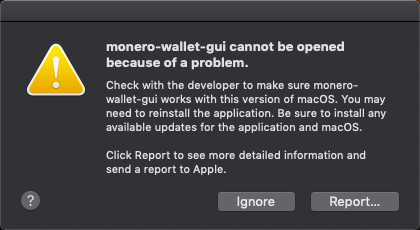
Monero-gui: monero-wallet-gui cannot be opened because of a problem. [Mac OS Mojave]
Monero wallet GUI Beryllium Bullet v0.13.0.3
Mac OS Mojave
Crashed Thread:        0
Exception Type:        EXC_CRASH (SIGABRT)
Exception Codes:       0x0000000000000000, 0x0000000000000000
Exception Note:        EXC_CORPSE_NOTIFY
Termination Reason:    DYLD, [0x1] Library missing
Application Specific Information:
dyld: launch, loading dependent libraries
Dyld Error Message:
  Library not loaded: /usr/local/Cellar/openssl/1.0.2p/lib/libcrypto.1.0.0.dylib
  Referenced from: /Applications/monero-wallet-gui.app/Contents/Frameworks/libssl.1.0.0.dylib
  Reason: image not found
 tiosecurity
All 25 comments
I got the same message, however I am able to run monorod and its currently updating the blockchain
 armybill461
on 16 Oct 2018
armybill461
on 16 Oct 2018
Dynamic Library Error
Dyld Error Message:
Library not loaded: /usr/local/Cellar/openssl/1.0.2p/lib/libcrypto.1.0.0.dylib <- missing
Referenced from: /Applications/monero-wallet-gui.app/Contents/Frameworks/libssl.1.0.0.dylib
Reason: image not found
ls /usr/local/
bin libexec share etc var
find /usr/ -name libcrypto.* -print
/usr//lib/libcrypto.42.dylib
/usr//lib/libcrypto.0.9.7.dylib
/usr//lib/libcrypto.41.dylib
/usr//lib/libcrypto.35.dylib
/usr//lib/libcrypto.dylib
/usr//lib/libcrypto.0.9.8.dylib
 hoyanf
on 16 Oct 2018
hoyanf
on 16 Oct 2018
Can someone test this out:
- Install homebrew from https://brew.sh
- Install
opensslusingbrew install openssl
This would obviously be only a temporary fix until there are new binaries without this problem.
 selsta
on 16 Oct 2018
selsta
on 16 Oct 2018
Installing OpenSSL via Homebrew has allowed me to then open monero-wallet-gui.
 Aquilae32
on 16 Oct 2018
Aquilae32
on 16 Oct 2018
Okay, so a workaround is good, but I really don't feel the urge to install HomeBrew. Dev's any idea on when a fix is likely at all? BTW, thank you for all the great work.
 xyberpix
on 16 Oct 2018
xyberpix
on 16 Oct 2018
openssl 1.0.2l -> 1.0.2p was indeed necessary for me
 binarymind
on 16 Oct 2018
binarymind
on 16 Oct 2018
@xyberpix - Stoffu is currently investigating the issue. Hopefully we can produce a new Mac OS X build soon that includes a fix.
 dEBRUYNE-1
on 16 Oct 2018
dEBRUYNE-1
on 16 Oct 2018
@dEBRUYNE-1 Thanks man, appreciate the update.
xyberpix
on 16 Oct 2018
You're welcome.
dEBRUYNE-1
on 16 Oct 2018
Trying to install HomeBrew ( by Restart-Utility-Terminal Pad) but it would not happen and getting the message: "Could not resolve host: raw.githubusercontent.com"
Any idea what I can do?
 Makazar
on 17 Oct 2018
Makazar
on 17 Oct 2018
@Makazar
The normal Terminal, not the Terminal in the Restart Utility.
selsta
on 17 Oct 2018
@selsta
Thanks. Have done but now it displays this message and would not let me type anything: "Press RETURN to continue or any other key to abort
==> /usr/bin/sudo /bin/chmod u+rwx /usr/local/bin
Password: "
Makazar
on 17 Oct 2018
Ok, figured out why. The password icon was displayed to signify that the password won't be shown when typing it. So I typed it in and the whole bunch of commands is downloading. Inept or what?😂
Makazar
on 17 Oct 2018
@selsta
YES! Installation of Homebrew completed, then installed 'brew install openssl' and the wallet has just opened!
Thanks guys.
Makazar
on 17 Oct 2018
I confirm GUI Beryllium Bullet v0.13.0.3 is working fine with Mac OS Mojave now installing homebrew https://brew.sh and running:
brew install openssl
Open the wallet, done ✅
tiosecurity
on 17 Oct 2018
+resolved
 erciccione
on 18 Oct 2018
erciccione
on 18 Oct 2018
Surely this isn't resolved yet? We can't possibly expect the average person to install brew and openssl manually? That's insane.
 phik
on 19 Oct 2018
phik
on 19 Oct 2018
We resolved this on the build machine, v0.13.0.4 has this fixed and should be out in the next days.
selsta
on 19 Oct 2018
We resolved this on the build machine, v0.13.0.4 has this fixed and should be out in the next days.
any update on this? will this also fix the issue on older versions of osX? i am on 10.11.4.
thanks in advance!
 umma08
on 19 Oct 2018
umma08
on 19 Oct 2018
will this also fix the issue on older versions of osX? i am on 10.11.4.
Yes and GUI v0.13.0.4 should be out soon.
dEBRUYNE-1
on 19 Oct 2018
Quick workaround:
`
$ sudo -i
root# mkdir /usr/local/Cellar/openssl/1.0.2p/lib/
root# ln -s /Applications/monero-wallet-gui.app/Contents/Frameworks/libcrypto.1.0.0.dylib /usr/local/Cellar/openssl/1.0.2p/lib/
`
 Emzy
on 24 Oct 2018
Emzy
on 24 Oct 2018
I had both installed, but had to upgrade brew via: brew upgrade
 ProBowie
on 28 Oct 2018
ProBowie
on 28 Oct 2018
Hello Iam trying to figure out how to install openssl. I am the avg person who has no idea how to do this. I have founs openssl in homebrew. Now trying to get the openssl to run on my mac. My mac says i need an app to run it. which app? any help to get thru would be amazing.
thanks!
Fred
 freddrums
on 2 Nov 2018
freddrums
on 2 Nov 2018
It is sufficient to have installed openSSL with Brew (“brew install openssl” in a terminal, supposing you have Brew already installed). The Monero GUI is the app that will automatically find it when opening. If it doesn’t, maybe openSSL is not in the PATH (the default directories where the system looks for a program).
(From Brew)
openssl is keg-only, which means it was not symlinked into /usr/local,
because Apple has deprecated use of OpenSSL in favor of its own TLS and crypto libraries.
If you need to have openssl first in your PATH run:
echo 'export PATH="/usr/local/opt/openssl/bin:$PATH"' >> ~/.bash_profile
Aquilae32
on 2 Nov 2018
This is fixed in the v0.13.0.4 binaries, openSSL is not required.
https://www.reddit.com/r/Monero/comments/9ti2on/gui_v01304_beryllium_bullet_released/
selsta
on 2 Nov 2018
Related issues
 blackvalyrian
·
4Comments
blackvalyrian
·
4Comments
 GBKS
·
9Comments
GBKS
·
9Comments
 serhack
·
4Comments
serhack
·
4Comments
 Realchacal
·
9Comments
Realchacal
·
9Comments
 ddyzhang
·
8Comments
ddyzhang
·
8Comments
Most helpful comment
Can someone test this out:
opensslusingbrew install opensslThis would obviously be only a temporary fix until there are new binaries without this problem.