Monaco-editor: renderWhitespace shows weird dots out of alignment
It appears that when I change the font, the rendering of whitespace is affected. Note: using the same Fira Code font family and size of 18 in Visual Studio Code does not present the same issue.

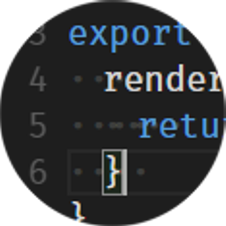
monaco-editor version: 0.10.1
Browser: Chrome 62.0.3202.94 (Official Build) (64-bit)
OS: Windows 10 Pro
Steps or JS usage snippet reproducing the issue (either of the two):
renderWhitespace: "all",
renderWhitespace: "boundary",
  static editorProps: MonacoEditorProps = {
    language: 'typescript',
    theme: 'vs-dark',
    options: {
      automaticLayout: true,
      dragAndDrop: true,
      fontFamily: 'Fira Code',
      fontSize: 18,
      formatOnPaste: true,
      formatOnType: true,
      minimap: {
        enabled: false,
      },
      mouseWheelZoom: true,
      renderIndentGuides: false,
      selectOnLineNumbers: true,
      renderWhitespace: 'boundary',
    }
  };
 jedmao
All 2 comments
I faced the same issue also with 0.17.0 and I'm also able to reproduce on the Monaco playground.
monaco-editor version: 0.17.0
Browser: Chrome 74.0.3729.157 (Official Build) (64-bit)
OS: Windows 10 Pro
Repro steps:
- Open playground: https://microsoft.github.io/monaco-editor/playground.html
- On the left side replace the code with the following below:
var editor = monaco.editor.create(document.getElementById("container"), {
    value: `function hello() {
    alert('Hello world!');
}
              `,
    theme: "vs-dark",
    language: "javascript",
    renderWhitespace: 'all',
    fontFamily: 'Arial',
    fontSize:20
});
editor.getModel().getOptions().insertSpaces = true;
Further experiences:
- By removing fontFamily property from the settings and pressing the Run button again the dots look fine.
- By using the code above and seeing the misaligned dots we can make them well aligned again by turning off the width css property in the devtools (or by removing the style="width:14px" attribute).
To repro this: open devtools in chrome, inspect the misaligned whitespace-dots and uncheck the width checkbox for all the span-s having 'vs-whitespace' class in the row. This way the alignment of the whitespaces look good. It seems that the measurement of the whitespace widths is wrong. - This is reproducible with lot of other fonts as well
@alexandrudima
When can we expect a fix for this?
Is there any workaround until then?
Thanks!
 magyarbitware
on 20 May 2019
magyarbitware
on 20 May 2019
When you are using custom fonts, and instantiating the editor before the custom fonts have finished loading, the editor ends up doing font measurements on the fallback fonts used by browsers. So the editor will contain a "poisoned" cache of font measurements. The solution is to use browser events on your side and when the custom fonts you are loading have finished loading to invoke monaco.editor.remeasureFonts().
 alexdima
on 12 Dec 2019
alexdima
on 12 Dec 2019
Related issues
 tylerlong
·
17Comments
tylerlong
·
17Comments
 fzafiroski
·
21Comments
fzafiroski
·
21Comments
 fdeitelhoff
·
24Comments
fdeitelhoff
·
24Comments
 akosyakov
·
16Comments
akosyakov
·
16Comments
 NikGovorov
·
92Comments
NikGovorov
·
92Comments
Most helpful comment
I faced the same issue also with 0.17.0 and I'm also able to reproduce on the Monaco playground.
monaco-editor version: 0.17.0
Browser: Chrome 74.0.3729.157 (Official Build) (64-bit)
OS: Windows 10 Pro
Repro steps:
Further experiences:
To repro this: open devtools in chrome, inspect the misaligned whitespace-dots and uncheck the width checkbox for all the span-s having 'vs-whitespace' class in the row. This way the alignment of the whitespaces look good. It seems that the measurement of the whitespace widths is wrong.
@alexandrudima
When can we expect a fix for this?
Is there any workaround until then?
Thanks!