Monaco-editor: Change the language of an existing editor
I am making a directive to help using Monaco Editor in AngularJS 1.X framework. One feature should be updating the language based on the option. But I cannot change the language.
It seems that the type of monacoeditor in my code is ICommonCodeEditor, I tried monacoeditor.updateOptions({ "language": newValues[key] }), it did nothing. I tried monacoeditor.getModel().updateOptions({ "language": newValues[key] }), it did nothing either. I tried also monacoeditor.setModelLanguage(monacoeditor.getModel(), newValues[key]), it gave an error TypeError: monacoeditor.setModelLanguage is not a function.
Note that it is not the problem of the directive, because it works well to change options like lineNumbers.
Could anyone help?
 SoftTimur
All 9 comments
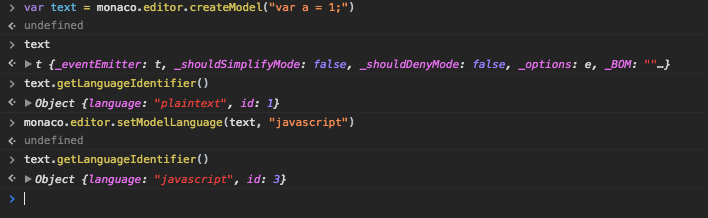
monaco.editor.setModelLanguage works as expected. Please make sure you are setting language names correctly.
 rebornix
on 9 Aug 2017
rebornix
on 9 Aug 2017
My friend... can you just make sure if your comment answered my question before closing the issue? Otherwise, it just gives the feeling that your mission is to close issues as quickly as possible...
Let me check the language names...
SoftTimur
on 9 Aug 2017
I think the name javascript is fine...
In your screenshot, you used monaco.editor.createModel("var a = 1;"), whereas in my code I used monaco.editor.create(document.getElementById('container'), { ... }), whose type is different, so it gave an error TypeError: monacoeditor.setModelLanguage is not a function.
If I want to use createModel like you, where could I specify the domElement?
SoftTimur
on 9 Aug 2017
@SoftTimur from you snippet, it seems you create the editor from string (if you create a model first then my previous comment answers your question IMO). setModelLanguage is a function we exposed in module monaco.editor, it's not a method of the editor object. So in your case, you can do
var model = monacoeditor.getModel(); // we'll create a model for you if the editor created from string value.
monaco.editor.setModelLanguage(model, "javascript")
Hope this helps you out, if it still doesn't solve it, I'll reopen this issue. BTW, you may want to refer monaco.d.ts file for typings reference.
rebornix
on 9 Aug 2017
Got it, I should use monaco.editor.setModelLanguage(monacoeditor.getModel(), newValues[key]) rather than monacoeditor.setModelLanguage(monacoeditor.getModel(), newValues[key]), where monacoeditor is my editor, and its type is probably ICommonCodeEditor, and does not have the setModelLanguage function.
Here is a working JSBin
Thank you...
SoftTimur
on 9 Aug 2017
I'm changing the file used for the template.
Like this: https://pastehero.com/view/8184a131-1d3b-420-8fbe-4a0c8910f78a
And using the file like this: https://pastehero.com/view/fbaac015-84a1-420-92cc-6f2f23512309
Thou might required ngx-monaco (https://github.com/SamVerschueren/ngx-monaco)
Hope it helps. :)
 mrbormeth
on 9 Nov 2018
mrbormeth
on 9 Nov 2018
Anyone know how to change the language according to code file extension or first line like "#!/usr/bin/env python"?
 Symbolk
on 20 Jun 2019
Symbolk
on 20 Jun 2019
This does not work with multiple editors on a page, like in split panes (a requirement for any IDE)
Is there a way to change the language for an existing instance of IStandaloneCodeEditor
I have tried settings options like
      this.editorComponent.instance.options = this.editorComponent.instance.options || {
        theme: 'atom', language: 'typescript', automaticLayout: true, minimap: {
          enabled: true
        }
      };
But this does not work.
 iamwhitebox
on 24 Oct 2019
iamwhitebox
on 24 Oct 2019
Anyone know how to change the language according to code file extension or first line like "#!/usr/bin/env python"?
  setLanguage(node: any) {
    if (node) {
      const languages = {
        'js': 'javascript',
        'ts': 'typescript',
        'html': 'html',
        'htm': 'html',
        'txt': 'text',
        'css': 'css'
      }
      const ext = node.name.match(/([^\.])+$/g)[0];

      // this.editorComponent.instance.options.language = languages[ext];

      (window as any).monaco.editor.setModelLanguage((window as any).monaco.editor.getModels()[0], languages[ext]);

      return node;
    }
  }
Related issues
 hawkerm
·
3Comments
hawkerm
·
3Comments
 galusben
·
3Comments
galusben
·
3Comments
 robclive
·
3Comments
robclive
·
3Comments
 ststeiger
·
3Comments
ststeiger
·
3Comments
 zeegin
·
3Comments
zeegin
·
3Comments
Most helpful comment
@SoftTimur from you snippet, it seems you create the editor from string (if you create a model first then my previous comment answers your question IMO).
setModelLanguageis a function we exposed in modulemonaco.editor, it's not a method of the editor object. So in your case, you can doHope this helps you out, if it still doesn't solve it, I'll reopen this issue. BTW, you may want to refer
monaco.d.tsfile for typings reference.