Modernization: Modern page webpart picker shows page layout options instead of webparts after transformation
Hello,
first off all, huge thanks for the page transformation solution.
I took the first steps attempting to modernize classic wiki pages when I came across the following odd behavior.
I'm using the following command:
ConvertTo-PnPClientSidePage -Identity 'Home.aspx' -DisablePageComments
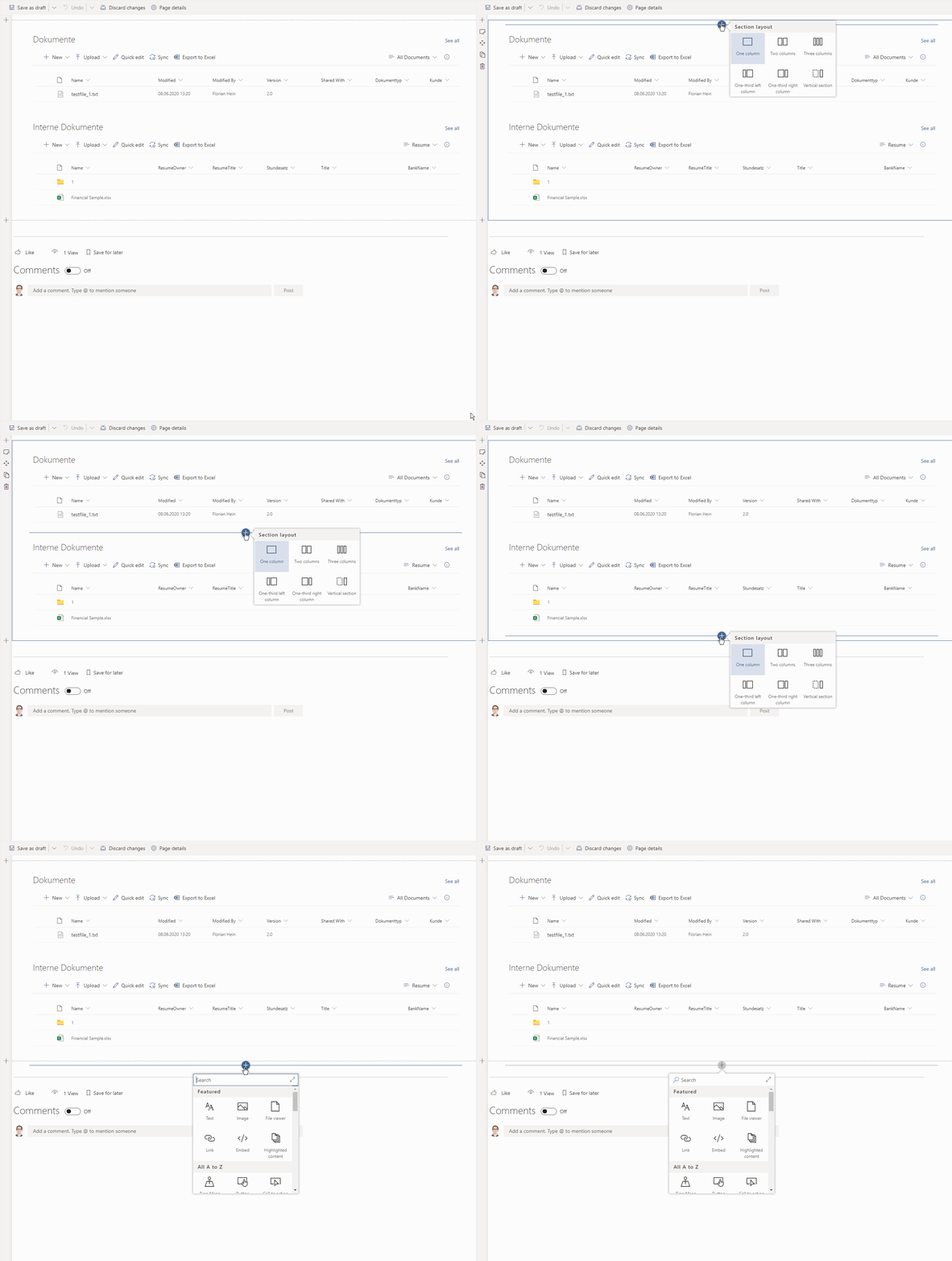
After this I notice that when I put the modern page in edit mode and attempt to add a webpart it won't let me. The common "+" icon only allows me to choose a page layout whereas it should show the list of webparts to add.
So I thought it had to do with the webpart mapping xml or the page layout xml from the classic source page. So I extracted these xml's with:
Export-PnPClientSidePageMapping -Folder "[removed]" -Logging -BuiltInPageLayoutMapping -BuiltInWebPartMapping -Overwrite and applied the unaltered xml templates via:
ConvertTo-PnPClientSidePage -Identity 'Home.aspx' -DisablePageComments -WebPartMappingFile "[removed]" -PageLayoutMapping "[removed]"
But still, the result is the same:

Any ideas what I might be doing wrong? It seems the class site's default page layout is not applied which is:

Thanks.
 colonelclaypoo
All 17 comments
Hey @colonelclaypoo, I've some questions:
- What is the version of PnP PowerShell you're using?
- You're able to add additional sections with controls, but you can't add a new control in the current section...is that what you see? If is there no other insert point when you hover over the page?
- Can you provide the content from the source page wikifield list item column (see below on how to do that)
# Check the id of your home.aspx page first
$p = Get-PnPListItem -List sitepages -Id 1
# copy contents into clipboard
$p.FieldValues["WikiField"] | clip
 jansenbe
on 8 Jun 2020
jansenbe
on 8 Jun 2020
Hey @colonelclaypoo, I've some questions:
- What is the version of PnP PowerShell you're using?
- You're able to add additional sections with controls, but you can't add a new control in the current section...is that what you see? If is there no other insert point when you hover over the page?
- Can you provide the content from the source page wikifield list item column (see below on how to do that)
# Check the id of your home.aspx page first
$p = Get-PnPListItem -List sitepages -Id 1
# copy contents into clipboard
$p.FieldValues["WikiField"] | clip
Thanks Bert.
PnP PowerShell version: 3.21.2005.2
WikiField data:
And here's a .gif illustrating the behavior on the transformed page:
colonelclaypoo
on 9 Jun 2020
Thanks for the gif, helps clarify things. I'll see if I can repro this
jansenbe
on 9 Jun 2020
@colonelclaypoo : looking at the shared html I see the following issue:
The value of this span (at the very end of your snippet) contains spaces "false, false, 2" whereas we normally would expect "false,false,2". This results in the layout of the page not being detected correctly. What type of site is this? Was this migrated from on-premises SharePoint in the past?
<span id="layoutsData" style="display:none;">false, false, 2</span>
Next steps:
- Can you manually fix the html of your page and test again?
- If requested fix helps I'll update page transformation to automatically trim the spaces during wiki page layout detection
jansenbe
on 9 Jun 2020
@jansenbe, thanks but unfortunately it seems that's not the problem. I noticed when checking the Home.aspx source in SPD2013 that there're in fact no spaces. I can only assume that the clipboard contents I got from the PowerShell output got autoformated in VSCode and I saved the spaces.
Would you please review the plain output in this text file?
Should I still change something in the HTML?
Thanks.
colonelclaypoo
on 9 Jun 2020
@colonelclaypoo : what's the source environment? SPO or an on-premises SharePoint farm?
jansenbe
on 9 Jun 2020
@colonelclaypoo : what's the source environment? SPO or an on-premises SharePoint farm?
@jansenbe, it is SharePoint online, not migrated from on prem. Let me know what you need and I will provide the data.
Thanks.
colonelclaypoo
on 10 Jun 2020
@jansenbe, did some further testing and found out that if I changed the text layout from "One column with sidebar" to just "One column" the transformation works fine right out of the box with ConvertTo-PnPClientSidePage -Identity 'Home.aspx'. Does that help in any way?
colonelclaypoo
on 11 Jun 2020
You mean changing the layout via the SharePoint UI? In theory we should be able to detect both layouts: would it be possible to capture the wikifield content before and after you've made the layout change and provide those?
jansenbe
on 11 Jun 2020
You mean changing the layout via the SharePoint UI? In theory we should be able to detect both layouts: would it be possible to capture the wikifield content before and after you've made the layout change and provide those?
Yes, through the ribbon UI.
Before I provide the wikifield content before and after changing the layout I noticed something that might be causing the problem.
It seems it is the spaces in <span id="layoutsData" style="display:none;">false, false, 2</span> after all. Last time we assumed that there should be no spaces and I verified in SPD 2013 on the original page that there're in fact no spaces, despite the first .txt I attached here which might have been automatically misformatted in VSCODE I guess.
So now I intentionally inserted spaces and applied ConvertTo-PnPClientSidePage -Identity 'Home.aspx' again and now it converts just fine.
Cann you account for this in the engine?
Hope that helps.
Thanks.
colonelclaypoo
on 11 Jun 2020
So you meant "I intentionally removed spaces" I assume? If so, yes that's something I can fix and include in the next release (the July drop)
jansenbe
on 11 Jun 2020
So you meant "I intentionally removed spaces" I assume? If so, yes that's something I can fix and include in the next release (the July drop)
Well, not quite I'm afraid.
I can only get it to work in the following way:
- Manually change text layout in UI from original "One column with sidebar" to "One Column", for example
- Change back to "One column with sidebar"
- Add spaces so that the span is:
<span id="layoutsData" style="display:none;">false, false, 2</span>
By following these steps ConvertTo-PnPClientSidePage -Identity 'Home.aspx' -DisablePageComments will convert the page properly.
If I omit step 1 and 2 and only add the spaces the cmdlet throws the following error (translated from German):
ConvertTo-PnPClientSidePage : The index was out of range/array. It must not be negativ or smaller than the collection.
Parameter name: index
But like I mentioned, when I don't add those spaces the initially documented issue presents (.gif).
I've attached the wikifield data for the page before and after manually changing the text layout back and forth. The original wikifield data seems to contain additional HTML code that gets stripped once 1 and 2 have been performed. It's strange.
Any idea?
Thanks
original wikifield data.txt
wikifield data after layout change.txt
colonelclaypoo
on 11 Jun 2020
Thanks for the sharing the details, will do some testing soon but a quick inspection of the before/after shows clear differences. FYI: the logic to detect a wiki page layout is here: https://github.com/pnp/sp-dev-modernization/blob/master/Tools/SharePoint.Modernization/SharePointPnP.Modernization.Framework/Pages/WikiPage.cs#L165
By inspecting the code and your samples we should be able to detect the correct layout...the main difference is that in the after you've dropped the 3 webparts from the sidebar column...could it be that these where somehow already not visible in the UI or is this something you did on purpose?
Can you provide some information about the source site?
- Is it a team site (STS#0) or something else?
- Does the issue only apply to your home page or also to other pages in the site?
jansenbe
on 11 Jun 2020
Can you also run a transformation with verbose logging enabled and share the output? Feel free to mail to [email protected] if there's information in there that you can't publicly share.
jansenbe
on 11 Jun 2020
Thanks for the sharing the details, will do some testing soon but a quick inspection of the before/after shows clear differences. FYI: the logic to detect a wiki page layout is here: https://github.com/pnp/sp-dev-modernization/blob/master/Tools/SharePoint.Modernization/SharePointPnP.Modernization.Framework/Pages/WikiPage.cs#L165
By inspecting the code and your samples we should be able to detect the correct layout...the main difference is that in the after you've dropped the 3 webparts from the sidebar column...could it be that these where somehow already not visible in the UI or is this something you did on purpose?
Can you provide some information about the source site?
- Is it a team site (STS#0) or something else?
- Does the issue only apply to your home page or also to other pages in the site?
Thanks for still bearing with this issue:-)
The strange thing is that visibly, there were no differences on the page between the original "One column with sidebar" layout and after changing it to "One coloumn" and back to "One column with sidebar". It's only in the code. They might be leftover containers from past edits to the page, not sure what they were originally, though.
The template is actually STS#1 because it we had used a custom provisioning solution by which this site was created.
Is STS#1 part of the problem?
This site collection only has the homepage. I have already tested the behavior on another site collection, also STS#1 but here everything works right out of the box; no need to put spaces or change the text layout.
I will transform with verbose logging and send you the results.
Thanks.
colonelclaypoo
on 11 Jun 2020
Hi @colonelclaypoo ,
I lost track of this issue (too busy + vacation)...is this still a blocking issue for you?
jansenbe
on 15 Jul 2020
Hi @jansenbe,
thanks for following up. Basically, it's been just the day before yesterday. We've manually gone in and corrected the classic layouts as per my previous posts. So currently, there's no further need to work on this but if other people mention this is an issue you might refer back to this thread to see how to implement a mechanism in your solution that can account for such a behavior.
Thanks and keep up the good work.
colonelclaypoo
on 16 Jul 2020
Related issues
jansenbe
·
5Comments
 gautamdsheth
·
7Comments
gautamdsheth
·
7Comments
 berryst2
·
6Comments
berryst2
·
6Comments
 FredrikEkstroem
·
4Comments
FredrikEkstroem
·
4Comments
 yumoraby
·
5Comments
yumoraby
·
5Comments
Most helpful comment
Hi @jansenbe,
thanks for following up. Basically, it's been just the day before yesterday. We've manually gone in and corrected the classic layouts as per my previous posts. So currently, there's no further need to work on this but if other people mention this is an issue you might refer back to this thread to see how to implement a mechanism in your solution that can account for such a behavior.
Thanks and keep up the good work.