Modernization: Custom page layout mapping error when webpart zone is empty
[x ] Bug
[ ] Enhancement
Problem Area
[ ] Page Transformation: Error during the setup/use of the Page Transformation UI solution (did you check our troubleshooting guide?)
[x ] Page Transformation: Error during the use of page transformation from PnP PowerShell
[ ] Page Transformation: Error during the use of page transformation from .Net
[ ] Page Transformation: Page is not looking correct after transformation
[ ] Modernization Scanner: something went wrong...
Expected or Desired Behavior
Custom page layout mapping should work even if a row doesn't contain any webpart
Observed Behavior
Since feb release custom page layout mapping fails when a row doesn't contain any webparts in the source page.
Image below shows the source page layout. In this example ConvertTo-PnPClientSidePage fails when the row containing the 3 webpart zones doesn't contain any webparts and there is a webpart in a row further down.
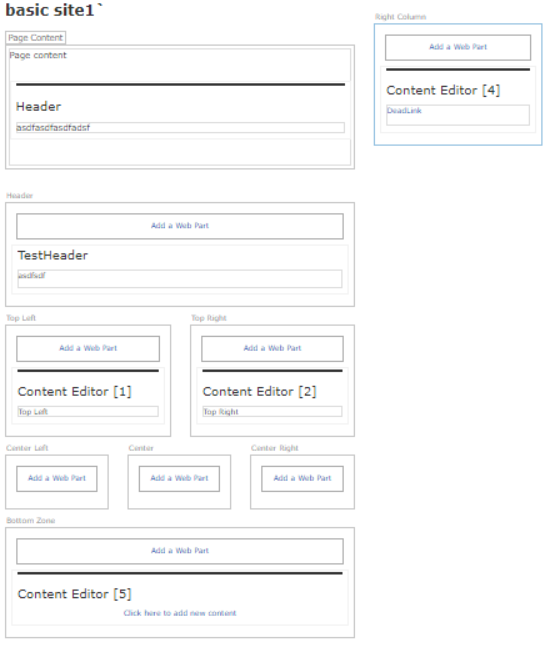
Error message from log:
_Index was out of range. Must be non-negative and less than the size of the collection.
Parameter name: index at System.ThrowHelper.ThrowArgumentOutOfRangeException(ExceptionArgument argument, ExceptionResource resource)
at SharePointPnP.Modernization.Framework.Transform.ContentTransformator.LastColumnOrder(Int32 row, Int32 col)
at SharePointPnP.Modernization.Framework.Transform.ContentTransformator.Transform(List`1 webParts)
at SharePointPnP.Modernization.Framework.Publishing.PublishingPageTransformator.Transform(PublishingPageTransformationInformation publishingPageTransformationInformation)_
Steps to Reproduce
Source: SP2016 (in 2013 mode) publishing page using custom page layout
Target: SP Online modern pages
Export custom page layout mapping
Export-PnPClientSidePageMapping -CustomPageLayoutMapping -Folder ($PSScriptRoot+"\PageLayoutMappings") -Connection $global:source -Overwrite
Update row column mapping in CustomPageLayoutMapping.xml
<PageLayout Name="IISectionSite" AssociatedContentType="" PageLayoutTemplate="AutoDetect" PageHeader="None" IncludeVerticalColumn="true">
      <MetaData>
        <Field Name="Title" TargetFieldName="" Functions="" />
        <Field Name="IIOwner" TargetFieldName="" Functions="" />
      </MetaData>
      <WebParts>
        <Field Name="PublishingPageContent" TargetWebPart="SharePointPnP.Modernization.WikiTextPart" Row="1" Column="1" >
          <Property Name="Text" Type="string" />
        </Field>
      </WebParts>
      <WebPartZones>
        <WebPartZone ZoneIndex="0" ZoneId="Header" Row="1" Column="1" />
        <WebPartZone ZoneIndex="0" ZoneId="RightZone" Row="1" Column="2" />
        <WebPartZone ZoneIndex="0" ZoneId="TopLeft" Row="2" Column="1" />
        <WebPartZone ZoneIndex="0" ZoneId="TopRight" Row="2" Column="2" />
        <WebPartZone ZoneIndex="0" ZoneId="CenterLeft" Row="3" Column="1" />
        <WebPartZone ZoneIndex="0" ZoneId="Center" Row="3" Column="2" />
        <WebPartZone ZoneIndex="0" ZoneId="CenterRight" Row="3" Column="3" />
        <WebPartZone ZoneIndex="0" ZoneId="Bottom" Row="4" Column="1" />
        <WebPartZone ZoneIndex="0" ZoneId="Footer" Row="5" Column="1" />
      </WebPartZones>
    </PageLayout>
Run ConvertTo-PnPClientSidePage
$newPage = ConvertTo-PnPClientSidePage -Identity $_.FieldValues.FileLeafRef -TakeSourcePageName -PublishingPage -Overwrite -TargetConnection $global:target -Connection $global:source -PageLayoutMapping ($PSScriptRoot+"\PageLayoutMappings\custompagelayoutmapping-bbec0be5-62ef-4e9b-a1b6-69f02364a812.xml") -WebPartMappingFile ($PSScriptRoot+"\PageLayoutMappings\webpartmapping.xml") -SetAuthorInPageHeader -KeepPageCreationModificationInformation -LogType File -LogVerbose -LogFolder ($PSScriptRoot+"\Logs");
 FredrikEkstroem
All 4 comments
hmm...let me try to repro this, thanks for reporting it. Are you unblocked if you use the January release?
 jansenbe
on 20 Feb 2020
jansenbe
on 20 Feb 2020
Yesterday I used the same code with jan release and had no issues
FredrikEkstroem
on 20 Feb 2020
Just verified, works with 3.17.2001.2, broken in 3.18.2002.0
FredrikEkstroem
on 21 Feb 2020
Hi @FredrikEkstroem , I was able to repro and fix this. This issue was a regression caused by fixing #426. Fix will be part of the March release, release schedule somewhere between March 7 and March 10.
I'll close the issue now, if you still have issues once you test with the March bits then please let me know. Thanks again for using page transformation and logging your issues, usage and feedback are the only ways to make this tool better.
jansenbe
on 24 Feb 2020
Related issues
 rudfoss
·
4Comments
rudfoss
·
4Comments
 pkbullock
·
8Comments
rudfoss
·
6Comments
pkbullock
·
7Comments
pkbullock
·
8Comments
rudfoss
·
6Comments
pkbullock
·
7Comments
 Alper2
·
8Comments
Alper2
·
8Comments