Modernization: Read publishing page in on-premises SharePoint and create the modern page in SharePoint Online
Category
[ X] Bug
[ ] Enhancement
Problem Area
[ ] Page Transformation: Error during the setup/use of the Page Transformation UI solution (did you check our troubleshooting guide?)
[X ] Page Transformation: Error during the use of page transformation from PnP PowerShell
[ ] Page Transformation: Error during the use of page transformation from .Net
[ ] Page Transformation: Page is not looking correct after transformation
[ ] Modernization Scanner: something went wrong...
Expected or Desired Behavior
On-premises SharePoint publishing should create on modern site as client side page in SharePoint Online
Observed Behavior
Page did not created, error log shows, "_Field or property "ExportMode" does not exists.
Steps to Reproduce
- SharePointPnPPowerShellOnline version 3.12.1908.1
- Run PnPPowerShell cmdlet on a machine that can connect to SP2013 and SPOnline
- Connect to SPOnline site (destination site)
- PS C:\Windows\system32> ConvertTo-PnPClientSidePage -Identity "CRM.aspx" -PublishingPage -TargetConnection $target -LogVerbose -LogType File -LogFolder E:\Install\GroundWork\PageTransformationLogs -PageLayoutMapping E:\Install\GroundWork\ff
xnet-custompagelayoutmapping1.xml
Output:
Report saved as: E:\Install\GroundWork\PageTransformationLogs\Page-Transformation-Report-8-9-2019-11-45-54-AM.md
Comments
Article followed -
https://docs.microsoft.com/en-us/sharepoint/dev/transform/modernize-userinterface-site-pages-powershell
 krishnachaluvadi
All 36 comments
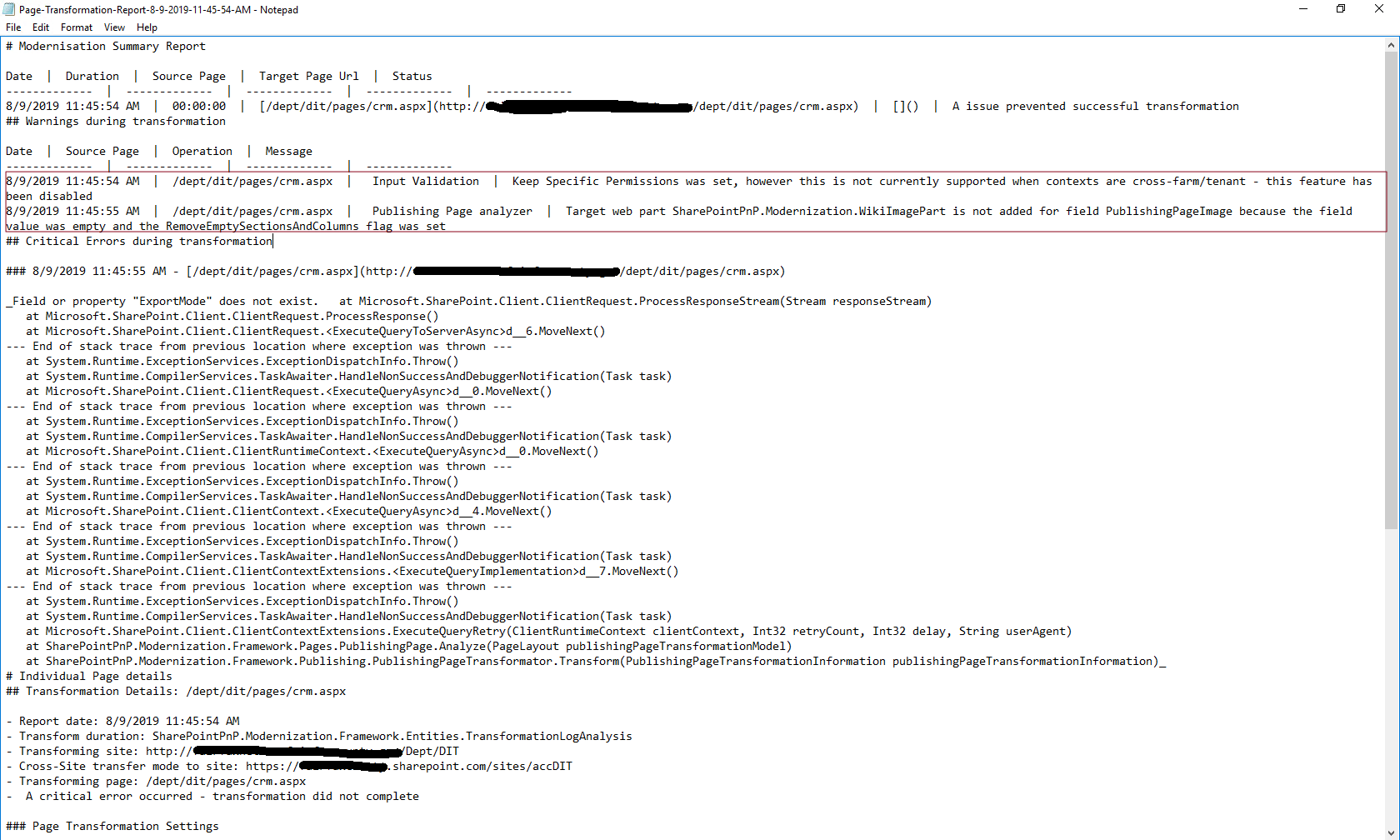
krishnachaluvadi
on 9 Aug 2019
@krishnachaluvadi thank you for raising this, I will be looking into this in more detail and will get back to you with an answer.
 pkbullock
on 12 Aug 2019
pkbullock
on 12 Aug 2019
@krishnachaluvadi : I see two possible issues:
- You're running PnP PS from a machine that has an older version of CSOM installed in the GAC and therefore it's missing
- You're running a fairly old version of on-premises SharePoint 2013/2016 which does not have support for the ExportMode property
Can you do the following:
- Verify that no CSOM redist has been installed on the machine you use for testing
- Provide version details of your on-premises SharePoint farm
 jansenbe
on 12 Aug 2019
jansenbe
on 12 Aug 2019
SharePointPnPPowerShellOnline version 3.12.1908.1 is installed on brand new Windows 10 workstation, nothing else or anything installed on this machine
Source is SharePoint 2013, build version is 15.0.4971.1001
What version of SharePoint supports page transformation from on-premise (classic publishing) to online (modern client side page)?
krishnachaluvadi
on 12 Aug 2019
According to Todd Klint blog this is patched to 15.0.4971.1000 | October 2017 CU (closest version number).
I believe ExportMode and ZoneId should be part of CSOM 15.0.5301.1001 which has a dependency on server side patch levels of May 2018 CU for SharePoint 2013.
Also for SharePoint 2016 again a dependency on May 2018 CU.
Found this reference in developer blog - https://developer.microsoft.com/en-us/sharepoint/blogs/updated-versions-of-the-sharepoint-on-premises-csom-nuget-packages/
@jansenbe this is a design decision for us whether to either to:
A) fall back to Web Services to get this information
B) detect for this and stop transformation with a warning that minimum patch levels are not met
C) both for now do B until we can write in A (which is probabily similar code to the SharePoint 2010 fall back).
I have re-tested SP2013 transforms on my test rig which is patched up to SharePoint 2013 CU May 2019 and this works.
pkbullock
on 13 Aug 2019
@pkbullock : doing A is the right solution for this. This will require some work, not sure if we can pull it off for the September drop,(I'm still in vacation this week) but should be definitely possible for the October drop.
@krishnachaluvadi : not sure if this is an option for you, but you could consider patching the 2013 farm up to a recent patch level. Obviously I can't assess how hard/easy this solution is, but in case it's easy for you it will provide you with a short term, self-service, fix.
jansenbe
on 13 Aug 2019
@jansenbe please assign to me, i can get the work started and will aim for Sept drop.
pkbullock
on 14 Aug 2019
Thx @pkbullock. I'll also send you an invite to sync on this for early next week.
jansenbe
on 14 Aug 2019
More notes on this...
Have been doing more investigating and proposed fixes, my statement around testing on the rig, was incorrect ExportMode error is reproducible up to near latest patch - I needed a Welcome Page based Page to reproduce the exact fault.
Some results from further testing:
- 2013 - ExportMode error occurs on my rig up to the May 19 CU. CAN fall back to Web Services written for 2010.
- 2016 - ExportMode error occurs on my rig up to the May 19 CU. Modification needed for Web Services Fall Back, output from calls are different to previous versions - need to investigate further.
- 2019 - Not Yet Tested.
Discuss further next week.
Paul
pkbullock
on 17 Aug 2019
Hi Paul,
I patched one my SP 2013 server with latest cu, August 2019 (KB4475561), and tried transforming the page, still same error, "ExportMode" does not exist.
Thank you.
Krishna.
krishnachaluvadi
on 18 Aug 2019
hi @krishnachaluvadi ,
Can you cross check in the GAC that there are no CSOM assemblies?
jansenbe
on 18 Aug 2019
hi, I don't see any CSOM assemblies installed on SP2013 server with Aug 2019 CU.
krishnachaluvadi
on 19 Aug 2019
@jansenbe further to discussion:
- SharePoint 2019 works without generating the error.
- I created 3 test projects one of each with corresponding version of the CSOM Client API e.g 2013, 2016, 2019 CSOM Apis and found that in SharePoint 2019 CSOM is the only version that contains ExportMode, the previous editions do not.
I feel we just need to write fall back for this scenario. I haven't yet tested against wikis or web part pages yet - but in theory these should also be affected.
pkbullock
on 20 Aug 2019
hi @pkbullock - Would love to see this in the September drop. Please let me know if I can help in any way to speed it up, either via doing PoC or help out via testing or just about anything else :)
 gautamdsheth
on 21 Aug 2019
gautamdsheth
on 21 Aug 2019
Hi @gautamdsheth, appreciate help with this,
- Can you confirm that you re seeing this issue in Publishing or WebPart/Wiki Pages?
- On SharePoint 2013?
- When i have writen a fix, are you able to test this?
Thanks
Paul
pkbullock
on 21 Aug 2019
Hi Paul,
Gautham and I work together.
Can you confirm that you re seeing this issue in Publishing or WebPart/Wiki Pages?
- Seeing issue with Publishing pages (custom publishing layout), I have not tested this with WebPart/Wiki pages, will let you know.
On SharePoint 2013?
- Yes, its SharePoint 2013
When i have writen a fix, are you able to test this? - Yes, we will test.
- Yes, its SharePoint 2013
Let me know if you need any additional information.
krishnachaluvadi
on 21 Aug 2019
@pkbullock / @krishnachaluvadi / @gautamdsheth
Did have a peek at this as well and can repro this as well. The only reason why we're retrieving exportmode is for checking whether we can export the web part XML, which then will be used to determine the web part type. Today, in case the web part is not exportable, we already use an alternative path via the GetTypeFromProperties (https://github.com/SharePoint/sp-dev-modernization/blob/dev/Tools/SharePoint.Modernization/SharePointPnP.Modernization.Framework/Pages/BasePage.cs#L559) method which deducts the web part type based upon the properties that the web part has.
Solution 1:
If we extend the GetTypeFromProperties method to handle the additional common on-premises web parts that need to be transformed then we can avoid using ExportMode for 2013/2016 all together. Possible risk is that certain web parts have the same properties and we can't distinguish between them.
Solution 2:
Use the on-premises implementation of the GetWebPartXml extension method (https://github.com/SharePoint/PnP-Sites-Core/blob/master/Core/OfficeDevPnP.Core/Extensions/PageExtensions.cs#L378) for 2013/2016. This will not work in app-only scenarios, but for on-premises migrations that's anyhow not so relevant
Solution 3:
Fall back to the 2010 approach for all 2013/2016 source pages...I'm not immediately in favor of this as we're growing our dependency on the classic web services + possible performance / compatibility issues we might see.
I'll do some more checking but wanted to already provide my thoughts here
jansenbe
on 22 Aug 2019
Solution 1 is problematic as not all web part properties that we need (e.g. Content property of a content editor web part) are retrieved...
Moving on to solution 2 :-)
jansenbe
on 22 Aug 2019
@jansenbe I am just about to submit a PR based on solution 3, sorry on client site so limited in my response times.
pkbullock
on 22 Aug 2019
@pkbullock / @krishnachaluvadi / @gautamdsheth
For solution 3, cannot adequately assess performance because the source farms are Dev Config e.g. One Server with SQL and low amounts of RAM, not representative of proper setups. however even with this, transforming is reasonabley quick.
The web services are only used as a fall back in pages with web parts, because CSOM lacks a mixture of ExportMode, Properties, ZoneId and ExportXml, depending on the version, the older, the worse.
Very open to better ideas, approaches. I have also noted in the PR that testing for each scenario has gone through the roof to accommodate all the versions.
So far my test is basic consisting of the Tony's Chocolate Article from MS News (content in Provision folder in Unit Tests under Common), so Text, Image Web Part, Content Editor web part, consistently added to Publishing, Web Part and Wiki Pages, then to each version of SharePoint. I was only able to run against SP13, SP16, SPO so far due to time constraints, but the output was identical. I am still evolving this, it will take a while to improve upon this.
pkbullock
on 22 Aug 2019
Great work @pkbullock !
I've done some testing from my 2013 farm and things work like a charm.
jansenbe
on 22 Aug 2019
Great stuff @pkbullock !! Much appreciated :)
Looks great, will do some testing at our end this week and let you know !
gautamdsheth
on 26 Aug 2019
@gautamdsheth / @krishnachaluvadi : did you guys manage to test this? End of this week I'll prep the September drop, if you still see issues then please let us know asap so that they can possibly still be included in the September drop
jansenbe
on 2 Sep 2019
@jansenbe - I am using SharePointPnPPowerShellOnline-3.12.1908.1 version on my workstation, since the fix for the above issue is not released, could you please share the link to download the dev version of it?
krishnachaluvadi
on 3 Sep 2019
There are no dev builds, only option is to build your own version of the modernization framework and PnP PowerShell. I'll close this issue, let's then re-open a new one if you still see issues when testing with the September release (will be available latest next week Monday)
jansenbe
on 4 Sep 2019
@jansenbe : Latest version of SharePointPnPPoweShellOnline 3.13.1909.1 installed and tested, this time "ExportMode" error got fixed and see the pages created using the out of the box page layouts are migrated successfully, but pages with "Custom Page Layouts" still giving errors and not migrated.
Error is 'asp' is an undeclared prefix.
The same custom page layout mapping xml works well when we migrate the pages from SP Online classic to SP Online modern sites, but throws the above error when migrate the pages from SP2013 to SPOnline modern sites. Please find the attached log file for the same.
PageTransformationError-CustompagelayoutPages.txt
Thank you
Krishna.
krishnachaluvadi
on 11 Sep 2019
Hi @krishnachaluvadi , you can please create a new issue for this as it's a different problem.
jansenbe
on 12 Sep 2019
Unfortunately, @jansenbe we will have to re-open this issue again. I tested with the latest version today got this error again. Looks like an edge case, since lots of publishing pages which had this error previously got resolved, but this particular page had the same error of export mode. Have attached the log. As mentioned previously, we are doing 2013 OnPrem to SPO transformation of publishing pages.
gautamdsheth
on 12 Sep 2019
@pkbullock: Ensuring you've seen the re-opening of this issue
jansenbe
on 12 Sep 2019
@gautamdsheth : the issue you mentioned is the same as #265...problem is that web part living in a content zone (e.g. PublishingPageContent field) were processed using the SPO web part retrieval logic...I've been able to repro this and have fixed this in the dev branch.
jansenbe
on 13 Sep 2019
The issue mentioned by @krishnachaluvadi seems to be different...will create a new issue for that one so that we can close this
jansenbe
on 13 Sep 2019
Thanks @jansenbe for the fix !
gautamdsheth
on 13 Sep 2019
@gautamdsheth issue is solved via #265. For @krishnachaluvadi issue I've created #267. Will close this issue now.
jansenbe
on 13 Sep 2019
@krishnachaluvadi in the above you mentioned an error in default.aspx 'asp' is undeclared prefix, did the page contain any custom controls or .net controls?
pkbullock
on 17 Sep 2019
hey @pkbullock - It looks like the page does contain something custom and server-side. Not sure if its custom controls, but could be Visual webpart as well. Am debugging this as well, hopefully by tomorrow i will have something more to share.
gautamdsheth
on 17 Sep 2019
@gautamdsheth / @pkbullock / @krishnachaluvadi : please provide your findings in #267 as I've created that issue to handle this problem.
jansenbe
on 17 Sep 2019
Related issues
 colonelclaypoo
·
5Comments
colonelclaypoo
·
5Comments
 FredrikEkstroem
·
4Comments
FredrikEkstroem
·
4Comments
 KHaranadh
·
7Comments
KHaranadh
·
7Comments
 adamtoad
·
8Comments
adamtoad
·
8Comments
 gabrielbray
·
4Comments
gabrielbray
·
4Comments
Most helpful comment
@pkbullock / @krishnachaluvadi / @gautamdsheth
For solution 3, cannot adequately assess performance because the source farms are Dev Config e.g. One Server with SQL and low amounts of RAM, not representative of proper setups. however even with this, transforming is reasonabley quick.
The web services are only used as a fall back in pages with web parts, because CSOM lacks a mixture of ExportMode, Properties, ZoneId and ExportXml, depending on the version, the older, the worse.
Very open to better ideas, approaches. I have also noted in the PR that testing for each scenario has gone through the roof to accommodate all the versions.
So far my test is basic consisting of the Tony's Chocolate Article from MS News (content in Provision folder in Unit Tests under Common), so Text, Image Web Part, Content Editor web part, consistently added to Publishing, Web Part and Wiki Pages, then to each version of SharePoint. I was only able to run against SP13, SP16, SPO so far due to time constraints, but the output was identical. I am still evolving this, it will take a while to improve upon this.