Modernization: Table dropped from publishing page
Thank you for reporting an issue or suggesting an enhancement. We appreciate your feedback - to help the team to understand your needs, please complete the below template to ensure we have the necessary details to assist you. Thanks!
Category
[x ] Bug
[ ] Enhancement
Problem Area
[ ] Page Transformation: Error during the setup/use of the Page Transformation UI solution (did you check our troubleshooting guide?)
[ ] Page Transformation: Error during the use of page transformation from PnP PowerShell
[ ] Page Transformation: Error during the use of page transformation from .Net
[x ] Page Transformation: Page is not looking correct after transformation
[ ] Modernization Scanner: something went wrong...
Hi,
I have a publishing page with the contents of the attached file stored as the content of the page.
Cod-Centres..txt
The content does not appear in the page after modernizing. The modern page is blank.
 russgove
All 14 comments
Hey @russgove ,
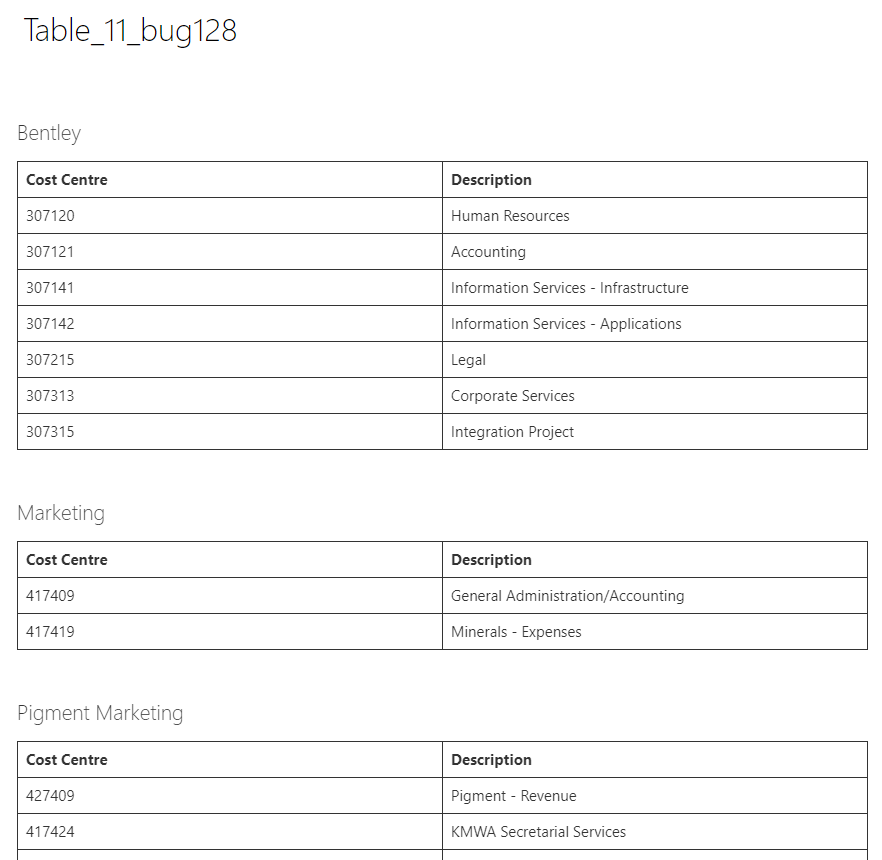
Thanks for reporting this one. I've tested the provided html (pasted into a wiki page) and it transforms fine (see screenshot). Could it be that this field was not included in your page layout mapping? Seems like the cause of not seeing the content is the actual html
 jansenbe
on 21 Apr 2019
jansenbe
on 21 Apr 2019
Thanks Bert,
I'm sure its something I'm doing wrong. I don't yet understand how all the pieces fit together.
On the source page the Page Layout is Topic-Page-No Links:
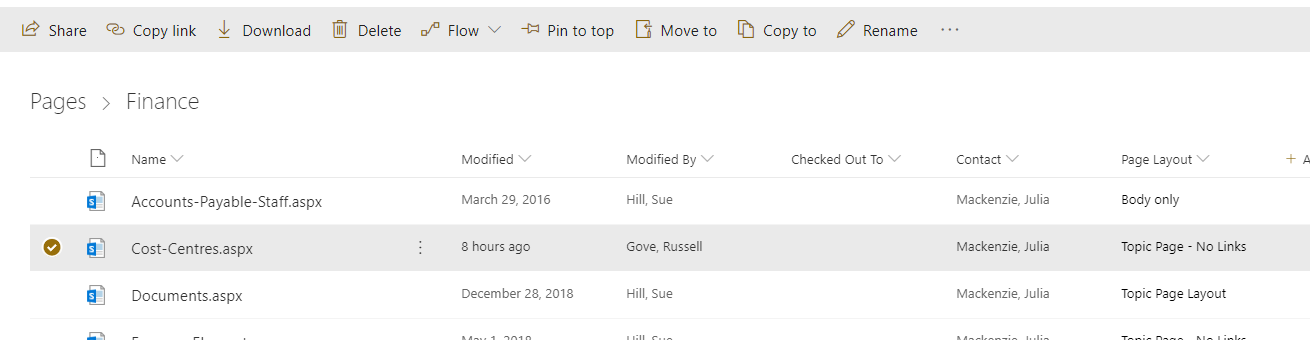
This, I beleive maps to the CustomTopicPageNoLinks.aspx layouts in mu masterpageGallery:
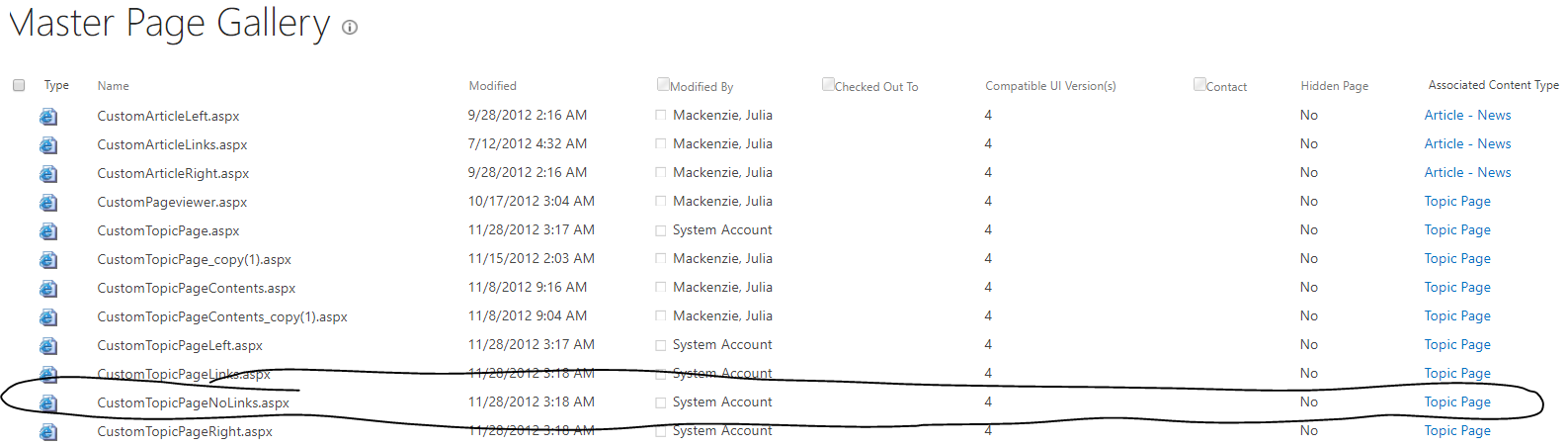
The layout uses the Topic Page custom content type:

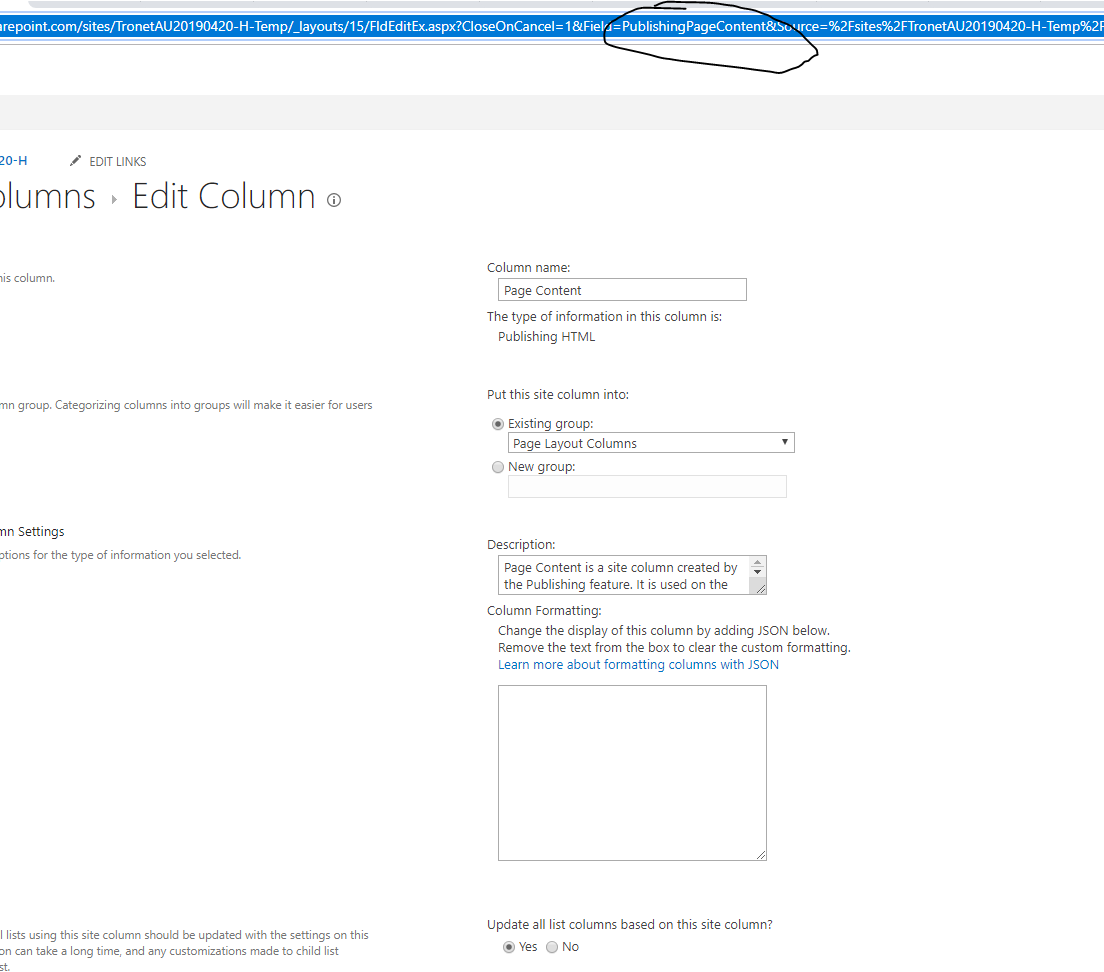
The Topic Page content type has a Page Content field of type Publishbing HTML:

Internal name of this field is PublishingPageContent:
I ran Export-PnPClientSidePageMapping -BuiltInPageLayoutMapping -CustomPageLayoutMapping -Folder C:\Temp
and the mapping dod notinclude that field in the CustomTopicPageNoLinks layout so I added it as shown below:
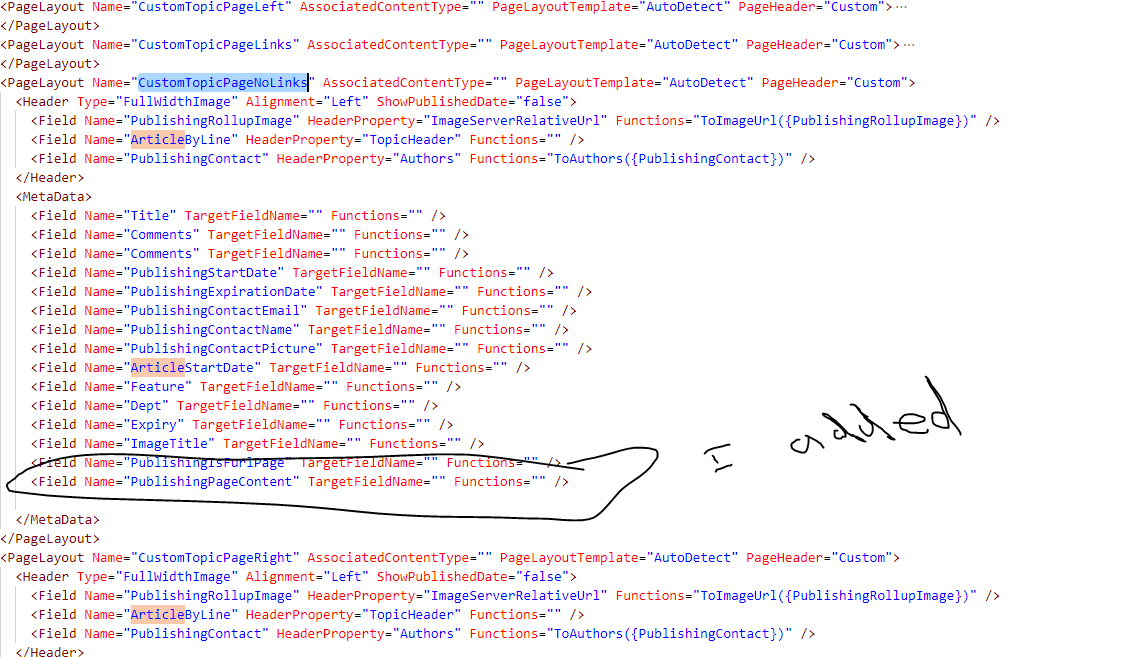
I reran the modernization on this page and the content still did not show.
The log is attached below.

russgove
on 22 Apr 2019
Hi @russgove ,
In a page layout mapping file the Metadata section describes which columns will become meta data and meta data by design is content not visible on the page. If you want to show a field as content on a page you need to define it in the webparts section. Below sample shows the 2 fields which are typically mapped to page content, one of them is the PublishingPageContent field. Can you remove the PublishingPageContent field from the metadata element and add below webparts section to your mapping file and try again?
More details on the page layout transformation file can be found here: https://docs.microsoft.com/en-us/sharepoint/dev/transform/modernize-userinterface-site-pages-model-publishing
      <WebParts>
        <Field Name="PublishingPageContent" TargetWebPart="SharePointPnP.Modernization.WikiTextPart" Row="1" Column="2">
          <Property Name="Text" Type="string" Functions="" />
        </Field>
      </WebParts>
It's kind of interesting that the analyzer did not add this web parts section automatically...would it be possible to share the page layout file as well so we can use it to improve the analyzer component. Adding @pkbullock for awereness
jansenbe
on 22 Apr 2019
@pkbullock analyser doesn't pick up in that section image fields either under the metadata tag but these are added as web parts because modern web parts doesn't read the metadata in this case.
 pkbullock
on 22 Apr 2019
pkbullock
on 22 Apr 2019
In my unit test, the Image and HTML fields ae ignored by metadata section but added into the web parts section see:
<PageLayout Name="ArticleCustom" AssociatedContentType="" PageLayoutTemplate="AutoDetect" PageHeader="Custom">
<Header Type="FullWidthImage" Alignment="Left" ShowPublishedDate="false">
<Field Name="PublishingRollupImage" HeaderProperty="ImageServerRelativeUrl" Functions="ToImageUrl({PublishingRollupImage})" />
<Field Name="ArticleByLine" HeaderProperty="TopicHeader" Functions="" />
<Field Name="PublishingContact" HeaderProperty="Authors" Functions="ToAuthors({PublishingContact})" />
</Header>
<MetaData>
<Field Name="Title" TargetFieldName="" Functions="" />
<Field Name="Comments" TargetFieldName="" Functions="" />
<Field Name="PublishingStartDate" TargetFieldName="" Functions="" />
<Field Name="PublishingExpirationDate" TargetFieldName="" Functions="" />
<Field Name="PublishingContactEmail" TargetFieldName="" Functions="" />
<Field Name="PublishingContactName" TargetFieldName="" Functions="" />
<Field Name="PublishingContactPicture" TargetFieldName="" Functions="" />
<Field Name="PublishingIsFurlPage" TargetFieldName="" Functions="" />
<Field Name="ArticleStartDate" TargetFieldName="" Functions="" />
</MetaData>
<WebParts>
<Field Name="PublishingPageImage" TargetWebPart="SharePointPnP.Modernization.WikiImagePart" Row="1" Column="1">
<Property Name="ImageUrl" Type="string" Functions="ToImageUrl({PublishingPageImage})" />
<Property Name="AlternativeText" Type="string" Functions="ToImageAltText({PublishingPageImage})" />
</Field>
<Field Name="PublishingPageContent" TargetWebPart="SharePointPnP.Modernization.WikiTextPart" Row="1" Column="1">
<Property Name="Text" Type="string" />
</Field>
</WebParts>
<WebPartZones>
<WebPartZone ZoneIndex="0" ZoneId="x00001a" Row="1" Column="1" />
<WebPartZone ZoneIndex="0" ZoneId="x00002b" Row="1" Column="1" />
<WebPartZone ZoneIndex="0" ZoneId="x00003c" Row="1" Column="1" />
<WebPartZone ZoneIndex="0" ZoneId="x00004d" Row="1" Column="1" />
</WebPartZones>
<FixedWebParts>
<WebPart Type="Microsoft.SharePoint.WebPartPages.ContentEditorWebPart, Microsoft.SharePoint, Version=16.0.0.0, Culture=neutral, PublicKeyToken=71e9bce111e9429c" Row="1" Column="1">
<Property Name="TITLE" Type="string" Value="Example Embedded Web Content Editor" />
<Property Name="FRAMETYPE" Type="string" Value="None" />
<Property Name="PARTIMAGELARGE" Type="string" Value="/_layouts/15/images/mscontl.gif" />
<Property Name="ID" Type="string" Value="g_db666743_4c5b_4a21_a9cf_7a199ce19a60" />
<Property Name="CONTENT" Type="string" Value="<p>Welcome to the home of all SharePoint modernization tools and solutions. Modernization means transforming current <em>"classic"</em> SharePoint usage into "modern" usage, e.g. using modern site pages instead of classic wiki pages or Office 365 Group connecting of classic sites.</p> <p>In this repository you'll find all the SharePoint PnP open source scripts, tools and solutions that will help you modernize your <strong>SharePoint</strong> environment.</p>" />
</WebPart>
<WebPart Type="Microsoft.SharePoint.WebPartPages.ImageWebPart, Microsoft.SharePoint, Version=16.0.0.0, Culture=neutral, PublicKeyToken=71e9bce111e9429c" Row="1" Column="1">
<Property Name="runat" Type="string" Value="server" />
<Property Name="imagelink" Type="string" Value="/sites/PnPTransformationSource/SiteCollectionImages/hero.jpg" />
<Property Name="alternativetext" Type="string" Value="Drone flying in the air" />
<Property Name="verticalalignment" Type="string" Value="Middle" />
<Property Name="horizontalalignment" Type="string" Value="Center" />
<Property Name="backgroundcolor" Type="string" Value="transparent" />
<Property Name="title" Type="string" Value="Let's go fly a drone" />
<Property Name="frametype" Type="string" Value="None" />
<Property Name="suppresswebpartchrome" Type="string" Value="False" />
<Property Name="description" Type="string" Value="Lets take to the skies with our new drone" />
<Property Name="isincluded" Type="string" Value="True" />
<Property Name="zoneid" Type="string" Value="" />
<Property Name="partorder" Type="string" Value="0" />
<Property Name="framestate" Type="string" Value="Normal" />
<Property Name="allowremove" Type="string" Value="True" />
<Property Name="allowzonechange" Type="string" Value="True" />
<Property Name="allowminimize" Type="string" Value="True" />
<Property Name="allowconnect" Type="string" Value="True" />
<Property Name="allowedit" Type="string" Value="True" />
<Property Name="allowhide" Type="string" Value="True" />
<Property Name="isvisible" Type="string" Value="True" />
<Property Name="catalogiconimageurl" Type="string" Value="/_layouts/15/images/msimagel.gif" />
<Property Name="detaillink" Type="string" Value="" />
<Property Name="helplink" Type="string" Value="" />
<Property Name="helpmode" Type="string" Value="Modeless" />
<Property Name="dir" Type="string" Value="Default" />
<Property Name="partimagesmall" Type="string" Value="" />
<Property Name="missingassembly" Type="string" Value="Cannot import this Web Part." />
<Property Name="partimagelarge" Type="string" Value="/_layouts/15/images/msimagel.gif" />
<Property Name="isincludedfilter" Type="string" Value="" />
<Property Name="exportcontrolledproperties" Type="string" Value="True" />
<Property Name="connectionid" Type="string" Value="00000000-0000-0000-0000-000000000000" />
<Property Name="id" Type="string" Value="g_4c8dec0d_e920_4c7e_bdfa_6532864b3904" />
<Property Name="exportmode" Type="string" Value="All" />
<Property Name="__markuptype" Type="string" Value="vsattributemarkup" />
<Property Name="__webpartid" Type="string" Value="{4c8dec0d-e920-4c7e-bdfa-6532864b3904}" />
<Property Name="webpart" Type="string" Value="true" />
<Property Name="height" Type="string" Value="" />
<Property Name="width" Type="string" Value="" />
</WebPart>
</FixedWebParts>
</PageLayout>
Hi, attached is my layoutmapping
russgove
on 22 Apr 2019
Hi,
I posted the wrong xml. Attached is the xml with the change bert mentioned.
The change WORKED... the modern page got created properly/
So am I to add that webpart to all the layouts?
custompagelayoutmapping-btly.xml.txt
russgove
on 22 Apr 2019
Yes, any content that needs to be visible content on the page needs to be defined in the webparts section...essentially you're mapping a publishing field to a web part. If the content is just metadata, then add it to the metadata section.
jansenbe
on 22 Apr 2019
I was maybe not very clear in my request for the page layout: I don't need the mapping file but rather the page layout aspx file that you page is using. That file lives in the master page gallery in the root of your site collection.
jansenbe
on 22 Apr 2019
Here it is
On Mon, Apr 22, 2019 at 8:49 AM Bert Jansen notifications@github.com
wrote:
I was maybe not very clear in my request for the page layout: I don't need
the mapping file but rather the page layout aspx file that you page is
using. That file lives in the master page gallery in the root of your site
collection.—
You are receiving this because you were mentioned.
Reply to this email directly, view it on GitHub
https://github.com/SharePoint/sp-dev-modernization/issues/128#issuecomment-485410111,
or mute the thread
https://github.com/notifications/unsubscribe-auth/AASNDHFGTWM2EX7SWN4B6EDPRWX5NANCNFSM4HHL3U5Q
.
<%@ Page language="C#" Inherits="Microsoft.SharePoint.Publishing.PublishingLayoutPage,Microsoft.SharePoint.Publishing,Version=14.0.0.0,Culture=neutral,PublicKeyToken=71e9bce111e9429c" meta:progid="SharePoint.WebPartPage.Document" %>
<%@ Register Tagprefix="SharePointWebControls" Namespace="Microsoft.SharePoint.WebControls" Assembly="Microsoft.SharePoint, Version=14.0.0.0, Culture=neutral, PublicKeyToken=71e9bce111e9429c" %> <%@ Register Tagprefix="WebPartPages" Namespace="Microsoft.SharePoint.WebPartPages" Assembly="Microsoft.SharePoint, Version=14.0.0.0, Culture=neutral, PublicKeyToken=71e9bce111e9429c" %> <%@ Register Tagprefix="PublishingWebControls" Namespace="Microsoft.SharePoint.Publishing.WebControls" Assembly="Microsoft.SharePoint.Publishing, Version=14.0.0.0, Culture=neutral, PublicKeyToken=71e9bce111e9429c" %> <%@ Register Tagprefix="PublishingNavigation" Namespace="Microsoft.SharePoint.Publishing.Navigation" Assembly="Microsoft.SharePoint.Publishing, Version=14.0.0.0, Culture=neutral, PublicKeyToken=71e9bce111e9429c" %>
russgove
on 22 Apr 2019
Created issue #131 for the page layout verification. Closing this issue.
jansenbe
on 23 Apr 2019
@russgove looking at this, I think I know what the problem is, has the site been migrated from On-Premises farm to SP Online in the past? Or have you been working on SharePoint Online since 2012?
pkbullock
on 23 Apr 2019
Hi Paul,
Yes the site is in the process of being migrated from sp2010 to SPO.
Thanks for all your work!
russgove
on 23 Apr 2019
Related issues
 rudfoss
·
4Comments
rudfoss
·
4Comments
 FredrikEkstroem
·
4Comments
pkbullock
·
8Comments
rudfoss
·
6Comments
FredrikEkstroem
·
4Comments
pkbullock
·
8Comments
rudfoss
·
6Comments
 gautamdsheth
·
7Comments
gautamdsheth
·
7Comments